How Do I Turn Off Traffic Aware Cruise Control on My Car
Traffic Aware Cruise Control is a helpful driver assist feature, but sometimes you need to turn it off. Whether your car uses radar sensors or cameras, disabling this system is simple once you know where to look. This guide walks you through the exact steps for popular car brands, common mistakes to avoid, and when it is best to use or turn off the feature.
You are cruising down the highway, and your car is handling the speed and braking all on its own. That is Traffic Aware Cruise Control doing its job. But what happens when you need to take back full control? Maybe you are stuck in a winding road, or perhaps the system is acting up and you just want to drive manually. Whatever the reason, knowing how to turn off this feature is an essential skill every driver should have.
Traffic Aware Cruise Control is a smart driver assist system that adjusts your car’s speed based on the traffic ahead. It uses radar sensors and cameras to detect vehicles in your lane and automatically slows down or speeds up to keep a safe distance. This technology has made long drives less tiring and highway commutes much safer. But it is not always the right choice for every driving situation.
In this article, we will walk you through exactly how to turn off Traffic Aware Cruise Control on different car brands. We will also cover why you might want to disable it, common mistakes people make, and expert tips to keep you safe. Whether you drive a Toyota, Ford, BMW, or any other popular brand, this guide has you covered.
Key Takeaways
- Quick Access Button: Most cars let you turn off Traffic Aware Cruise Control with a single button on the steering wheel.
- Brand-Specific Steps: Each car manufacturer uses a slightly different method, so knowing your specific model matters.
- Safety First: Disabling the system does not turn off other safety features like automatic emergency braking.
- Common Mistakes: Many drivers confuse turning off the system with putting it on standby mode.
- When to Use It: Highway driving benefits most from this feature, but city traffic may require you to disable it.
- Restart Is Simple: You can re-enable Traffic Aware Cruise Control anytime with just a few taps.
📑 Table of Contents
- What Is Traffic Aware Cruise Control?
- Why Would You Want to Turn Off Traffic Aware Cruise Control?
- How to Turn Off Traffic Aware Cruise Control by Car Brand
- Step-by-Step: General Guide to Disabling Traffic Aware Cruise Control
- Common Mistakes When Disabling Traffic Aware Cruise Control
- When Should You Use Traffic Aware Cruise Control vs. When to Turn It Off?
- Quick Tips for Managing Traffic Aware Cruise Control
- Can You Turn Off Traffic Aware Cruise Control Permanently?
- What Happens When You Turn Off Traffic Aware Cruise Control?
- How to Re-Enable Traffic Aware Cruise Control
- Conclusion
What Is Traffic Aware Cruise Control?
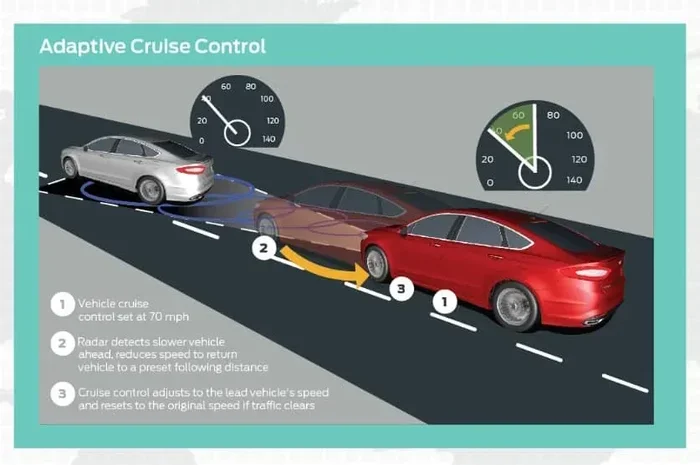
Before we dive into the steps to turn it off, let us understand what this system actually does. Traffic Aware Cruise Control, also known as adaptive cruise control or ACC, is an advanced driver assistance feature. It goes beyond traditional cruise control by using sensors to monitor the road ahead.
How Does It Work?
The system relies on a radar sensor or a forward-facing camera mounted behind the front grille. These sensors scan the road for other vehicles and measure the distance and speed of the car in front of you. When traffic slows down, your car automatically reduces speed. When the road clears, it accelerates back to your set speed.
Here is what the system typically handles:
- Automatic speed adjustment based on vehicles ahead
- Stop-and-go traffic support in some models
- Safe following distance maintenance
- Automatic braking when traffic slows suddenly
- Throttle control to prevent sudden acceleration
Most modern cars with driver assist features include some version of this system. It is especially useful on highways and open roads where traffic flows steadily. However, there are times when you may want to turn it off and take full manual control of your vehicle.
Why Would You Want to Turn Off Traffic Aware Cruise Control?
There are several valid reasons to disable this feature. Some are about comfort, and others are about safety. Let us look at the most common ones.
Winding or Curvy Roads
Traffic Aware Cruise Control works best on straight, well-marked highways. On winding roads, the sensors can get confused by curves and may not detect vehicles correctly. This can lead to unexpected braking or acceleration, which can be dangerous.
Heavy Rain or Poor Weather
The radar sensors and cameras that power this system can be affected by heavy rain, snow, or fog. When sensors are blocked or dirty, the system may behave unpredictably. Turning it off in bad weather gives you full control over your vehicle.
Stop-and-Go City Driving
While some newer models handle stop-and-go traffic well, older systems may not. If you find the system constantly engaging and disengaging in city traffic, it can be more annoying than helpful. Disabling it in these conditions makes sense.
System Malfunction
Sometimes the system simply malfunctions. You might see a warning light on the dashboard, or the car may not respond as expected. In these cases, turning off Traffic Aware Cruise Control and driving manually is the safest option.
How to Turn Off Traffic Aware Cruise Control by Car Brand
Every car manufacturer designs its system a little differently. Below, we cover the most popular brands and their specific steps to disable the feature.
Toyota and Lexus
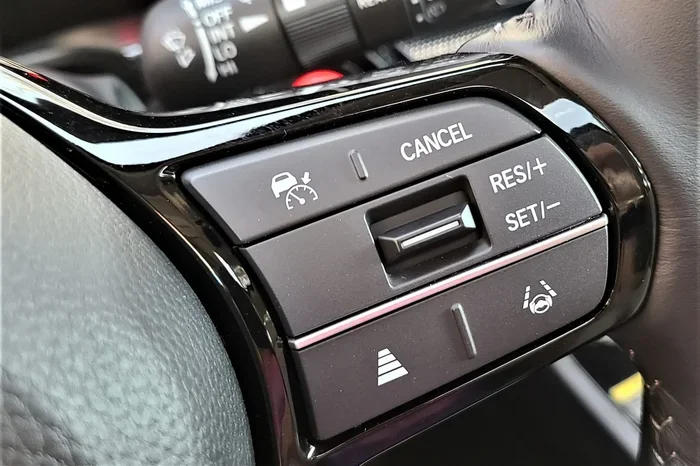
Toyota vehicles use a system called Dynamic Radar Cruise Control. To turn it off, look for the CRUISE button on the steering wheel. Press it once, and the system will disengage. You can also press the CANCEL button to temporarily turn it off without fully disabling it. On the dashboard, you will see the cruise control indicator light turn off.
Quick Tip: If your Toyota has a radar sensor behind the front grille, make sure it is clean. A dirty sensor can cause the system to malfunction and may make you want to turn it off more often than necessary.
Ford and Lincoln
Ford vehicles use Adaptive Cruise Control with Stop-and-Go. To turn it off, press the ON/OFF button on the steering wheel controls. The indicator light on the dashboard will go off, confirming the system is disabled. You can also use the CANCEL button to temporarily suspend the feature while driving.
On some Ford models, you can also access cruise control settings through the touchscreen display. Go to the vehicle settings menu and look for driver assistance options.
BMW and Mercedes-Benz
BMW and Mercedes-Benz vehicles have more advanced systems. For BMW, press the cruise control stalk on the steering column to the end position. This fully deactivates the system. For Mercedes-Benz, press the cruise control button on the steering wheel or pull the stalk toward you. The symbol on the dashboard will disappear when the system is off.
Both brands also offer a temporary override. Simply pressing the brake pedal will temporarily pause the cruise control, but it will resume once you release the pedal unless you fully turn it off.
Honda and Acura
Honda vehicles use Adaptive Cruise Control. To turn it off, press the MAIN button on the steering wheel. This shuts down the entire system. You can also press the CANCEL button to temporarily disable it. On the dashboard, the ACC indicator will turn off when the system is fully disabled.
Chevrolet and GMC
Chevrolet and GMC trucks and SUVs use a similar approach. Look for the cruise control buttons on the steering wheel. Press the ON/OFF button to disable the system. Some models also allow you to adjust settings through the Infotainment system under the vehicle preferences menu.
Step-by-Step: General Guide to Disabling Traffic Aware Cruise Control
While every car is different, there is a general pattern you can follow. Here is a simple step-by-step process that works for most vehicles.
- Find the steering wheel controls. Look for buttons labeled CRUISE, ACC, ON/OFF, or CANCEL.
- Press the ON/OFF button. This is usually the primary button to fully disable the system.
- Check the dashboard display. Look for the cruise control indicator light turning off.
- Pull the brake pedal. This is a secondary way to confirm the system has disengaged.
- Verify the system is off. The vehicle speed display should no longer show a set cruise control speed.
That is it. In most cars, you can turn off Traffic Aware Cruise Control in under five seconds. It is a simple process once you know where the controls are.
What Is the Difference Between Cancel and Off?
This is a common point of confusion. The CANCEL button temporarily suspends the system. The car will still be in cruise control mode and may resume automatically when conditions are right. Pressing the ON/OFF button fully turns off the system. You will need to re-enable it manually when you want to use it again.
Common Mistakes When Disabling Traffic Aware Cruise Control
Even though turning off this system is straightforward, many drivers make mistakes. Here are the most common ones and how to avoid them.
Confusing Standby Mode with Being Off
The biggest mistake is thinking the system is off when it is really just in standby. When you press CANCEL, the system goes into standby mode. It is still active and ready to resume. Always press the ON/OFF button to fully disable it.
Not Checking the Dashboard Indicator
Always look at the dashboard after turning off the system. The cruise control indicator light should be off. If it is still on, the system may still be active. This is an easy way to confirm that Traffic Aware Cruise Control is truly disabled.
Forgetting to Clean the Sensors
If you are turning off the system frequently, it may be because the sensors are dirty. A dirty radar sensor can cause false readings and make the system behave erratically. Cleaning the front grille area regularly can prevent this issue.
Ignoring Warning Lights
If you see a cruise control warning light on the dashboard, do not ignore it. It could indicate a sensor problem, a software issue, or a malfunction. Have the system checked by a mechanic before you rely on it again.
When Should You Use Traffic Aware Cruise Control vs. When to Turn It Off?
Knowing when to use and when to disable this feature is just as important as knowing how to turn it off. Here is a simple guide.
| Use Traffic Aware Cruise Control | Turn It Off |
|---|---|
| Long highway drives | Winding or curvy roads |
| Steady traffic flow | Heavy rain or snow |
| Open roads with clear markings | Dense city stop-and-go traffic (older models) |
| When you want to reduce driver fatigue | When sensors are dirty or malfunctioning |
| Roads with clear lane markings | Unfamiliar or poorly marked roads |
The general rule is simple. Use Traffic Aware Cruise Control on highways and open roads where traffic is predictable. Turn it off in complex driving environments where you need more active control over your vehicle.
Expert Insight from Driving Instructors
Driving instructors often recommend keeping the system on during highway driving but turning it off in unfamiliar areas. They also suggest practicing manual driving regularly so you do not become too reliant on driver assist features. The best approach is to use the technology as a helper, not a replacement for your own attention.
Quick Tips for Managing Traffic Aware Cruise Control
Here are some practical tips to help you get the most out of your cruise control system while staying safe.
- Read your owner’s manual. Every car model is different. The manual will have the exact steps for your vehicle.
- Keep sensors clean. Wipe the front grille area regularly to ensure the radar and cameras work properly.
- Use the brake pedal to override. Pressing the brake pedal always temporarily pauses the system, no matter what.
- Update your software. Some car manufacturers release updates that improve cruise control performance.
- Practice in a safe area. If you are new to the system, practice turning it on and off in a quiet parking lot or empty road.
- Do not rely on it entirely. Always keep your hands on the wheel and your eyes on the road, even with the system active.
Can You Turn Off Traffic Aware Cruise Control Permanently?
Some drivers wonder if they can permanently disable the system so it never turns on automatically. The answer depends on your car model. Some vehicles allow you to turn off the feature through the settings menu on the infotainment screen. Others require you to manually turn it off each time you start the car.
For example, some Ford models let you go into the vehicle settings and disable Adaptive Cruise Control entirely. Similarly, some BMW models allow you to set the system to off by default. Check your owner’s manual or consult your dealer to see if your car supports permanent disabling.
Keep in mind that permanently turning off the system also disables related features like automatic emergency braking and forward collision warning on some models. Always understand what else gets disabled before you make this change.
What Happens When You Turn Off Traffic Aware Cruise Control?
When you disable the system, your car returns to standard driving mode. You are responsible for controlling your speed and braking. The car will not automatically adjust its speed based on traffic ahead. However, other safety features like lane departure warnings and automatic emergency braking may still remain active, depending on your vehicle model.
The dashboard will also change. The cruise control indicator light will turn off, and the set speed display will disappear. Your car will behave like a vehicle without any driver assist cruise features. This is perfectly normal and safe.
How to Re-Enable Traffic Aware Cruise Control
Turning the system back on is just as easy as turning it off. Here is the quick process:
- Press the ON/OFF button on the steering wheel.
- Set your desired speed using the resume or set buttons.
- Adjust the following distance if needed.
- Check the dashboard to confirm the system is active.
Most cars will remember your last settings, so you do not need to reconfigure everything each time. This makes it very convenient to switch between using and not using the feature based on driving conditions.
Conclusion
Traffic Aware Cruise Control is a fantastic feature that makes driving easier and safer on highways. But knowing how to turn it off is just as important. Whether you are dealing with bad weather, curvy roads, or a system malfunction, you now have the knowledge to disable it quickly and confidently.
Remember, every car brand has its own method. Always refer to your owner’s manual for the exact steps for your vehicle. Keep your sensors clean, stay aware of your dashboard indicators, and never rely solely on driver assist features. With the tips and steps in this guide, you are fully equipped to manage your Traffic Aware Cruise Control like a pro.
Take a moment to practice turning the system on and off in a safe environment. The more familiar you are with the controls, the more confident you will be when you need to make a quick change on the road. Safe travels!
Frequently Asked Questions
Can I turn off Traffic Aware Cruise Control while driving?
Yes, you can turn off Traffic Aware Cruise Control at any time while driving. Simply press the ON/OFF button on the steering wheel or the CANCEL button for a temporary pause. Always keep your hands on the steering wheel and your eyes on the road when making any adjustments.
Will turning off cruise control affect my car’s other safety features?
In most cases, turning off Traffic Aware Cruise Control does not disable other safety features like automatic emergency braking or lane departure warnings. However, some vehicles link these features together. Check your owner’s manual to understand exactly what gets affected on your specific model.
Why does my Traffic Aware Cruise Control keep turning off by itself?
This usually happens when the sensors are dirty, blocked by snow or debris, or malfunctioning. Heavy rain and fog can also cause the system to disengage automatically. Clean the front grille area where the radar sensor is located and check for any warning lights on your dashboard.
Is it safe to drive without Traffic Aware Cruise Control?
Absolutely. Traffic Aware Cruise Control is an assist feature, not a requirement. Your car functions perfectly well without it. Many drivers prefer to turn it off in city traffic or on unfamiliar roads where they want more direct control over their vehicle.
How do I know if Traffic Aware Cruise Control is on or off?
Check your dashboard display. When the system is active, you will see a cruise control indicator light, usually green or white. When it is off, the light will be dark or gray. The set speed will also appear on the speedometer when the system is engaged.
Can I set a different speed after turning off and restarting Traffic Aware Cruise Control?
Yes, you can set a completely new speed each time you re-enable the system. Simply press the SET or RES button after turning the system back on, and choose your desired speed. The system will remember your last settings, but you can always change them.