Learn How to Reset BMW SOS Call System Failure Fast
Dealing with a BMW SOS call system failure can be frustrating, but the good news is that you can often fix it yourself with a few simple steps. This guide walks you through everything you need to know about resetting your BMW emergency call system, from understanding how it works to performing a full reset. Whether you have a BMW iDrive system or an older model, you will find practical tips to get your SOS functionality back up and running.
Have you ever been driving your BMW and suddenly seen a warning light pop up on the dashboard that reads something about the SOS call system? It is a scary moment. You wonder if your car is broken. You wonder if you are safe. The truth is, a BMW SOS call system failure is more common than most people think. And the good news is that it is usually something you can fix yourself at home.
In this guide, we will walk you through everything you need to know about the BMW emergency call system. We will explain why it fails, how to reset it, and when you should call a professional. Whether you drive a new BMW with iDrive or an older model, this article has you covered. Let us get your safety system back online.
Key Takeaways
- Soft Reset via iDrive: A simple menu reset can often clear minor BMW SOS call system failure errors without any tools.
- Battery Disconnect Method: Disconnecting the car battery for 15 minutes forces a full system reboot and clears stubborn fault codes.
- Use BMW Diagnostic Tools: Tools like ISTA or INPA can read fault codes and guide you through a proper BMW SOS reset.
- Know When to Seek Help: If the SOS module or communication bus is damaged, professional diagnosis is the safest route.
- Prevention is Key: Regular software updates and battery maintenance can prevent future BMW emergency call system issues.
- Your Settings Stay Safe: Resetting the SOS system does not erase your BMW personal settings or saved data.
📑 Table of Contents
Understanding the BMW SOS Call System
Before you can fix a BMW SOS call system failure, it helps to understand what the system actually does. The BMW emergency call system is a built-in safety feature. It automatically contacts emergency services if your car gets into a serious accident. The system uses sensors to detect a crash. Then it sends your GPS location and vehicle data to the BMW call center. From there, operators can dispatch help to your exact location.
What Is the BMW SOS Call System?
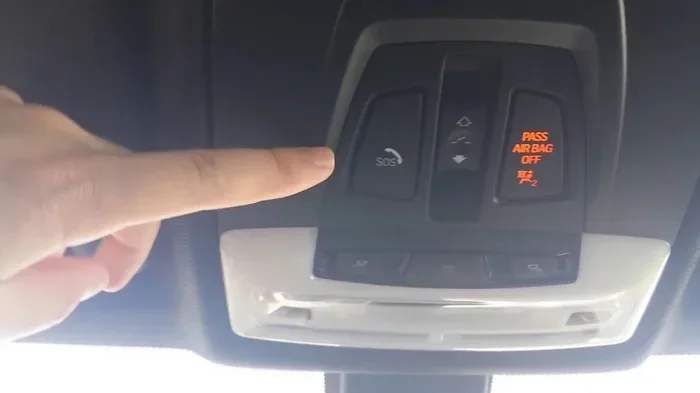
The BMW SOS system is part of the BMW ConnectedDrive suite. It includes the emergency call button located on the roof console or the rearview mirror. When you press the SOS button, it connects you directly to a BMW emergency operator. The operator can talk to you, send help, and even unlock your doors remotely if needed. This system has saved many lives since it was introduced. It is one of the reasons BMW safety ratings are so strong.
How the Emergency Call System Works
The BMW automatic emergency call system relies on several components working together. The BMW emergency call module is the brain behind the system. It communicates with the crash sensors, the GPS unit, and the cellular modem. When a collision is detected, the module activates. It sends a data packet to the BMW response center. This data includes vehicle speed, impact force, number of airbag deployments, and your exact location. The whole process happens in seconds. That is what makes this system so valuable.
Sometimes, however, the system can glitch. A software error, a weak battery, or a faulty sensor can trigger a BMW SOS call system failure warning. The system may refuse to activate, or it may send false alerts. Either way, it needs to be addressed quickly.
Common Causes of BMW SOS Call System Failure
Understanding why your BMW emergency call system fails is the first step toward fixing it. There are several common reasons this warning appears on your dashboard. Let us break them down.
Software Glitches and System Errors
BMW vehicles rely heavily on software. The iDrive system, the navigation module, and the SOS module all run on complex software. Sometimes, a software update goes wrong. Or a minor bug builds up over time. When this happens, the SOS system may stop working. You might see error messages like “Service Required” or “SOS System Malfunction.” These are often caused by corrupted data or an interrupted software update. A simple reset usually clears these errors.
Hardware and Module Issues
Not all failures are software-related. Sometimes, the hardware is the problem. The BMW communication module can fail due to water damage, age, or electrical issues. If the module has a short circuit, it cannot send or receive signals. The SOS system depends on a stable connection to the cellular network. If the antenna is damaged or the modem is faulty, the system will show a failure warning. In these cases, a reset alone may not be enough. You may need a replacement part.
Battery and Power Supply Problems
Your BMW battery plays a bigger role than just starting the engine. It powers all the electronic systems, including the SOS module. If your battery is weak or dying, the SOS system may not get enough power to function. This is especially common in older BMWs or after a long period of inactivity. A low battery voltage can also trigger multiple warning lights at once, not just the SOS light.
Aftermarket Modifications
Did you recently install a new stereo, a dash cam, or an alarm system? Aftermarket electronics can interfere with the BMW SOS system. If the wiring is not done correctly, it can disrupt the communication bus. This is a common cause of BMW SOS call system failure in modified vehicles. Always have aftermarket installations done by a certified technician.
How to Reset BMW SOS Call System Failure
Now for the part you have been waiting for. Here are the step-by-step methods to reset your BMW SOS call system. Start with Method 1 and work your way down if the first method does not work.
Method 1: Soft Reset via iDrive
A soft reset is the easiest and least invasive way to fix a BMW SOS call system failure. This method reboots the iDrive system without erasing any of your settings. Here is how to do it:
- Press and hold the power button on the iDrive controller for about 10 seconds.
- The screen will go black. Wait for it to restart on its own.
- Once the system boots back up, check if the SOS warning is gone.
- Test the SOS button to make sure it connects properly.
This method works for most minor software glitches. It is like restarting your phone when it acts up. If the error was caused by a temporary bug, this should fix it.
Method 2: Hard Reset by Disconnecting the Battery
If the soft reset does not work, try a hard reset. This method clears all temporary data from the car’s computers. It forces every module to start fresh. Here is what you need to do:
- Turn off the engine and remove the key from the ignition.
- Open the hood and locate the negative battery terminal.
- Use a wrench to loosen the nut on the negative cable.
- Disconnect the cable and move it away from the battery terminal.
- Wait at least 15 minutes. This gives the capacitors time to fully discharge.
- Reconnect the negative cable and tighten the nut.
- Start the engine and wait for all systems to initialize.
- Check the dashboard for any remaining SOS warnings.
After a hard reset, your BMW may take a few minutes to relearn all its settings. The radio presets might reset, and the clock may need to be adjusted. But your personal data and saved navigation points should remain intact. This method is very effective for clearing stubborn BMW SOS call system failure codes.
Quick Tip: Before disconnecting the battery, make sure you know your radio PIN code. Some BMWs require a PIN after a battery disconnect. You can find this code in your owner’s manual or by contacting your BMW dealer.
Method 3: Using BMW Diagnostic Tools
If neither the soft reset nor the hard reset works, it is time to bring in the big guns. BMW diagnostic tools like ISTA (BMW’s official software) or INPA can read fault codes directly from the SOS module. Here is how this process works:
- Connect the diagnostic tool to the OBD-II port under your steering column.
- Run a full system scan to identify the specific fault code.
- The tool will tell you exactly which component is causing the BMW SOS call system failure.
- Follow the on-screen instructions to clear the code or update the module software.
- After clearing the code, test the SOS system to confirm it is working.
You can buy or rent BMW diagnostic tools from auto parts stores or online. Some independent BMW shops also offer diagnostic services for a flat fee. Using a professional-grade tool gives you the most accurate diagnosis. It also helps you avoid replacing parts that are not actually broken.
When to Seek Professional Help
Not every BMW SOS call system failure can be fixed with a simple reset. Some problems require professional attention. Here are signs that you should take your BMW to a certified technician:
- The SOS warning light stays on after multiple reset attempts.
- You hear a clicking sound or static when pressing the SOS button.
- The system fails to connect to the BMW call center even after a full reset.
- You notice water damage or corrosion around the SOS module or antenna.
- Multiple electronic systems in your BMW are malfunctioning at the same time.
These symptoms could point to a deeper issue with the BMW emergency call module or the vehicle’s communication network. A trained BMW technician has the tools and expertise to diagnose and repair these problems safely. Trying to fix a hardware issue yourself can sometimes make things worse.
How Much Does It Cost to Repair?
The cost of repairing a BMW SOS call system failure depends on the root cause. A simple software reset costs nothing if you do it yourself. If the communication module needs replacement, expect to pay between $300 and $800 for parts and labor. If the antenna or wiring is damaged, the cost may be lower, around $150 to $400. Always get a quote before authorizing any repair work.
Preventing Future BMW SOS Call System Failures
The best way to deal with a BMW SOS call system failure is to prevent it from happening in the first place. Here are some practical steps you can take to keep your emergency call system working reliably.
Keep Your BMW Software Updated
BMW regularly releases software updates that fix bugs and improve system stability. Check with your dealer or use the BMW Connected app to see if any updates are available for your vehicle. Keeping your iDrive and SOS modules up to date reduces the risk of software-related failures.
Maintain Your Battery Health
A healthy battery is essential for all electronic systems in your BMW. Have your battery tested at least once a year, especially if your car is more than three years old. If your battery is weak, replace it before it causes problems with the SOS system or other electronics.
Avoid Aftermarket Interference
If you install aftermarket electronics, make sure they are wired properly. Use quality components and have the installation done by a professional. Poorly installed electronics can cause electrical noise that disrupts the BMW communication bus and triggers false SOS warnings.
Drive Your BMW Regularly
BMW electronic systems need regular use to stay healthy. If your car sits idle for weeks at a time, the modules can lose their calibration. Try to drive your BMW at least a few times a week. This keeps all systems active and functioning properly.
Expert Insight: BMW engineers recommend performing a full vehicle health check every 10,000 miles. This includes checking the SOS module, the communication antenna, and all related wiring. A routine check can catch small issues before they turn into a full BMW SOS call system failure.
Final Thoughts
A BMW SOS call system failure can be alarming, but it is almost always fixable. Whether you need a simple iDrive reset, a battery disconnect, or a diagnostic scan with professional tools, there is a solution for every situation. The key is to act quickly and not ignore the warning. Your SOS system is one of the most important safety features in your BMW. Keeping it in good working order protects you and your passengers on every drive.
Start with the easiest fix and work your way up. Most of the time, a soft reset or a battery disconnect will solve the problem. If the issue persists, do not hesitate to visit a certified BMW service center. They have the expertise and equipment to handle even the most complex BMW emergency call system problems. Stay safe, and keep your BMW in top shape.
Frequently Asked Questions
Can I still drive my BMW if the SOS system is not working?
Yes, you can still drive your BMW safely even if the SOS system shows a failure warning. The SOS system is a safety feature, but it does not affect your ability to operate the vehicle. However, you should get the system checked and reset as soon as possible. A working SOS system ensures that emergency services can reach you quickly if you are ever in an accident.
How much does it cost to repair the BMW SOS call system?
The cost depends on what is causing the BMW SOS call system failure. A simple software reset costs nothing. If the communication module needs replacement, the cost typically ranges from $300 to $800. For antenna or wiring issues, expect to pay between $150 and $400. Always ask for a detailed quote before approving any repair.
Does the BMW SOS system work after a battery replacement?
In most cases, yes. The BMW SOS system should work normally after a battery replacement. However, sometimes the system needs a reset to re-establish the connection. If the SOS warning light stays on after replacing the battery, try the soft reset or hard reset methods described in this guide.
How often should I reset the BMW emergency call system?
You should only reset the SOS system when you see a failure warning. There is no need to reset it on a regular schedule. Performing unnecessary resets can sometimes cause more issues. If your system is working properly, leave it alone and let it do its job.
Will resetting the SOS system erase my BMW personal settings?
No, resetting the SOS system will not erase your personal BMW settings. Your radio presets, seat positions, and navigation favorites are stored separately. A soft reset or even a hard reset should not affect your saved data. However, after a battery disconnect, you may need to reset the clock and re-enter your radio PIN code.
Can weather conditions cause BMW SOS call failure?
Extreme weather can sometimes affect the BMW SOS system. Heavy rain, snow, or ice can interfere with the cellular signal that the SOS module uses to communicate. In rare cases, water intrusion into the module or antenna can cause a failure. If you notice SOS issues during or after severe weather, have the system inspected for water damage or signal problems.