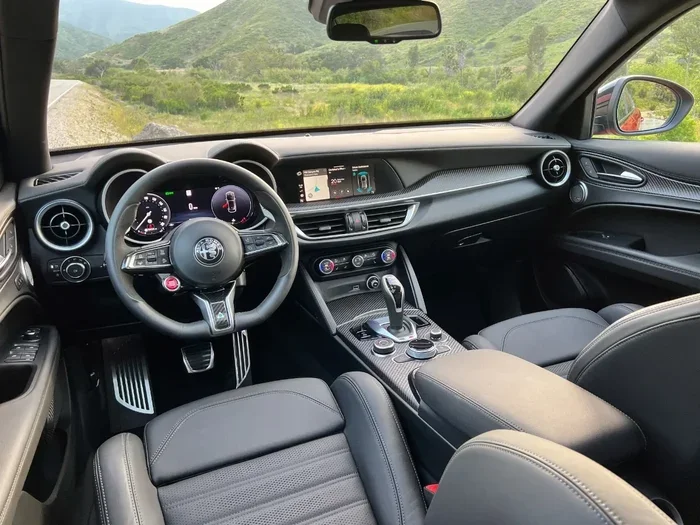
How to Reset the Oil Change Light on an Alfa Romeo Stelvio
Resetting the oil change light on your Alfa Romeo Stelvio is a quick and easy task you can do at home. This guide walks you through every method step by step, so you can clear the oil change reminder in minutes. Whether you use the steering wheel buttons or the infotainment screen, we have you covered for every Stelvio model year.
That little yellow or orange warning light on your dashboard can really get under your skin. You just got your oil changed, but the oil change light on your Alfa Romeo Stelvio is still blinking. It happens to almost every Stelvio owner at some point. The good news is that resetting this light is a simple process you can handle yourself. You do not need a trip to the dealer or a expensive mechanic visit. In this guide, we walk you through every step to clear that stubborn light quickly and easily.
The Alfa Romeo Stelvio is a beautiful SUV with sharp handling and Italian style. But like any vehicle, it needs regular maintenance to keep running smoothly. The oil change reminder is one of the most important alerts your car gives you. Ignoring it can lead to engine damage over time. But once you have changed the oil, you need to reset the system. This tells your Stelvio that fresh oil is in the engine and the service interval has been completed. Let us show you exactly how to do it.
Key Takeaways
- Easy Home Fix: You can reset the oil change light yourself without visiting a dealer or mechanic.
- Multiple Methods: The reset process works through steering wheel controls or the infotainment system depending on your model year.
- Know Your Oil Life System: Understanding how the oil life monitor works helps you stay on top of maintenance.
- Avoid Common Mistakes: Skipping steps or using the wrong method can cause the light to stay on.
- Regular Maintenance Matters: Resetting the light is not the same as changing the oil — always follow your service interval schedule.
- Quick Process: The entire reset takes less than five minutes once you know the steps.
📑 Table of Contents
Why the Oil Change Light Matters on Your Stelvio
The oil change light is not just a random warning. It is part of your Stelvio’s oil life monitoring system. This system tracks your driving habits and engine conditions. It calculates when the oil is starting to degrade. When the light comes on, it means the system thinks it is time for an oil change. Understanding this helps you take better care of your engine.
How the Oil Life System Works
Your Stelvio uses a smart algorithm to determine oil health. It looks at factors like engine temperature, driving conditions, and mileage. When the system decides the oil is no longer performing well, it triggers the warning light. This is different from older cars that simply tracked mileage. The oil life monitor gives you a more accurate picture of when your oil actually needs changing. It is a helpful feature that protects your engine.
There are two types of indicators you might see. One is a simple oil can icon. The other shows an oil life percentage. Both mean the same thing — it is time to service your vehicle. After you get the oil changed, you must reset the system manually. Otherwise, the light will keep coming back on.
How to Reset the Oil Change Light on an Alfa Romeo Stelvio
The reset process depends on your Stelvio model year and trim level. Newer models use the infotainment screen. Older models rely on steering wheel controls. We cover both methods below so you can find the one that works for your vehicle.
Method 1: Using the Steering Wheel Controls
This is the most common method for most Stelvio years. You can complete this reset in under two minutes. Here is exactly what to do:
- Turn the ignition to the ON position. Do not start the engine. Just press the start button without pressing the brake pedal. The dashboard lights will turn on.
- Use the steering wheel buttons to navigate. Press the MENU button on the left side of the steering wheel. Scroll through the options until you see the vehicle settings.
- Find the service menu. Use the up and down arrows to scroll to the maintenance or service section. Press OK to select it.
- Select the oil change option. Look for an option that says “Oil Change” or “Reset Oil Life.” Press OK to enter that menu.
- Confirm the reset. You will see a prompt asking if you want to reset the oil life system. Select “Yes” or “Reset.” The light should turn off immediately.
- Turn the ignition off and back on. This confirms the reset was successful. Check the dashboard — the light should be gone.
If the light does not go off, try repeating the steps. Sometimes the system needs a second confirmation. Make sure you are in the right menu. The exact wording may vary slightly depending on your Stelvio’s infotainment version.
Method 2: Using the Infotainment Screen
Newer Stelvio models, especially the 2021 and later versions, use a touchscreen interface. The process is slightly different but just as simple. Follow these steps:
- Press the power button to turn on the vehicle. Do not start the engine. Just activate the electrical systems.
- Tap the Settings icon on the home screen. It usually looks like a gear symbol. This opens the vehicle settings menu.
- Scroll down to Vehicle Maintenance. This section contains all your service-related options.
- Select Oil Life Reset. Tap on this option to enter the reset screen.
- Follow the on-screen prompts. The system will ask you to confirm the reset. Tap “Reset” or “Yes” to proceed.
- Turn the vehicle off and restart it. Check the dashboard to confirm the light has been cleared.
The infotainment method is very user-friendly. The on-screen instructions guide you through each step. If you are not comfortable with the touchscreen, the steering wheel method works just as well. Choose whichever feels more natural to you.
What to Do If the Light Keeps Coming Back
Sometimes the light returns even after you reset it. This can be frustrating. Here are a few things to check. First, make sure the oil level is correct. Low oil can trigger the warning again. Pull out the dipstick and check the level. Add oil if needed. Second, confirm that you actually changed the oil. The system tracks usage, so if you did not change it, the light will return. Third, check for any error codes. A faulty oil sensor can cause false warnings. In this case, a visit to the mechanic may be necessary.
Tips for Maintaining Your Stelvio’s Oil System
Resetting the light is only part of the equation. You also need to maintain your oil system properly. Here are some practical tips to keep your Stelvio running strong.
When to Change Your Oil
The oil change interval for the Alfa Romeo Stelvio varies. Most models need an oil change every 7,500 to 10,000 miles. However, this depends on your driving conditions. If you drive in severe conditions, you should change the oil more often. Severe conditions include short trips, extreme temperatures, and heavy towing. Check your owner’s manual for the exact maintenance schedule for your model year.
Here are some quick guidelines to follow:
- Normal driving: Change oil every 10,000 miles or once a year.
- Severe driving: Change oil every 5,000 to 7,500 miles.
- Track driving: Change oil after every track day or every 3,000 miles.
- Always check the oil life percentage: If it drops below 15%, plan your oil change soon.
Choosing the Right Oil for Your Stelvio
Not all oils are the same. The Stelvio engine performs best with high-quality synthetic oil. Check your owner’s manual for the recommended oil viscosity. Most Stelvio models use 0W-20 or 5W-30 full synthetic oil. Using the wrong oil can reduce engine performance and trigger the warning light prematurely. Always use oil that meets Alfa Romeo specifications. Look for the correct API certification on the oil bottle.
Here are some quick tips for choosing oil:
- Stick with synthetic oil. It provides better protection and lasts longer.
- Check the viscosity grade. Using the wrong grade can affect engine performance.
- Use OEM-recommended brands. Alfa Romeo often specifies certain oil brands.
- Change the oil filter every time. A clean filter keeps the oil fresh longer.
Common Mistakes to Avoid When Resetting the Oil Change Light
Even a simple task like resetting the oil light can go wrong. Here are common mistakes Stelvio owners make and how to avoid them.
Resetting Before Actually Changing the Oil
This is the biggest mistake people make. Do not reset the light if you have not changed the oil yet. The oil life system tracks the actual condition of the oil. Resetting it prematurely means the system will not alert you when the oil actually needs changing. Always change the oil first, then reset the light immediately after.
Not Turning the Ignition to the Correct Position
Many people try to reset the light while the engine is running. This will not work. You need the ignition in the ON position, not the START position. The difference matters. ON means the dashboard lights are on but the engine is off. If you are unsure, turn the key to the first click or press the start button once without pressing the brake.
Skipping the Confirmation Step
The system usually asks you to confirm the reset. If you accidentally select “No” or “Cancel,” the light will stay on. Make sure you follow through on every prompt. Take your time and read each screen carefully. Rushing through the process is the fastest way to make a mistake.
Using the Wrong Method for Your Model Year
Not all Stelvio models use the same reset process. Older models use steering wheel buttons while newer ones use the touchscreen. Check your owner’s manual to confirm which method applies to your vehicle. Using the wrong method will not damage anything, but it will waste your time and leave the light on.
When to Seek Professional Help
Most of the time, resetting the oil change light is a DIY task. But there are situations where professional help makes sense. If the light stays on after you have followed all the steps correctly, something may be wrong. A faulty oil sensor, a wiring issue, or a software glitch could be the cause. A certified Alfa Romeo mechanic can diagnose the problem with specialized tools. They can also perform a full vehicle service check to make sure everything is in order.
You should also see a professional if you notice other warning lights along with the oil change light. Multiple dashboard warnings can indicate a more serious issue. Do not ignore these signs. Getting a professional inspection early can save you from costly repairs down the road.
Final Thoughts
Resetting the oil change light on an Alfa Romeo Stelvio is a simple process that anyone can do at home. Whether you use the steering wheel controls or the infotainment screen, the steps are straightforward and take just a few minutes. The key is to follow each step carefully and make sure you have actually changed the oil before resetting the system.
Taking care of your Stelvio’s maintenance schedule keeps the engine running strong for years. The oil life monitor is a valuable tool that helps you stay on track. Just remember that resetting the light is not a substitute for regular oil changes. Always follow the recommended service interval for your vehicle. With the right oil and a consistent maintenance routine, your Stelvio will continue to deliver the thrilling driving experience you love.
Keep this guide handy for your next oil change. You will never have to wonder how to clear that annoying dashboard light again. Your Stelvio will thank you with smooth performance and reliable operation mile after mile.
Frequently Asked Questions
Can I reset the oil change light without changing the oil?
Technically yes, but you should not. Resetting the light without changing the oil tricks your Stelvio’s oil life monitor into thinking fresh oil has been added. This means you will not get a warning when the oil actually needs changing. Always change the oil first, then reset the light.
How often does the Alfa Romeo Stelvio need an oil change?
Most Stelvio models require an oil change every 7,500 to 10,000 miles under normal driving conditions. If you drive in severe conditions like extreme heat, short trips, or heavy towing, you should change the oil more frequently. Check your owner’s manual for the exact maintenance schedule for your model year.
What oil does the Alfa Romeo Stelvio use?
The Stelvio typically uses 0W-20 or 5W-30 full synthetic oil. Always check your owner’s manual for the recommended oil viscosity and specifications. Using the correct oil type ensures optimal engine performance and protection.
Why won’t my oil change light turn off after resetting?
If the light stays on after resetting, try repeating the process. Make sure you are in the correct menu and confirming each step. If the light persists, the oil level may be low, or there could be a faulty sensor. In this case, visit a certified Alfa Romeo mechanic for a professional diagnosis.
Is resetting the oil change light covered under warranty?
Resetting the light yourself does not affect your warranty. However, if you skip or delay actual oil changes, it could void your warranty coverage. Always follow the recommended service interval and keep records of your maintenance.
Can I use any reset method for all Stelvio model years?
No, the reset method varies by model year and trim. Newer models use the infotainment touchscreen, while older models use steering wheel controls. Always refer to your owner’s manual to confirm the correct reset procedure for your specific Stelvio.
=== CONCLUSION ===
The oil change light on your Alfa Romeo Stelvio is there to protect your engine. Once you understand how it works and how to reset it, you can handle this maintenance task with confidence. Follow the steps in this guide for your specific model year, and you will clear the light in just a few minutes. Remember, resetting the light is only useful after you have actually changed the oil. Keep up with your service interval, use the right oil, and your Stelvio will reward you with years of excellent performance. Take care of your car, and it will take care of you on every drive.