How Do I Reboot My Bluetooth and Fix Connection Issues
Rebooting your Bluetooth is the fastest way to fix connection problems in your car. Whether your Bluetooth car stereo won’t pair or your audio keeps cutting out, a simple reset often solves the issue. This guide walks you through every method, from soft resets to full device restarts, so you can get back on the road with clear music and hands-free calling.
You’re driving down the road. Your favorite song starts playing through the speakers. Then suddenly — silence. The Bluetooth connection drops, and you’re stuck tapping your phone screen trying to get it back. Sound familiar?
How do I reboot my Bluetooth is one of the most searched questions by car owners today. Bluetooth problems in vehicles are incredibly common. They happen in older cars and brand-new models alike. The good news is that most Bluetooth issues are easy to fix with a simple reboot.
This guide will walk you through every method to reset Bluetooth in your car and get your wireless connection working again. We cover soft resets, full device restarts, and advanced troubleshooting. By the end, you’ll know exactly what to do when your Bluetooth car audio starts acting up.
Key Takeaways
- Soft reset works most of the time: Turning Bluetooth off and back on clears minor glitches instantly.
- Full device reboot fixes deeper issues: Restarting your phone or car infotainment system solves most pairing problems.
- Check for interference first: Other wireless devices can cause Bluetooth connection drops and lag.
- Update firmware regularly: Outdated software is a hidden cause of Bluetooth problems in cars.
- Forget and re-pair when needed: Removing old pairings and reconnecting fresh often fixes stubborn issues.
- Factory reset is the last resort: Only use this option when nothing else works.
- Prevention keeps Bluetooth smooth: Regular maintenance stops problems before they start.
📑 Table of Contents
- Why Does Bluetooth Keep Disconnecting in Cars?
- How Do I Reboot My Bluetooth: Step-by-Step Methods
- Bluetooth Troubleshooting for Specific Car Brands
- Preventing Bluetooth Problems Before They Start
- When to Seek Professional Help
- Common Mistakes People Make When Fixing Bluetooth
- Expert Tips for Better Bluetooth Performance in Your Car
- Quick Tips for Fast Bluetooth Fixes
- Final Thoughts
Why Does Bluetooth Keep Disconnecting in Cars?
Before we dive into fixes, let’s understand why Bluetooth connection issues happen in the first place. Knowing the cause helps you prevent problems in the future.
Common Causes of Bluetooth Problems
Several things can mess with your wireless connection car setup:
- Signal interference: Other wireless devices nearby can disrupt the Bluetooth signal. Wi-Fi routers, USB cables, and even other phones can cause problems.
- Outdated software: Both your phone and your car’s infotainment system need current firmware. Old software creates compatibility gaps.
- Too many paired devices: When your car remembers too many devices, it gets confused about which one to connect.
- Distance and obstacles: Bluetooth has a limited range. Walls, metal surfaces, and distance weaken the signal.
- Low battery: A phone or car battery that’s running low can cause Bluetooth to disconnect randomly.
- Software glitches: Sometimes electronics just need a fresh start. A simple reboot clears temporary bugs.
How to Tell If It’s a Bluetooth Issue
Not every audio problem is a Bluetooth issue. Here’s how to check:
- Your phone shows a connected Bluetooth icon but no sound plays.
- The audio cuts in and out while driving.
- Your phone won’t find the car’s Bluetooth name in the list.
- Hands-free calling works but music streaming doesn’t.
- The connection drops every time you hit a certain speed.
If any of these sound familiar, you’re in the right place. Let’s fix it.
How Do I Reboot My Bluetooth: Step-by-Step Methods
Now let’s get into the actual steps. There are several ways to reboot Bluetooth, and each one works for different situations. Start with Method 1 and work your way down.
Method 1: The Soft Reset (Quick Toggle)
The soft reset is the fastest fix. It takes about 10 seconds and solves most minor glitches.
- Open your phone’s Settings app.
- Tap on Bluetooth or Connections.
- Find your car’s Bluetooth name in the list.
- Tap the gear icon next to it.
- Select Unpair or Forget Device.
- Turn Bluetooth off completely.
- Wait 15 seconds.
- Turn Bluetooth back on.
- Re-pair your car’s Bluetooth.
This method works because it clears the active connection without deleting any saved data. Think of it like closing and reopening an app on your phone.
Method 2: Restart Your Phone
If the soft reset doesn’t work, try restarting your phone. This refreshes all wireless connections, including Bluetooth.
- iPhone users: Press and hold the power button and volume button. Slide to power off. Wait 30 seconds. Turn it back on.
- Android users: Press and hold the power button. Tap Restart. Wait for the phone to fully boot up.
After your phone restarts, try connecting to your car’s Bluetooth again. This fixes Bluetooth pairing problems caused by temporary software conflicts.
Method 3: Restart Your Car’s Infotainment System
Your car’s computer needs a reboot too sometimes. Here’s how:
- For most cars: Press and hold the power button on your infotainment screen for 10 seconds. The screen will go black. Wait 30 seconds. Press the power button again to restart.
- For cars with a dedicated reset button: Look for a small hole near the screen. Use a paperclip to press it gently. The system will restart automatically.
- For older cars: Try disconnecting the negative battery terminal for 5 minutes. This clears the car’s entire electrical memory, including Bluetooth settings.
Restarting the infotainment system is like restarting your home router. It clears temporary files and refreshes the Bluetooth module.
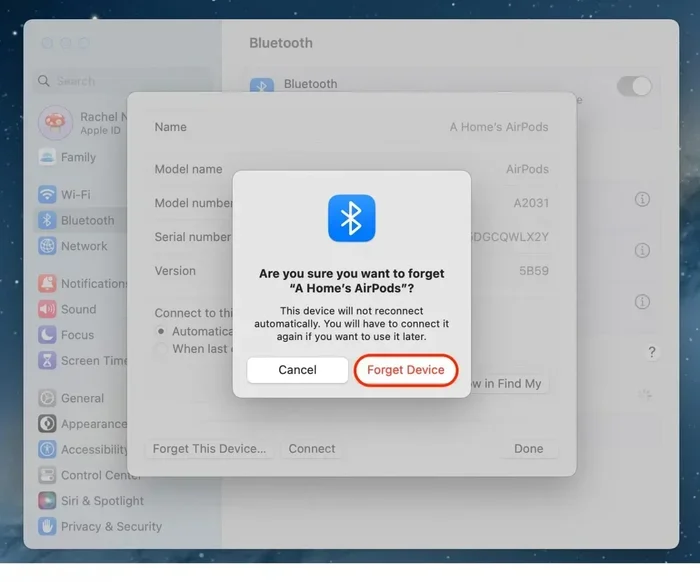
Method 4: The Forget-and-Re-Pair Method
This method is more thorough than a simple toggle. It removes all old connection data and starts fresh.
- On your phone, go to Bluetooth Settings.
- Find your car’s name and tap the (i) or gear icon.
- Select Forget This Device or Unpair.
- Do the same on your car’s infotainment screen.
- Turn Bluetooth off on both devices.
- Wait one minute.
- Turn Bluetooth on both devices.
- Put your car in pairing mode.
- Select your car from your phone’s Bluetooth list.
- Enter the PIN if prompted (usually 0000 or 1234).
This method is especially helpful when your Bluetooth car stereo connects but won’t play audio. The fresh pairing establishes a clean data channel between devices.
Method 5: Factory Reset the Car’s Bluetooth Module
If nothing else works, a factory reset clears all Bluetooth settings on your car’s system. Use this as a last resort.
- Go to your car’s Settings menu on the infotainment screen.
- Look for System or Factory Settings.
- Select Reset Bluetooth or Factory Reset.
- Confirm the reset.
- The system will restart with all Bluetooth data cleared.
Warning: A factory reset may erase other saved settings too, like radio presets and navigation favorites. Make sure you know how to set those up again before proceeding.
Bluetooth Troubleshooting for Specific Car Brands
Different car brands have different Bluetooth systems. Here are some brand-specific tips for Bluetooth troubleshooting.
Toyota and Lexus
Toyota vehicles use the Bluetooth Hands-Free system. If your connection drops, try clearing the phone list on the car’s display. Go to Phone Settings > Delete All Phone Data. Then re-pair your device.
Ford and Lincoln
Ford’s SYNC system sometimes needs a full module reboot. Press and hold the radio power button for 20 seconds. This forces the SYNC module to restart without losing your saved settings.
Chevrolet and GMC
Chevy’s MyLink system can get sluggish with too many paired devices. Go to Settings > Bluetooth > Device List and delete any devices you no longer use. Keep your active list under five devices for best performance.
Honda and Acura
HondaLink Bluetooth sometimes needs the phone’s location services turned off during pairing. Go to Phone Settings > Location and disable it temporarily while pairing your device.
Preventing Bluetooth Problems Before They Start
Rebooting fixes problems, but prevention stops them from happening in the first place. Here are simple habits that keep your wireless connection car system running smoothly.
Keep Your Software Updated
Both your phone and your car’s infotainment system receive software updates. These updates often include Bluetooth fixes and improvements.
- Check for phone updates every week or two.
- Visit your car dealer for infotainment updates at least twice a year.
- Some newer cars support over-the-air updates. Check your owner’s manual.
Limit Paired Devices
Your car’s Bluetooth module can only handle so many connections at once. Too many paired devices slow things down and cause conflicts.
- Delete devices you no longer use.
- Keep your active paired list under five devices.
- Remove old phones after you get a new one.
Avoid Signal Interference
Bluetooth uses the 2.4 GHz frequency band. Other devices on this same band can cause interference.
- Don’t place USB chargers or Wi-Fi hotspots too close to your car’s antenna.
- If your phone has a wireless charger, try moving it away from the infotainment system.
- Turn off unused Bluetooth devices in the car when not needed.
Restart Your System Monthly
Make it a habit to restart your car’s infotainment system once a month. This clears temporary files and keeps the Bluetooth module running efficiently. It takes less than a minute and can save you hours of frustration.
When to Seek Professional Help
Most Bluetooth issues resolve with a reboot or reset. But some problems need professional attention.
Signs You Need a Mechanic or Dealer
- Bluetooth won’t turn on at all, even after a full reboot.
- The Bluetooth icon appears but no audio plays through any method.
- Your car’s Bluetooth works with one phone but not any others.
- You hear static or buzzing through the speakers during calls.
- The Bluetooth module causes the infotainment screen to freeze repeatedly.
These symptoms could point to a hardware issue with the Bluetooth antenna or module. A dealer can run diagnostics and replace faulty parts if needed.
What to Expect at the Dealer
Dealers can check your car’s Bluetooth module with specialized diagnostic tools. They can update firmware, replace antennas, and reset the entire system. Many Bluetooth-related repairs are covered under warranty, especially for newer vehicles.
Common Mistakes People Make When Fixing Bluetooth
Avoid these common errors that make Bluetooth problems worse:
- Skipping the unpairing step: Just toggling Bluetooth off and on doesn’t clear old connection data. Always unpair first.
- Ignoring phone updates: An outdated phone operating system is the number one cause of Bluetooth pairing failures.
- Pairing in the wrong mode: Your car must be in pairing mode for your phone to find it. Check your car’s manual for the exact steps.
- Rebooting only one device: If the connection fails, restart both your phone and your car’s system.
- Giving up too quickly: Some Bluetooth issues need two or three reset attempts before they fully resolve.
Expert Tips for Better Bluetooth Performance in Your Car
Here are some extra tips from automotive tech experts that make a real difference:
- Keep your phone charged. Low battery power causes Bluetooth to drop. A car charger keeps your phone powered and the connection stable.
- Use the latest Bluetooth version. Bluetooth 5.0 and newer offer better range and fewer dropouts. Check if your phone supports the latest version.
- Clear your phone’s Bluetooth cache regularly. On Android, go to Settings > Apps > Bluetooth > Storage > Clear Cache. This removes corrupted temporary files.
- Name your devices clearly. Give your car’s Bluetooth a recognizable name so you don’t accidentally connect to the wrong one.
- Restart before long trips. A quick reboot of both devices before a road trip prevents issues on the highway where you can’t stop to fix them.
Quick Tips for Fast Bluetooth Fixes
Bookmark these quick tips for the next time your Bluetooth audio problems strike:
- Tip 1: The 15-second rule. Always wait at least 15 seconds after turning Bluetooth off before turning it back on.
- Tip 2: Airplane mode trick. Turn on Airplane Mode for 30 seconds, then turn it off. This resets all wireless connections at once.
- Tip 3: Move closer. If your phone won’t connect, bring it closer to the car’s infotainment system during pairing.
- Tip 4: Try a different phone. If your car connects to another phone fine, the issue is with your original phone, not the car.
- Tip 5: Check for metal phone mounts. Some metal mounts block Bluetooth signals. Move your phone away from the mount during pairing.
Final Thoughts
How do I reboot my Bluetooth doesn’t have to be a frustrating question. With the right steps, you can fix most connection issues in under five minutes. Start with the soft reset and work your way up to a full factory reset if needed.
Remember that Bluetooth connection issues in cars are normal and expected. Electronics need maintenance just like anything else. A simple reboot clears temporary glitches and refreshes your wireless connection.
Keep your software updated, limit paired devices, and restart your system monthly. These small habits prevent most problems before they start. And when issues do come up, you now have the tools to fix them yourself.
Your Bluetooth car audio should make driving more enjoyable, not more stressful. Use this guide anytime your connection acts up. You’ll be back to streaming music and making hands-free calls in no time.
Frequently Asked Questions
How long does it take to reboot Bluetooth in a car?
A soft reset takes about 30 seconds. A full phone and car system reboot takes 2 to 3 minutes. The forget-and-re-pair method takes about 5 minutes. Most Bluetooth issues resolve with the quick toggle method.
Why does my Bluetooth keep disconnecting while driving?
Signal interference from other wireless devices is the most common cause. Low battery on your phone or car system can also trigger disconnections. Try restarting both devices and moving your phone to a different location in the car.
Will rebooting Bluetooth delete my paired devices?
A soft reset or phone restart does not delete paired devices. However, a factory reset on your car’s Bluetooth module will remove all saved pairings. Always unpair before doing a full reset so you can reconnect easily.
Can I reboot Bluetooth without turning off my car?
Yes. You can reboot Bluetooth through your phone settings or your car’s infotainment menu without turning off the engine. The soft reset and forget-and-re-pair methods work while the car is running.
What should I do if my Bluetooth won’t connect after a reboot?
Try the forget-and-re-pair method next. Make sure both devices have the latest software updates. If the problem persists, check for signal interference from other wireless devices in the car.
Is it normal for Bluetooth to have connection issues in older cars?
Yes. Older car Bluetooth modules may not support the latest Bluetooth versions. This can cause compatibility issues with newer phones. A factory reset and fresh pairing often improve performance in older vehicles.