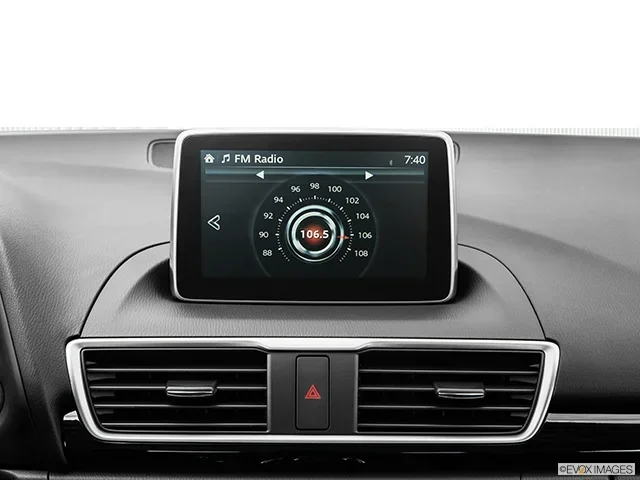
How to Reset Mazda 3 Radio in Just a Few Simple Steps
Learning how to reset Mazda 3 radio is easier than you think. Whether your screen is frozen, the audio cuts out, or the Bluetooth won’t connect, a simple reset often solves the problem fast. This guide walks you through every method, from a quick power cycle to a full factory reset, so you can get your Mazda audio system working again without visiting a dealer.
There’s nothing more frustrating than settling into your Mazda 3 for a drive, only to find the radio is dead, frozen, or stuck on a blank screen. You press buttons, nothing happens. You restart the car, and still nothing. It’s a common problem that Mazda 3 owners face, and the good news is that it’s usually easy to fix.
Whether you’re dealing with a frozen infotainment display, a radio that won’t power on, or Bluetooth connections that keep dropping, knowing how to reset Mazda 3 radio can save you time and money. You won’t need to visit a dealership or call a mechanic for most of these issues. A few simple steps can bring your Mazda audio system back to life in minutes.
In this guide, we’ll cover every method you can use to reset your radio. We’ll also explore why radios glitch in the first place, what common mistakes to avoid, and how to prevent problems from coming back. Let’s get started.
Key Takeaways
- Soft Reset: A quick power cycle can fix most minor glitches in your Mazda 3 radio.
- Hard Reset: Disconnecting the battery resets the entire infotainment system to factory settings.
- Button Combinations: Specific button presses on the dashboard can trigger a reset without tools.
- Common Causes: Software bugs, loose wiring, and firmware glitches are the top reasons radios freeze or fail.
- Prevention Tips: Regular updates and proper shutdowns help avoid future radio problems.
- When to Seek Help: If resets don’t work, the issue may be hardware-related and needs professional diagnosis.
📑 Table of Contents
- Why Does the Mazda 3 Radio Need a Reset?
- How to Reset Mazda 3 Radio: Step-by-Step Methods
- Comparison: Which Reset Method Should You Use?
- Common Mistakes to Avoid When Resetting Your Mazda 3 Radio
- How to Prevent Radio Problems in Your Mazda 3
- When to Seek Professional Help
- Quick Tips for a Smooth Reset Experience
- Frequently Asked Questions
- Final Thoughts
Why Does the Mazda 3 Radio Need a Reset?
Before we jump into the steps, it helps to understand what causes radio issues in the first place. A Mazda 3 radio reset isn’t just a random fix. It addresses specific problems that build up over time. Here are the most common reasons your radio might need a reset.
Software Glitches and Freezes
Modern Mazdas come packed with digital features. The infotainment system runs on software, just like a smartphone. And just like a phone, it can freeze or bug out. A software glitch might cause the screen to go black, the audio to cut in and out, or the system to become unresponsive to touch inputs. A reset clears these temporary errors and refreshes the system.
Firmware Bugs After Updates
Sometimes Mazda releases firmware updates for the infotainment system. These updates can occasionally introduce bugs. If you recently updated your system and the radio started acting up, a reset can help roll back minor issues and restore normal function.
Loose or Corroded Wiring
Under the dashboard, a tangle of wires connects the radio to the car’s electrical system. Over time, vibrations from driving can loosen connections. Corrosion can build up on older vehicles. These issues can cause the radio to lose power intermittently or fail to turn on at all.
Power Surges and Battery Issues
A weak battery or a sudden power surge can confuse the radio’s internal memory. When the battery voltage drops or spikes, the system may not boot up properly. Resetting the radio clears corrupted settings and allows it to start fresh.
How to Reset Mazda 3 Radio: Step-by-Step Methods
There are several ways to reset the radio in a Mazda 3. The method you choose depends on the problem you’re facing. Let’s walk through each one in detail.
Method 1: The Quick Power Cycle (Soft Reset)
The soft reset is the simplest and fastest method. It works like restarting a computer. This method is perfect for minor freezes, audio dropouts, or when the screen becomes unresponsive.
- Turn off the engine and remove the key from the ignition.
- Open the driver’s side door and wait 30 seconds. This lets the car’s electrical system drain residual power.
- Close the door and get back in.
- Turn the ignition to the “On” position without starting the engine.
- Wait for the radio to boot up fully.
- Start the engine and test the radio.
This simple power cycle resolves most minor issues. It takes less than two minutes and requires no tools.
Method 2: The Fuse Reset
If the power cycle doesn’t work, the next step is to reset the radio through the fuse box. This method cuts power to the radio unit directly, forcing it to restart.
Here’s what to do:
- Open the hood and locate the fuse box. In most Mazda 3 models, it’s on the left side of the engine bay.
- Consult your owner’s manual to find the fuse labeled “Radio” or “Audio.”
- Use a fuse puller or a pair of needle-nose pliers to remove the fuse carefully.
- Wait at least 60 seconds.
- Reinsert the fuse firmly.
- Start the car and check if the radio powers on.
This method is slightly more involved but still very safe. Just make sure the car is turned off before you touch any fuses.
Method 3: The Battery Disconnect (Hard Reset)
A hard reset is the most thorough method. It resets the entire electrical system, including the infotainment unit. Use this method when the radio has completely stopped working or when other methods fail.
Follow these steps carefully:
- Park the car on a flat surface and turn off the engine.
- Open the hood and locate the negative battery terminal (marked with a minus sign).
- Use a wrench to loosen the nut on the negative cable.
- Slide the cable off the terminal and tuck it away so it can’t touch the battery.
- Wait 10 to 15 minutes. This gives the car’s computers time to fully discharge.
- Reconnect the negative cable and tighten the nut.
- Start the car and test the radio.
A hard reset will also reset your clock, radio presets, and Bluetooth pairings. You’ll need to set those up again, but the trade-off is a completely fresh start for your system.
Method 4: Using the Radio Button Combination
Some Mazda 3 models have a secret button combination that triggers a reset directly on the radio unit. This method varies by model year, so check your owner’s manual first.
Try this common sequence:
- Turn the ignition to the “On” position.
- Press and hold the “Eject” button and the “Power” button simultaneously for 10 seconds.
- Release both buttons when the screen goes dark.
- Wait for the system to reboot.
If this combination doesn’t work for your specific model, try the “Volume” knob and the “Tune” button together. The exact steps depend on your Mazda 3’s year and trim level.
Method 5: Factory Reset Through the Infotainment Menu
Newer Mazda 3 models with touchscreen infotainment systems offer a factory reset option built into the settings menu. This is the most user-friendly method for recent models.
Here’s how to do it:
- Tap the “Settings” icon on the infotainment screen.
- Scroll down to “System” or “General Settings.”
- Look for “Factory Reset” or “Restore Defaults.”
- Confirm your choice when prompted.
- Wait for the system to reboot completely.
This method wipes all personal settings, saved stations, and paired devices. But it gives you a clean slate, which is exactly what a stuck or glitchy system needs.
Comparison: Which Reset Method Should You Use?
Not every reset method is right for every situation. Here’s a quick comparison to help you choose the best approach for your problem.
| Method | Difficulty | Time Required | Best For | Tools Needed |
|---|---|---|---|---|
| Power Cycle | Easy | 1-2 minutes | Minor freezes, audio dropouts | None |
| Fuse Reset | Medium | 3-5 minutes | Radio won’t turn on | Fuse puller or pliers |
| Battery Disconnect | Medium | 10-15 minutes | Complete system failure | Wrench |
| Button Combination | Easy | 1 minute | Frozen touchscreen | None |
| Factory Reset (Menu) | Easy | 5-10 minutes | Persistent software bugs | None |
For most people, the power cycle or button combination will do the job. Reserve the harder methods for situations where the simpler ones don’t work.
Common Mistakes to Avoid When Resetting Your Mazda 3 Radio
Even though resetting a radio is straightforward, some mistakes can cause more harm than good. Here are the pitfalls to watch out for.
- Skipping the owner’s manual: Button combinations differ between model years. Always check your manual before trying a specific sequence.
- Disconnecting the wrong battery terminal: Always remove the negative terminal first. Removing the positive terminal can cause sparks and damage electrical components.
- Holding buttons too long: In button combination resets, holding buttons for 30 seconds instead of 10 won’t help. It can sometimes trigger a different system function.
- Forgetting to clear error codes: After a hard reset, your car might store error codes. Use an OBD2 scanner to clear them if the check engine light stays on.
- Not waiting long enough: Rushing the process is the most common mistake. Give the system enough time to fully discharge and reboot.
Expert Insight
Automotive technicians often see owners rush through resets or try the wrong method for their problem. The best approach is to start simple. A power cycle fixes about 70% of minor radio issues. Only move to harder methods if the simple ones don’t work.
How to Prevent Radio Problems in Your Mazda 3
Once you’ve got your radio working again, you’ll want to keep it that way. Prevention is always better than fixing a problem after it happens. Here are some simple habits that protect your Mazda 3 infotainment system.
Keep Your Firmware Updated
Mazda occasionally releases firmware updates that fix known bugs and improve performance. Check for updates through the infotainment settings or ask your dealer during routine service visits. Staying current reduces the chance of software-related glitches.
Avoid Force Restarts
It’s tempting to yank the key from the ignition when the radio freezes. But force shutting down the system repeatedly can corrupt the software. Always use the proper shutdown sequence through the car’s controls when possible.
Protect Against Power Surges
If you use aftermarket accessories like amplifiers or subwoofers, make sure they’re installed properly. Poorly wired accessories can send power surges through the car’s electrical system, which can damage the factory radio unit.
Keep the Software Clean
Don’t overload your infotainment system with too many apps or paired devices. A cluttered system runs slower and is more prone to freezing. Periodically review your connected devices and remove ones you no longer use.
When to Seek Professional Help
Most radio issues respond well to a reset. But sometimes the problem goes deeper than software. Here are signs that you need professional help.
- The radio makes a persistent buzzing or humming noise that doesn’t go away after a reset.
- You notice a burning smell or see smoke coming from the dashboard.
- The radio stops working again immediately after a reset.
- You hear popping or crackling sounds from the speakers when the radio is on.
- The display shows lines, flickers, or remains completely black even after multiple reset attempts.
These symptoms often point to hardware failures. A blown speaker, damaged wiring, or a faulty amplifier might need replacement. In these cases, a visit to a certified Mazda mechanic or audio specialist is the best move.
Quick Tips for a Smooth Reset Experience
Here are some quick tips to make the reset process as smooth as possible:
- Have your owner’s manual handy: It contains model-specific instructions that can save you time.
- Know your radio model: The Mazda 3 has used different radio units across model years. Knowing which one you have helps you find the right reset method.
- Keep a fuse puller in your glove box: It’s a small tool that makes fuse removal quick and safe.
- Write down your presets: Before doing a factory reset, jot down your favorite radio stations so you can reprogram them easily.
- Stay patient: The system needs time to reboot. Don’t mash buttons during the restart process.
Frequently Asked Questions
How long does a Mazda 3 radio reset take?
A soft reset takes about 1 to 2 minutes. A hard reset involving battery disconnection takes 10 to 15 minutes of waiting time plus a few minutes for the system to reboot. The factory reset through the menu usually takes 5 to 10 minutes. Most resets are quick and don’t require much time at all.
Will resetting the Mazda 3 radio erase my saved stations?
A soft reset or power cycle won’t erase your saved stations. But a factory reset or battery disconnect will clear all presets, Bluetooth pairings, and personal settings. You’ll need to reprogram those after the reset is complete.
Why does my Mazda 3 radio keep freezing?
Frequent freezing usually points to a software bug or outdated firmware. It can also happen if the infotainment system is low on memory from too many apps or paired devices. Try a factory reset first. If the problem persists, check for firmware updates or visit a Mazda dealer for diagnostics.
Can I reset the radio without disconnecting the battery?
Yes. The power cycle method, button combination method, and factory reset through the menu all work without touching the battery. The battery disconnect is only needed for persistent issues that don’t respond to simpler methods.
Is it safe to reset the Mazda 3 radio myself?
Absolutely. All the methods described in this guide are safe for the average car owner. Just follow the steps carefully, especially when working near the battery or fuse box. If you feel uncomfortable at any point, a mechanic can do the reset for you quickly.
What should I do if the radio still won’t work after a reset?
If a reset doesn’t fix the problem, the issue is likely hardware-related. Check the fuse first, as a blown fuse is a common hidden cause. If the fuse is fine, the radio unit itself may need replacement. Contact a Mazda dealership or a qualified audio technician for a proper diagnosis.
Final Thoughts
Dealing with a malfunctioning radio in your Mazda 3 doesn’t have to be stressful. With the right approach, you can fix most issues in just a few minutes from your own driveway. Remember to start with the simplest method, the power cycle, and work your way up only if needed.
Knowing how to reset Mazda 3 radio gives you confidence and saves money. You won’t need to rely on expensive dealership visits for a problem that a five-minute fix can solve. Keep the tips in this guide handy, and you’ll be back to enjoying your favorite music, podcasts, and calls in no time.
Take care of your Mazda audio system with regular maintenance and smart usage habits. And if the problem ever goes beyond what a reset can fix, don’t hesitate to seek professional help. Your Mazda 3 infotainment system is designed to serve you well for years, and a little know-how goes a long way in keeping it running smoothly.