How to Reset the Oil Meter on a Honda Civic Step by Step
Resetting the oil meter on a Honda Civic is a simple process anyone can do at home. This guide walks you through every step of the oil life reset procedure for different Honda Civic models and years. You will learn why the oil meter matters, how to reset it correctly, and common mistakes to avoid during the Honda Civic maintenance routine.
If you own a Honda Civic, you have probably seen that little oil change light flicker on your dashboard at the worst possible time. It is annoying, isn’t it? But here is the good news. Resetting the oil meter on a Honda Civic is one of the easiest maintenance tasks you can do. You do not need a mechanic. You do not need expensive tools. All you need is a few minutes and this guide.
Whether you drive a 2012 Honda Civic or a brand-new 2024 model, the process is surprisingly similar. In this article, we will walk you through the entire oil meter reset process step by step. We will also explain why this matters, what common mistakes to avoid, and how to keep your Honda running strong between oil changes. Let us get into it.
The oil life system in your Honda Civic is a smart feature. It tracks your driving habits and tells you when it is time for an oil change. But after you get the oil changed, that reminder stays on until you manually reset it. Forgetting to reset it means you will keep seeing that annoying light, even though your engine is fresh and clean. So let us fix that right now.
Key Takeaways
- Easy DIY Process: Resetting the oil meter takes just a few minutes and requires no special tools.
- Model-Specific Steps: Different Honda Civic years may have slightly different reset procedures.
- Prevents Misleading Readings: A properly reset oil life system keeps your maintenance schedule accurate.
- Saves Money: Doing it yourself avoids unnecessary trips to the mechanic for a simple reset.
- Extends Engine Life: Regular oil changes paired with correct meter resets keep your engine running smoothly.
- Quick Tips Included: We share expert-backed tips to make the process even easier.
📑 Table of Contents
- Why the Oil Meter Matters for Your Honda Civic
- How to Reset the Oil Meter on a Honda Civic Step by Step
- Oil Life System vs. Oil Change Indicator — What’s the Difference?
- Common Mistakes to Avoid When Resetting the Oil Meter
- How Often Should You Change the Oil in a Honda Civic?
- When to See a Mechanic for Oil-Related Issues
- Final Thoughts
Why the Oil Meter Matters for Your Honda Civic
Many car owners ignore the oil meter until it becomes a real problem. That is a mistake. The oil change indicator on your Honda Civic dashboard is designed to protect your engine. It tracks the miles you drive and the conditions under which you drive. Then it calculates when the oil is no longer effective.
Here is why paying attention to this system matters so much.
- Engine Protection: Fresh oil lubricates engine parts and reduces friction. Old oil loses its ability to do this.
- Fuel Efficiency: Clean oil helps your engine run more efficiently, which saves you money at the pump.
- Prevents Costly Repairs: Ignoring oil changes can lead to engine damage that costs thousands of dollars to fix.
- Resale Value: A well-maintained Honda Civic holds its value much better than one with a neglected engine.
When the oil life percentage drops to zero or the maintenance light comes on, it is time to act. And once you have changed the oil, the next step is to reset the meter. This tells your Honda Civic that you have completed the service. Without the reset, the system keeps counting down from where it left off, which can confuse you later.
The Honda maintenance minder system is smart, but it is not perfect. It relies on algorithms based on average driving conditions. If you drive in severe conditions, such as stop-and-go traffic or extreme temperatures, your oil may degrade faster. The meter helps you stay on top of this without guessing.
How to Reset the Oil Meter on a Honda Civic Step by Step
Now let us get to the part you have been waiting for. The actual reset process. We will cover the most common methods for different Honda Civic model years. Before you start, make sure your engine is running or turned to the ON position. You will also need the steering wheel controls or the dashboard buttons, depending on your model.
Method 1: Using the Steering Wheel Controls (2012 and Newer Models)
This is the most common method for recent Honda Civic models. Follow these steps carefully.
- Turn the ignition to ON. Do not start the engine. Just press the start button without pressing the brake, or turn the key to the ON position.
- Press the MENU button on the steering wheel. This brings up the main display settings.
- Use the steering wheel controls to scroll to the Vehicle Settings menu. Look for an icon that resembles a wrench or a car with a spanner.
- Select Oil Life Reset. Scroll through the options until you find the oil life system reset choice.
- Press and hold the ENTER button. Hold it for about 10 seconds until you see the countdown begin.
- Wait for the confirmation message. The screen should display “Oil Life Reset to 100%” or something similar.
- Turn the ignition off and then back on. This confirms the reset. The oil meter should now show a full reading.
If this works, you are all set. The maintenance light should turn off, and your oil life percentage should be back to 100%. If it does not work, do not worry. Try the next method.
Method 2: Using the Dashboard Buttons (Older Models)
For older Honda Civic models, the process is a bit different. These cars use physical buttons on the dashboard rather than steering wheel controls.
- Turn the ignition to ON without starting the engine.
- Press the SELECT/RESET button on the instrument panel. This button is usually located near the speedometer or on the steering wheel stalk.
- Scroll through the display options until you see the oil life percentage.
- Press and hold the SELECT/RESET button for about 10 seconds.
- The oil life indicator should start blinking.
- Release the button, then press and hold it again for 5 more seconds.
- The display should now read 100%.
- Turn the ignition off and back on to confirm the reset.
This method works for most Honda Civic models from 2006 to 2011. If you have a model from before 2006, the steps may vary slightly. Always check your owner’s manual for model-specific instructions.
Method 3: Using the Information Display Screen (Touring and EX-L Models)
Higher trim levels of the Honda Civic come with more advanced information displays. These screens make the reset process even easier.
- Press the HOME button on the center display.
- Navigate to Settings, then Vehicle Settings.
- Select Oil Life System.
- Choose Reset.
- Hold the OK button for 5 to 10 seconds.
- The screen will confirm the reset with a full oil life reading.
No matter which method applies to your car, the key is to hold the button long enough. Many people release the button too early, and the reset does not complete. Give it a full count of 10 seconds to be safe.
Quick Tip: If the oil meter does not reset after trying all three methods, try disconnecting the battery for 15 minutes. This resets the entire electrical system. Reconnect the battery, start the car, and try the reset process again. This trick works surprisingly often.
Oil Life System vs. Oil Change Indicator — What’s the Difference?
People often confuse the oil life system with the oil change indicator. While they are related, they serve different purposes. Understanding the difference helps you take better care of your Honda Civic.
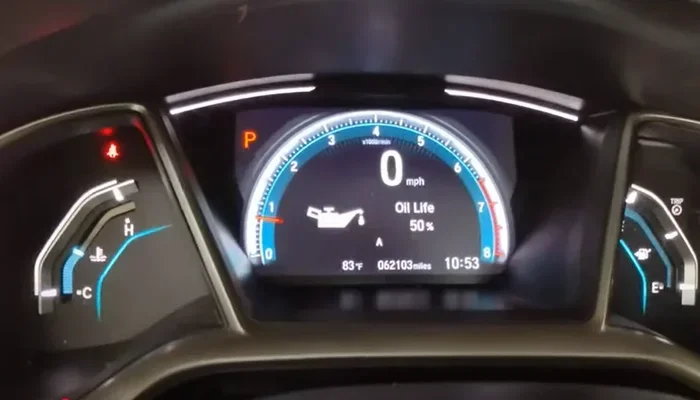
The oil life system is a computer-based algorithm. It tracks your driving patterns, engine temperature, and mileage. Based on this data, it estimates when the oil needs to be replaced. The system shows a percentage from 100% down to 0%. When it hits 0%, the maintenance light comes on.
The oil change indicator light is a simpler warning. It is usually a yellow or orange icon shaped like an oil can. This light comes on when the oil life system reaches zero. It is basically the final warning that an oil change is overdue.
Here is a quick comparison to clarify things.
| Feature | Oil Life System | Oil Change Indicator |
|---|---|---|
| Purpose | Tracks oil condition based on driving data | Warns that oil change is overdue |
| Display | Percentage on dashboard screen | Warning light icon |
| Reset Method | Button sequence after oil change | Turns off automatically after reset |
| Accuracy | Adjusts for driving conditions | Simple on/off signal |
Both systems work together to keep your engine healthy. The oil life system does the thinking for you, and the indicator light tells you when to pay attention. After an oil change, resetting the oil meter updates both systems so they are in sync again.
Common Mistakes to Avoid When Resetting the Oil Meter
Resetting the oil meter seems simple, but people make mistakes all the time. Here are the most common ones and how to avoid them.
Mistake 1: Resetting Before Changing the Oil
This is the biggest mistake people make. They reset the oil meter without actually changing the oil. This clears the warning but does nothing to protect the engine. Always change the oil first, then reset the meter. That way, the oil life percentage starts fresh from 100%.
Mistake 2: Not Holding the Button Long Enough
Many people press and release the button too quickly. The Honda Civic needs you to hold the button for a full 10 seconds. If you release early, the system does not register the reset. Count slowly and be patient.
Mistake 3: Ignoring the Owner’s Manual
Every Honda Civic model is slightly different. The owner’s manual contains the exact reset procedure for your specific year and trim. Skipping this step can lead to confusion, especially if your model uses a unique button layout.
Mistake 4: Resetting with the Engine Off
The reset process requires the ignition to be in the ON position. If you try to reset with the engine completely off, the display may not respond. Always turn the key or press the start button to get to the ON position first.
Mistake 5: Assuming One Reset Covers All Services
The oil meter reset only clears the oil change reminder. It does not reset other maintenance reminders, such as tire rotation or transmission service. Each service item has its own reset procedure in the vehicle settings menu.
Expert Insight: According to Honda service advisors, the most common reason for a failed oil meter reset is impatience. Taking an extra few seconds to hold the button can save you a trip to the dealership. If the reset still fails, a professional diagnostic tool can clear the system in seconds.
How Often Should You Change the Oil in a Honda Civic?
The oil change interval for a Honda Civic depends on several factors. The traditional recommendation was every 3,000 miles or 3 months. But modern Honda Civic engines and synthetic oils have changed this significantly.
Here is what you need to know.
- Normal Driving Conditions: Most Honda Civics need an oil change every 7,500 to 10,000 miles. Check your owner’s manual for the exact interval.
- Severe Driving Conditions: If you drive in heavy traffic, extreme heat, or dusty environments, you may need to change oil every 5,000 miles.
- Synthetic Oil: Honda Civics that use full synthetic oil can often go longer between changes, sometimes up to 10,000 miles.
- Conventional Oil: If your Civic uses conventional oil, stick to the 5,000 to 7,500 mile range.
The oil life percentage on your dashboard is the best guide. It adjusts the interval based on your actual driving conditions. If the system says you need an oil change at 4,000 miles, trust it. If it says you are good at 8,000 miles, you can probably wait.
Regular oil changes are the single most important thing you can do for your Honda Civic’s engine. Clean oil keeps all the moving parts lubricated, reduces wear and tear, and helps the engine run smoothly for years. Skipping oil changes is one of the fastest ways to shorten your engine’s lifespan.
When to See a Mechanic for Oil-Related Issues
Most oil meter resets go smoothly. But sometimes, things go wrong. Knowing when to seek professional help can save you from bigger problems down the road.
Here are signs that something is wrong beyond a simple reset issue.
- The oil change light comes on again immediately after a reset.
- You notice a burning oil smell inside the car.
- The oil pressure warning light stays on.
- You see dark or gritty oil on the dipstick.
- The engine makes unusual knocking or ticking sounds.
- The oil level drops significantly between changes.
If you notice any of these symptoms, do not just reset the meter and ignore it. These could be signs of an oil leak, a faulty oil pump, or engine damage. A qualified mechanic can diagnose the problem and recommend the right fix.
For the Honda Civic, staying on top of Honda Civic maintenance is key. Regular oil changes, timely resets, and attention to warning lights all contribute to a long-lasting, reliable vehicle. Honda Civics are known for their durability, but only when they receive proper care.
The good news is that resetting the oil meter is just one small part of the bigger picture. Once you learn how to do it, you will never have to worry about that annoying dashboard light again. It is a skill that every Honda Civic owner should have in their toolkit.
So the next time your oil meter tells you it is time for a change, do not panic. Change the oil, follow the steps in this guide, and reset the meter with confidence. Your Honda Civic will thank you for it.
Final Thoughts
Resetting the oil meter on a Honda Civic is a quick and easy task. It takes less than five minutes and requires no special equipment. Whether you drive a newer model with a digital display or an older model with a simple instrument panel, the process is straightforward once you know the steps.
The key is to always reset the meter after an oil change, not before. Hold the button long enough for the system to register the reset. And if something does not work, consult your owner’s manual or try the battery disconnect trick.
Taking care of your Honda Civic’s oil system is one of the best things you can do for your car. It protects the engine, improves fuel efficiency, and keeps your car running smoothly for years to come. Now that you know how to reset the oil meter on a Honda Civic, you are fully equipped to handle this task anytime it comes up.
Do not let that oil change light stress you out anymore. The next time it comes on, you will know exactly what to do. Share this guide with other Honda Civic owners who might benefit from it. A little knowledge goes a long way when it comes to car maintenance.
Keep your Honda Civic in top shape. Reset that oil meter, stay on top of your maintenance schedule, and enjoy the ride. Your engine will thank you every mile of the way.
Frequently Asked Questions
Can I reset the oil meter without changing the oil?
Yes, you can reset the oil meter without changing the oil. However, this is not recommended. The reset simply clears the reminder and does not replace the old oil. Always change the oil first, then reset the meter to ensure your engine stays properly lubricated.
Why does the oil change light come back after I reset it?
If the oil change light returns shortly after a reset, it usually means the oil life system has detected that the oil condition has degraded. This can happen if you reset without actually changing the oil. It may also indicate a problem with the oil level or quality that needs professional attention.
How long does the oil meter reset process take?
The entire process takes less than five minutes. Once you know the correct button sequence for your Honda Civic model, the reset is quick and straightforward. Most people complete it in under two minutes after the first time.
Do I need any special tools to reset the oil meter?
No special tools are needed. You only need access to the steering wheel controls or dashboard buttons on your Honda Civic. The process uses the car’s built-in information display system. A paperclip or pen can sometimes help if a button is hard to reach, but this is rarely necessary.
Will resetting the oil meter clear all warning lights on my Honda Civic?
No, resetting the oil meter only clears the oil change reminder and the oil life percentage. Other warning lights, such as the check engine light or tire pressure light, have their own separate reset procedures. Each system must be addressed individually.
Is it safe to drive with the oil change light on?
It is generally safe for a short period, but you should not delay the oil change for too long. The oil life system calculates when the oil is no longer effective. Driving with old oil can cause increased engine wear over time. Reset the meter only after completing the oil change to keep your engine protected.