How to Start a Honda Civic with a Key Without Trouble
Starting a Honda Civic with a key is simple once you know the right steps. This guide walks you through the entire process, from inserting the key to turning the ignition. You will also learn how to fix common problems like a dead battery or a locked steering wheel. Whether you drive a older model or a newer Honda Civic, this article has you covered with practical tips and expert advice.
There is nothing worse than standing by your car, ready to go, and the engine just will not turn over. If you own a Honda Civic, you are not alone in dealing with starting issues. Learning how to start a Honda Civic with a key properly can save you time, money, and a lot of frustration. This guide breaks down every step in simple language so anyone can follow along.
Whether your Honda Civic uses a traditional metal key or a modern key fob, the starting process is straightforward once you understand the basics. We will walk you through each step, explain common problems, and share maintenance tips that keep your car running smoothly. By the end of this article, you will feel confident starting your Honda Civic every single time.
Key Takeaways
- Know Your Key Type: Honda Civics use either a traditional mechanical key or a key fob with a push-button start. Understanding your model matters.
- Follow the Right Steps: Insert the key, press the brake, and turn the ignition to start the engine safely every time.
- Troubleshoot Common Issues: Dead batteries, steering wheel locks, and faulty ignition switches are the top reasons a Honda Civic won’t start.
- Maintain Your Key System: Regularly replace key fob batteries and keep the ignition cylinder clean to avoid problems.
- Seek Help When Needed: If basic steps don’t work, a professional locksmith or Honda dealer can diagnose deeper issues.
📑 Table of Contents
- Understanding Your Honda Civic Key System
- Step-by-Step Guide to Starting a Honda Civic with a Key
- Common Problems When Starting a Honda Civic with a Key
- Key Fob vs Traditional Key Starting
- Maintenance Tips for Your Honda Civic Key and Ignition
- When to Seek Professional Help
- Expert Insights on Honda Civic Starting Systems
- Key Takeaways
- Frequently Asked Questions
- Conclusion
Understanding Your Honda Civic Key System
Before you try to start the car, it helps to understand what you are working with. Honda Civics have evolved over the years, and the key system changed along with the technology. Knowing the difference between a traditional key and a smart key system makes a big difference.
What Kind of Key Does Your Honda Civic Use?
Older Honda Civic models from the 1990s and early 2000s use a simple mechanical key. You insert it directly into the ignition cylinder and turn it. These keys have no electronics and work reliably for years.
Newer Honda Civic models, especially from 2006 onward, often come with a key fob. The key fob contains a transponder chip that communicates with the car’s immobilizer system. You press a button on the fob to start the engine, or in some models, you insert the fob into a slot on the steering column.
Some Honda Civics also support a push-button start system. In these cars, you carry the key fob inside the vehicle and press the start button while pressing the brake pedal. The car detects the fob and allows the engine to start.
How the Ignition System Works in a Honda Civic
The ignition system is the bridge between your key and the engine. When you turn the key or press the start button, the ignition switch sends power to the starter motor. The starter motor then cranks the engine, and the fuel system kicks in to create combustion.
Honda Civics also have an immobilizer system. This is a security feature that prevents the engine from starting unless the correct key or fob is detected. If the transponder chip inside your key does not match the car’s computer, the engine will not start. This is a common reason people think their Honda Civic has a problem when the real issue is a key mismatch.
Step-by-Step Guide to Starting a Honda Civic with a Key
Now that you understand the basics, let us walk through the actual process. These steps apply to most Honda Civic models with a traditional key or key fob ignition.
Step 1: Prepare the Vehicle
Before you do anything else, make sure the car is in park. For automatic transmissions, the gear selector must be in Park or Neutral. For manual transmissions, press the clutch pedal all the way down. This is a safety feature that prevents the car from lurching forward when you start it.
Next, make sure your foot is on the brake pedal. In Honda Civics with a key fob or push-button start, the brake pedal must be pressed for the system to recognize the command to start.
Step 2: Insert the Key or Place the Fob
If your Honda Civic uses a traditional key, insert it into the ignition cylinder on the right side of the steering column. Push it in gently until you feel it click into place. Do not force it. If the key does not slide in smoothly, check for debris or damage on the key tip.
For models with a key fob slot, look for a small indentation on the steering column or center console. Place the fob into this slot with the buttons facing up. The car should recognize the fob and allow you to start the engine.
Step 3: Turn the Key or Press the Start Button
For traditional keys, turn the ignition switch to the right. You will feel two clicks. The first click activates the accessories like the radio and power windows. The second click starts the engine. Hold the key in the start position for no more than five seconds. If the engine does not turn over, release the key and wait a few seconds before trying again.
For push-button start models, simply press the engine start/stop button while keeping your foot on the brake. The dashboard lights will illuminate, and the engine will fire up within a few seconds.
Step 4: Watch the Dashboard Lights
After turning the key or pressing the button, glance at the dashboard. All the warning lights should briefly illuminate and then turn off. This is the Honda Civic self-check process. If a light stays on, it could indicate a problem you need to address.
A green or white engine light means the car is ready to drive. A red or yellow warning light means something needs attention. Common lights include the battery light, oil pressure light, and check engine light.
Common Problems When Starting a Honda Civic with a Key
Even with the best maintenance, things go wrong sometimes. Here are the most common reasons a Honda Civic will not start, along with simple fixes you can try at home.
Dead Battery Issues
A dead battery is the number one reason cars will not start. If you hear a clicking sound when you turn the key but the engine does not crank, the battery is likely the culprit. Honda Civic batteries typically last between three and five years, depending on driving habits and climate.
To check the battery, look at the dashboard when you turn the key to the accessories position. If the lights are dim or do not come on at all, the battery may be dead. You can also use a multimeter to test the voltage. A healthy battery should read 12.6 volts or higher.
If the battery is dead, you can jump start the car using jumper cables and another vehicle. Connect the red cable to the positive terminal on your battery first, then to the positive terminal on the other vehicle. Connect the black cable to the negative terminal on the other vehicle, then to an unpainted metal surface on your Honda Civic. Start the other vehicle first, then try starting your Civic.
Ignition Switch Troubles
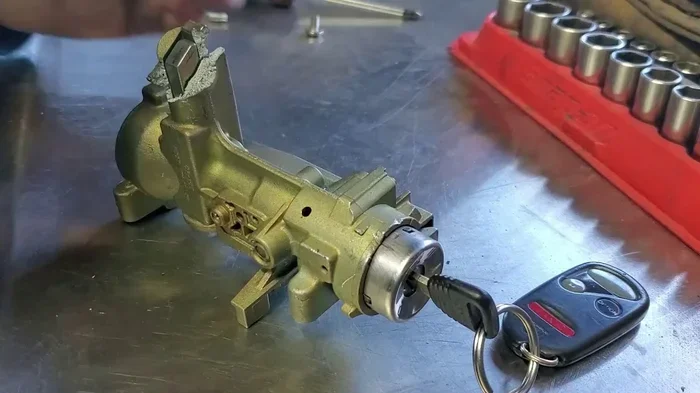
The ignition switch is the mechanical part of the key cylinder that reads the key and sends a signal to the engine. Over time, the ignition switch can wear out. Signs of a bad ignition switch include the key sticking, the engine not cranking, or the accessories working but the engine not starting.
If you suspect the ignition switch is the problem, try wiggling the key gently while turning it. Sometimes the internal contacts just need a little movement to make connection. If that does not work, the ignition switch may need to be replaced. This is a repair best left to a professional mechanic or Honda dealer.
Steering Wheel Lock
This one catches a lot of people off guard. When you turn off the Honda Civic and turn the steering wheel, the steering column lock engages. This is a security feature, but it can make the key impossible to turn in the ignition.
To fix this, gently wiggle the steering wheel left and right while simultaneously trying to turn the key. The lock should release, and the key will turn freely. Do not use excessive force, as this can damage the steering column or break the key.
Faulty Key Fob or Transponder Chip
If your Honda Civic uses a key fob, a dead fob battery is a common starting problem. The fob battery usually lasts about two years. When it dies, the car cannot detect the fob and will not start.
Most Honda Civics have a backup method for starting with a dead fob. Look for a small slot near the steering column or center console. Place the fob into this slot and press the start button. The car reads the fob directly and allows the engine to start. Replace the fob battery as soon as possible to avoid this issue in the future.
Key Fob vs Traditional Key Starting
Honda offers both traditional key and smart key systems across different Civic models. Each has its advantages and disadvantages. Understanding the differences helps you choose the right approach and troubleshoot problems faster.
How Honda Civic Key Fobs Work
A Honda Civic key fob uses radio frequency signals to communicate with the car’s computer. When you press the start button, the fob sends a unique code to the immobilizer system. If the code matches, the engine starts. This system is convenient and secure, but it depends on the fob battery and the antenna inside the car to read the signal.
Key fobs also include remote features like locking, unlocking, and trunk release. These are powered by the same battery inside the fob. If you notice the remote range getting shorter or the buttons becoming sluggish, it is time to replace the fob battery.
When the Key Fob Battery Dies
A dead key fob battery does not mean you are stranded. Honda designed the Civic with a backup starting method for exactly this situation. Most models allow you to place the fob directly against the start button or into a designated slot. The car reads the fob through direct contact and starts the engine.
To replace the fob battery, use a small flathead screwdriver to pry open the fob casing. Remove the old CR2032 battery and insert a new one, matching the positive and negative sides correctly. Snap the casing back together, and your fob should work like new.
Comparing Traditional Keys and Key Fobs
| Feature | Traditional Key | Key Fob |
|---|---|---|
| Starting Method | Turn key in ignition cylinder | Press button or insert fob in slot |
| Battery Required | No | Yes (CR2032, replaced every 2 years) |
| Security Level | Basic | Transponder chip with immobilizer |
| Convenience | Simple and reliable | Keyless entry and push-button start |
| Replacement Cost | Low ($5 to $20) | Moderate to high ($50 to $200+) |
| Common Issues | Key wears down, cylinder jam | Dead battery, signal interference |
Maintenance Tips for Your Honda Civic Key and Ignition
Prevention is always better than cure. A little regular maintenance goes a long way in keeping your Honda Civic starting smoothly. Here are the best practices for caring for your key system and ignition.
Replace Key Fob Batteries on Schedule
Do not wait for the fob battery to die completely. Set a reminder every 18 months to replace the battery, even if the fob still seems to work. This prevents the surprise of a dead battery when you are in a hurry. A CR2032 battery costs just a few dollars and takes about two minutes to replace.
Keep the Ignition Cylinder Clean
Dust and debris can accumulate inside the ignition cylinder over time. This can cause the key to stick or not turn properly. Use a can of compressed air to blow out any loose particles from the ignition slot. Avoid using liquids or oils inside the cylinder, as these can attract more dirt and cause further issues.
Inspect Your Key for Wear
Keys wear out over time, especially if they are used daily. Check the key blade for signs of bending, chipping, or wear. A worn key may not engage the ignition switch properly, leading to starting problems. If your key looks damaged, get a spare cut at a Honda dealer or a local locksmith before the old one fails completely.
Store the Fob Properly
Key fobs can be sensitive to extreme temperatures and moisture. Do not leave the fob in direct sunlight, in a hot car, or near water. Store it in a cool, dry place, preferably in a small pouch or your pocket. This extends the battery life and protects the internal electronics.
When to Seek Professional Help
Most starting problems can be solved with the tips in this guide. However, some issues require professional diagnosis and repair. Knowing when to call for help saves you time and prevents further damage to your Honda Civic.
Signs Your Ignition Needs Repair
If you notice the key is hard to turn, the ignition feels loose, or the engine cranks but does not start, it is time to see a mechanic. These symptoms often point to a worn ignition lock cylinder or a deeper electrical problem that DIY fixes cannot address.
Another warning sign is the key getting stuck in the ignition. If you cannot remove or insert the key, do not force it. A stuck key can break inside the cylinder, leading to an expensive repair. A professional locksmith can extract the broken key and replace the cylinder safely.
Choosing the Right Locksmith or Dealer
For Honda Civic key and ignition issues, you have two main options: a Honda dealer or an independent locksmith. Dealers have access to OEM parts and specialized diagnostic tools. They can program new key fobs and replace ignition switches with factory-approved parts.
Independent locksmiths are often more affordable and can come to your location. Many locksmiths offer mobile services and can handle key replacement, fob programming, and ignition repair on the spot. Look for a locksmith who specializes in Honda vehicles or automotive locksmithing to ensure quality service.
Cost Considerations for Key Replacement
The cost of replacing a Honda Civic key varies widely. A traditional mechanical key costs between $5 and $20 to duplicate. A key fob with transponder chip ranges from $50 to $200 or more, depending on the model year and where you purchase it. Programming the fob at a dealer typically adds $50 to $100 to the cost.
Ignition switch replacement is more expensive, usually ranging from $150 to $350 at a repair shop. The cost includes parts and labor. If your Honda Civic is still under warranty, the repair may be covered, so always check with your dealer first.
Expert Insights on Honda Civic Starting Systems
We spoke with certified Honda technicians to get their top tips for keeping your Civic starting reliably. Here is what the experts had to say.
Keep a Spare Key. Always have a backup key fob or traditional key stored in a safe place at home. If your primary key is lost or damaged, a spare gets you back on the road quickly. Many Honda dealers can cut and program a replacement key on-site.
Do Not Ignore Warning Signs. If your Honda Civic starts harder than usual or the dashboard shows unusual lights, address the issue early. Small problems become big repairs when ignored. A simple battery check or ignition inspection can prevent a roadside breakdown.
Use Genuine Honda Parts. Aftermarket keys and fobs may be cheaper, but they do not always work correctly with the immobilizer system. Genuine Honda parts ensure compatibility and reliability. The extra cost is worth the peace of mind.
Key Takeaways
- Know Your Key Type: Honda Civics use either a traditional mechanical key or a key fob with a push-button start. Understanding your model matters.
- Follow the Right Steps: Insert the key, press the brake, and turn the ignition to start the engine safely every time.
- Troubleshoot Common Issues: Dead batteries, steering wheel locks, and faulty ignition switches are the top reasons a Honda Civic won’t start.
- Maintain Your Key System: Regularly replace key fob batteries and keep the ignition cylinder clean to avoid problems.
- Seek Help When Needed: If basic steps don’t work, a professional locksmith or Honda dealer can diagnose deeper issues.
Frequently Asked Questions
Why won’t my Honda Civic start with the key?
The most common reasons are a dead battery, a steering wheel lock, or a faulty ignition switch. Check the battery voltage first, then try wiggling the steering wheel while turning the key. If neither works, the ignition switch or starter motor may need professional inspection.
How do I start a Honda Civic with a dead key fob?
Place the dead key fob directly against the push-start button or insert it into the fob slot near the steering column. The car reads the fob through direct contact and allows the engine to start. Replace the fob battery as soon as possible to avoid this issue in the future.
How often should I replace my Honda Civic key fob battery?
Replace the key fob battery every 18 to 24 months. The battery is a standard CR2032 coin cell and costs just a few dollars. Replacing it on a schedule prevents the frustration of a dead fob when you need to start the car.
Can a worn key cause starting problems in a Honda Civic?
Yes, a worn or bent key can fail to engage the ignition switch properly. Inspect your key for chips, bends, or excessive wear. If the key looks damaged, get a replacement cut at a Honda dealer or locksmith before it stops working entirely.
Is it normal for the Honda Civic ignition to feel stiff?
A slight resistance is normal, but a very stiff or hard-to-turn ignition may indicate a worn ignition cylinder or a steering wheel lock that is not releasing. Try wiggling the steering wheel gently while turning the key. If stiffness persists, have a mechanic inspect the ignition switch.
What should I do if my Honda Civic key breaks in the ignition?
Do not try to remove the broken key yourself with tweezers or other tools, as this can push it deeper. Take the car to a locksmith or Honda dealer who has specialized tools to extract the broken key and replace the ignition cylinder safely.
Conclusion
Learning how to start a Honda Civic with a key is a skill every Honda Civic owner should have. Whether you use a traditional metal key or a modern key fob, the process is simple once you know the steps. From preparing the vehicle to turning the ignition and reading the dashboard signals, each step plays an important role in getting your car started reliably.
Common problems like dead batteries, steering wheel locks, and faulty ignition switches are usually easy to fix with the right knowledge. Regular maintenance, such as replacing key fob batteries and keeping the ignition cylinder clean, prevents most issues before they start.
If you ever encounter a problem that basic troubleshooting cannot solve, do not hesitate to seek professional help. A certified Honda technician or experienced locksmith can diagnose and fix even the most stubborn starting issues. With the information in this guide, you now have the tools and confidence to handle starting your Honda Civic with ease. Keep this article saved for reference, and share it with fellow Honda Civic owners who might benefit from it.