JVC Car Stereo Remote Control Everything You Need to Know
The JVC car stereo remote control gives you hands-free access to your car audio system, making it easier than ever to adjust volume, change tracks, and manage settings while driving. Whether you own a JVC KD-series receiver or a newer JVC Bluetooth stereo, finding the right remote control can transform your in-car listening experience. This guide covers compatibility, installation, troubleshooting, and the best models available today.
Driving your car should feel effortless. From the moment you turn the key, every part of the experience should work smoothly, including your audio system. The JVC car stereo remote control plays a big role in making that happen. It lets you change songs, adjust the volume, and tweak settings without reaching for the head unit on your dashboard.
If you have ever squinted at a tiny screen or fumbled with buttons while driving, you know how frustrating a bad audio setup can be. A JVC stereo remote solves that problem. It puts all the controls you need right at your fingertips, whether they are on a small handheld device or integrated into your steering wheel. In this guide, we will walk you through everything you need to know about JVC car stereo remote controls, from choosing the right model to fixing common issues.
Whether you are a car audio enthusiast or someone who just wants a simple way to control music on road trips, this article has you covered. We will break down the types of remotes available, how they work, and what to look for when buying one. By the end, you will feel confident picking the perfect JVC remote control for your setup.
Key Takeaways
- Convenience at Your Fingertips: A JVC car stereo remote control lets you manage your audio system without taking your hands off the wheel.
- Wide Compatibility: Most JVC remotes work with a broad range of JVC receivers, but always check model numbers before purchasing.
- Easy Installation: Setting up a JVC remote is straightforward, typically involving a simple plug-and-play cable connection.
- Troubleshooting Is Simple: Most common issues like unresponsive buttons or signal loss can be fixed with basic steps like battery replacement or repositioning.
- Multiple Remote Options Exist: From wired remotes to wireless Bluetooth options, there is a JVC remote solution for every driver.
- Steering Wheel Integration: Many JVC remotes can connect with steering wheel controls for an even more seamless experience.
- Regular Maintenance Helps: Keeping your remote clean and replacing batteries on schedule extends its lifespan significantly.
📑 Table of Contents
- What Is a JVC Car Stereo Remote Control?
- Types of JVC Car Stereo Remotes
- Compatibility: Does Your JVC Remote Work With Your Stereo?
- How to Install a JVC Car Stereo Remote Control
- Common JVC Remote Control Problems and How to Fix Them
- Benefits of Using a JVC Car Stereo Remote Control
- Tips for Getting the Most Out of Your JVC Remote
- Expert Insights: Choosing the Right JVC Remote for Your Setup
- Key Takeaways
- Conclusion
What Is a JVC Car Stereo Remote Control?
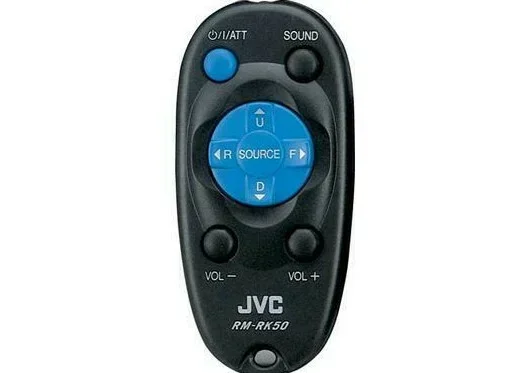
A JVC car stereo remote control is a device that lets you operate your JVC car stereo or receiver from a distance. Instead of reaching over to the head unit, you can press buttons on a compact remote to change tracks, adjust volume, or switch between audio sources. These remotes come in different shapes, sizes, and connection types, but they all share one goal: making your driving experience more convenient.
JVC has been a trusted name in car audio for decades. Their receivers and head units are known for solid build quality and great sound. The remotes that come with or work alongside these systems are designed to match that standard. A JVC car audio remote typically offers the same functions as the front panel of your stereo, just in a smaller, portable form factor.
Most JVC remotes use infrared (IR) or radio frequency (RF) signals to communicate with the receiver. Some newer models also support Bluetooth connectivity, giving you even more flexibility. No matter which type you choose, the core purpose remains the same: control your stereo without distractions.
How Does a JVC Stereo Remote Work?
Most JVC stereo remote controls use infrared signals, much like a TV remote. The remote sends a signal that the receiver picks up through a small sensor on the front panel. The receiver then interprets the signal and performs the requested action, like increasing the volume or switching to the next track.
Wireless remotes use radio frequency signals instead. These do not require a direct line of sight to work, which makes them more flexible in terms of placement. JVC Bluetooth remotes take this a step further by connecting to your stereo through a Bluetooth pairing process, giving you wireless control from your phone or a dedicated handheld device.
Wired remotes, on the other hand, connect directly to the receiver using a small cable. These are the most reliable option because they do not depend on batteries or wireless signals. A JVC remote control cable simply plugs into a dedicated remote input on the back of the head unit.
Types of JVC Car Stereo Remotes
Not all remotes are the same. JVC offers several types of remote controls, each designed for different needs and setups. Understanding the differences helps you choose the right one for your car and driving habits.
Wired Remotes
A JVC wired remote control connects directly to the stereo receiver through a cable. These remotes are plug-and-play, meaning you do not need to pair them or worry about batteries. They are the most reliable option because the signal travels through the wire, so there is no risk of interference or signal loss.
Wired remotes are often included when you purchase a JVC receiver. If yours did not come with one, you can buy a compatible JVC remote control cable separately. They are slim, lightweight, and easy to tuck under a seat or mount on the steering column.
Wireless Infrared Remotes
Wireless JVC IR remotes use infrared light to send signals. These are the most common type of handheld remote you will find. They are compact, easy to use, and do not require any wiring. However, they do need a clear line of sight to the receiver sensor, which means you need to point the remote at the stereo for it to work.
These remotes run on small batteries, usually CR2025 or AAA cells. Battery life is generally long, but you will need to replace them eventually. Keeping a spare battery in your glove box is a smart move.
Wireless RF and Bluetooth Remotes
JVC radio frequency remotes do not require line of sight. They use RF signals that can travel through the car interior, giving you more freedom to place the remote anywhere. Some JVC Bluetooth remotes even let you control your stereo through a smartphone app, adding a modern twist to the classic remote control experience.
These options are ideal for drivers who want a cleaner dashboard setup without visible wires. They also work well in larger vehicles like trucks and SUVs, where the stereo might be farther from the driver.
Compatibility: Does Your JVC Remote Work With Your Stereo?
One of the most important things to check before buying a JVC car stereo remote control is compatibility. Not every remote works with every JVC receiver. Using the wrong remote can lead to frustration, so taking a few minutes to verify compatibility saves a lot of headaches.
Checking Your Receiver Model
Every JVC receiver has a model number printed on the front or back of the unit. Common JVC receiver series include the KD-R series, KD-X series, and KD-S series. The model number tells you exactly which remotes are compatible with your stereo.
You can usually find this information in the owner’s manual or on the JVC website. Simply enter your receiver model number, and the site will list all compatible JVC stereo remote controls. If you no longer have the manual, a quick online search with your model number will pull up the details.
Universal vs. Brand-Specific Remotes
Some remotes are designed specifically for JVC products, while others are universal remotes that can be programmed to work with multiple brands. A JVC-specific remote will always offer the best compatibility and full button functionality. Universal remotes can work, but you may not get access to every feature.
If you want the best experience, stick with a JVC-branded remote control. If you need a universal option for a multi-brand setup, look for remotes that list JVC compatibility in their specifications.
Quick Compatibility Check List
- Find your receiver model number on the unit or in the manual.
- Visit the JVC website or check the remote packaging for compatible models.
- Verify the remote type (wired, IR, RF, or Bluetooth) matches your setup.
- If buying a universal remote, confirm it supports JVC protocols.
- Check for any firmware updates on your receiver that might affect remote compatibility.
How to Install a JVC Car Stereo Remote Control
Installing a JVC car stereo remote control is one of the easiest upgrades you can make to your car audio system. Most remotes require no special tools or technical knowledge. Whether you have a wired or wireless remote, the process is straightforward.
Installing a Wired Remote
Start by locating the remote input port on the back of your JVC receiver. It is usually labeled “REMOTE” or “REM.” Plug the remote cable into this port, then route the cable along the existing wire harness behind the dashboard. Secure the cable with zip ties or adhesive clips to keep it neat and out of the way.
Attach the remote control unit to the other end of the cable. Most JVC wired remotes simply click into place. Once connected, turn on your stereo and test the remote. Every button should respond immediately. If a button does not work, double-check the connection and try again.
Installing a Wireless Remote
Wireless remotes are even simpler. For an infrared remote, just insert the batteries and point the remote at the stereo sensor. Press any button to test the signal. The receiver should respond right away.
For a JVC Bluetooth remote, go to the Bluetooth settings on your receiver and put it in pairing mode. Then, open the Bluetooth menu on your phone or remote device and search for available devices. Select your JVC receiver and follow the on-screen prompts to complete the pairing. Once connected, you can control your stereo from your phone or the dedicated remote app.
Mounting Tips for Your Remote
Where you place your remote matters. You want it within easy reach but not in a spot where it can slide around while driving. Here are some practical mounting ideas:
- Mount it on the steering column using an adhesive mount or clip.
- Place it in the center console storage area for easy access.
- Use a vent-mounted holder to keep it visible and secure.
- Tuck a wired remote under the dashboard near the steering column.
Common JVC Remote Control Problems and How to Fix Them
Even the best JVC car stereo remote control can occasionally cause issues. Most problems are minor and easy to fix. Here are the most common issues drivers face and how to solve them.
Remote Not Responding
If your remote stops working, the first thing to check is the batteries. Weak or dead batteries are the number one cause of remote failure. Replace them with fresh batteries and test again. Make sure you insert the batteries with the correct polarity.
Next, check the distance between the remote and the receiver. Infrared remotes need to be within about 10 feet and pointed directly at the sensor. If the sensor is blocked by a sunshade or other object, move it out of the way and try again.
Intermittent Signal Loss
If your remote works sometimes but not others, you might have an interference issue. Other electronic devices in the car, such as phone chargers or GPS units, can sometimes interfere with the remote signal. Move these devices away from the stereo receiver and test again.
For wireless remotes, low battery power can also cause intermittent signals. Replace the batteries and see if the problem goes away. If you are using a JVC Bluetooth remote, make sure the Bluetooth connection is stable and that no other devices are connected to the receiver.
Buttons Not Working Properly
Dirt and grime can build up on remote buttons over time, causing some buttons to stick or stop working. Clean the remote with a soft, damp cloth. For stubborn grime, use a cotton swab dipped in a small amount of rubbing alcohol. Let the remote dry completely before using it again.
If cleaning does not help, the remote might need to be reprogrammed or replaced. Check the JVC website for firmware updates or reset instructions specific to your remote model.
Remote Works But Stereo Does Not Respond
This issue usually means the remote input on the receiver is not enabled or is malfunctioning. Check your receiver settings to make sure the remote input is turned on. If the setting is correct, the remote input sensor on the receiver might be damaged and need replacement.
Benefits of Using a JVC Car Stereo Remote Control
Adding a remote control to your JVC car stereo brings several real benefits that improve your daily driving experience. Here is why so many car owners choose to use one.
Hands-free operation is the biggest advantage. You can adjust volume, skip tracks, or change the audio source without ever taking your hands off the steering wheel. This makes driving safer and more focused.
Convenience is another major benefit. Whether you are parked at a red light or cruising on the highway, you have full control over your audio system from wherever you are sitting in the car. No more reaching over to the dashboard while driving.
Cleaner dashboard appearance is a bonus many people overlook. A remote lets you keep the head unit display on a setting you prefer, without needing to constantly interact with the touchscreen or buttons on the receiver itself.
Extended stereo life is also worth mentioning. When you use a remote instead of pressing buttons on the head unit repeatedly, you reduce wear and tear on the physical controls. This can help your stereo last longer.
Tips for Getting the Most Out of Your JVC Remote
To get the best experience from your JVC car stereo remote control, follow these practical tips. They are simple but make a big difference over time.
- Keep spare batteries on hand. Nothing is worse than a dead remote when you are on a long drive. Stock up on the correct battery type for your model.
- Clean your remote regularly. A quick wipe-down every few weeks keeps the buttons responsive and the surface looking new.
- Store the remote in a safe spot. Avoid leaving it on the dashboard where it can slide or fall. A small pouch or clip keeps it secure.
- Update your receiver firmware. JVC occasionally releases updates that improve remote performance and add new features.
- Pair your Bluetooth remote properly. If you use a Bluetooth remote, make sure the pairing is done correctly and that the connection stays active.
- Test the remote range. Know how far your remote works from the receiver. This helps you decide where to mount it for best performance.
Expert Insights: Choosing the Right JVC Remote for Your Setup
Not all JVC car stereo remote controls are created equal. The right choice depends on your specific stereo model, your vehicle type, and your personal preferences. Here is what experts recommend.
If you drive a compact car or sedan, a small wired remote is often the best choice. It is unobtrusive, reliable, and requires no batteries. For larger vehicles like trucks and SUVs, a wireless remote with a longer range gives you more flexibility to control the stereo from the back seat or a more distant driving position.
Tech-savvy drivers who love smart features should look into JVC Bluetooth remotes or app-based control options. These let you manage not just your stereo but also connected features like Bluetooth music streaming and hands-free calling from a single device.
One expert tip is to always buy from authorized JVC dealers or reputable retailers. This ensures you get a genuine product with a warranty. Counterfeit or unverified remotes may not work correctly and could even damage your receiver.
Key Takeaways
- Convenience at Your Fingertips: A JVC car stereo remote control lets you manage your audio system without taking your hands off the wheel.
- Wide Compatibility: Most JVC remotes work with a broad range of JVC receivers, but always check model numbers before purchasing.
- Easy Installation: Setting up a JVC remote control is straightforward, typically involving a simple plug-and-play cable connection or quick Bluetooth pairing.
- Troubleshooting Is Simple: Most common issues like unresponsive buttons or signal loss can be fixed with basic steps like battery replacement or repositioning.
- Multiple Remote Options Exist: From wired remotes to wireless Bluetooth options, there is a JVC remote control solution for every driver.
- Steering Wheel Integration: Many JVC stereo remotes can connect with steering wheel controls for an even more seamless experience.
- Regular Maintenance Helps: Keeping your remote clean and replacing batteries on schedule extends its lifespan significantly.
Conclusion
The JVC car stereo remote control is a small accessory that makes a big difference in your daily driving experience. It brings convenience, safety, and a cleaner dashboard setup to your car audio system. Whether you choose a wired, infrared, or Bluetooth remote, the key is finding one that matches your JVC receiver model and your driving style.
Now that you understand the different types of remotes, how to install them, and how to troubleshoot common issues, you are well-equipped to make the best choice for your setup. Take a few minutes to verify compatibility, follow the installation tips, and enjoy the hands-free control that a JVC stereo remote provides.
Your car audio system is an investment. A JVC car stereo remote control is one of the simplest and most affordable ways to get more out of that investment. So go ahead, pick the right remote, and take full control of your driving soundtrack.
Frequently Asked Questions
Can I use a universal remote with my JVC car stereo?
Yes, many universal remotes are compatible with JVC receivers. However, you may need to program the remote to match your specific JVC model. Check the universal remote’s manual for JVC code listings, and note that a JVC-specific remote will always offer full feature access compared to a universal one.
Why does my JVC remote stop working after a few months?
The most common reason is weak or dead batteries. Replace them with fresh ones and try again. If the problem persists, the remote sensor on the receiver may be blocked by dirt or a sunshade. Cleaning the remote buttons and checking the receiver sensor usually resolves the issue.
Is a wired or wireless JVC remote better?
It depends on your needs. Wired remotes are more reliable because they do not depend on batteries or wireless signals. Wireless remotes offer more flexibility and a cleaner setup. If you prioritize reliability, go wired. If you want convenience and flexibility, a wireless JVC remote control is the better choice.
Can I control my JVC stereo from my phone?
Yes, if you have a JVC receiver with Bluetooth capability, you can use a JVC Bluetooth remote or a compatible smartphone app to control your stereo wirelessly. Check your receiver model to confirm it supports phone-based remote control features.
How do I know which JVC remote is compatible with my receiver?
Find the model number of your JVC receiver, which is printed on the unit or listed in the owner’s manual. Visit the JVC website and search for compatible remotes using that model number. You can also contact JVC customer support for assistance.
Can I install a JVC car stereo remote control myself?
Absolutely. Most JVC car stereo remote controls are designed for easy DIY installation. Wired remotes simply plug into a remote input port on the receiver, while wireless remotes require no installation at all. If you are comfortable connecting a few cables behind your dashboard, you can handle it yourself with basic tools.