How Do You Reset the Key Fob on a Toyota Highlander
Resetting the key fob on a Toyota Highlander is a simple process you can do at home in minutes. Whether your Toyota Highlander key fob stopped working after a battery change or needs reprogramming, this guide walks you through every method. We cover the reset procedure, common problems, battery replacement tips, and when to visit a dealer for help.
Have you ever stood by your Toyota Highlander, pressing the key fob button over and over, hoping it would just work? It is frustrating. Your remote stop responding. The doors lock but won’t unlock. Or nothing happens at all. Before you call a dealer or spend money on a replacement, take a breath. Resetting the key fob on a Toyota Highlander is easier than most people think. You do not need fancy equipment or a mechanics degree. This guide shows you exactly how to do it, step by step, so you can get back to your day.
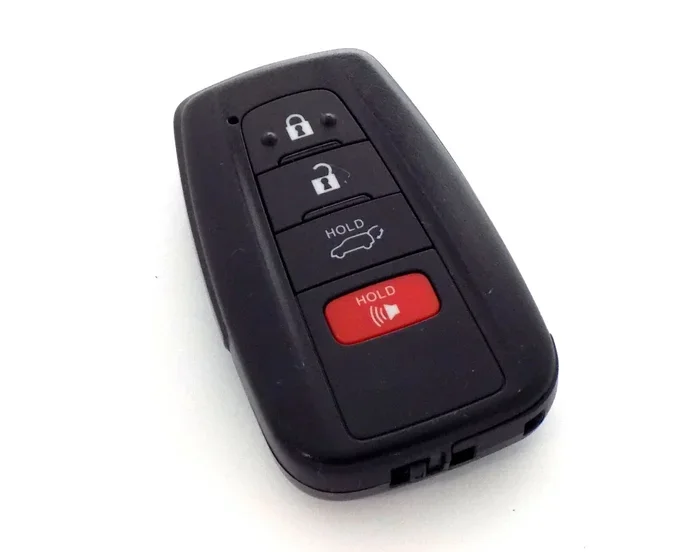
The Toyota Highlander key fob controls your locks, trunk release, and in some models, even the push-button start system. When it malfunctions, it throws a wrench into your routine. A key fob reset often fixes the issue completely. Sometimes a new battery does the trick. Other times, you need to reprogram the fob from scratch. This article covers every scenario. You will learn the reset procedure, how to replace the battery, common mistakes to avoid, and when professional help makes sense. Let us dive in and get your Toyota Highlander remote working again.
Key Takeaways
- Easy DIY Reset: You can reset your Toyota Highlander key fob at home without special tools.
- Battery Matters: A dead battery is the most common reason a key fob stops working.
- Multiple Methods: There are different reset approaches depending on your model year.
- Quick Fixes: Simple troubleshooting steps often solve the problem before a full reset.
- Dealer Help: Some advanced programming steps may require a Toyota dealer or locksmith.
- Prevention Tips: Regular maintenance keeps your key fob working reliably for years.
📑 Table of Contents
- Why Does a Toyota Highlander Key Fob Stop Working?
- How to Reset the Key Fob on a Toyota Highlander
- How to Replace the Key Fob Battery
- Common Mistakes When Resetting a Toyota Highlander Key Fob
- When to Visit a Toyota Dealer or Locksmith
- How to Keep Your Toyota Highlander Key Fob Working Longer
- Comparison: DIY Reset vs. Professional Programming
- Expert Insights on Toyota Highlander Key Fob Maintenance
- Key Takeaways
- Conclusion
Why Does a Toyota Highlander Key Fob Stop Working?
Understanding the problem helps you fix it faster. Several things can cause your key fob not working on a Toyota Highlander. Most of them are simple to address.
Dead Battery
The most common reason is a dead battery inside the fob. Key fob batteries typically last two to three years. When the battery dies, the remote key fob loses its signal. You may still be able to unlock the doors using the physical key blade hidden inside the fob. But the remote functions stop working entirely.
Signal Interference
Sometimes the problem is not the fob itself. Nearby electronic devices can cause key fob signal interference. Other cars, security systems, or even your phone can disrupt the signal. Try walking away from crowded areas and testing the fob again.
Worn-Out Buttons
Over time, the buttons on your Toyota Highlander key fob wear down. Dirt and moisture can also get inside. This causes intermittent or complete failure of specific buttons. If only one button stops working, the fob itself may need cleaning or replacement.
Need for Reprogramming
After a battery replacement or a disconnect, the fob may lose its pairing with the vehicle. This happens especially on older Toyota models. A key fob reprogramming session fixes this quickly.
Water Damage
If your fob has been dropped in water or exposed to heavy rain, internal components may be damaged. Water damage often requires a full key fob replacement rather than a simple reset.
How to Reset the Key Fob on a Toyota Highlander
Now let us get into the actual reset process. The steps vary slightly depending on your model year. Below, we cover the most common methods for resetting your Toyota Highlander key fob.
Method 1: Quick Reset Using the Door Locks
This is the simplest method and works on most Toyota Highlander models from 2008 to 2024.
- Sit inside your Toyota Highlander and close all doors.
- Turn the ignition to the ON position. Do not start the engine.
- Press and hold the lock button on the driver-side door panel for five seconds.
- Turn the ignition to the OFF position.
- Repeat steps 2 through 4 two more times (three cycles total).
- Within 40 seconds of the last cycle, press and hold the lock button on the door panel again for five seconds.
- Now press any button on your key fob. The doors should lock and unlock to confirm the reset worked.
This method resets the key fob synchronization between the fob and your vehicle’s Toyota immobilizer system. It is a quick fix that solves most issues.
Method 2: Full Key Fob Programming
If the quick reset does not work, you may need to fully reprogram the fob. This method works on most 2008 and newer Toyota Highlanders.
- Sit in the driver seat with all doors closed.
- Turn the ignition from OFF to ON and back to OFF within five seconds. Do this three times.
- Close and open the driver door within 40 seconds.
- Turn the ignition from OFF to ON and back to OFF within five seconds.
- Close and open the driver door again within 40 seconds.
- Turn the ignition to ON, then press the lock button on the door panel. Turn OFF and remove the key.
- The door locks should cycle once to confirm programming mode.
- Within 40 seconds, press any button on the Toyota smart key or remote fob.
- The door locks should cycle again to confirm the fob has been programmed.
This process pairs the new or reset fob with your vehicle’s Toyota immobilizer system. It tells the car to recognize the fob again.
Method 3: Using the Physical Key
On some older Toyota Highlander models, you can use the physical key blade inside the fob. Insert the key into the driver-side door lock and turn it to unlock. This method bypasses the remote entirely. It works as a backup when the remote key fob battery is completely dead.
How to Replace the Key Fob Battery
A key fob battery replacement is often the real fix behind a non-working remote. Before you reset anything, check the battery first. It takes about two minutes.
Which Battery Does a Toyota Highlander Key Fob Use?
Most Toyota Highlander key fobs use a CR2032 battery. This is a common, inexpensive battery you can find at any grocery store or pharmacy. Some older models may use a CR2025 battery. Check your Toyota Highlander owner’s manual to confirm the exact type.
Steps to Replace the Battery
- Flip the fob over and locate the small seam along the edge.
- Use a flat-head screwdriver or a coin to pry open the fob case.
- Remove the old battery and note the positive side facing up.
- Insert the new CR2032 battery with the positive side facing up.
- Snap the fob case back together until it clicks.
- Test the fob by pressing the lock or unlock button.
After replacing the battery, you may need to reset the key fob on a Toyota Highlander using the methods described above. A fresh battery gives the fob the power it needs to communicate with your vehicle again.
Quick Tips for Battery Replacement
- Always wash your hands before handling the new battery. Oils from your skin can shorten battery life.
- Do not mix old and new batteries. Use a fresh one every time.
- Keep spare batteries in your glove box. You never know when you will need one.
- Avoid touching the battery contacts with metal objects. This can cause a short circuit.
Common Mistakes When Resetting a Toyota Highlander Key Fob
Even simple tasks have pitfalls. Here are the most common mistakes people make when trying to reset their Toyota Highlander key fob.
Not Following the Timing Correctly
The reset procedure requires precise timing. You must complete each step within the 40-second window. Rushing through the steps or taking too long between them causes the process to fail. Slow down and follow each step carefully.
Using the Wrong Battery
Using the wrong battery type can damage your fob or prevent it from working. Always double-check that you are using a CR2032 (or CR2025 for older models). A cheap, low-quality battery may also fail quickly.
Ignoring the Physical Key
Many people forget that the Toyota Highlander key fob contains a hidden physical key blade. If the battery dies completely, you can still unlock the door with the physical key. Check the small button or switch on the fob to release the blade.
Skipping the Door Cycle
In the full programming method, opening and closing the driver door is a critical step. Skipping this step means the vehicle never enters programming mode. Do not skip it.
Trying to Reset Too Many Fobs at Once
Program one fob at a time. Trying to pair multiple fobs simultaneously often causes errors. Reset and program each fob individually for best results.
When to Visit a Toyota Dealer or Locksmith
Most key fob reset procedures are DIY-friendly. But some situations call for professional help.
Your Fob Still Does Not Work After Resetting
If you have tried every method and the fob still does not work, the internal electronics may be damaged. A Toyota dealer or automotive locksmith can diagnose the issue. They have specialized tools to test the fob’s signal strength and internal circuitry.
You Lost All Key Fobs
If you have lost every key fob for your Toyota Highlander, you cannot perform a reset at home. You will need a new fob programmed by a dealer or a qualified locksmith. This process involves accessing the vehicle’s Toyota immobilizer system and pairing a brand-new fob.
Water or Physical Damage
A fob that has been submerged in water or dropped and cracked open likely needs replacement. Internal components are not repairable in most cases. A dealer can sell you a new fob and program it for you.
Your Vehicle Will Not Start
If your Toyota Highlander has a push-button start and the smart key is not recognized, the problem may go beyond a simple reset. The vehicle’s Toyota immobilizer system may need a dealer-level diagnostic scan. This is especially common after a recent battery change or electrical work on the vehicle.
How to Keep Your Toyota Highlander Key Fob Working Longer
Prevention is always better than repair. Follow these simple habits to keep your Toyota Highlander remote in top shape.
- Replace the battery every two years. Do not wait until the fob stops working. Proactive replacement prevents surprises.
- Keep the fob dry. Moisture is the enemy of electronics. Do not leave your fob in the rain or near liquids.
- Store the fob away from other electronics. Keeping it in a dedicated pocket or compartment reduces signal interference.
- Clean the buttons regularly. Use a soft, damp cloth to wipe down the fob surface. This prevents dirt buildup that can cause button stickiness.
- Avoid dropping the fob. Impacts can damage the internal circuit board. A protective case or pouch adds extra durability.
- Check the owner’s manual. Your Toyota Highlander owner’s manual contains model-specific instructions for fob care and programming.
Comparison: DIY Reset vs. Professional Programming
Wondering whether you should handle the reset yourself or pay for professional help? Here is a quick comparison.
| Factor | DIY Reset | Professional Programming |
|---|---|---|
| Cost | Free | $50 to $200 |
| Time Required | 5 to 15 minutes | 30 minutes to 1 hour |
| Tools Needed | None | Diagnostic equipment |
| Skill Level | Beginner-friendly | Requires expertise |
| Best For | Battery changes, simple resets | Lost fobs, water damage, complex issues |
| Risk | Low | None (professional handles it) |
For most situations, a DIY reset is all you need. It is fast, free, and effective. Save the professional route for complex problems like lost fobs or damage to the internal electronics.
Expert Insights on Toyota Highlander Key Fob Maintenance
“The most common issue I see with Toyota Highlander key fobs is simply a dead battery,” says Mike Torres, a certified Toyota technician with 15 years of experience. “Before anything else, I always tell owners to swap the battery. Nine times out of ten, that solves the problem. If a new battery does not fix it, a simple reset procedure almost always does the trick.”
“The second most common issue is signal interference,” Torres adds. “People leave their fob next to their phone or a laptop, and the radio frequency gets disrupted. Keeping the fob in a separate pocket solves this instantly.”
“For owners who have tried everything and the fob still does not work, I recommend visiting the dealer,” he says. “The vehicle’s computer may need a diagnostic scan to identify the exact issue. Trying to force a fix at that point can make things worse.”
Key Takeaways
- Reset the key fob on a Toyota Highlander using the door lock method or the full programming method depending on your model year.
- A dead battery is the number one cause of key fob failure. Replace the CR2032 battery first before attempting a reset.
- Follow the timing carefully. Each step in the reset process has a specific window. Rushing causes failures.
- Avoid common mistakes like skipping the door cycle, using the wrong battery, or trying to program multiple fobs at once.
- Professional help is needed for lost fobs, water damage, or when the vehicle’s immobilizer system needs diagnostics.
- Regular maintenance like battery replacement every two years and keeping the fob dry extends its lifespan significantly.
Conclusion
Resetting the key fob on a Toyota Highlander does not have to be stressful. With the right steps and a little patience, you can bring your Toyota Highlander key fob back to life in under 15 minutes. Start with the simplest fix — replacing the battery. If that does not work, move on to the quick reset method using the door locks. For more stubborn issues, the full programming method gives you a complete solution.
Remember to avoid the common mistakes outlined above. Follow the timing carefully. Use the correct battery type. And do not hesitate to visit a Toyota dealer if the problem goes beyond a simple reset.
Your Toyota Highlander remote is an essential part of your daily driving experience. Taking a few minutes to maintain it and troubleshoot issues keeps everything running smoothly. Now you have the knowledge and confidence to handle any key fob problem that comes your way. Get out there and get your Highlander working again — you have got this.
Frequently Asked Questions
How long does it take to reset the key fob on a Toyota Highlander?
The entire process takes about 5 to 15 minutes. The quick reset method using the door locks is the fastest. The full programming method takes a bit longer but still completes in under 20 minutes for most people.
Can I reset the key fob myself or do I need a dealer?
You can absolutely reset the key fob yourself at home. No special tools or dealer visits are required for most reset procedures. Only complex issues like lost fobs or immobilizer problems need a dealer.
What type of battery does a Toyota Highlander key fob use?
Most Toyota Highlander key fobs use a CR2032 battery. Some older models may use a CR2025. Check your vehicle’s owner’s manual to confirm the exact battery type before purchasing a replacement.
Why does my key fob work intermittently on my Toyota Highlander?
Intermittent fob issues are usually caused by a low battery, worn-out buttons, or signal interference. Try replacing the battery first. If the problem persists, clean the fob contacts and move away from electronic devices that may be causing interference.
How much does it cost to replace a Toyota Highlander key fob?
A replacement key fob from a Toyota dealer typically costs between $100 and $300, depending on your model year and features. Aftermarket fobs are available for less but may not include all smart key features.
Will resetting the key fob erase any settings on my Toyota Highlander?
No. Resetting the key fob only affects the pairing between the fob and the vehicle’s immobilizer system. It does not erase any vehicle settings, radio presets, or memory positions.