How to Turn Off the Reverse Beep on a Hyundai Tucson
Tired of the constant reverse beep on your Hyundai Tucson? This guide shows you exactly how to disable the backup alarm quickly and easily. Whether you have a newer or older model, we cover every method to turn off the reverse beep on a Hyundai Tucson. Save your sanity and enjoy a quieter ride with these proven steps.
There is nothing more frustrating than backing out of a tight parking spot and hearing that relentless beeping noise over and over again. If you own a Hyundai Tucson, you have probably wondered at some point how to turn off the reverse beep on a Hyundai Tucson. The good news is that it is totally doable, and you do not need to be a mechanic to pull it off.
Whether your Tucson is brand new or a few years old, this guide walks you through every method available. We will cover step-by-step instructions, model-specific differences, and even some tips to make your parking experience much more pleasant. By the end of this article, you will know exactly how to silence that annoying backup alarm for good.
Let us be real for a second. That reverse beep serves a purpose. It alerts pedestrians and other drivers that your vehicle is moving backward. But when you are just pulling into your own driveway or navigating a quiet parking lot at 6 AM, that sound can feel like it is echoing through your entire neighborhood. The Hyundai Tucson reverse beep is loud by design, and for good reason. However, there are legitimate times when you just want a little peace and quiet.
Before we dive into the how-to, let us quickly talk about what you are working with. The Hyundai Tucson comes equipped with a parking sensor system and a backup camera. These features work together to help you park safely. The reverse beep is part of the parking assistance system that activates when you shift into reverse gear. Understanding this system helps you make informed decisions about turning it off or adjusting it.
Key Takeaways
- Multiple Methods Available: You can disable the reverse beep through the infotainment system, dashboard settings, or steering wheel controls depending on your Tucson model year.
- Works Across Model Years: Both newer and older Hyundai Tucson models have options to reduce or eliminate the reverse alarm sound.
- Safety First: Always consider the safety implications of disabling parking alerts before making changes.
- Legal Considerations: Some regions have regulations about vehicle backup warning sounds that you should be aware of.
- Reversible Changes: Most settings can be easily reversed if you change your mind later.
- Alternative Solutions Exist: If you cannot fully disable the beep, there are workarounds to reduce the noise significantly.
📑 Table of Contents
- Understanding the Reverse Beep on Your Hyundai Tucson
- How to Turn Off the Reverse Beep on a Hyundai Tucson
- Can You Turn Off the Reverse Beep on Older Tucson Models?
- Is It Legal to Disable the Reverse Beep?
- Tips for a Quieter Parking Experience
- Common Mistakes When Disabling the Reverse Beep
- Frequently Asked Questions
- Conclusion
Understanding the Reverse Beep on Your Hyundai Tucson
The reverse beep on a Hyundai Tucson is not just a random noise. It is part of a carefully designed safety system. When you put your vehicle in reverse, the parking sensors activate and emit warning tones. The beeping speed increases as you get closer to objects behind you. This is meant to prevent accidents and protect people nearby.
Why Does the Reverse Beep Exist?
Backup alarms have been a standard feature in vehicles for decades. The purpose is simple. They warn pedestrians, cyclists, and other drivers that a car is moving backward. According to the National Highway Traffic Safety Administration, backup accidents cause thousands of injuries every year. The reverse beep is your vehicle’s way of saying, “Hey, I am moving back. Pay attention.”
For the Hyundai Tucson specifically, the beep volume and frequency are calibrated to cut through ambient noise. This means it works well in busy parking lots and residential areas. But it also means it can be quite loud in quieter environments. The Tucson parking alert system is effective, but sometimes it feels like overkill.
When the Beep Becomes a Problem
There are plenty of situations where the reverse beep becomes more of a nuisance than a help. Early morning garage exits, late-night apartment parking, and quiet suburban streets are just a few examples. In these settings, the beeping can disturb neighbors, wake sleeping family members, or simply become an irritation after months of daily driving.
Some Tucson owners also report that the backup beep sound feels overly sensitive. The sensors can trigger even when there is no real obstacle nearby. This false alerting can be frustrating and can make you ignore the warning altogether, which defeats the purpose entirely.
How to Turn Off the Reverse Beep on a Hyundai Tucson
Now let us get to the good stuff. There are a few different ways to disable the reverse beep on your Hyundai Tucson. The method you use depends on your model year and the specific features your vehicle has. Let us walk through each one.
Method 1: Using the Infotainment System
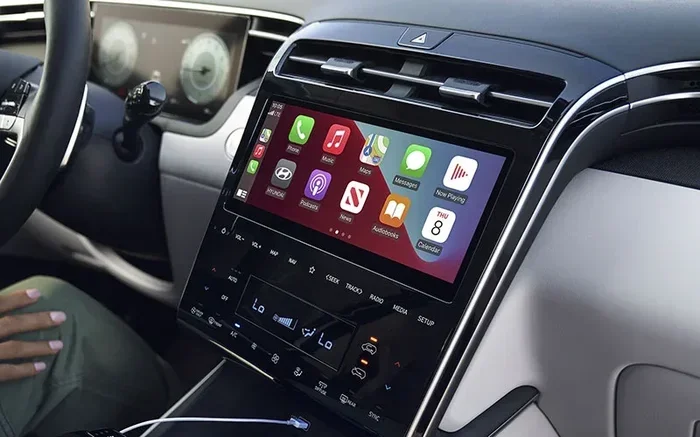
Most newer Hyundai Tucson models, especially those from 2019 and later, allow you to adjust the reverse beep through the infotainment screen. Here is how to do it step by step.
- Start your Hyundai Tucson and make sure it is in park.
- Press the Settings button on the infotainment screen.
- Navigate to the Vehicle Settings menu.
- Look for the Driver Assistance or Parking section.
- Find the Reverse Warning or Backup Alarm option.
- Toggle it off or adjust the volume to your preference.
- Confirm your changes and exit the settings menu.
This method works on most Hyundai Tucson models with the touchscreen infotainment system. The exact menu names may vary slightly depending on your year and trim level. If you do not see the option right away, try looking under the “Advanced” or “Expert” settings menu.
Quick Tip: If your Tucson has the Bluelink connected car system, some settings may also be accessible through the Bluelink mobile app. Check the app for parking sensor options.
Method 2: Through the Dashboard Controls
Some Tucson models use physical buttons and dashboard knobs instead of a touchscreen. If your vehicle has this setup, the process is slightly different but just as simple.
- Turn the ignition to the ON position without starting the engine.
- Locate the steering wheel controls or the dashboard button panel.
- Press and hold the OK or Settings button for a few seconds.
- Use the arrow buttons to scroll to the Vehicle Settings menu.
- Find the Parking Assistance or Reverse Warning option.
- Select it and choose to turn the beep off or lower the volume.
- Confirm and exit the menu.
This method works well for Hyundai Tucson models from around 2015 to 2020. The dashboard interface is straightforward once you know where to look. If you are unsure which buttons to press, consult your owner’s manual for the exact layout.
Method 3: Using the Steering Wheel Controls
On certain Tucson trims, you can access the parking settings directly from the steering wheel. This is the fastest method if your vehicle supports it.
- Press the left steering wheel button to access the main menu.
- Scroll down to Vehicle Settings using the arrow buttons.
- Select Parking Assistance.
- Choose Reverse Warning and set it to Off.
- Press OK to confirm your selection.
This approach is especially handy if you want to make quick adjustments while sitting in your parked Tucson. It takes less than a minute once you know the steps.
Can You Turn Off the Reverse Beep on Older Tucson Models?
Older Hyundai Tucson models, particularly those from 2010 to 2014, may not have the same digital settings as newer versions. However, there are still options available to you.
Differences Between Model Years
The Hyundai Tucson reverse beep system has evolved over the years. Earlier models relied more on simpler wiring and fewer digital controls. This means the options for disabling the beep are more limited. Newer models with advanced infotainment systems give you full control, but older models may require a different approach.
If you have a 2010 or 2011 Tucson, the reverse beep may not be adjustable at all through the vehicle’s settings. In these cases, you may need to explore alternative solutions, which we will cover in a later section.
Workarounds for Older Models
For older Tucson models, here are a few workarounds you can try.
- Fuse Removal: Some owners have had success removing the reverse light fuse. This disables both the backup lights and the beeping sound. However, this also means your backup lights will not work, which is a safety concern.
- Sensor Disconnection: You can physically disconnect the parking sensors behind the bumper. This requires some basic tools and a bit of mechanical know-how.
- Aftermarket Modules: There are aftermarket modules available that let you control the volume of your parking sensors. These can be installed by a mechanic or a handy DIYer.
Keep in mind that modifying your vehicle’s electrical system can void your warranty. Always check with your dealer before making any changes to a newer vehicle.
Is It Legal to Disable the Reverse Beep?
This is a question many Tucson owners ask before making any changes. The short answer is that it depends on where you live and what you do.
Safety Considerations
The reverse beep is a safety feature. It exists to protect you, your passengers, and people around your vehicle. When you turn off the reverse beep on a Hyundai Tucson, you are removing an audible warning that alerts others to your vehicle’s movement. This can increase the risk of accidents, especially in crowded areas like parking lots, driveways, and residential streets.
Consider the situations where you drive. If you mostly park in quiet, open spaces, the risk may be lower. But if you frequently park in busy areas with pedestrians, keeping the beep on or at least at a lower volume is a smart choice.
Legal Regulations by Region
Different countries and states have different laws regarding vehicle backup warnings. In the United States, the Federal Motor Vehicle Safety Standard 141 requires backup cameras on all new vehicles. However, there is no federal law that specifically requires a backup beep. Some states and localities may have their own rules about vehicle noise levels.
In many places, you are allowed to adjust or reduce the volume of your reverse beep. Fully disabling it may or may not be legal depending on your local regulations. When in doubt, check with your local Department of Motor Vehicles or a trusted mechanic.
Expert Insight: According to automotive safety experts, the best approach is to reduce the volume rather than completely disabling the feature. This way, you still have an audible warning without the constant noise irritation.
Tips for a Quieter Parking Experience
If you decide to keep some form of the reverse alert but want a less intrusive experience, there are several things you can do.
Adjust the Sensitivity of Your Parking Sensors
Many Hyundai Tucson models let you adjust the sensitivity of the parking sensors. Lowering the sensitivity means fewer false alerts, which reduces how often the beep sounds. You can usually find this option in the same parking settings menu where you adjust the reverse warning.
Use the Backup Camera Instead
The Hyundai Tucson reverse camera is a great alternative to relying solely on audio alerts. The camera gives you a clear visual of what is behind you, which can be more useful than a beeping sound. Make sure your camera lens stays clean for the best view.
Practice Parallel Parking Techniques
The better your parking skills, the less you rely on parking sensors and backup beeps. Taking a few minutes to practice parallel parking and spatial awareness can go a long way. Over time, you may find that you barely notice the beep because you are already so aware of your surroundings.
Maintain Your Parking Sensors
Dirty or damaged parking sensors can cause false alerts and excessive beeping. Regularly clean the sensors located on your rear bumper with a soft cloth and mild soap. If a sensor is damaged, have it repaired or replaced promptly. Well-maintained sensors beep only when they actually need to.
Common Mistakes When Disabling the Reverse Beep
As you go through the process of turning off the reverse beep, there are a few common mistakes to avoid.
- Confusing the Reverse Beep with Other Alerts: Your Tucson has multiple warning sounds. Make sure you are adjusting the right setting. The reverse beep is specifically tied to the reverse gear and parking sensors.
- Disabling Without Testing: After making changes, always test your vehicle in a safe area. Shift into reverse and confirm the beep is off (or at the volume you want). This ensures your settings were saved correctly.
- Ignoring the Owner’s Manual: Your Hyundai Tucson owner’s manual is the best resource for model-specific instructions. It contains detailed diagrams and explanations that can save you time and frustration.
- Making Permanent Electrical Changes: Avoid cutting wires or removing fuses unless you are confident in what you are doing. Reversible digital settings are always the safer first choice.
- Forgetting to Re-Enable When Needed: If you disable the beep for a quiet drive and forget to turn it back on, you may miss important warnings in a busy parking lot. Make it a habit to check your settings periodically.
Quick Tip: If you share your Tucson with family members, make sure everyone knows about the changes you made to the reverse beep settings. A passenger might be startled when they first notice the silence and think something is wrong with the vehicle.
Frequently Asked Questions
Can I completely turn off the reverse beep on a Hyundai Tucson?
Yes, on most Hyundai Tucson models from 2015 and newer, you can completely turn off the reverse beep through the infotainment or dashboard settings. Older models may have more limited options, and some may require alternative solutions like sensor disconnection or aftermarket modules.
Will turning off the reverse beep affect my warranty?
Adjusting settings through the infotainment system will not affect your warranty. However, physically modifying wiring or removing sensors might. Always check with your Hyundai dealer before making any permanent changes to your vehicle.
Is it safe to drive without the reverse beep?
Driving without the reverse beep is safe if you are attentive and use your backup camera. The beep is a helpful warning, but it is not the only safety feature your Tucson has. Always check your surroundings when reversing.
Can I just lower the volume of the reverse beep instead of turning it off completely?
Absolutely. Most Hyundai Tucson models let you adjust the volume of the reverse beep rather than disabling it entirely. This is a great middle-ground solution that keeps you safe while reducing noise irritation.
Do all Hyundai Tucson model years have the same reverse beep settings?
No, the settings vary by model year and trim level. Newer models with touchscreen infotainment systems offer more customization options. Older models may have limited or no digital controls for the reverse beep.
What should I do if I cannot find the reverse beep setting on my Tucson?
Start by consulting your owner’s manual. If the manual does not help, try searching the infotainment system for “parking” or “backup” settings. You can also contact a Hyundai dealer or a trusted mechanic for assistance specific to your model.
Conclusion
Learning how to turn off the reverse beep on a Hyundai Tucson is easier than most people think. Whether you use the infotainment system, dashboard controls, or steering wheel buttons, the process is straightforward and takes just a few minutes. The key is knowing which method works for your specific model year and trim level.
Remember that the reverse beep exists for a reason. It keeps you and those around you safe. If you choose to disable it, do so with awareness of the potential risks. And if full silence feels too risky, reducing the volume is always a solid alternative.
Take a few minutes today to explore your Tucson’s settings. You might be surprised at how much control you already have over your vehicle’s alert sounds. A quieter parking experience is just a few menu taps away. Enjoy the peace and quiet, and happy driving!