How Do I Reset Oil Maintenance Light On Your Vehicle
Resetting your oil maintenance light is a simple process that every car owner should know. This guide walks you through the exact steps to clear the oil maintenance reminder on any vehicle, from Toyota to Ford and everything in between. You will learn why the light comes on, how to turn it off safely, and when you should never reset it.
Ever glanced at your dashboard and seen a little wrench or oil can light staring back at you? It is easy to feel a bit panicked. But here is the good news. Resetting the oil maintenance light is something you can do yourself in just a few minutes. You do not need a mechanic or expensive tools. In this guide, we will walk you through every step. You will learn exactly what this light means, how to turn it off on different vehicles, and when you should never hit that reset button.
Whether you drive a Toyota, Honda, Ford, Chevy, or any other brand, the process is more straightforward than you think. We will break it down by vehicle type and give you real-world tips that actually work. By the end of this article, you will feel confident handling this common car maintenance task on your own. Let us get started.
Key Takeaways
- Know your system: The oil maintenance light is part of the vehicle’s oil life monitoring system, not a direct oil pressure warning.
- Reset methods vary: Different brands use different button combinations, trip meters, or infotainment screens to reset the light.
- Reset after service: Always reset the light after completing an oil change to keep your maintenance schedule on track.
- Do not ignore the light: Resetting without changing the oil can damage your engine over time.
- Check your owner manual: Your vehicle’s manual has the exact reset procedure for your specific model.
- Use quality oil: Using the right oil type helps your oil life system calculate accurate service intervals.
📑 Table of Contents
- Why Does the Oil Maintenance Light Come On?
- How to Reset Oil Maintenance Light: Step-by-Step Guide
- Vehicle-Specific Reset Instructions
- When You Should NOT Reset the Oil Maintenance Light
- Common Mistakes When Resetting the Oil Maintenance Light
- Tips to Keep Your Vehicle Running Smoothly After Resetting the Light
- Frequently Asked Questions About the Oil Maintenance Light
- Conclusion
Why Does the Oil Maintenance Light Come On?
Before we dive into the reset process, it helps to understand what this light is actually telling you. Many drivers confuse the oil maintenance reminder with a serious engine problem. But in most cases, it is simply a service interval reminder. Your vehicle has an oil life monitoring system built into its computer. This system tracks driving habits, engine temperature, mileage, and other factors to estimate when your oil needs changing.
Understanding the Oil Life Monitoring System
Modern vehicles use smart sensors to track oil quality over time. The system does not just count miles. It also considers how hard you drive, how often you start the engine, and the conditions you typically drive in. For example, if you do a lot of short trips in stop-and-go traffic, your system may recommend an oil change sooner than the standard mileage interval.
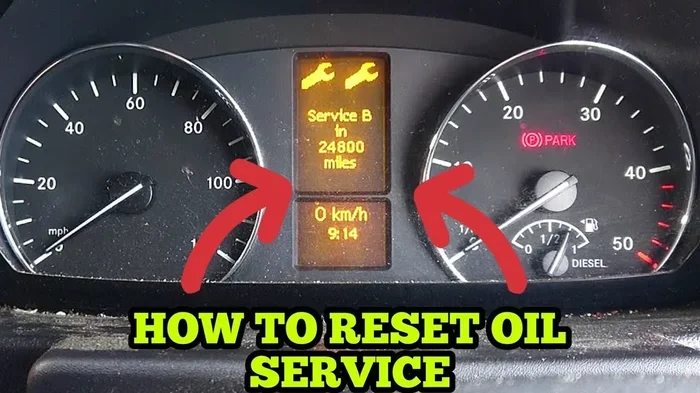
The oil change reminder light usually appears as a wrench icon, an oil can symbol, or the words “OIL” or “MAINT” on your dashboard. When you see it, your vehicle is telling you that the oil change interval has been reached. It is a helpful nudge to keep your engine running smoothly.
Oil Maintenance Light vs. Check Engine Light
It is important to know the difference between the oil service light and the check engine light. The check engine light signals a problem with the engine or emissions system. The oil maintenance light is simply a reminder for scheduled service. However, if you ignore the oil light for too long, it can eventually lead to real engine problems. Low oil levels or degraded oil can cause increased wear on engine components.
Here is a quick comparison to help you tell them apart:
| Light | Meaning | Urgency | Action Needed |
|---|---|---|---|
| Oil Maintenance Light | Scheduled oil service due | Low to Medium | Change oil and reset light |
| Check Engine Light | Engine or emissions issue | Medium to High | Diagnose with OBD2 scanner |
| Oil Pressure Warning | Low oil pressure detected | High | Stop driving immediately |
How to Reset Oil Maintenance Light: Step-by-Step Guide
Now for the part you have been waiting for. Resetting the oil maintenance light is different for every vehicle brand. But the general idea is the same across most models. You will typically use a combination of buttons on your dashboard, steering wheel, or infotainment screen. Below, we cover the most common methods.
Method 1: Using the Trip Meter Reset Button
This is the most common method for older vehicles and many current models. Here is how it works:
- Turn the ignition to the “ON” position. Do not start the engine. Just power up the dashboard.
- Locate the trip meter reset button. It is usually on the dashboard or steering wheel stalk.
- Press and hold the trip reset button.
- While holding the button, turn the ignition off and then back on.
- Keep holding the button until the maintenance light starts to flash or disappears.
- Release the button. The light should now be off.
This method works on many older Ford, Chevy, and some Honda models. If it does not work for your vehicle, do not worry. We have other methods below.
Method 2: Using the Instrument Panel Buttons
Many newer vehicles use a combination of buttons on the steering wheel or instrument panel. The process usually involves navigating through a small menu on the odometer display.
Here is the general process:
- Turn the ignition to the “ON” position.
- Press the menu or set button on the instrument panel repeatedly until you see the maintenance menu.
- Press and hold the same button for several seconds.
- The system should prompt you to confirm the reset.
- Confirm the reset, and the light will turn off.
Quick Tip: If you are not sure which buttons to press, look for a “SET” or “RESET” label on your dashboard controls. These are almost always the buttons you need for the maintenance light reset.
Method 3: Using the Infotainment Screen
Many modern vehicles from brands like Toyota, BMW, and Mercedes use the infotainment screen for maintenance tasks. Here is the general process:
- Start the vehicle or turn the ignition to “ON.”
- Navigate to the “Settings” menu on the infotainment screen.
- Look for “Vehicle Info,” “Maintenance,” or “Service” in the menu.
- Select “Reset Maintenance” or “Oil Life Reset.”
- Confirm the reset when prompted.
Some vehicles may require you to hold a button on the steering wheel for several seconds to confirm. Always refer to your owner manual reset procedure for exact instructions.
Expert Insight: If you cannot find the reset procedure in your owner manual, try searching online for your specific vehicle make, model, and year. Many forums and YouTube videos show the exact steps. The process is almost always simpler than you think.
Vehicle-Specific Reset Instructions
Not all vehicles use the same method. Here is a closer look at how to reset the oil maintenance light on some of the most popular brands.
How to Reset on Toyota and Lexus
Toyota vehicles use a straightforward process for the oil change reminder reset:
- Turn the ignition to “ON” without starting the engine.
- Press the odometer/trip button until the odometer reads “ODO” mode.
- Turn the ignition to “OFF.”
- Press and hold the odometer/trip button.
- While holding the button, turn the ignition back to “ON.”
- Continue holding the button until the maintenance light blinks and then turns off.
- Release the button. Turn the ignition off and then on again to confirm.
How to Reset on Honda and Acura
Honda vehicles have a slightly different approach:
- Turn the ignition to the “ON” position (second notch, do not start the engine).
- Press and hold the trip meter reset button (the small button on the dashboard near the speedometer).
- While holding the button, turn the ignition to “OFF” and then back to “ON.”
- Keep holding the button for about 10 seconds until the maintenance light goes out.
How to Reset on Ford and Lincoln
Ford vehicles often use the steering wheel controls:
- Use the steering wheel arrows to navigate to the “Settings” menu on the dashboard display.
- Select “Vehicle Information.”
- Choose “Maintenance Required.”
- Press and hold the “OK” button to reset.
On older Ford models without a screen, you may need to use the trip meter method described earlier.
How to Reset on Chevrolet and GMC
Chevrolet vehicles typically use the infotainment system:
- Press the “Menu” button on the steering wheel.
- Navigate to “Vehicle Info” or “Settings.”
- Select “Oil Life System.”
- Choose “Reset” and confirm.
For trucks and older models without infotainment, the trip meter method usually works.
Comparison Table: Reset Methods by Brand
| Brand | Common Method | Difficulty Level |
|---|---|---|
| Toyota | Trip meter button | Easy |
| Honda | Trip meter button | Easy |
| Ford | Steering wheel controls or infotainment | Easy to Medium |
| Chevrolet | Infotainment system | Easy |
| BMW | Infotainment screen | Medium |
| Jeep | Steering wheel controls | Easy |
When You Should NOT Reset the Oil Maintenance Light
Here is a critical point that many drivers overlook. Never reset the oil maintenance light without actually changing the oil. The light exists to remind you that your vehicle needs service. If you reset it without performing the oil change, you are essentially clearing a warning without fixing the problem.
Here are situations where you should not reset the light:
- The oil has not been changed. Resetting without an oil change tricks your maintenance tracking system and can lead to engine wear.
- You do not know what the light means. If the light is accompanied by strange noises, smoke, or poor engine performance, get your vehicle inspected first.
- You are low on oil. The oil maintenance light is not the same as the oil pressure warning. If your oil level is low, add oil first and address the root cause.
- You just bought a used car. If the previous owner did not service the vehicle properly, reset the light only after completing a full oil change and inspection.
Think of the maintenance light as a friendly reminder, not just a switch to flip. Respecting it keeps your engine healthy and your vehicle reliable for years to come.
Common Mistakes When Resetting the Oil Maintenance Light
Even though resetting this light is simple, people still make mistakes. Here are the most common ones to avoid:
Mistake 1: Resetting Without Changing the Oil
This is the number one mistake. The light comes on because your vehicle’s system has calculated that the oil change interval has been reached. If you reset it without fresh oil, your engine runs on old, degraded oil. Over time, this leads to increased friction, heat buildup, and potential engine damage.
Mistake 2: Using the Wrong Reset Procedure
Every vehicle model is slightly different. Following the wrong procedure can sometimes cause errors or fail to clear the light. Always double-check the method for your specific make and model before starting.
Mistake 3: Ignoring the Oil Pressure Warning
Some drivers see a dashboard warning light and assume it is the maintenance light. But the oil pressure warning is a completely different and much more serious indicator. If you see a red oil can light (not a yellow or orange one), pull over safely and check your oil level immediately.
Mistake 4: Not Recording the Oil Change Date
After resetting the light, make a note of the date and mileage. This helps you track your oil change schedule and reminds you when the next service is due. Many drivers reset the light and forget about it entirely, only to be surprised when the light comes back on months later.
Quick Tip: Keep a small log in your glove box or use a phone app to track oil changes. This simple habit can save you hundreds of dollars in engine repairs over the life of your vehicle.
Tips to Keep Your Vehicle Running Smoothly After Resetting the Light
Resetting the light is only one part of the equation. Here are some practical tips to keep your engine in great shape between oil changes:
- Check your oil level monthly. A quick dipstick check takes less than two minutes and can catch low oil levels early.
- Use the oil type recommended by your manufacturer. Whether it is conventional, synthetic blend, or full synthetic, using the right oil helps your oil quality sensor and oil life monitoring system work accurately.
- Do not skip oil filter replacements. The oil filter traps contaminants. A clogged filter reduces oil flow and can damage your engine.
- Watch for other dashboard warning lights. If any warning light stays on after resetting, have your vehicle inspected by a professional.
- Follow the maintenance schedule in your owner manual. Every vehicle has a recommended service interval. Sticking to it extends engine life and maintains your warranty.
Common Mistakes to Avoid: Do not rely solely on the maintenance light. Some vehicles have inaccurate readings if the driving conditions are unusual. If you frequently drive in extreme heat, cold, dusty roads, or tow heavy loads, consider shortening your oil change interval by 10 to 15 percent.
Expert Insight: Many modern vehicles now use condition-based maintenance. This means the system adjusts the service interval based on real-time driving data. If you switch to a different driving style or environment, the system may recalibrate on its own. This is one of the biggest advantages of having an oil life monitoring system in your vehicle.
Frequently Asked Questions About the Oil Maintenance Light
Here are answers to some of the most common questions drivers have about their oil maintenance light and the reset process.
Can I drive with the oil maintenance light on?
Yes, you can drive a short distance with the light on. It is a service reminder, not an emergency warning. However, you should get your oil changed as soon as possible. Driving with old oil for extended periods can reduce engine performance and cause long-term damage. The oil change interval exists for a reason, so try not to push it too far past the recommended mileage.
How often should I reset the oil maintenance light?
You should reset the light every time you get an oil change. This keeps your vehicle’s maintenance reminder system accurate and helps you stay on top of your car maintenance schedule. If you change your own oil, resetting the light is the final step in the process.
Will resetting the oil maintenance light clear a check engine light?
No. The oil maintenance light and the check engine light are completely separate systems. Resetting one will not affect the other. If your check engine light is on, you need to diagnose the underlying issue separately, usually with an OBD2 scanner or a visit to a mechanic.
What if the oil maintenance light keeps coming back after I reset it?
If the light returns shortly after resetting, it could mean one of two things. First, you may not have changed the oil yet, and the system is still detecting that service is overdue. Second, there could be a problem with the oil quality sensor or the oil pressure sensor. In this case, it is best to have a professional diagnose the issue.
Do I need special tools to reset the oil maintenance light?
No special tools are needed for most vehicles. You only need access to the dashboard buttons or infotainment screen. However, some newer or luxury vehicles may require a diagnostic tool or software update at a dealership. In most cases, the process is free and easy to do yourself.
Is it safe to reset the oil maintenance light myself?
Absolutely. Resetting the oil maintenance light is one of the simplest and safest DIY vehicle maintenance tasks you can perform. It does not involve any engine parts or fluids. Just follow the correct procedure for your vehicle, and you will be done in a few minutes.
Conclusion
Resetting the oil maintenance light is a quick and easy task that every car owner should know how to do. It takes just a few minutes and requires no special tools or mechanical knowledge. Whether you use the trip meter method, the instrument panel buttons, or the infotainment screen, the process is straightforward once you know the steps for your specific vehicle.
Remember the most important rule: always change the oil before you reset the light. The maintenance light is your vehicle’s way of keeping track of its service needs. Respecting it means a healthier engine, better fuel economy, and fewer unexpected repairs down the road.
Use the vehicle-specific instructions in this guide to find the right method for your car, truck, or SUV. Keep a record of each oil change, and you will never have to wonder when your next service is due. With these simple steps, you can handle the oil maintenance light reset confidently and keep your vehicle running strong for miles to come.