What Battery Does a Key Fob Use and How to Replace It
A key fob battery is typically a small coin cell battery, most commonly the CR2032 type. Knowing how to replace a key fob battery can save you time and money. This guide covers battery types, replacement steps, and troubleshooting tips for common key fob problems. You will learn how long a key fob battery lasts and when it is time for a replacement.
Have you ever stood by your car, pressing the remote button over and over, hoping it would finally unlock the doors? That frustrating moment usually means one thing: your key fob battery is dying. The good news is that fixing this problem is incredibly simple. Most of the time, you just need a new battery and about three minutes of your time.
A key fob battery powers the remote functions that let you lock, unlock, and even start your vehicle from a distance. Without a working battery, your fancy remote becomes nothing more than a plastic key. Understanding what battery your fob uses and how to replace it can keep you from being stranded or locked out. This guide walks you through everything you need to know.
Whether you drive a sedan, SUV, or truck, the process is nearly the same across all brands. You do not need any special tools or technical skills. Let us dive into the details and get your remote working again.
Key Takeaways
- Most key fobs use a CR2032 coin cell battery: This is the most common battery type found in vehicle remote key fobs and home access remotes.
- Replacement is easy and affordable: You can swap out a dying key fob battery at home in under five minutes with basic tools.
- Key fob batteries last 2 to 4 years: The lifespan depends on usage frequency, distance from the vehicle, and battery quality.
- Watch for early warning signs: Reduced range, delayed response, and a blinking dashboard light all signal a low key fob battery.
- Use the right battery brand and type: Matching the exact battery specification prevents damage and ensures reliable performance.
- Some modern fobs need professional programming: After a battery swap, certain vehicles require a reset or reprogramming step.
📑 Table of Contents
- What Kind of Battery Does a Key Fob Use
- How to Replace a Key Fob Battery
- How Long Does a Key Fob Battery Last
- Can You Recharge a Key Fob Battery
- What to Do After Replacing the Key Fob Battery
- Choosing the Right Replacement Battery
- Common Mistakes to Avoid When Replacing a Key Fob Battery
- Key Fob Battery Maintenance Tips
- Conclusion
What Kind of Battery Does a Key Fob Use
Almost every modern key fob battery is a small, round, coin-shaped cell. These are officially called coin cell batteries or button cell batteries. They are tiny, lightweight, and last a long time. But not all key fobs use the same battery, so it is important to know which one yours needs.
Common Key Fob Battery Types
The most popular battery for a key fob battery replacement is the CR2032. You will find this battery in countless vehicle models from brands like Toyota, Honda, Ford, Chevrolet, BMW, and Mercedes. It provides 3 volts of power and fits perfectly in the slim housing of most remotes.
Here are the most common battery types you will encounter:
- CR2032 — The most widely used battery in car key fobs and home remotes.
- CR2025 — Slightly thinner than the CR2032. Found in some older models and compact fobs.
- CR2016 — Even thinner. Used in some older or smaller remote designs.
- CR1632 — Less common but found in certain luxury vehicle models.
- CR2450 — Thicker battery used in some larger fobs with more features.
Each of these batteries looks similar but has a different thickness and diameter. Using the wrong one can cause the fob to malfunction or not fit at all. Always double-check before you buy a replacement.
How to Find Your Key Fob Battery Type
Finding the right battery is easier than you think. Start by checking the owner manual for your vehicle. Most manuals list the battery type right in the section about the key fob or remote entry system.
If you do not have the manual, try these methods:
- Check the old battery: The number printed on the battery itself tells you exactly what type it is.
- Search online: Type your vehicle make, model, and year plus “key fob battery type” into a search engine.
- Visit a dealership or auto parts store: Staff can look up the correct battery for your fob model.
- Check the fob housing: Some fobs have the battery type printed on the inside of the casing.
Once you know the correct type, buying a replacement is easy. You can find them at grocery stores, drugstores, auto parts shops, and online retailers. A single key fob battery costs between one and five dollars, making this one of the cheapest car maintenance tasks you can do.
How to Replace a Key Fob Battery
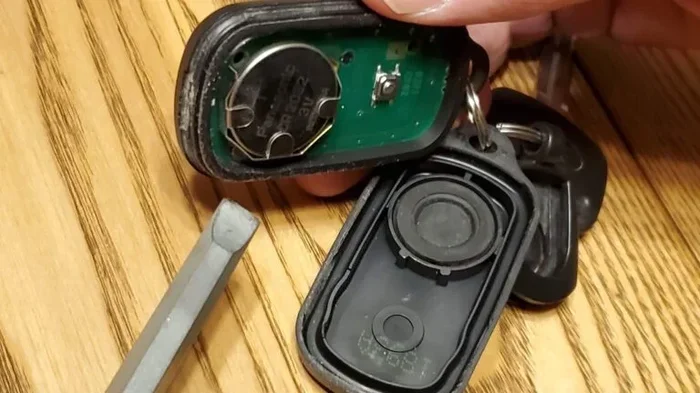
Swapping out a key fob battery is one of the easiest DIY car maintenance jobs you will ever do. You do not need to visit a mechanic or pay for a service call. With a flathead screwdriver and a fresh battery, you are done in minutes.
Step-by-Step Replacement Guide
Follow these simple steps to replace your remote key battery:
- Gather your tools: You need a replacement battery, a small flathead screwdriver, and a clean, soft surface to work on.
- Locate the seam: Look closely at your key fob. You will notice a thin line or seam running along the middle or edge of the casing.
- Insert the screwdriver: Gently insert the flathead screwdriver into the seam. Apply light pressure and twist slightly to pop the cover open.
- Remove the old battery: The old battery will be sitting in a small compartment. Use the screwdriver or your fingernail to carefully lift it out. Pay attention to which side faces up.
- Insert the new battery: Place the new battery in the same orientation as the old one. The positive side, marked with a plus sign, usually faces up.
- Snap the fob back together: Align the two halves of the fob and press firmly until the seam clicks shut.
- Test the fob: Stand near your vehicle and press the lock or unlock button. The doors should respond immediately.
That is it! You have just saved yourself a trip to the dealer or a locksmith. The entire process takes less time than it took to read those steps.
Tips for Opening Your Key Fob Safely
Opening a key fob the first time can feel a little tricky. Here are some tips to make it easier and avoid damaging the casing:
- Use a plastic pry tool instead of a metal screwdriver. This reduces the risk of scratching or cracking the fob housing.
- Work on a soft surface. A towel or cloth prevents the fob from sliding and protects it if it drops.
- Go slow. Apply gentle, even pressure around the seam. Do not force one spot or you may break the clip.
- Take a photo before opening. This helps you remember the battery orientation and the placement of any small internal parts.
- Keep track of the clips. Some fobs have small plastic clips that can pop out. Set them aside safely so you do not lose them.
These small precautions make a big difference. A careful approach keeps your key fob battery replacement clean and stress-free.
How Long Does a Key Fob Battery Last
Most key fob battery units last between two and four years. However, the exact lifespan depends on several factors. Understanding these can help you plan ahead and avoid being caught off guard.
Factors That Affect Key Fob Battery Life
Several things determine how long your remote battery will last:
- Usage frequency: The more you press the buttons, the faster the battery drains. If you use your remote multiple times a day, expect to replace it more often.
- Distance from the vehicle: Some fobs continuously emit a signal when they are far from the car. This extra effort drains the battery faster.
- Weather conditions: Extreme cold or heat can reduce battery performance and shorten overall lifespan.
- Battery brand and quality: Name-brand batteries like Energizer and Duracell tend to last longer than generic ones.
- Fob design and features: Fobs with more features, such as proximity sensors or push-button start, may use more power.
On average, plan to replace your key fob battery every two to three years. Setting a calendar reminder can help you stay ahead of the problem.
Signs Your Key Fob Battery Is Dying
Your fob usually gives you warning signs before the battery dies completely. Watch out for these red flags:
- Reduced range: You have to stand closer to the car for the remote to work. If you used to unlock from twenty feet away and now need to be right next to the door, the battery is weakening.
- Delayed response: There is a noticeable lag between pressing the button and the car responding.
- Intermittent function: The fob works sometimes but not others. This inconsistent behavior is a classic sign of a low battery.
- Dashboard warning light: Many modern vehicles display a “key fob battery low” message on the dashboard or instrument cluster.
- Push-button start issues: If your vehicle uses a push-to-start system, a weak fob battery may prevent the engine from starting even when the fob is inside the car.
If you notice any of these symptoms, it is time to grab a new battery. Do not wait until the fob stops working entirely, especially if you rely on it every day.
Can You Recharge a Key Fob Battery
Most traditional key fob battery designs use disposable coin cell batteries. These cannot be recharged. Once the chemical reaction inside the battery is spent, it is done.
However, some newer vehicles come with rechargeable key fobs. These use lithium-ion batteries similar to what you find in a smartphone. For these models, you can charge the fob using a USB cable or a charging pad. Check your vehicle manual to see if your fob is rechargeable.
If your fob uses a disposable battery, the best approach is to keep spare batteries on hand. Storing a few CR2032 batteries in your glove box means you are always ready for a quick swap.
What to Do After Replacing the Key Fob Battery
Once you have swapped in the new key fob battery, there are a few things you should do to make sure everything works correctly.
Test All Functions
Do not just test the lock and unlock buttons. Try every function your fob offers:
- Lock and unlock all doors
- Open the trunk or rear hatch
- Activate the panic alarm
- Use the push-button start feature
- Test any proximity or hands-free entry features
If any function does not work, double-check the battery orientation. A battery installed upside down will not power the fob correctly.
Reset the Fob if Needed
Some vehicles require a reset after a key fob battery replacement. This is especially common with push-to-start systems. The reset process varies by brand, but here is a general approach:
- Insert the physical key into the ignition.
- Turn the ignition to the “On” or “Acc” position without starting the engine.
- Press the lock button on the fob three times quickly.
- Turn the ignition off and remove the key.
- Test the fob from outside the vehicle.
If this does not work for your specific model, consult the owner manual or search online for your vehicle year and model plus “key fob reset after battery replacement.”
When to Seek Professional Help
Most key fob battery replacements are simple and do not require a professional. However, there are situations where you should call in an expert:
- The fob still does not work after a battery swap: This could indicate a damaged fob, not just a dead battery.
- You cannot open the fob casing: Some newer fobs are sealed and require special tools or dealer service to open.
- Your vehicle does not recognize the fob: After replacing the battery, if the car still does not detect the remote, the fob may need reprogramming.
- You have a smart key system: These advanced systems sometimes require dealership-level equipment to reset properly.
In these cases, a dealership or qualified locksmith can help. Reprogramming a key fob battery replacement typically costs between fifty and two hundred dollars, depending on your vehicle and location.
Choosing the Right Replacement Battery
Not all batteries are created equal. When shopping for a key fob battery, quality matters more than you might think.
Brand Name vs. Generic
Name-brand batteries from Energizer, Duracell, or Panasonic tend to offer more consistent performance and a longer shelf life. Generic or off-brand batteries may save you a few cents, but they can also leak, die early, or provide inconsistent voltage.
For a device as small and sensitive as a key fob, you want reliable power. Spending an extra dollar or two on a trusted brand is worth the peace of mind.
Where to Buy Key Fob Batteries
You have plenty of options for purchasing a replacement:
- Grocery stores and pharmacies: Most carry CR2032 and other common coin cell batteries near the checkout.
- Auto parts stores: Stores like AutoZone or O’Reilly often sell batteries specifically packaged for key fobs.
- Online retailers: Amazon and other online stores offer bulk packs at great prices.
- Electronics stores: Best Buy and similar stores carry a wide selection of coin cell batteries.
Buy a battery from a reputable seller and check the expiration date. A fresh battery ensures your remote key fob works reliably from day one.
Common Mistakes to Avoid When Replacing a Key Fob Battery
Even a simple task like a key fob battery replacement can go wrong if you are not careful. Here are common mistakes to avoid:
- Using the wrong battery type: A CR2025 will not work the same as a CR2032. Always match the exact specifications.
- Forgetting to check the battery orientation: Putting the battery in backward means the fob will not power on.
- Forcing the fob open: If the casing does not pop open easily, you may be prying at the wrong spot. Stop and re-examine the seam.
- Touching the battery contacts with metal tools: This can cause a short circuit and damage the fob’s internal electronics.
- Ignoring the reset step: Some vehicles need a reset after a battery change. Skipping this step can leave the fob unresponsive.
- Buying old stock: Batteries sitting on a shelf for years lose charge. Always check the expiration or manufacture date.
Avoiding these simple mistakes ensures a smooth, successful replacement every time.
Key Fob Battery Maintenance Tips
Taking care of your key fob battery can extend its life and keep your remote working smoothly. Here are some easy maintenance habits:
- Keep the fob away from extreme temperatures: Leave it inside the house during very hot or cold weather, not in your car.
- Do not drop the fob: Physical impacts can damage the internal battery and circuitry.
- Replace the battery proactively: Do not wait until the fob stops working. Swap it out every two to three years as a precaution.
- Store spare fobs properly: If you have a backup remote, keep its battery fresh by replacing it on the same schedule.
- Clean the battery contacts: A quick wipe with a dry cloth can prevent corrosion and ensure a solid connection.
These small habits add up over time and help you avoid unexpected lockouts or frustrating moments by the car.
Conclusion
Replacing a key fob battery is one of the simplest and most satisfying maintenance tasks you can do. It costs just a few dollars, takes only a few minutes, and keeps your vehicle’s remote functions working perfectly. You now know what battery your fob uses, how to open the casing, how to swap in a new cell, and how to troubleshoot common issues.
Remember to always use the correct battery type, pay attention to the orientation, and test all functions after the replacement. If your vehicle requires a reset, do not skip that step. And if the fob still does not work after a fresh battery, it may be time to consult a professional.
Keep a spare key fob battery in your glove box or junk drawer. You never know when you will need it, and having one on hand means you will never be stuck with a dead remote again. Take a few minutes today to check your fob battery status and stay ahead of the problem. Your future self will thank you.
Frequently Asked Questions
How do I know what battery my key fob uses?
Check your vehicle owner manual, look at the old battery printed with its type number, or search online using your vehicle make, model, and year. Most modern remotes use a CR2032 coin cell battery, but some models use CR2025 or other variations.
Can I use any brand of CR2032 battery for my key fob?
Yes, you can use any brand that matches the CR2032 specification. However, name brands like Energizer, Duracell, and Panasonic tend to offer more reliable performance and longer life than generic alternatives. Always check the expiration date before purchasing.
How much does it cost to replace a key fob battery?
A replacement key fob battery costs between one and five dollars at most retail stores. If you visit a dealership or locksmith for the replacement, you may pay between fifty and two hundred dollars including labor and any reprogramming fees.
Why does my key fob still not work after replacing the battery?
Check that the battery is inserted in the correct orientation. Try resetting the fob according to your vehicle manual. If the fob still does not respond, the internal circuitry may be damaged or the fob may need professional reprogramming.
How long does a key fob battery typically last?
A key fob battery usually lasts between two and four years depending on usage frequency, climate, and battery quality. Vehicles with push-button start systems may drain the battery slightly faster due to constant proximity sensing.
Do I need to reprogram my key fob after replacing the battery?
Most key fobs work immediately after a battery swap without any reprogramming. However, some vehicles with advanced smart key systems or push-to-start features may require a simple reset procedure. Consult your owner manual for specific instructions.
=== CONCLUSION ===
Knowing what battery does a key fob use and how to replace it is essential knowledge for every vehicle owner. A dead key fob battery can disrupt your daily routine, but with the right information, you can fix the problem in minutes. Keep spare batteries handy, watch for warning signs, and do not hesitate to tackle this simple repair yourself. Your key fob will keep working reliably, and you will save time and money in the process.