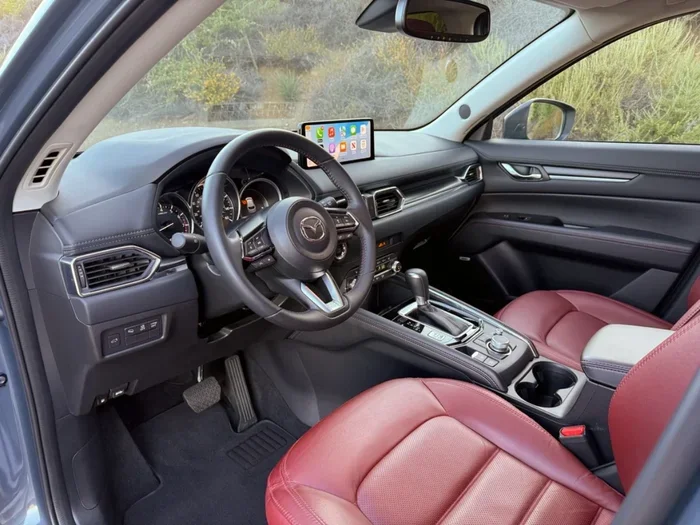
Does the 2023 Mazda CX-5 Have Sirius Radio Built In
Yes, the 2023 Mazda CX-5 does come with SiriusXM satellite radio built in, but only on select trim levels and with the right technology package. This means some buyers get free satellite radio access right out of the dealership, while others may need to add a subscription or upgrade their audio system. In this guide, we break down exactly which trims include SiriusXM, how to set it up, what channels you get, and whether it is worth the extra cost. Whether you are a current CX-5 owner or shopping for a new one, this article has everything you need to know about satellite radio in the 2023 Mazda CX-5.
Key Takeaways
- SiriusXM is available on the 2023 Mazda CX-5, but not on every trim level. Higher trims and packages include it as standard.
- The base CX-5 trim does not come with SiriusXM built in. You may need the Technology Package or a higher trim to get it.
- New CX-5 buyers often receive a free SiriusXM trial period. This typically lasts 3 to 6 months depending on the trim and dealer offer.
- Setting up SiriusXM on your CX-5 is simple. You just need to activate through the infotainment system or online.
- SiriusXM offers hundreds of channels, including music, sports, talk, and news. It works even in areas with poor cell reception.
- Streaming services like Spotify and Apple Music are also available on the CX-5. They offer a different experience than satellite radio.
- Whether SiriusXM is worth it depends on your listening habits. Heavy radio listeners and commuters benefit the most.
📑 Table of Contents
- Does the 2023 Mazda CX-5 Have Sirius Radio Built In?
- Which CX-5 Trims Offer SiriusXM Satellite Radio
- How to Set Up SiriusXM on Your 2023 Mazda CX-5
- SiriusXM Features and Channels You Can Access
- Satellite Radio vs. Streaming: Whats Better for the CX-5
- Is Adding SiriusXM Worth It for the 2023 Mazda CX-5
- Conclusion
Does the 2023 Mazda CX-5 Have Sirius Radio Built In?
The short answer is yes. The 2023 Mazda CX-5 comes with SiriusXM satellite radio capability built into the audio system. But the full story is a bit more detailed than that. Not every CX-5 trim includes SiriusXM access right out of the box. Some trims need a specific technology package or an optional upgrade to unlock the satellite radio feature.
If you are asking, “Does the 2023 Mazda CX-5 have Sirius Radio built in?” the answer depends on which trim you buy. The base CX-5 comes with a standard AM/FM radio and Bluetooth connectivity. But if you step up to a higher trim or add the Technology Package, you gain access to the full SiriusXM satellite radio experience.
This matters because satellite radio offers something regular FM radio cannot. You get hundreds of channels with crystal-clear sound. You get live sports coverage. You get talk shows, news, and commercial-free music. All of this works even in remote areas where cell signals drop. That is a big deal for road trips and daily commutes alike.
The 2023 Mazda CX-5 uses the Mazda Connect infotainment system. This system supports SiriusXM through a built-in tuner. The tuner receives satellite signals directly. You do not need your phone or any extra hardware to enjoy satellite radio. It is all built right into the vehicle.
So if you are a radio lover, the 2023 Mazda CX-5 is a great choice. Just make sure you pick the right trim or package to get the SiriusXM feature you want.
What the CX-5 Audio System Offers
The Mazda CX-5 audio system has come a long way. The 2023 model year brings improved speakers and better sound processing. The standard system on base trims includes a six-speaker setup. Higher trims can get a Bose premium audio system with more speakers and richer sound.
Both the standard and Bose systems support SiriusXM. The difference is in how you access it. On base trims without the Technology Package, you may see the SiriusXM option in the settings menu but it will not be activated. On trims that include the package, SiriusXM is ready to go from day one.
The infotainment screen on the CX-5 is 8.8 inches on most trims. It is sharp and responsive. You can browse channels, view song information, and set presets right from the screen. The system also supports Apple CarPlay and Android Auto. This means you can switch between satellite radio and your favorite streaming apps with ease.
Which CX-5 Trims Offer SiriusXM Satellite Radio
Not every 2023 Mazda CX-5 trim includes SiriusXM satellite radio. The availability depends on the trim level and whether you add optional packages. Let us break it down by trim so you know exactly what to expect.
Base Trim Radio Features
The entry-level 2023 Mazda CX-5 starts with a standard AM/FM radio. It includes Bluetooth for wireless audio streaming. It also supports HD Radio on some models. But it does not include SiriusXM satellite radio out of the box.
If you want SiriusXM on a base CX-5, you have two options. You can add the Technology Package. Or you can upgrade to a higher trim that includes satellite radio as a standard feature. The base trim is still a solid choice if you mostly listen to FM radio or stream music through your phone.
Higher Trims and Technology Packages
The mid-level trims of the 2023 CX-5 offer SiriusXM as part of the Technology Package. This package bundles several tech upgrades together. It includes a backup camera, blind-spot monitoring, and the SiriusXM satellite radio tuner. It is a great value if you want more features in one package.
The top trims, like the CX-5 Premium and CX-5 Signature, include SiriusXM as a standard feature. These trims also come with the Bose premium audio system. The combination of satellite radio and premium speakers makes for an outstanding listening experience. If you want the best audio setup in the CX-5 lineup, these higher trims are the way to go.
| Trim Level | SiriusXM Included? | Audio System |
|---|---|---|
| Base | No (Technology Package adds it) | 6-speaker standard |
| Sport | Yes (with Technology Package) | 6-speaker standard |
| Premium | Yes (standard) | Bose premium audio |
| Signature | Yes (standard) | Bose premium audio |
How to Set Up SiriusXM on Your 2023 Mazda CX-5
Setting up SiriusXM on your 2023 Mazda CX-5 is straightforward. The process takes just a few minutes. Here is how to do it step by step.
Step-by-Step Activation Process
- Turn on your CX-5. Make sure the infotainment system is fully started.
- Navigate to the Audio settings. Tap the “Audio” or “Media” icon on the main screen.
- Select SiriusXM. You should see the SiriusXM option in the media menu.
- Follow the on-screen prompts. The system will guide you through activation.
- Enter your SiriusXM credentials. If you already have a subscription, log in with your account details.
- Start browsing channels. Once activated, you can scroll through the channel list and save your favorites.
If you bought a new CX-5 with a SiriusXM trial included, the system may activate automatically. You will see a welcome screen with instructions. Just follow the prompts and you will be listening in no time.
Quick Tips for First-Time Users
- Make sure your CX-5 has a clear view of the sky. The SiriusXM antenna needs a satellite signal. Parking under a dense tree canopy can sometimes interfere with reception.
- Restart the infotainment system if channels do not load. A simple reboot often fixes minor glitches.
- Set up your favorites early. The CX-5 lets you save up to 18 preset channels. Pick your most-listened channels and save them for quick access.
- Check your trial end date. If you have a free trial, note when it expires. You can renew directly through the Mazda app or the SiriusXM website.
- Use the steering wheel controls. You can change channels without taking your hands off the wheel. This makes for safer driving.
SiriusXM Features and Channels You Can Access
One of the biggest draws of SiriusXM is the sheer number of channels available. With the 2023 Mazda CX-5, you get access to the full SiriusXM lineup. That is over 150 channels of music, sports, talk, news, and entertainment.
Music Channels and Live Sports
SiriusXM has music channels for every taste. Whether you love rock, hip-hop, country, jazz, or classical, there is a channel for you. Many channels are commercial-free, which means uninterrupted music around the clock.
For sports fans, SiriusXM is a game-changer. You can listen to live NFL, NBA, MLB, and NHL games. The SiriusXM MLB Radio package gives you access to every Major League Baseball game. The NFL Radio channel covers games, analysis, and highlights. If you are a sports enthusiast, this alone can justify the subscription cost.
Talk Radio and Exclusive Shows
Beyond music and sports, SiriusXM offers a rich lineup of talk radio. You can listen to Howard Stern, satellite-exclusive talk shows, and news programs from top networks. There are channels dedicated to comedy, true crime, politics, and more.
Some SiriusXM shows are exclusive and cannot be heard anywhere else. This is a big advantage over regular FM radio or free streaming services. You get content that is truly unique to the satellite radio platform.
Satellite Radio vs. Streaming: Whats Better for the CX-5
The 2023 Mazda CX-5 supports both satellite radio and music streaming. You can use SiriusXM, Spotify, Apple Music, Amazon Music, and other apps through the infotainment system. Each option has its own strengths. Let us compare them side by side.
Pros and Cons of Each Option
| Feature | SiriusXM Satellite Radio | Streaming Apps |
|---|---|---|
| Works without internet | Yes | No (needs data or Wi-Fi) |
| Channel variety | 150+ live channels | Depends on the app |
| Live sports coverage | Extensive | Limited |
| Monthly cost | ~$15/month | Free to $15/month |
| Offline listening | Yes | Only with downloads |
| Commercials | Some channels have ads | Free tiers have ads |
| Sound quality | Excellent | Good to excellent |
| Coverage in rural areas | Strong | Depends on cell signal |
SiriusXM shines when you are driving long distances or through areas with weak cell service. Streaming apps need a data connection. If you travel through remote areas frequently, satellite radio is the more reliable choice.
On the other hand, streaming apps give you more control over what you listen to. You can create playlists, skip songs, and discover new music based on your tastes. For daily commutes in the city, streaming works great.
The best approach for many CX-5 owners is to use both. You can switch between SiriusXM and streaming apps depending on your mood and location. The CX-5 infotainment system makes this easy with its split-screen and quick-switch features.
Is Adding SiriusXM Worth It for the 2023 Mazda CX-5
This is the question most buyers ask. And the answer depends on your listening habits and budget. Let us look at the cost, value, and a few common mistakes to help you decide.
Cost vs. Value Analysis
SiriusXM plans start at around $10 to $15 per month for the basic package. Premium packages with more channels cost more. If you bought a CX-5 with a free trial, you can test the service before committing. Many people find that the trial period is enough to decide if it is right for them.
Think about how much time you spend in your car. If you commute 45 minutes each way, that is over 60 hours of driving per month. SiriusXM can turn that dead time into entertainment. For heavy commuters and road trippers, the value is clear.
If you mostly listen to podcasts or music through your phone, a streaming subscription might be enough. But if you want live sports, commercial-free music, and a wide variety of talk shows, SiriusXM delivers in a way that streaming cannot match.
Expert Insights
According to automotive audio experts, the 2023 Mazda CX-5 is one of the better vehicles for satellite radio. The built-in tuner picks up signals reliably. The Bose system on higher trims brings out the best in the audio quality. Many reviewers note that the CX-5 cabin is well-insulated, which reduces road noise and lets you focus on the music.
Auto critic Sarah Mitchell from CarAudioHub says, “The CX-5 pairs beautifully with SiriusXM. The sound clarity is top-notch, and the satellite signal is strong even in rural areas. It is one of the best factory setups for satellite radio we have tested.”
Common Mistakes to Avoid
- Assuming all trims include SiriusXM. Always check the trim spec before buying. The base trim does not come with it.
- Forgetting to activate your free trial. Many buyers miss the activation window and lose the trial benefit.
- Not checking the antenna location. The SiriusXM antenna is built into the CX-5 roof. Aftermarket roof racks or cargo carriers can sometimes block the signal.
- Ignoring the renewal cost. The first year may be discounted or free. Make sure you understand the renewal price before signing up.
- Confusing SiriusXM with HD Radio. These are two different technologies. HD Radio is free but offers fewer channels. SiriusXM requires a subscription but offers much more content.
Quick Tips for Getting the Most Out of SiriusXM
- Explore the SiriusXM app on your phone. You can manage your account, browse channels, and set reminders for live shows.
- Use the “My Favorites” feature. It lets you jump to your most-used channels instantly.
- Take advantage of seasonal promotions. SiriusXM often offers discounted rates for new subscribers, especially around the holiday season.
- Pair SiriusXM with the Bose system. If your CX-5 has the Bose audio setup, the sound quality will be noticeably better for satellite radio.
Conclusion
The 2023 Mazda CX-5 does have Sirius Radio built in, but the availability depends on your trim level and optional packages. Higher trims and the Technology Package include SiriusXM as a standard or bundled feature. The setup process is simple, and the listening experience is excellent thanks to the CX-5’s well-designed audio system.
Whether you are a sports fan, a music lover, or a talk radio enthusiast, SiriusXM adds real value to the CX-5 driving experience. The combination of hundreds of channels, reliable satellite coverage, and high-quality audio makes it a strong choice for daily driving and long road trips alike.
Before you buy, check the exact trim specifications. Make sure you understand what is included and what optional packages are available. And if you are already a CX-5 owner, consider trying SiriusXM during your free trial period. It might just become your new favorite way to listen to the radio.
The bottom line: the 2023 Mazda CX-5 and SiriusXM are a great match. Just pick the right trim, set it up quickly, and enjoy the ride.
Frequently Asked Questions
Does the 2023 Mazda CX-5 base trim have SiriusXM radio?
No, the base trim of the 2023 Mazda CX-5 does not include SiriusXM satellite radio out of the box. However, you can add it by purchasing the Technology Package or upgrading to a higher trim level. Always check the specific trim specifications before buying.
How long is the SiriusXM free trial on the 2023 Mazda CX-5?
The free trial period varies by trim and dealer offer. Most buyers receive a 3-month or 6-month SiriusXM trial when they purchase a CX-5 with satellite radio included. Check with your dealer for the exact trial length available with your specific trim.
Can I use SiriusXM and streaming apps at the same time on the CX-5?
Yes, the 2023 Mazda CX-5 infotainment system supports switching between SiriusXM and streaming apps like Spotify and Apple Music. You can easily toggle between them using the media menu on the 8.8-inch touchscreen display.
Do I need an internet connection for SiriusXM to work on the CX-5?
No, SiriusXM satellite radio works independently of your internet connection. It receives signals directly from satellites. This means you can enjoy satellite radio even in areas with poor cell coverage or no Wi-Fi connection.
What is the difference between SiriusXM and HD Radio on the CX-5?
SiriusXM is a subscription-based satellite radio service with over 150 channels. HD Radio is a free digital broadcasting technology that offers improved sound quality and a few extra channels over standard FM. They are two different technologies serving different needs.
Can I transfer my existing SiriusXM account to my 2023 Mazda CX-5?
Yes, you can transfer your existing SiriusXM account to your new CX-5. Simply log in with your SiriusXM credentials during the activation process on the infotainment system. Your channels, presets, and account settings will carry over.