How to Change the Battery in Your Acura MDX Key Fob
Changing the battery in your Acura MDX key fob is a simple task you can do in under five minutes. This guide walks you through everything you need to know, from picking the right battery to getting your remote working again. Whether your Acura MDX key fob battery has died or you just want to be prepared, you will find clear, easy-to-follow steps inside. No special tools or dealer visits required.
You are heading out the door, ready for your day, and you press the button on your Acura MDX key fob. Nothing happens. You press it again. Still nothing. That sinking feeling hits you right in the gut. Before you panic or call the dealer, take a deep breath. More often than not, the problem is as simple as a dead battery. Knowing how to change the battery in your Acura MDX key fob can save you time, money, and a whole lot of frustration.
This guide is designed for Acura MDX owners of all experience levels. You do not need to be a mechanic or a tech expert. With a few household items and about five minutes of your time, you can have your key fob working like new. We will walk you through every single step. From identifying the right battery type to troubleshooting common issues after replacement, this article covers it all. Let us get started.
Key Takeaways
- Easy DIY Fix: Replacing the battery in your Acura MDX key fob takes just a few minutes and costs under five dollars.
- Right Battery Matters: Most Acura MDX key fobs use a CR2032 button cell battery, but always double-check your model year.
- No Dealer Needed: You can complete the entire replacement at home with basic household tools.
- Reset Is Simple: After swapping the battery, a quick reset gets your smart key working again.
- Prevent Future Issues: Knowing the signs of a dying battery helps you avoid getting locked out.
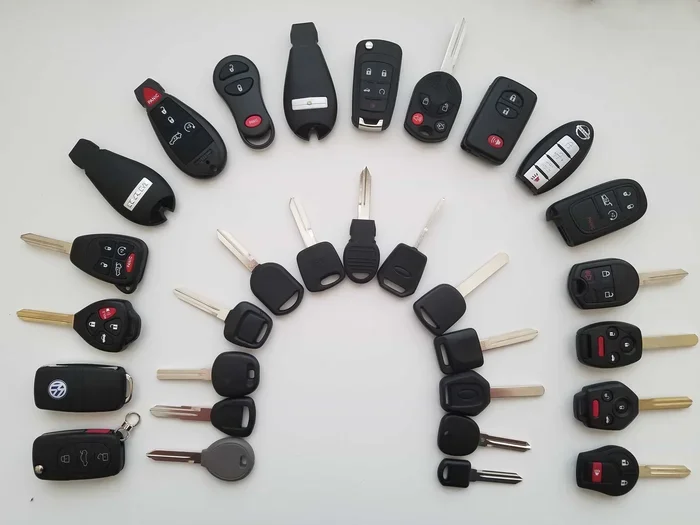
- Multiple Fob Types: Different Acura MDX model years use slightly different key fob designs, so the opening method may vary.
📑 Table of Contents
- Why Your Acura MDX Key Fob Battery Dies
- What Battery Does Your Acura MDX Key Fob Need?
- Tools You Will Need
- Step-by-Step Guide: How to Change the Battery in an Acura MDX Key Fob
- Troubleshooting After Battery Replacement
- Preventing Key Fob Battery Problems
- Acura MDX Key Fob Battery Replacement Cost
- Key Takeaways
- Conclusion
Why Your Acura MDX Key Fob Battery Dies
Understanding why your key fob battery dies helps you prevent it from happening at the worst possible moment. Like all remote devices, your Acura MDX smart key relies on a small button cell battery to send signals to your vehicle. Over time, that battery loses its charge. The good news is that the average Acura MDX key fob battery lasts between two and four years, depending on how often you use the remote features.
Common Signs of a Dying Key Fob Battery
Your key fob usually gives you warning signs before it completely dies. Watch for these red flags:
- Reduced signal range: You have to stand closer to the car for the remote to work.
- Delayed response: There is a noticeable lag between pressing the button and the car responding.
- Intermittent working: The fob works sometimes but not others, especially in cold weather.
- Dashboard warning: Some Acura MDX models display a key fob battery warning on the instrument cluster.
- Lock/unlock fails: The remote locking and unlocking functions stop working entirely.
If you notice any of these symptoms, it is a great time to replace the battery. Waiting too long can leave you stranded with a completely dead fob. The good news is that learning how to change the battery in an Acura MDX key fob is one of the easiest maintenance tasks you will ever do.
How Long Does an Acura MDX Key Fob Battery Last?
Most button cell batteries in Acura MDX key fobs last between two and four years. However, several factors can shorten that lifespan. Frequent use of the remote start feature drains the battery faster. Cold weather also reduces battery performance. If you live in a very cold climate or use your remote features heavily, you may need to replace the battery more often. Keeping a spare battery in your glove box is a smart move for any Acura MDX owner.
What Battery Does Your Acura MDX Key Fob Need?
Choosing the correct battery is the most important step in this entire process. Using the wrong battery can damage your key fob or prevent it from working properly. The vast majority of Acura MDX key fobs use a standard CR2032 lithium button cell battery. This is one of the most common battery types in the world, and you can find it at virtually any grocery store, pharmacy, or auto parts shop.
CR2032 vs. CR2025: What is the Difference?
Some older Acura MDX models may use a CR2025 battery instead of the CR2032. These two batteries look very similar, but they are not interchangeable. The CR2032 is 3.0 millimeters thick, while the CR2025 is 2.5 millimeters thick. Using the wrong size can cause the battery to fit loosely or not make proper contact. Always check your owner’s manual or look at the old battery before purchasing a replacement. The model number is printed right on the battery itself.
Recommended Battery Brands
Not all batteries are created equal. When shopping for a replacement, look for trusted brands. Duracell, Energizer, and Panasonic all make excellent CR2032 batteries. Avoid cheap generic brands that may leak or lose charge quickly. A quality battery ensures your Acura MDX key fob works reliably for years to come. Spending an extra dollar or two on a name-brand battery is well worth it.
Tools You Will Need
One of the best things about this job is how little you need. You probably already have everything in your home. Here is a simple list of tools and materials:
- CR2032 or CR2025 battery (depending on your model year)
- Small flathead screwdriver or a thin plastic pry tool
- Soft cloth or microfiber towel to protect the fob
- A well-lit workspace
- Your owner’s manual for reference
That is it. You do not need any special diagnostic equipment or expensive tools. A small flathead screwdriver works perfectly for prying open the key fob shell. Some people prefer a plastic pry tool because it eliminates any risk of scratching the fob casing. Either option works great. The key is to go slowly and be gentle. The key fob clips are small but surprisingly sturdy, so there is very little risk of breaking them if you are careful.
Step-by-Step Guide: How to Change the Battery in an Acura MDX Key Fob
Now for the part you have been waiting for. This step-by-step walkthrough will show you exactly how to replace the battery in your Acura MDX key fob. Follow each step carefully, and you will have a working remote in no time.
Step 1: Locate the Emergency Mechanical Key
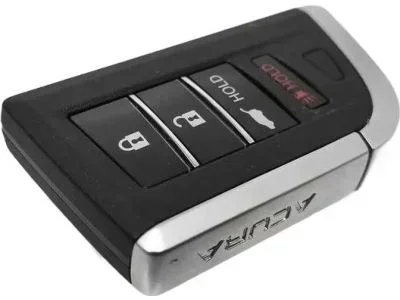
Every Acura MDX key fob includes a hidden mechanical key blade. This is your backup if the battery dies completely. Look along the side of the fob for a small release button or slider. Press or slide it, and the mechanical key will pop out. Set the mechanical key aside for now. You will not need it for the battery swap, but it is good to know where it is.
Step 2: Find the Seam and Open the Fob
Hold your Acura MDX key fob in one hand. Look closely at the edges. You will notice a thin seam running around the perimeter of the fob. This is where the two halves of the shell meet. Insert your flathead screwdriver or plastic pry tool into the seam near the bottom of the fob. Work the tool gently around the edge to release the clips. Go slowly. The clips are small but will pop free with light pressure. Once the top half separates, set it aside carefully.
Step 3: Remove the Old Battery
With the fob open, you will see the battery sitting in a small compartment. It is usually held in place by a tiny metal clip or simply sits in a slot. Note which side of the battery faces up. The positive side (marked with a +) should be facing upward in most models. Use your screwdriver or a fingertip to gently lift the old battery out. Dispose of the old battery properly. Do not throw it in the regular trash. Many stores have battery recycling bins.
Step 4: Insert the New Battery
Take your new CR2032 battery and hold it with the positive side facing up. Drop it into the compartment, making sure it sits flat and secure. The metal clip, if present, should snap back into place to hold the battery. Give it a gentle push to confirm it is seated correctly. The battery should not wobble or feel loose. A snug fit ensures good electrical contact.
Step 5: Reassemble the Key Fob
Align the top half of the fob with the bottom half. Press them together firmly until you hear the clips click into place. Run your finger around the seam to make sure everything is flush and even. Do not force it. If the halves do not line up, check that no plastic tabs are caught or misaligned. A properly reassembled fob should feel solid with no gaps.
Step 6: Test Your Key Fob
Now the moment of truth. Stand near your Acura MDX and press the lock button. You should hear the car respond immediately. Test the unlock button, the remote start button, and the trunk release if your fob has one. If all functions work, congratulations. You just successfully changed your Acura MDX key fob battery. If nothing happens, do not worry. We will cover troubleshooting in the next section.
Troubleshooting After Battery Replacement
Sometimes, even after installing a new battery, the key fob may not work right away. This is normal and usually easy to fix. Do not panic. Here are the most common issues and their solutions.
The Key Fob Still Does Not Work
If your Acura MDX key fob still does not respond after a battery change, the first thing to check is the battery orientation. Make sure the positive side is facing up and the battery is fully seated. Next, check for corrosion on the battery contacts. A tiny bit of corrosion can prevent the fob from working. If you see any greenish or white buildup, gently clean the contacts with a dry cloth or a cotton swab dipped in white vinegar.
The Fob Works but Has a Weak Signal
A weak signal after a battery replacement usually means the new battery is not making full contact. Remove the battery and reseat it, pressing down firmly. You can also try a different brand of CR2032 battery, as some batteries have slightly different dimensions that affect fit. If the signal is still weak, the fob may need to be reprogrammed or reset. Consult your owner’s manual for the reset procedure specific to your Acura MDX model year.
Do You Need to Reprogram the Key Fob?
In most cases, changing the battery does not require reprogramming your Acura MDX key fob. The system retains its programming. However, if the fob still does not work after a battery change, a reset may be necessary. The reset process varies by model year. Some models require you to insert the key into the ignition and cycle it to the ON position several times. Others require you to press a specific sequence of buttons on the fob itself. Your owner’s manual is the best resource for the exact reset steps for your vehicle.
Preventing Key Fob Battery Problems
Once you know how to change the battery in an Acura MDX key fob, you can take steps to prevent future issues. A little proactive care goes a long way toward keeping your remote working smoothly.
Tips to Extend Key Fob Battery Life
- Avoid extreme temperatures: Hot and cold weather drain batteries faster. Store your fob in a cool, dry place when possible.
- Do not press buttons unnecessarily: Every press uses a small amount of battery power. Be intentional with your remote actions.
- Keep spare batteries on hand: Store a spare CR2032 battery in your glove box or console. You will be glad you did.
- Replace batteries proactively: Do not wait for the fob to die completely. Replace the battery at the first sign of weakness.
- Use quality batteries: Name-brand batteries last longer and are less likely to leak, which can damage the fob.
When to Replace the Entire Key Fob
A battery change fixes most key fob problems, but sometimes the issue is bigger. If you have replaced the battery multiple times and the fob still malfunctions, the internal electronics may be failing. Water damage, drops, and general wear and tear can all cause permanent damage. In that case, you may need to purchase a replacement fob. You can buy a new Acura MDX key fob from your dealer or from aftermarket suppliers. Programming a new fob is straightforward and can often be done at home following the instructions in your owner’s manual.
Acura MDX Key Fob Battery Replacement Cost
One of the best things about this repair is how affordable it is. A CR2032 battery costs between one and three dollars at most stores. Even if you buy a premium brand, you are unlikely to spend more than five dollars. Compare that to a trip to the dealer, which could cost you well over a hundred dollars for the same simple task. Doing it yourself saves you both money and time. The entire process takes about five minutes from start to finish.
For Acura MDX owners who prefer professional service, most dealerships and quick-lube shops will replace the battery for a small fee. However, once you know how to do it yourself, there is no reason to pay someone else for such a simple job. Think of it as a basic maintenance skill, just like checking your oil or tire pressure. Once you learn it, you will never have to worry about a dead key fob battery again.
Key Takeaways
- Quick and Easy: Changing the battery in your Acura MDX key fob takes just a few minutes and requires no special skills.
- Affordable: A replacement CR2032 battery costs only a few dollars, making this one of the cheapest car maintenance tasks you will ever do.
- No Dealer Required: You can complete the entire process at home with basic tools found in most households.
- Know the Right Battery: Most Acura MDX models use a CR2032, but always verify your specific model year to avoid buying the wrong size.
- Reset After Replacement: A quick reset may be needed if the fob does not work immediately after the battery swap.
- Prevention is Key: Keeping spare batteries on hand and replacing them at the first sign of weakness prevents inconvenient breakdowns.
Conclusion
Knowing how to change the battery in an Acura MDX key fob is one of the most useful skills any Acura owner can have. It is fast, inexpensive, and incredibly simple. You do not need to visit a dealer or pay for expensive repairs. With just a new CR2032 battery and a small screwdriver, you can bring your key fob back to life in minutes. The steps outlined in this guide apply to most Acura MDX model years, and the process is nearly identical across different fob designs.
Take a moment right now to check your key fob battery health. If you have noticed any of the warning signs we discussed, do not wait for the fob to die completely. Grab a replacement battery and follow the steps above. You will be amazed at how easy it is. Keep a spare battery in your car, and you will never be caught off guard by a dead key fob again. Your Acura MDX deserves the best care, and this simple maintenance task is a great place to start.
Share this guide with fellow Acura MDX owners. You never know who might be struggling with a dead key fob right now. A little knowledge goes a long way, and this is one piece of information everyone can use. Stay prepared, stay informed, and keep your Acura MDX running at its best.
Frequently Asked Questions
What type of battery does the Acura MDX key fob use?
Most Acura MDX key fobs use a CR2032 lithium button cell battery. Some older models may use a CR2025. Always check your owner’s manual or the markings on the old battery before purchasing a replacement to ensure you get the correct size.
How long does an Acura MDX key fob battery last?
The battery in an Acura MDX key fob typically lasts between two and four years. Usage frequency, weather conditions, and battery quality all affect how long the battery lasts. If you use remote start frequently or live in a cold climate, the battery may need replacing sooner.
Do I need to reprogram my key fob after changing the battery?
In most cases, no. Changing the battery does not erase the programming on your Acura MDX key fob. However, if the fob does not work after replacement, a simple reset procedure may be needed. Refer to your owner’s manual for the specific reset steps for your model year.
Can I use a generic or off-brand CR2032 battery?
Yes, you can use a generic CR2032 battery, but we recommend sticking with trusted brands like Duracell, Energizer, or Panasonic. Quality batteries provide more consistent performance and are less likely to leak, which can damage your key fob internals.
What should I do if my key fob still does not work after replacing the battery?
First, double-check that the battery is inserted correctly with the positive side facing up. Clean any corrosion from the battery contacts with a dry cloth. If the fob still does not work, try a different brand of battery. If none of these steps resolve the issue, the fob’s internal electronics may be damaged and require professional inspection.
How much does it cost to change the battery in an Acura MDX key fob?
A CR2032 battery costs between one and five dollars, making this one of the most affordable car maintenance tasks you can do yourself. If you have it done at a dealership or shop, you may pay a small service fee, but the battery itself is very inexpensive.