How to Remote Start a Nissan and Stay Warm in Winter
Learning how to remote start a Nissan is one of the best upgrades you can make for cold winter mornings. This guide walks you through every method, from factory systems to aftermarket kits, so you can warm up your car before you even step outside. Whether you drive a Nissan Sentra, Rogue, or Altima, you will find clear steps, expert tips, and practical advice to stay warm and safe all season long.
There is nothing worse than stepping out into a frozen parking lot and climbing into a car that feels like an icebox. Your breath freezes. The steering wheel sticks to your gloves. And the defroster? It takes forever to clear the windshield. This is exactly the kind of miserable morning experience that a how to remote start a Nissan guide is designed to fix.
A remote start system lets you fire up your Nissan engine from the comfort of your warm home. You can turn on the heater, melt the ice on your windows, and even charge your phone before you walk out the door. It is not a luxury anymore. It is a practical, everyday convenience that makes winter driving dramatically better. In this guide, we will cover everything you need to know about remote starting your Nissan, from factory features to aftermarket options, setup steps, and smart winter tips.
Key Takeaways
- Factory remote start systems are built into many newer Nissan models and offer the easiest, most seamless experience.
- Aftermarket remote start kits are a great option for older Nissan models that lack built-in remote start features.
- Pre-conditioning your car with a remote start saves time, melts ice, and warms the cabin before you drive.
- Nissan Intelligent Key and key fob buttons make the remote start process simple and quick for daily use.
- Common mistakes like idling too long or skipping maintenance can reduce the effectiveness of your remote start system.
- Winter driving safety improves dramatically when your car is warm and defrosted before you hit the road.
- Compatibility matters always check your Nissan model year and trim to confirm remote start support.
📑 Table of Contents
- Why Remote Starting a Nissan Makes Winter Driving Better
- Factory Remote Start vs Aftermarket Remote Start Systems
- How to Set Up Your Nissan Remote Start System
- Best Nissan Models with Remote Start Capability
- Tips for Getting the Most Out of Your Nissan Remote Start
- Common Mistakes People Make When Remote Starting a Nissan
- How Remote Start Improves Your Winter Driving Experience
- Conclusion
Why Remote Starting a Nissan Makes Winter Driving Better
Cold mornings are hard enough without having to scrape ice off your car for ten minutes. A remote engine start changes the entire morning routine. Instead of bundling up and standing on the driveway, you can start your Nissan from inside and let the cabin warm up while you finish your coffee.
Here are the real benefits that make remote starting worth it:
- Warmer cabin when you step outside, so no frozen steering wheel or icy seats.
- Faster defrost because the heating system runs before you drive.
- Better visibility since your windshield clears before you leave the house.
- Engine health because a warmed-up engine runs more efficiently in cold weather.
- Comfort and convenience that saves you time every single morning.
When you learn how to remote start a Nissan properly, you unlock all of these benefits without any extra effort. The system works with your existing key fob or Nissan Intelligent Key, so there is no new device to carry around.
How Cold Weather Affects Your Nissan
Cold temperatures affect nearly every part of your car. The battery struggles to hold a charge. The engine oil thickens and flows slower. Tires lose pressure. And the cabin takes forever to heat up because the engine needs time to reach operating temperature. Remote starting gives your Nissan a head start on all of these problems.
By letting the engine run for a few minutes before you drive, you allow the oil to circulate, the engine to warm up, and the heating system to kick in. This simple step reduces wear and tear and makes your daily commute far more comfortable. It is one of the easiest ways to take better care of your vehicle during the winter months.
Factory Remote Start vs Aftermarket Remote Start Systems
Not all Nissan models come with a built-in remote start system. And for those that do, the features and range can vary. Understanding the difference between factory and aftermarket options is the first step in choosing the right solution for your car.
Factory Remote Start on Newer Nissan Models
Many newer Nissan vehicles come equipped with a factory remote start system. This feature is built right into the car’s computer and works seamlessly with your Nissan key fob. You simply press the remote start button on your key fob, and the engine fires up within seconds.
The factory system is the easiest option because it requires no extra installation. It is designed specifically for your Nissan model, so everything works together perfectly. Most factory systems also include safety features like automatic engine shutoff if the car is moved or if the hood is opened.
Some Nissan models that commonly include factory remote start are the Nissan Altima, Nissan Maxima, Nissan Rogue, and Nissan Pathfinder. However, availability depends on the model year and trim level. Always check your owner’s manual or ask your dealer to confirm whether your specific Nissan has this feature.
Aftermarket Remote Start Kits for Older Nissan Models
If your Nissan does not have a factory remote start, you can still add one. Aftermarket remote start kits are available for almost every Nissan model, including older vehicles. These kits include a control module, a bypass module, and a remote transmitter that you install yourself or have a professional install.
Popular aftermarket brands include Compustar, Viper, and DroneMobile. These systems offer features like long-range control, smartphone integration, and even GPS tracking. Some kits connect to your phone through an app, so you can start your Nissan from anywhere with a cell signal.
Aftermarket installation typically costs between $200 and $500, depending on the brand and features. While it is a bigger upfront investment than using a factory system, it adds significant value to older Nissan models that would otherwise lack this convenience.
Comparison Table: Factory vs Aftermarket Remote Start
| Feature | Factory Remote Start | Aftermarket Remote Start |
|---|---|---|
| Installation | No installation needed | Professional or DIY install required |
| Cost | Included with vehicle | $200 to $500+ |
| Range | Typically 300 to 600 feet | Up to 3,000 feet or more |
| Smartphone Control | Limited or none | Available with advanced kits |
| Compatibility | Specific to newer models | Works with most Nissan models |
| Safety Features | Built into car systems | Varies by brand and kit |
How to Set Up Your Nissan Remote Start System
Setting up your remote start system depends on whether you have a factory system or an aftermarket kit. Both methods are straightforward, and we will walk you through each one step by step.
Setting Up Factory Remote Start
If your Nissan has a factory remote start, the setup process is simple. Follow these steps to get started:
- Enter your Nissan and make sure all doors are closed.
- Press the unlock button on your key fob to lock all doors.
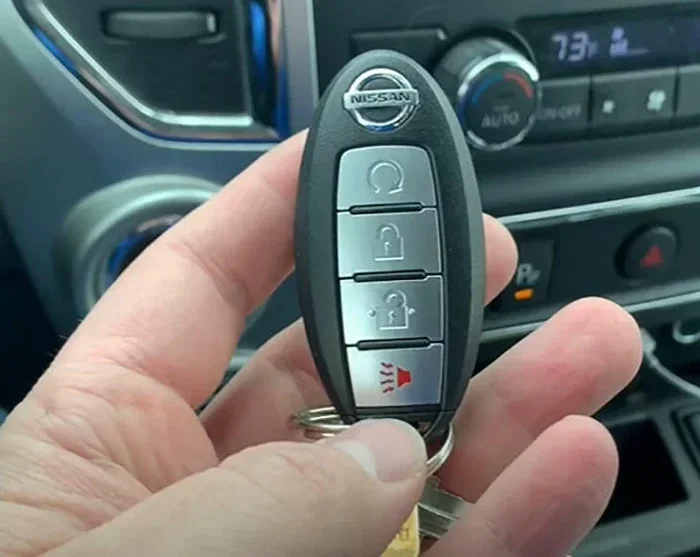
- Press the remote start button on your key fob. On most models, this is a separate button with a circular arrow icon.
- Wait a few seconds for the engine to start. You will see the dashboard lights turn on and hear the engine idle.
- Adjust the climate control using your NissanConnect or manual controls to set your preferred temperature.
Most factory systems allow you to run the engine for 10 to 15 minutes before it automatically shuts off. You can also extend the runtime by repeating the remote start process within the allowed window.
Setting Up an Aftermarket Remote Start Kit
Installing an aftermarket remote start kit requires a bit more work. Here is a general overview of the process:
- Choose the right kit for your Nissan model and year. Check compatibility before purchasing.
- Install the control module under the dashboard, following the kit instructions carefully.
- Wire the bypass module to your Nissan’s ignition system. This step is critical for proper operation.
- Connect the remote transmitter and test the range from different locations around your home.
- Test the entire system before relying on it daily. Make sure the engine starts, the climate control works, and the safety features engage properly.
If you are not comfortable with wiring and electronics, we strongly recommend having a professional handle the installation. A local auto electronics shop can usually install a remote start kit in one to two hours for a reasonable fee.
Quick Tips for Remote Start Setup
- Always read your owner’s manual before attempting any setup or installation.
- Keep your key fob battery fresh because a weak battery will reduce the range and reliability.
- Test your system regularly especially before the coldest months of winter.
- Use the correct remote start procedure for your specific Nissan model, as steps can vary.
Best Nissan Models with Remote Start Capability
Not every Nissan comes with remote start as standard equipment. Some models offer it only on higher trims, while others require the aftermarket route. Here is a closer look at the best Nissan models for remote starting.
The Nissan Altima is one of the most popular sedans in the lineup, and many recent models include a factory remote start system. The Altima offers a comfortable cabin and excellent climate control, making it a great choice for cold weather drivers. When paired with remote start, the Altima warms up quickly and provides a comfortable ride every morning.
The Nissan Rogue is a compact SUV that also supports remote start on many trims. The Rogue is especially popular among families because of its spacious interior and strong safety features. Adding a remote start to a Rogue means your kids can get into a warm car on freezing mornings, which is a huge win for any parent.
The Nissan Maxima is a full-size sedan that comes with a premium experience, and remote start is often included on higher trims. The Maxima has a powerful engine and a luxurious cabin, and starting it remotely before your commute makes the whole experience feel more refined.
For truck lovers, the Nissan Frontier is a solid workhorse. While remote start is not always standard on every trim, aftermarket kits work perfectly with the Frontier and are a popular upgrade among owners who use their truck in cold climates.
Nissan Models Without Factory Remote Start
Some Nissan models, like the Nissan Sentra and Nissan Kicks, do not include factory remote start on all trims. However, aftermarket kits work great with these models. The Sentra is an affordable compact sedan, and adding a remote start kit is a cost-effective way to bring this convenience feature to your daily drive.
The Nissan Leaf and other electric models also support remote climate control through the NissanConnect app. While these vehicles do not have a traditional engine to start, you can still pre-condition the cabin by turning on the heat or cooling system remotely. This is a different approach to the same goal of staying comfortable in extreme temperatures.
Tips for Getting the Most Out of Your Nissan Remote Start
Remote starting your Nissan is simple, but a few smart habits will help you get the best results and avoid common problems. Here are practical tips that every Nissan owner should know.
Use the Climate Control Before You Start Driving
One of the best features of remote starting is the ability to set the cabin temperature before you get in. Most Nissan models allow you to adjust the climate control from the key fob or through the NissanConnect app. Set the temperature to your preferred level, and by the time you walk out the door, the car will be warm and ready.
In the winter, set the heat to a comfortable level and turn on the defroster. This clears frost and fog from the windshield while the engine warms up. You will save time and drive more safely because your visibility will be clear from the moment you start moving.
Mind the Idling Time Limits
Most remote start systems have a built-in idling limit, usually around 10 to 15 minutes. After that time, the engine will automatically shut off to prevent fuel waste and reduce emissions. If you need more warm-up time, you can restart the system, but try not to let the car idle for too long.
Excessive idling wastes fuel and can cause carbon buildup in the engine over time. A few minutes of idling is plenty to warm up the cabin and defrost the windows. Once you start driving, the engine will warm up faster under light load than it does while sitting still.
Keep Your Key Fob Within Range
Your remote start system works through a signal from your key fob. The range is typically 300 to 600 feet for factory systems and up to 3,000 feet for aftermarket kits. However, walls, buildings, and other obstacles can reduce the effective range.
Make sure you are within range when you press the remote start button. If the engine does not start, check that your key fob battery is fresh and that you are not too far from the vehicle. Carrying your key fob in a coat pocket or bag is usually fine, but keeping it close to your body can boost signal strength.
Maintain Your Remote Start System Regularly
Like any electronic system in your car, your remote start needs regular maintenance to work reliably. Replace your key fob battery at least once a year. Check the wiring on aftermarket kits to make sure nothing has come loose. And have your system tested before winter arrives so you are not caught off guard on the coldest morning of the year.
For factory systems, the main maintenance task is simply keeping the key fob battery fresh. For aftermarket kits, a quick visual inspection of the wiring and modules once or twice a year goes a long way in preventing issues.
Use Remote Start Safely
Safety should always come first when using a remote start system. Never remote start your Nissan in an enclosed space like a garage. Even with the garage door open, exhaust fumes can build up quickly and become dangerous. Always remote start your car in an open, well-ventilated area.
Also, make sure your car is in park before you remote start it. Most systems will not start the engine if the transmission is not in park, but it is a good habit to double-check every time. And never let your car idle unattended in a public parking lot, as this can attract thieves and may violate local laws.
Common Mistakes People Make When Remote Starting a Nissan
Even though remote starting is straightforward, some common mistakes can reduce the effectiveness of the system or even cause problems. Here are the errors to avoid.
Forgetting to lock the doors. Most remote start systems require the car to be locked before they will engage. If you forget to press the lock button, the engine will not start. Always make it a habit to lock your doors first, then press the remote start button.
Leaving the car idling too long. Some people start their Nissan remotely and then go back inside for 20 or 30 minutes. This wastes fuel, increases emissions, and can cause unnecessary engine wear. Keep the idling time to 10 to 15 minutes maximum.
Ignoring warning lights. If your dashboard shows a warning light after remote starting, do not ignore it. The system may have a fault, or there could be an issue with the engine or emissions system that needs attention.
Using the wrong key fob. Some aftermarket systems require a specific remote transmitter. Using the wrong fob or a generic replacement can cause the system to malfunction. Always use the remote that came with your kit or one that is specifically compatible.
Skipping winter maintenance. Cold weather puts extra stress on your car’s battery, fluids, and electrical systems. Skipping routine maintenance during winter increases the chance that your remote start system will not work when you need it most.
How Remote Start Improves Your Winter Driving Experience
Beyond the obvious comfort of a warm car, remote starting has real benefits for your safety and your vehicle’s longevity. When your Nissan is warm before you drive, the oil flows freely, the brakes respond better, and the tires have better grip on cold pavement.
You also spend less time distracted by scraping ice and adjusting the defroster while driving. That means more attention on the road and less risk of accidents. For parents, remote start means the car seats are warm and the kids are more comfortable on the way to school. For commuters, it means a stress-free start to the day instead of a battle with the cold.
The NissanConnect app adds another layer of convenience for models that support it. You can start your car, adjust the temperature, and check your vehicle status from your smartphone. This feature is especially useful if you forget to remote start before leaving the house or if you want to warm up your car while still at work.
Overall, learning how to remote start a Nissan and using it properly transforms your winter driving experience. It is a small change that delivers big results in comfort, safety, and vehicle care.
Conclusion
Remote starting your Nissan is one of the simplest and most effective ways to make winter driving easier and more enjoyable. Whether you have a factory system or an aftermarket kit, the process is straightforward and the benefits are immediate. You stay warmer, your car warms up faster, and your morning routine becomes smoother.
By following the setup steps, using smart tips, and avoiding common mistakes, you can get the most out of your Nissan remote start system all winter long. Remember to maintain your key fob, keep the idling time reasonable, and always prioritize safety. With the right approach, your Nissan will be ready to face the coldest days of the year with confidence.
So take a few minutes to understand your remote start system, test it before the temperatures drop, and enjoy the warmth and convenience it brings. Once you experience the difference a remote start makes, you will wonder how you ever managed winter mornings without it.
Frequently Asked Questions
Can I remote start any Nissan model?
Not every Nissan model comes with factory remote start. Newer models like the Altima, Rogue, and Maxima often include it on higher trims. For older models or trims without factory support, you can add an aftermarket remote start kit that works with your specific Nissan.
How far can I be from my Nissan when using remote start?
Factory remote start systems typically work within 300 to 600 feet. Aftermarket kits can extend that range to 3,000 feet or more, especially if they include smartphone app control through GPS and cellular connectivity.
Is it safe to remote start my Nissan in cold weather?
Yes, remote starting is safe when used correctly. Always remote start in an open area, never in an enclosed garage. The engine will warm up safely, and the system includes automatic shutoff features to prevent overheating or fuel waste.
How long can I let my Nissan idle when remote starting?
Most Nissan remote start systems limit idling to 10 to 15 minutes before automatically shutting off the engine. This prevents excessive fuel consumption and reduces emissions. You can restart the system if you need additional warm-up time.
Do I need a special key fob for Nissan remote start?
Factory remote start uses your existing Nissan Intelligent Key or key fob. Aftermarket systems come with their own remote transmitter. Always check compatibility before purchasing any replacement fobs or additional remotes.
Can I use remote start with my NissanConnect app?
NissanConnect app support varies by model and year. Some newer Nissan vehicles allow you to start the engine, adjust climate settings, and check vehicle status through the app on your smartphone. Check with your dealer to confirm app compatibility for your specific model.