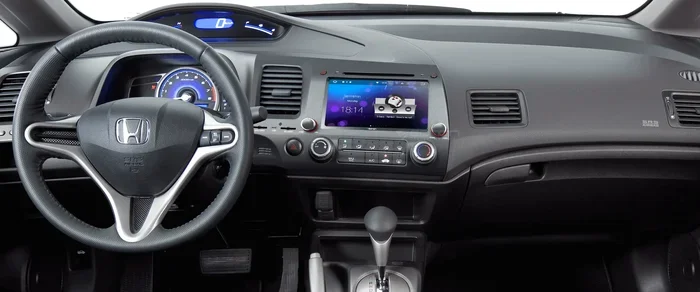
How to Reset the Radio on a Honda Civic Step by Step
Resetting the radio on a Honda Civic is simple and fast when you follow the right steps. Whether your Honda Civic radio is locked, frozen, or acting up, this guide walks you through every method. You will learn battery disconnect tricks, reset button locations, and radio code retrieval tips. No mechanic needed — just a few minutes and basic tools. Keep your Honda Civic audio system running smoothly with these proven solutions.
Have you ever turned the key in your Honda Civic and found the radio completely dead? Or maybe the screen is frozen, and no button seems to work. It is a frustrating experience, but the good news is that fixing it is usually very easy.
This guide will show you exactly how to reset the radio on a Honda Civic, step by step. We cover every method that works across different model years. Whether you have a newer model with a touchscreen or an older unit with physical buttons, you will find the right fix here.
You do not need to be a car expert. You do not even need special tools. In most cases, the whole process takes less than ten minutes. Let us get your Honda Civic radio working again.
Key Takeaways
- Easy Reset Methods: Multiple ways to reset your Honda Civic radio, from simple button presses to battery disconnects.
- No Special Tools Required: Most reset methods use tools you already have at home.
- Radio Code Retrieval: Learn how to find your Honda Civic radio code if it gets locked after a power loss.
- Common Problems Solved: Fixes for frozen screens, no sound, and display issues.
- Preventive Tips: Simple habits to keep your Honda Civic audio system in great shape.
- Works Across Models: Methods apply to many Honda Civic years and trims.
📑 Table of Contents
Why Your Honda Civic Radio Might Need a Reset
Before we dive into the steps, it helps to understand why the radio acts up in the first place. A reset is not just a quick fix. It clears temporary glitches and restores your Honda Civic audio system to its normal state.
Here are the most common reasons a Honda Civic radio needs a reset:
- Battery disconnect or dead battery: When you disconnect the battery for service, the radio often loses its settings and may lock up.
- Power surge or electrical issue: A sudden power spike can freeze the infotainment system.
- Software glitch: Like any electronic device, the radio software can sometimes hang or crash.
- Anti-theft lock activation: After a battery death, the radio may demand a code to prevent theft.
- Frozen or unresponsive screen: The display stops responding to button presses.
- No sound or distorted audio: The radio turns on but produces no audio or crackling sounds.
Knowing the cause helps you pick the right reset method. Most of the time, a simple reset solves all of these problems. Let us look at each method in detail.
How to Reset the Radio on a Honda Civic
There are three main ways to reset the radio on a Honda Civic. Each method works for different situations. We will walk you through each one clearly.
Method 1: Using the Reset Button
The easiest way to reset your Honda Civic radio is by using the reset button. Most Honda Civic models have a small reset button on the radio unit itself. Here is how to find and use it.
First, turn the ignition to the ON position. You do not need to start the engine. Just turn the key to the position where the dashboard lights come on. Now look at the radio faceplate carefully.
On many Honda Civic models, the reset button is a small pinhole on the front or side of the radio unit. It may be labeled as “RESET.” If you do not see a button, check around the volume knob area or near the bottom edge of the radio.
Use a paperclip or a small pin to press and hold the reset button for about ten seconds. The radio screen should go dark and then come back on. Once it restarts, the factory settings are restored.
Quick Tip: If the radio does not respond after the first try, wait thirty seconds and try again. Sometimes the system needs a moment to fully power down before it resets.
Method 2: Disconnecting the Battery
If the reset button method does not work, disconnecting the battery is the next best option. This method fully resets the electrical system, including the radio. It works well when the radio is completely frozen or unresponsive.
Here is how to do it safely:
- Turn off the ignition and remove the key.
- Open the hood of your Honda Civic.
- Locate the battery. You will see the positive (+) and negative (-) terminals.
- Using a wrench, loosen the nut on the negative (-) terminal first.
- Carefully lift the negative cable off the battery post.
- Wait for at least fifteen minutes. This allows the system to fully discharge.
- Reconnect the negative cable and tighten the nut securely.
- Turn the ignition to ON and check if the radio is working.
Important Note: Always disconnect the negative terminal first. This prevents short circuits. Also, be aware that disconnecting the battery may reset other settings like the clock, radio presets, and power window calibration.
After reconnecting the battery, you may need to enter a radio code. We will cover that in the next section. Do not worry — it is a simple process.
Method 3: Using the Radio Code
If your Honda Civic radio displays a “CODE” or “LOCKED” message after a reset, you need to enter the radio security code. This is an anti-theft feature built into Honda vehicles. It is easy to handle once you know the code.
First, check your owner’s manual. The radio code is often printed on a card or sticker inside the manual booklet. If you no longer have the manual, look for a small card that came with the car when you purchased it.
If you cannot find the code, you have a few options:
- Call a Honda dealer: They can retrieve the code using your vehicle identification number (VIN).
- Check online retrieval tools: Some Honda owners have found the code through Honda’s official website.
- Use a radio code calculator: There are online tools that generate the code based on your serial number.
Once you have the code, turn on the radio. It will ask you to enter a four-digit code. Use the preset buttons (1, 2, 3, 4, 5, 6) to enter each digit. Press the seek or tuning knob to confirm each number. Once all four digits are entered correctly, the radio unlocks and works normally.
Quick Tip: Write down your radio code and store it in a safe place. This saves you time if the battery dies again in the future.
Honda Civic Radio Code Retrieval Made Easy
Retrieving the radio code for a Honda Civic is straightforward. The code is unique to your vehicle and radio unit. Honda uses it as a security measure to prevent theft.
Here is what you need to retrieve the code:
- Your VIN: The vehicle identification number is found on the dashboard near the windshield and on the driver’s side door jamb.
- The radio serial number: This is displayed on the screen when the radio shows “CODE” or “LOC.”
- Your Honda Civic model year: Different years may use different code retrieval methods.
Follow these steps to retrieve the code:
- Turn the radio on. It should display a code or “LOC” message.
- Write down the serial number shown on the screen.
- Visit a Honda dealer or call their customer service line.
- Provide the serial number and VIN.
- They will give you the four-digit code over the phone.
- Enter the code using the radio preset buttons.
Some Honda Civic models from 2006 and newer may allow you to retrieve the code directly through the infotainment menu. Check your owner’s manual for model-specific instructions.
Common Honda Civic Radio Problems and How to Fix Them
Resetting the radio fixes many issues, but some problems need extra attention. Here are the most common Honda Civic radio problems and their solutions.
Radio Is Completely Dead
If the radio will not turn on at all, the first thing to check is the fuse. Open the fuse box under the dashboard on the driver’s side. Look for the radio fuse, which is usually labeled “RADIO” or “AUDIO.” If the fuse is blown, replace it with a new one of the same amperage.
Also check if the antenna cable is connected properly. A loose antenna connection can make the radio appear dead.
No Sound but Radio Turns On
If the display works but you hear nothing, try these fixes:
- Check that the volume is not turned all the way down.
- Make sure the mute button is not activated.
- Verify that the correct audio source is selected (FM, AM, or auxiliary).
- Check the speaker fuses in the fuse box.
Screen Is Frozen or Unresponsive
A frozen screen is one of the most common reasons people search for how to reset radio on a Honda Civic. The battery disconnect method usually fixes this. Simply wait fifteen minutes with the battery disconnected and reconnect it. The screen should restart normally.
Static or Poor Reception
If your Honda Civic radio has static or weak reception, the issue is usually the antenna. Check that the antenna cable is firmly connected to the back of the radio unit. You can also inspect the antenna mast on the roof for damage or corrosion.
Tips to Keep Your Honda Civic Radio in Top Shape
Prevention is always better than repair. Here are some simple tips to keep your Honda Civic audio system working perfectly for years.
- Keep the firmware updated: If your Honda Civic has a touchscreen, check for software updates at the dealer.
- Use a surge protector: A quality surge protector for your car’s electrical system can prevent power-related glitches.
- Avoid forceful button presses: The buttons on the Honda Civic radio are sensitive. Gentle presses work better.
- Store the radio code safely: Keep a photo or copy of your radio code in your phone or glove box.
- Clean the radio unit regularly: Dust can build up around buttons and affect responsiveness.
- Have the battery tested regularly: A weak battery can cause power drops that affect the radio.
Following these simple habits means you are less likely to face radio problems in the future. Your Honda Civic audio system will stay reliable and clear.
When to Seek Professional Help
Most radio resets are simple DIY fixes. But sometimes, professional help is the right call. If you have tried all the methods in this guide and the radio still does not work, it is time to see a specialist.
Here are signs you should visit a mechanic or Honda dealer:
- The radio unit shows visible physical damage.
- You hear a burning smell or see smoke from the dashboard.
- The reset methods do not work after multiple attempts.
- The radio works intermittently, turning on and off randomly.
- Other electrical systems in the car are also malfunctioning.
A professional can diagnose deeper electrical issues that a simple reset cannot fix. They also have access to Honda-specific diagnostic tools that can read error codes from the audio system.
Remember, trying to open or repair the radio unit yourself can void your warranty. Always check with a professional before taking apart any dashboard components.
Final Thoughts
Resetting the radio on a Honda Civic does not have to be stressful. With the methods in this guide, you can handle most radio issues on your own. Whether it is a simple reset button press, a battery disconnect, or entering a radio code, you now have the knowledge to fix the problem quickly.
The key is to stay calm and follow the steps in order. Start with the easiest method and work your way up. Most Honda Civic radio issues are resolved with just one or two of these techniques.
Keep your radio code stored safely, and take good care of your car’s electrical system. A little prevention goes a long way. Now you know exactly what to do the next time your Honda Civic radio gives you trouble.
Reset your Honda Civic radio today and enjoy clear, uninterrupted sound on every drive.
Frequently Asked Questions
How do I reset the radio on my Honda Civic after a battery change?
After changing the battery, turn the ignition to ON and look for a “CODE” or “LOC” message on the screen. Enter the four-digit radio code using the preset buttons. If you do not have the code, check your owner’s manual or contact a Honda dealer with your VIN.
Why does my Honda Civic radio keep resetting itself?
A radio that keeps resetting may have a loose wiring connection or a failing battery. Check the battery voltage first. If the battery is healthy, inspect the wiring behind the radio unit for loose connections. A professional can help diagnose persistent reset issues.
Can I reset the Honda Civic radio without losing my presets?
The reset button method usually preserves presets. However, disconnecting the battery will erase all radio presets and settings. To keep your presets safe, write them down before performing a battery disconnect reset.
What is the radio code for my Honda Civic?
The radio code is a four-digit number unique to your vehicle. You can find it in your owner’s manual, on the card that came with the car, or by contacting a Honda dealer with your VIN and radio serial number.
How long does it take to reset the radio on a Honda Civic?
Most resets take between five and fifteen minutes. The reset button method is the fastest, while the battery disconnect method takes about fifteen minutes of waiting time plus reconnection.
Is it safe to disconnect the battery to reset the Honda Civic radio?
Yes, it is safe as long as you follow the proper steps. Always disconnect the negative terminal first, wait at least fifteen minutes, and reconnect it securely. Be aware that this will also reset the clock and other electronic settings in the car.
=== FOOTER ===
Disclaimer: This article is for informational purposes only. Always refer to your Honda Civic owner’s manual for model-specific instructions. If you are unsure about any steps, consult a certified Honda technician.