How to Reset TPMS on a 2019 Honda Civic Without Tools
Resetting the TPMS on your 2019 Honda Civic is easier than you think and requires no special tools. This guide walks you through the entire process, from understanding what the TPMS light means to completing the reset in just a few minutes. You will learn simple steps, quick tips, and common mistakes to avoid so your tire pressure monitoring system works perfectly again.
Have you ever been driving your 2019 Honda Civic and suddenly seen that little tire-shaped light pop up on your dashboard? It is alarming at first, but here is the good news. You do not need a mechanic or expensive equipment to fix it. In this guide, I will show you exactly how to reset TPMS on a 2019 Honda Civic without tools. The process is simple, fast, and something you can do right in your driveway. Let us get into it.
The tire pressure monitoring system, or TPMS, is a safety feature in your Honda Civic. It keeps an eye on the air pressure inside your tires. When the pressure drops too low, the system triggers a warning light. Sometimes, this light stays on even after you fix the tire issue. That is when you need to reset it. This article covers everything you need to know about the Honda TPMS reset procedure. Whether you are a beginner or a seasoned driver, you will find clear, easy-to-follow steps that work. No special equipment required.
Key Takeaways
- No Tools Needed: You can reset the TPMS on a 2019 Honda Civic using just the steering wheel controls.
- Quick Process: The reset takes only 5 to 10 minutes when you follow the right steps.
- Understand the Light: The TPMS warning light tells you about tire pressure issues, and resetting it clears false alerts.
- Check Tire Pressure First: Always verify your tire pressure before resetting the system to avoid repeat warnings.
- Common Mistakes Exist: Driving too fast during reset or skipping the tire check are errors many drivers make.
- Maintenance Matters: Regular tire pressure checks keep your TPMS accurate and your Honda Civic running safely.
📑 Table of Contents
Understanding the TPMS on Your 2019 Honda Civic
Before you learn how to reset TPMS on a 2019 Honda Civic, it helps to understand what the system does. The tire pressure monitoring system uses small sensors inside each tire. These sensors send data to your car’s computer. If the pressure drops below the recommended level, the TPMS warning light turns on. This is your car telling you to check your tires. The recommended pressure for a 2019 Honda Civic is usually around 32 PSI. You can find the exact number on the sticker inside the driver’s door frame.
The TPMS light looks like a horseshoe shape with an exclamation mark in the middle. When it is solid, it means one or more tires have low pressure. When it flashes, it could signal a problem with the TPMS sensor itself. Understanding these differences helps you respond correctly. Sometimes, after you add air to a tire, the light does not turn off right away. That is when a TPMS reset becomes necessary. The system needs to recalibrate so it recognizes the corrected pressure. This is a normal part of the Honda Civic maintenance routine.
Why Does the TPMS Light Come On?
Several things can trigger the TPMS warning light on your 2019 Honda Civic. The most common reason is low tire pressure. Tires naturally lose air over time. A small leak or a puncture can also cause the light to turn on. Temperature changes play a role too. Cold weather can reduce tire pressure and activate the light. Another reason is a faulty TPMS sensor. These sensors have batteries that eventually die. When the battery dies, the sensor cannot send accurate readings. In some cases, the light comes on after you rotate your tires or replace a tire. The system simply needs a refresh. That is exactly what the reset process does.
Why You Need to Reset the TPMS
Resetting the TPMS is not just about turning off a annoying light. It serves an important purpose. When you fix a tire pressure problem, the system does not always update automatically. The TPMS needs to recalibrate so it knows the current pressure is correct. Without a reset, the light stays on, which can be distracting and stressful. Worse, a constantly lit TPMS light might mask a real problem later. You might ignore it because you think it is a false alarm. That is dangerous.
A proper TPMS reset also helps with fuel efficiency. Tires with incorrect pressure can reduce your gas mileage. The 2019 Honda Civic is designed to run best at the recommended tire pressure. When the TPMS is working correctly, you stay on top of pressure issues before they become bigger problems. Regular resets also extend the life of your tires. Uneven pressure causes uneven wear, which means you replace tires sooner than you need to. Keeping your Honda TPMS reset procedure part of your routine car care saves money in the long run.
How Often Should You Reset the TPMS?
You should reset the TPMS every time you add air to a tire or fix a pressure issue. Some drivers also reset it after rotating tires or changing seasonal tires. There is no set schedule for this. The light tells you when a reset is needed. If the light stays on after you correct the pressure, it is time to reset. Many Honda Civic owners reset their TPMS once or twice a year. This depends on driving habits and local weather conditions. The key is to respond quickly when the light appears. Ignoring it does not make it go away.
How to Reset TPMS on a 2019 Honda Civic Without Tools
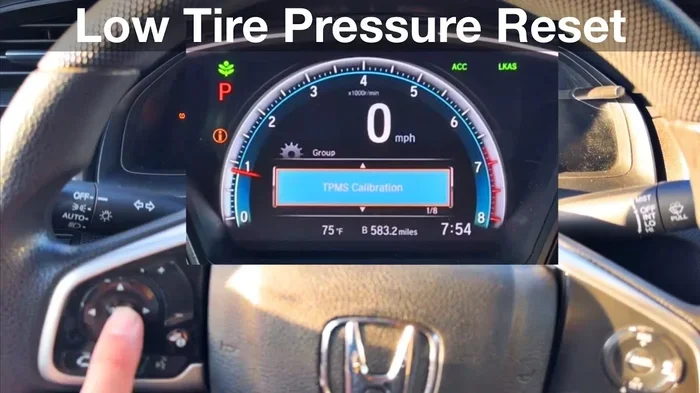
Now for the part you have been waiting for. Learning how to reset TPMS on a 2019 Honda Civic without tools is straightforward. You do not need any special equipment. Everything is done through the steering wheel controls and the dashboard. Follow these steps carefully, and your TPMS light will be off in no time.
Step-by-Step TPMS Reset Procedure
Here is the Honda TPMS reset procedure for the 2019 Civic. Make sure your car is parked and turned off before you start.
- Step 1: Check Your Tire Pressure. Before you do anything else, use a tire pressure gauge to check all four tires. Add air to any tire that is below 32 PSI. This is the recommended pressure for the 2019 Honda Civic. Skipping this step is the most common mistake drivers make.
- Step 2: Turn the Ignition to the ON Position. Press the start button without pressing the brake pedal. The dashboard lights will turn on, but the engine will not start. This puts the car in accessory mode.
- Step 3: Locate the TPMS Reset Button. The TPMS reset button is located below the steering wheel on the left side of the dashboard. It is a small button with a tire symbol on it. Press and hold this button.
- Step 4: Hold the Button Until the Light Blinks. Keep holding the button for about three to five seconds. The TPMS warning light on the dashboard should start blinking three times. This means the system has entered reset mode.
- Step 5: Release the Button. Let go of the reset button once you see the light blink. The system is now recalibrating.
- Step 6: Start the Engine. Turn the ignition to start the car. Drive the vehicle for about 20 minutes at speeds above 25 mph. The TPMS sensor needs time to relearn the tire pressure readings.
- Step 7: Check if the Light Is Off. After driving for 20 minutes, the TPMS light should be off. If it is still on, repeat the process. Sometimes it takes two attempts.
This Honda Civic TPMS reset method works because the car’s onboard computer recognizes the corrected pressure readings during the drive cycle. The system recalibrates itself automatically. It is a clean, tool-free process that anyone can do at home.
Quick Tips for a Successful Reset
- Make sure all tires are at the correct pressure before starting the reset.
- Drive at a steady speed of 30 to 45 mph during the recalibration period.
- If the light does not go off, try resetting again after letting the car sit for 10 minutes.
- Cold weather can affect tire pressure, so check tires when they are cold for the most accurate reading.
- Keep the TPMS reset button clean. Dirt and grime can make it hard to press.
Common TPMS Problems and How to Fix Them
Sometimes, resetting the TPMS does not solve the problem right away. Several issues can cause the TPMS light to stay on or come back frequently. Understanding these problems helps you troubleshoot effectively.
TPMS Light Stays On After Reset
If the TPMS warning light stays on after you complete the reset, do not panic. The most likely cause is that one or more tires still have low pressure. Go back and check each tire with a gauge. Even a small difference of 2 PSI can trigger the light. Another possibility is a dead TPMS sensor battery. Each sensor has a small battery inside that lasts about 5 to 10 years. When the battery dies, the sensor cannot communicate with the car’s computer. In this case, you will need to replace the sensor. This is a simple fix that a mechanic can handle quickly.
TPMS Light Flashes and Then Stays On
A flashing TPMS light followed by a solid light usually indicates a malfunction with the TPMS system itself. This could mean a faulty sensor, a wiring issue, or a problem with the car’s computer module. The 2019 Honda Civic TPMS system is reliable, but electronics can fail. If you see a flashing pattern, it is worth getting a diagnostic scan done. Many auto parts stores offer free TPMS diagnostics. They can read the error codes and pinpoint the exact problem.
TPMS Light Comes Back After a Few Days
If the TPMS light returns a few days after a successful reset, something is still wrong with your tire pressure. Check for slow leaks by applying soapy water to each tire valve. Bubbles will form at the site of a leak. You can also visit a tire shop for a free pressure check. Sometimes the issue is as simple as a faulty valve stem. Replacing a valve stem is inexpensive and takes only a few minutes. Regular tire inspections help catch these small problems before they trigger the TPMS light again.
Tips to Keep Your TPMS in Good Shape
Taking care of your TPMS system on your 2019 Honda Civic is easier than you might think. A little prevention goes a long way toward avoiding false alerts and sensor failures.
Regular Tire Pressure Checks
Get into the habit of checking your tire pressure at least once a month. Use a reliable tire pressure gauge and compare the reading to the recommended 32 PSI. Make adjustments as needed. This simple habit keeps your tires in great shape and reduces the frequency of TPMS alerts. It also improves your fuel economy and extends tire life. The 2019 Honda Civic is a fun car to drive, and properly inflated tires make it handle even better.
Replace TPMS Sensors When Needed
TPMS sensor batteries do not last forever. When a sensor battery dies, the entire sensor needs replacement. Most sensors last between 5 and 10 years. If your 2019 Honda Civic is getting older and the TPMS light keeps coming on for no clear reason, a sensor replacement might be the answer. The cost is usually between 50 and 100 dollars per sensor. It is a small price to pay for peace of mind and accurate tire pressure monitoring.
Avoid Hitting Potholes and Curbs
Impact from potholes and curbs can damage TPMS sensors. The sensors are mounted inside the tire, attached to the valve stem. A hard hit can knock them loose or damage the internal components. While you cannot always avoid every pothole, slowing down before bumps and driving carefully over curbs helps protect your TPMS system. This is especially important for the 2019 Honda Civic, which has a relatively low ride height.
Keep Your Tires Properly Inflated Year Round
Temperature changes affect tire pressure significantly. In cold weather, air inside the tires contracts, which lowers the pressure. In hot weather, the air expands, which can raise the pressure. Check your tire pressure more often during seasonal transitions. A simple check takes just a couple of minutes and can prevent unnecessary TPMS warnings. Keeping your tires at the right pressure is one of the easiest ways to maintain your Honda Civic’s safety and performance.
When to See a Professional
Most TPMS issues can be resolved at home using the steps in this guide. However, there are times when professional help is the right call. If you have tried the reset procedure multiple times and the light keeps coming back, it is time to visit a mechanic. A persistent TPMS light could indicate a deeper problem with the sensors or the car’s onboard computer. Similarly, if you notice physical damage to a tire or a valve stem, a professional inspection is wise. Tire shops and Honda dealerships have specialized diagnostic equipment that can read TPMS error codes in detail. They can also replace sensors and recalibrate the system with precision. Do not hesitate to seek help when you need it. Your safety on the road matters more than saving a few dollars.
How to Choose the Right Service
When selecting a service provider for TPMS issues, look for certified technicians who specialize in Honda vehicles. Many tire shops offer TPMS services at competitive prices. You can also visit a Honda dealership, though this may cost a bit more. Ask for a diagnostic fee upfront and get a clear explanation of what needs to be fixed. Reading reviews and getting recommendations from other Honda Civic owners can also help you find a trustworthy mechanic. The goal is to get your TPMS working correctly without overpaying for unnecessary repairs.
Key Takeaways
- Resetting TPMS is Simple: You can reset TPMS on a 2019 Honda Civic without any tools using the steering wheel controls.
- Check Pressure First: Always verify tire pressure is correct before starting the reset process.
- Drive After Reset: The system needs 20 minutes of driving above 25 mph to recalibrate fully.
- Flashing Lights Signal Bigger Issues: A flashing TPMS light may indicate a sensor problem that needs professional attention.
- Regular Maintenance Helps: Monthly tire pressure checks and timely sensor replacements keep your TPMS working well.
- No Need to Panic: The TPMS light is a helpful warning, not a sign of a catastrophic problem in most cases.
Conclusion
Learning how to reset TPMS on a 2019 Honda Civic without tools is one of the simplest and most useful skills you can have as a car owner. The process is quick, straightforward, and requires nothing more than the steering wheel controls and a few minutes of your time. By following the steps in this guide, you can clear the TPMS warning light, recalibrate your tire pressure monitoring system, and get back to driving with confidence. Remember to always check your tire pressure first, drive for 20 minutes after the reset, and watch for any recurring issues. Regular maintenance of your tires and TPMS sensors keeps your 2019 Honda Civic safe, efficient, and running at its best. Take a few minutes today to check your tires and reset the system if needed. Your car will thank you for it.
Frequently Asked Questions
Can I drive my 2019 Honda Civic with the TPMS light on?
You can drive short distances, but it is not recommended. The TPMS light means your tire pressure is likely too low, which affects handling and safety. Check your tires and reset the system as soon as possible to avoid potential blowouts or uneven tire wear.
How long does the TPMS reset take on a 2019 Honda Civic?
The reset process itself takes about 5 minutes. However, you need to drive the car for 20 minutes afterward so the system can recalibrate. In total, plan for about 25 to 30 minutes to complete the entire TPMS reset procedure.
What does it mean when the TPMS light flashes and then stays solid?
A flashing TPMS light followed by a solid light usually indicates a malfunction in the TPMS system. This could be a dead sensor battery, a faulty sensor, or a wiring issue. It is best to get a diagnostic scan to identify the exact cause and address it promptly.
How much does it cost to replace a TPMS sensor on a 2019 Honda Civic?
Replacing a TPMS sensor typically costs between 50 and 100 dollars per sensor. The price includes the sensor and the battery inside it. Some tire shops may charge a small additional fee for programming the new sensor to your car’s system.
Do I need special tools to reset the TPMS on a 2019 Honda Civic?
No, you do not need any special tools. The 2019 Honda Civic TPMS reset is done entirely through the steering wheel controls and dashboard buttons. You only need a tire pressure gauge to check your air pressure before starting the reset.
Why does my TPMS light come on in cold weather?
Cold weather causes the air inside your tires to contract, which lowers the tire pressure. When the pressure drops below the recommended level, the TPMS light turns on. Adding air to the proper pressure and then resetting the system usually resolves the issue quickly.