How to Reset the Mazda CX 5 Screen and Fix Display Issues
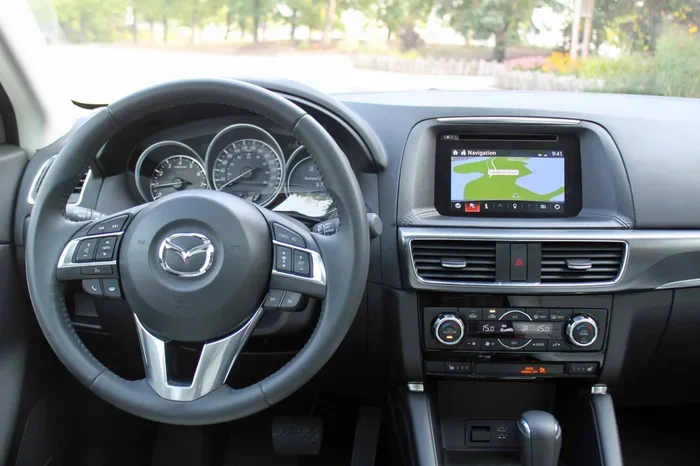
Learning how to reset the Mazda CX 5 screen is easier than you think, and it can save you from frustrating display problems like freezing, flickering, or a black screen. Whether you need a quick soft reset or a full hard reset, this guide walks you through every step with clear instructions. We also cover common Mazda CX 5 infotainment issues, prevention tips, and when to call a professional. By the end, you will know exactly what to do when your Mazda CX 5 touchscreen stops responding.
There is nothing more annoying than tapping your Mazda CX 5 touchscreen and watching it freeze mid-tap. You are trying to change the radio station, pull up navigation, or adjust the climate controls, and the display just sits there doing nothing. It happens to the best of us, and it is more common than you might think.
The good news is that resetting the Mazda CX 5 screen is usually a simple fix you can do in minutes. You do not need to be a tech expert or visit a dealership. This guide covers everything you need to know about Mazda CX 5 screen reset, from the easiest soft reset to the more involved hard reset. We will also look at why these display issues happen in the first place and how you can prevent them.
Whether your Mazda CX 5 infotainment system is frozen, showing a black screen, flickering, or just acting strange, we have got you covered. Let us dive in and get your display back to normal.
Key Takeaways
- Soft reset is quick and easy: A simple power cycle can fix most minor Mazda CX 5 screen glitches without losing any data.
- Hard reset restores factory settings: Use this method only when a soft reset fails, as it erases saved preferences and paired devices.
- Common causes include software bugs and loose connections: Understanding why your Mazda CX 5 display acts up helps you prevent future issues.
- Regular maintenance keeps the system running smoothly: Simple habits like updating software and keeping the screen clean go a long way.
- Know when to seek professional help: Some Mazda CX 5 screen problems need a certified technician, not a DIY fix.
- Prevention is better than cure: Following a few best practices can keep your Mazda CX 5 touchscreen working perfectly for years.
📑 Table of Contents
- Why Does the Mazda CX 5 Screen Need a Reset?
- How to Perform a Soft Reset on the Mazda CX 5 Screen
- How to Do a Hard Reset on the Mazda CX 5 Screen
- Common Mazda CX 5 Display Issues and How to Fix Them
- Preventing Mazda CX 5 Screen Problems
- When to Seek Professional Help for Mazda CX 5 Screen Issues
- Key Takeaways
- Conclusion
Why Does the Mazda CX 5 Screen Need a Reset?
Before we jump into the how-to, let us talk about why your Mazda CX 5 touchscreen might need a reset in the first place. Understanding the cause helps you know which type of reset to try and how to avoid the problem in the future.
Software Glitches and Bugs
Like any computer system, the Mazda CX 5 infotainment system runs on software. Over time, temporary bugs can build up and cause the screen to behave oddly. Maybe the touch response becomes delayed, or the display shows static lines. These are usually harmless software glitches that a simple reset can clear out.
The Mazda CX 5 multimedia system handles a lot of tasks at once. It manages audio, navigation, Bluetooth connections, backup cameras, and even some vehicle settings. When too many processes run at the same time, the system can get overloaded. A reset clears the temporary memory and gives the system a fresh start.
Firmware Outdated Issues
Sometimes the problem is not a glitch but outdated firmware. Mazda releases updates to improve performance and fix known bugs. If you have not updated your system in a while, the Mazda CX 5 display might start acting up. While a reset does not install updates, it can help stabilize the system after an update is applied.
Loose or Faulty Connections
Inside your Mazda CX 5, the infotainment system connects to the main computer through wiring and data cables. Over time, vibrations from driving can loosen these connections. When the connection is weak, the screen might flicker, go black, or fail to respond to touch. A reset can sometimes re-establish the connection, but a loose wire may need physical attention.
Power Surges and Battery Issues
Your vehicle’s electrical system powers the infotainment display. If there is a power surge or if the battery is low, the Mazda CX 5 screen can behave unpredictably. A reset helps the system recalibrate and return to normal operation after a power-related issue.
How to Perform a Soft Reset on the Mazda CX 5 Screen
A soft reset is the first thing you should try. It is quick, easy, and does not delete any of your settings, paired phones, or saved navigation data. Think of it like restarting your phone when it gets slow.
Method 1: The Ignition Cycle
This is the most common way to reset the Mazda CX 5 screen using a soft reset. Here is what you need to do:
- Make sure your vehicle is parked and the engine is off.
- Press and hold the power button on the infotainment screen for about 10 seconds.
- The screen will go dark and the system will power off completely.
- Wait about 30 seconds to let the system fully discharge.
- Start the engine again by pressing the start button or turning the key.
- The Mazda CX 5 display should boot up normally within 15 to 30 seconds.
This method works for most minor issues like a frozen screen, slow response, or audio glitches. It resets the temporary memory without touching your saved data.
Method 2: The Fuse Reset
If the ignition cycle does not work, you can try resetting the system through the fuse box. This method cuts power to the infotainment unit completely.
- Turn off the engine and remove the key from the ignition.
- Open the hood and locate the fuse box. In most Mazda CX 5 models, it is on the driver’s side near the battery.
- Look for the fuse labeled “INFOTAINMENT” or “RADIO.” Check your owner’s manual for the exact location.
- Use a fuse puller or a pair of needle-nose pliers to remove the fuse.
- Wait for about two minutes.
- Reinsert the fuse firmly into its slot.
- Start the engine and check if the display is working properly.
Quick Tip: Always check your Mazda CX 5 owner’s manual before pulling any fuses. The fuse layout can vary slightly between model years. Taking a photo of the fuse box diagram before you start can save you time and confusion.
When to Use a Soft Reset
A soft reset is perfect for these situations:
- The Mazda CX 5 touchscreen is frozen and unresponsive to touch.
- The display shows a black screen but the system is still powered on.
- Audio cuts out randomly or the sound quality drops suddenly.
- Navigation stops responding or shows incorrect location data.
- The system takes unusually long to boot up after starting the car.
In most cases, a soft reset solves the problem. If it does not, it is time to move on to a hard reset.
How to Do a Hard Reset on the Mazda CX 5 Screen
A hard reset is more involved than a soft reset. It essentially restores the infotainment system to its original factory settings. This means all your saved Wi-Fi networks, paired Bluetooth devices, custom display settings, and navigation preferences will be erased.
You should only use a hard reset when a soft reset fails to fix the problem. Think of it as the nuclear option for your Mazda CX 5 display issues.
Step-by-Step Hard Reset Guide
Here is how to perform a hard reset on your Mazda CX 5:
- Start by performing a soft reset first. This ensures the system is completely powered down before the hard reset.
- Press and hold the volume knob on the infotainment system for about 15 to 20 seconds.
- You should see a menu appear on the screen asking if you want to restore factory settings.
- Select “Yes” or “Restore” using the on-screen controls.
- The system will begin the reset process. This can take anywhere from 2 to 5 minutes.
- Do not turn off the ignition or disconnect the battery during this process.
- Once the reset is complete, the system will restart automatically.
- You will need to reconnect your Bluetooth devices and set up your preferences again.
Important Note: The exact steps can vary depending on your Mazda CX 5 model year and the version of the infotainment system installed. Always refer to your owner’s manual for model-specific instructions.
What Gets Wiped After a Hard Reset?
Before you proceed with a hard reset, make sure you know what you will lose:
- Paired Bluetooth phones and devices
- Saved Wi-Fi network passwords
- Custom display themes and brightness settings
- Saved navigation addresses and recent destinations
- Radio station presets
- Voice recognition training data
Most of these can be set up again in just a few minutes. But if you have a lot of custom settings, you might want to write them down before you start the hard reset process.
Hard Reset vs. Soft Reset: Which Should You Choose?
Here is a quick comparison to help you decide which reset method to use:
| Feature | Soft Reset | Hard Reset |
|---|---|---|
| Data Loss | None | All saved settings erased |
| Time Required | 1-2 minutes | 3-5 minutes plus setup |
| Difficulty Level | Easy | Moderate |
| Best For | Minor glitches and freezes | Persistent display problems |
| Risk Level | Very low | Low (but erases data) |
| Frequency of Use | Can be done anytime | Only when soft reset fails |
As a rule of thumb, always try a soft reset first. Only move to a hard reset if the soft reset does not resolve the issue. This saves you the hassle of reconfiguring all your settings.
Common Mazda CX 5 Display Issues and How to Fix Them
Not all Mazda CX 5 screen problems require a reset. Some issues have simpler fixes that you can try right at home. Let us look at the most common problems and what you can do about them.
Black Screen
A black screen on the Mazda CX 5 is one of the most common complaints. Usually, this happens when the system goes to sleep and does not wake up properly. Try the soft reset method first. If the screen is completely black and unresponsive, the fuse reset method can help. In rare cases, a black screen might indicate a failing display unit that needs professional replacement.
Flickering or Glitching Screen
If your Mazda CX 5 infotainment system flickers or shows random lines, it could be a software issue or a loose connection. A soft reset often fixes flickering caused by software bugs. If the flickering continues after a reset, check the wiring behind the infotainment unit. A loose HDMI or data cable can cause intermittent flickering.
Touchscreen Not Responding
A non-responsive touchscreen can be caused by a software freeze or a calibration issue. Try the soft reset first. If that does not work, a hard reset can restore the system to its default calibration. If neither reset works, the touch digitizer might be damaged and need replacement.
Slow Performance
Over time, the Mazda CX 5 multimedia system can become sluggish, especially if you have many apps running in the background. Clearing the cache through a soft reset can help speed things up. Also, make sure your firmware is up to date. Mazda occasionally releases performance improvements through software updates.
Audio and Video Sync Issues
If the audio and video are out of sync when playing media, a system reset can often fix this. The reset clears any corrupted audio processing data and allows the system to re-sync properly.
Navigation System Errors
Navigation errors like incorrect routing or a map that will not load can often be resolved with a reset. The system needs a clean slate to properly connect to GPS satellites and download map data. If the problem persists after a reset, check your internet connection or update the map data.
Preventing Mazda CX 5 Screen Problems
Prevention is always better than cure. While you cannot avoid every issue, there are several things you can do to keep your Mazda CX 5 screen working smoothly for years to come.
Keep Your Firmware Updated
Mazda regularly releases firmware updates that fix bugs and improve performance. Check for updates through the Mazda Connect system or visit your local dealership. Keeping your system updated is one of the best ways to prevent screen issues.
Avoid Overloading the System
The Mazda CX 5 infotainment system has limited processing power. Running too many apps at once can slow it down or cause freezes. Close apps you are not using, and avoid connecting too many Bluetooth devices simultaneously.
Keep the Screen Clean
Dust, dirt, and grease can interfere with the touchscreen’s responsiveness. Use a soft microfiber cloth to clean the screen regularly. Avoid harsh chemicals that can damage the display coating.
Protect Against Power Surges
Using a surge protector for any aftermarket devices you connect to the infotainment system can help prevent power-related issues. Also, make sure your vehicle battery is in good condition, as a weak battery can cause display problems.
Restart the System Regularly
Just like your phone, the Mazda CX 5 infotainment system benefits from regular restarts. Once a week, perform a quick soft reset by holding the power button for 10 seconds. This clears temporary files and keeps the system running smoothly.
When to Seek Professional Help for Mazda CX 5 Screen Issues
Most Mazda CX 5 display problems can be fixed with a soft or hard reset. But there are times when professional help is the right call. Here are signs that you should take your vehicle to a Mazda dealership or certified technician:
- The screen remains completely black even after multiple soft and hard resets.
- You notice physical damage to the display, such as cracks or bleeding pixels.
- The system repeatedly crashes or freezes even after a factory reset.
- You smell burning or notice unusual sounds coming from the infotainment unit.
- The display works intermittently and the problem keeps coming back no matter what you try.
- Your vehicle is still under warranty, and you want to avoid voiding it with DIY repairs.
A certified Mazda technician has access to diagnostic tools that can pinpoint the exact cause of the problem. They can also check for hardware failures that a software reset cannot fix. If your vehicle is under warranty, professional service is usually the best and safest route.
Expert Insight: Many Mazda dealerships offer free or low-cost diagnostic checks for infotainment issues. It is always worth a call to your local dealer before spending money on repairs. They can often guide you through a reset over the phone and save you a trip to the shop.
Key Takeaways
- A soft reset is your first line of defense: It takes just a couple of minutes and fixes most minor Mazda CX 5 screen glitches without any data loss.
- A hard reset restores factory settings: Use it only when the soft reset fails, and be prepared to re-pair your devices and reset your preferences.
- Common causes include software bugs, outdated firmware, loose connections, and power issues: Understanding the root cause helps you choose the right fix.
- Prevention goes a long way: Regular updates, clean screens, and periodic restarts keep your Mazda CX 5 touchscreen running smoothly.
- Know when to call a professional: Persistent problems, physical damage, or repeated crashes warrant a visit to a certified Mazda technician.
- Your owner’s manual is a valuable resource: It contains model-specific instructions for resets, fuse locations, and troubleshooting steps.
Conclusion
Dealing with a Mazda CX 5 screen that freezes, flickers, or goes black can be frustrating, but it is almost always fixable. Whether you choose a soft reset or a hard reset, the steps are straightforward and do not require any special tools or technical knowledge.
Resetting the Mazda CX 5 screen is one of the simplest and most effective ways to resolve display issues. A soft reset handles most minor problems in minutes, while a hard reset tackles deeper software issues by restoring the system to its factory defaults. And with the prevention tips we covered, you can reduce the chances of running into these problems again.
Remember, if your Mazda CX 5 touchscreen continues to give you trouble after trying both reset methods, do not hesitate to reach out to a Mazda professional. There is no shame in asking for help, and a quick diagnostic check can save you hours of frustration.
Keep this guide bookmarked for the next time your Mazda CX 5 display acts up. With the right knowledge, you can get back on the road and enjoy a smooth, responsive infotainment experience in no time.
Frequently Asked Questions
How long does it take to reset the Mazda CX 5 screen?
A soft reset takes about 1 to 2 minutes, including the waiting period. A hard reset takes a bit longer, usually 3 to 5 minutes for the reset itself, plus a few more minutes to set up your preferences again after the system restarts.
Will resetting the Mazda CX 5 screen delete my saved data?
A soft reset does not delete any data. However, a hard reset restores the system to factory settings, which means all saved Wi-Fi passwords, paired Bluetooth devices, radio presets, and navigation preferences will be erased. Always try a soft reset first to avoid losing your data.
Why does my Mazda CX 5 screen keep freezing?
Freezing is often caused by software bugs, outdated firmware, or an overloaded system running too many apps at once. Try a soft reset first. If the problem keeps coming back, check for firmware updates or consider a hard reset. If freezing persists after a reset, there may be a hardware issue that needs professional attention.
Can I reset the Mazda CX 5 screen while driving?
It is not recommended. Performing a reset while driving can distract you and may cause the display to go dark temporarily, which can affect your use of navigation and audio. Always pull over to a safe, parked location before attempting any reset on your Mazda CX 5.
What should I do if the soft reset does not fix my Mazda CX 5 screen?
If a soft reset does not work, try the fuse reset method as a second option. If that also fails, a hard reset may resolve the issue. If none of these methods work, the problem could be hardware-related, and you should take your vehicle to a Mazda dealership or certified technician for a proper diagnosis.
How often should I reset my Mazda CX 5 screen?
You do not need to reset your screen regularly. A soft reset once a month as part of routine maintenance can help keep the system running smoothly. Beyond that, only reset when you notice display problems. Performing unnecessary resets can actually contribute to data buildup and slow down the system over time.