How to Reset the Tire Pressure Light on Your Mazda 3
This guide shows you exactly how to reset the tire pressure light on your Mazda 3. We cover simple step-by-step methods, common causes, and expert tips to keep your TPMS happy. Learn the quick reset procedure now and drive with confidence.
Have you ever glanced at your dashboard and spotted a yellow horseshoe icon with an exclamation mark? That’s your tire pressure light on a Mazda 3, and it can feel alarming. You might wonder if you have a flat or a serious problem. The good news is that in many cases, a simple reset solves the issue. This guide walks you through how to reset the tire pressure light on a Mazda 3 in clear, easy steps. You’ll also learn why the light comes on, what to check first, and when to call a pro. Let’s get your Mazda 3 back to feeling right.
Your Mazda 3 uses a Tire Pressure Monitoring System, or TPMS, to watch the air inside your tires. When pressure drops too low, the system triggers a warning on the dashboard. Sometimes the light stays on even after you fix the pressure. That’s when you need a reset. This article covers the exact reset methods for different model years, common mistakes, and quick tips to prevent the light from coming back. Whether you drive a 2010 Mazda 3 or a 2023 model, you’ll find the answer here.
Why does this matter? Driving with incorrect tire pressure can reduce fuel economy, wear tires unevenly, and even affect safety. A flashing or steady warning light means your Mazda 3 is trying to tell you something. Resetting the light is not just about clearing a warning. It’s about confirming that your tires are properly inflated and your system is working. We’ll show you how to do that the right way.
Key Takeaways
- Simple Reset Process: You can reset the light in minutes using the steering wheel controls or the infotainment system.
- Check Tire Pressure First: Always verify and adjust pressure before resetting to avoid the light returning.
- Model Year Matters: Different Mazda 3 years use slightly different reset steps.
- Common Causes: A loose gas cap, temperature change, or slow leak often triggers the warning.
- When to Seek Help: If the light stays on after reset, a faulty sensor or hardware issue may need a mechanic.
- Prevention Tips: Regular monthly checks keep your TPMS healthy and prevent false alerts.
📑 Table of Contents
- Understanding the Tire Pressure Light on Your Mazda 3
- How to Reset the Tire Pressure Light on a Mazda 3
- Common Problems That Keep the Tire Pressure Light On
- When to See a Mechanic
- Preventing Future Tire Pressure Light Issues
- Comparison Table: Reset Methods by Mazda 3 Model Year
- Final Thoughts on Resetting the Tire Pressure Light
Understanding the Tire Pressure Light on Your Mazda 3
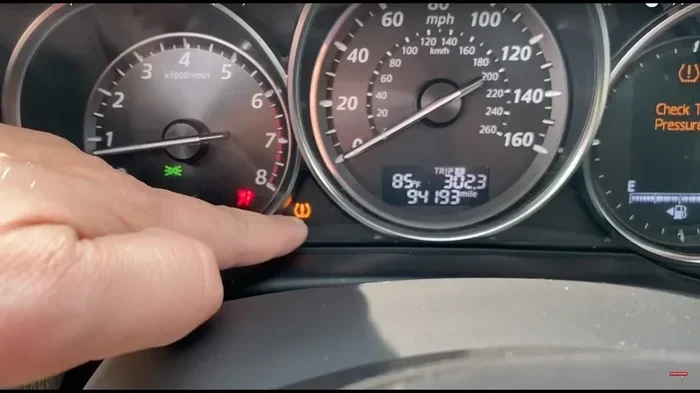
The tire pressure warning light looks like a cross-section of a tire with an exclamation mark inside. It’s part of the TPMS. The system uses sensors inside each wheel to measure inflation pressure. If one or more tires fall below the recommended level, the light illuminates. Sometimes it flashes first, then stays solid. A solid light usually means a persistent low-pressure condition. A flashing light often points to a TPMS malfunction.
What is the recommended pressure? You’ll find the exact number on a sticker inside the driver’s door jamb. For most Mazda 3 models, it’s between 32 and 35 PSI. Always check pressure when the tires are cold, meaning the car has been parked for at least three hours. Driving heats up the air inside, which can give a false reading.
Why Does the Tire Pressure Light Come On?
Several things can trigger the low tire pressure light. The most common cause is a drop in air pressure due to a slow leak or puncture. Temperature changes also play a big role. Cold weather can reduce pressure by 1 PSI for every 10 degrees Fahrenheit drop. A loose or damaged gas cap can sometimes cause the light to appear because the system detects a small leak in the fuel system, which shares a sensor network. In rare cases, a faulty TPMS sensor or a dead battery in the sensor causes the warning. Understanding the root cause helps you decide whether a simple reset will work or if you need repairs.
How to Reset the Tire Pressure Light on a Mazda 3
Resetting the light is straightforward once you’ve confirmed your tires are at the correct pressure. The exact steps vary slightly depending on your model year. Below we cover the most common methods. Always refer to your Mazda 3 owner manual for the specific procedure for your trim and year.
Method 1: Using the Steering Wheel Controls (Most Mazda 3 Models)
This method works on many Mazda 3 models from 2010 to 2023. Follow these steps carefully.
- Start the engine and let the car sit for a few minutes.
- Use the steering wheel arrow buttons to navigate to the Main Menu or Settings on the instrument cluster display.
- Scroll down to Vehicle Features or TPMS settings.
- Select TPMS Reset or Initialize Tire Pressure Monitoring System.
- Confirm the reset when prompted.
- The light should turn off after a few seconds. Drive the car for a few miles to allow the system to relearn the tire pressures.
Quick Tip: If you don’t see a TPMS option, try pressing the INFO button on the steering wheel, then scroll to Vehicle Info and look for a Tire Pressure Reset choice. The exact wording may differ slightly between the 2014 Mazda 3 and the 2020 Mazda 3.
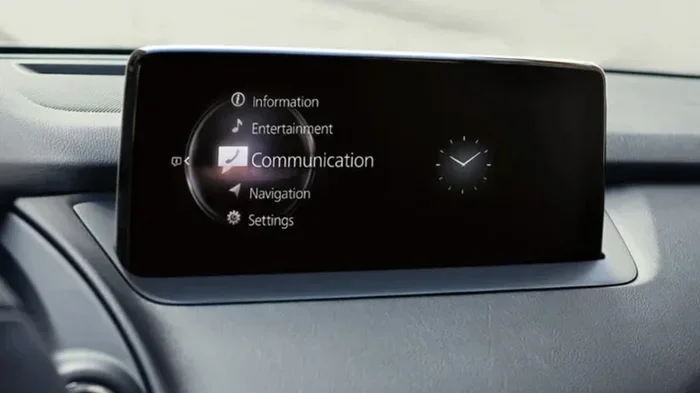
Method 2: Using the Infotainment Screen (2019 and Newer Mazda 3)
Later models with the Mazda Connect infotainment system offer a touchscreen reset path.
- Press the Home button on the infotainment screen.
- Tap Settings.
- Select Vehicle Settings.
- Choose TPMS or Tire Pressure Monitoring.
- Tap Initialize TPMS or Reset Tire Pressure Light.
- Follow the on-screen prompts to complete the process.
This method is very user-friendly. If the screen doesn’t respond, try turning the ignition to the “ON” position without starting the engine, then repeat the steps. Sometimes a simple system reboot clears temporary glitches.
Method 3: The Manual Reset Button (Some Older Models)
Certain Mazda 3 models, especially 2010 to 2013, have a small reset button under the steering column or near the driver’s side kick panel. Look for a black or red button labeled TPMS or SET. With the ignition on, press and hold the button until the warning light blinks three times, then release. The system should reset. If you can’t find the button, consult your owner manual or a Mazda dealer.
Common Problems That Keep the Tire Pressure Light On
You’ve checked the pressure, reset the system, but the light stays on. That’s frustrating. Here are the most common reasons the tire pressure light on Mazda 3 won’t turn off.
Slow Leak or Puncture
A small nail or screw can cause a slow leak that’s hard to see. The tire may lose just 1 PSI per week, which is enough to trigger the TPMS. Use a tire pressure gauge to check each tire individually. If one tire is consistently low, inspect the tread for embedded objects. A simple plug or patch from a tire shop often fixes the problem. After the repair, reset the light again.
Faulty TPMS Sensor
Each wheel has a TPMS sensor with a small battery. These batteries last about 5 to 10 years. When the battery dies, the sensor can’t send data, and the light comes on. A mechanic can test each sensor with a special tool. If one sensor is dead, replacing it usually solves the issue. This is a common problem on older Mazda 3 models with high mileage.
Temperature Shock
Have you ever noticed the light coming on after a cold front? A sudden temperature drop can lower tire pressure quickly. The TPMS is very sensitive. Once the tires warm up from driving, the pressure may rise enough to turn the light off. If it doesn’t, you may need to add air and then reset the system. This is not a serious problem, but it’s easy to mistake for a leak.
Aftermarket Tires or Rims
If you’ve recently changed tires or installed larger rims, the TPMS sensors may not be properly seated or may not be compatible. Some aftermarket wheels don’t have a sensor groove, which can cause the system to report a fault. Always ensure your new tires are TPMS-compatible and that the sensors are installed correctly.
When to See a Mechanic
Most tire pressure light resets are DIY-friendly. However, some situations require professional help. If you’ve checked all tires, they’re at the correct PSI, and the reset procedure doesn’t clear the light, a deeper issue is likely. A faulty TPMS module, a wiring problem, or a computer glitch may need diagnostic equipment to fix. Also, if the light flashes rapidly and stays on, it often indicates a malfunction in the TPMS system itself, not just low pressure. Don’t ignore a flashing light. Visit a Mazda dealership or a trusted repair shop. They can read the specific error codes and replace any defective sensors or modules.
Expert Insight: Many drivers wait too long to address a persistent TPMS light. A small sensor replacement costs far less than replacing a tire ruined by prolonged under-inflation. Early action saves money and keeps you safe.
Preventing Future Tire Pressure Light Issues
Prevention is always easier than cure. A few simple habits keep your TPMS working properly and the warning light off.
- Check tire pressure monthly. Use a quality digital or analog gauge. The recommended PSI is on the driver’s door jamb sticker.
- Inspect the gas cap. A loose, damaged, or missing gas cap can trigger a leak code that sometimes affects the TPMS display. Replace the cap if it’s worn.
- Rotate tires regularly. Follow the maintenance schedule in your Mazda 3 owner manual. This helps sensors last longer and ensures even wear.
- Keep a tire pressure gauge in your glove box. You’ll always be ready to check pressure at gas stations or before long trips.
- Reset the system after any tire service. Whether you rotated tires, changed a flat, or added air, a quick TPMS reinitialization keeps the system accurate.
Quick Tips for a Perfect Reset
Here are a few quick tips to make the reset process smooth and error-free.
- Always inflate tires to the manufacturer’s recommended PSI before resetting. The system learns the current pressure as the baseline.
- Drive at a steady speed of 30 to 50 mph for a few minutes after the reset. This allows the TPMS to recalibrate.
- If the light returns within a day, recheck pressure. You may have a slow leak that needs attention.
- Keep the ignition in the “ON” position, not “START,” when performing the reset. Starting the engine can interrupt the initialization process.
- For the 2019 Mazda 3 and newer, use the touchscreen method. It’s the most intuitive and least prone to errors.
Common Mistakes to Avoid
Avoid these frequent errors when trying to clear the tire pressure light.
- Resetting without checking pressure: This is the biggest mistake. If a tire is actually low, the light will come right back on.
- Using the wrong reset method: Older and newer models have different procedures. Guessing can lead to frustration.
- Ignoring a flashing light: A flashing TPMS light usually means a severe fault. Don’t just reset it and drive away.
- Over-inflating tires: Putting too much air in to “trick” the sensor is dangerous and can affect handling and braking.
- Skipping the gas cap check: A loose gas cap is an easy fix that many people overlook.
Comparison Table: Reset Methods by Mazda 3 Model Year
Not sure which method fits your car? Here’s a quick comparison of the most common reset approaches for different Mazda 3 generations.
- 2010–2013 Mazda 3: Steering wheel menu or under-dash reset button. Manual button is common.
- 2014–2018 Mazda 3: Steering wheel controls to access Settings > TPMS Reset. Some trims use a button near the driver’s seat.
- 2019–2023 Mazda 3: Infotainment touchscreen Settings > Vehicle Settings > TPMS Initialize. No physical button needed.
Always double-check your specific model year in the Mazda 3 owner manual. The steps above cover the majority of cases, but trim levels can change the exact menu path.
Final Thoughts on Resetting the Tire Pressure Light
Resetting the tire pressure light on your Mazda 3 is a simple task that most owners can do in under ten minutes. The key is to first ensure your tires are properly inflated, then follow the correct reset procedure for your model year. Whether you use the steering wheel controls, the infotainment screen, or a manual button, the process is straightforward. If the light returns or stays on, don’t ignore it. Check for slow leaks, faulty sensors, or temperature-related pressure changes. Regular maintenance and monthly pressure checks keep your TPMS in top shape. You’ll enjoy better fuel economy, safer driving, and a dashboard that stays quiet. Now you have the knowledge and confidence to handle the Mazda 3 tire pressure light reset on your own. Keep this guide bookmarked for future reference.
Frequently Asked Questions
Why won’t my tire pressure light reset on my Mazda 3?
The most common reason is that one or more tires are still below the recommended PSI. Double-check pressure with a gauge and inflate to the door jamb specification. Then try the reset again. If it still won’t reset, a faulty TPMS sensor or a dead sensor battery could be the culprit.
How long does the tire pressure light stay off after resetting?
If the tires are properly inflated and no leak exists, the light should stay off permanently. Sometimes it takes a few days of driving for the system to fully relearn the pressures. If it returns quickly, you likely have a slow leak or a sensor issue.
Can I drive with the tire pressure light on?
You can drive short distances if the pressure is only slightly low, but it’s not safe. Under-inflated tires reduce handling and increase stopping distance. They also wear out faster. Have the pressure checked and the light reset as soon as possible.
Is resetting the tire pressure light the same as fixing a leak?
No. Resetting only clears the warning. It does not repair a puncture, a faulty valve stem, or a bad sensor. Always find and fix the root cause before resetting the system.
What should I do if the tire pressure light flashes and then stays solid?
A flashing light followed by a solid light often indicates a TPMS malfunction, not just low pressure. This could be a dead sensor battery or a wiring issue. Visit a mechanic or Mazda dealer for diagnostic scanning and sensor replacement if needed.
Do I need special tools to reset the tire pressure light on a Mazda 3?
No special tools are required for most resets. You just need the steering wheel controls or the infotainment screen. A basic tire pressure gauge is helpful to verify pressure before resetting. Some owners keep an OBD-II scanner for advanced diagnostics, but it’s not necessary for a standard reset.