How to Reset Mazda Infotainment System Like a Pro
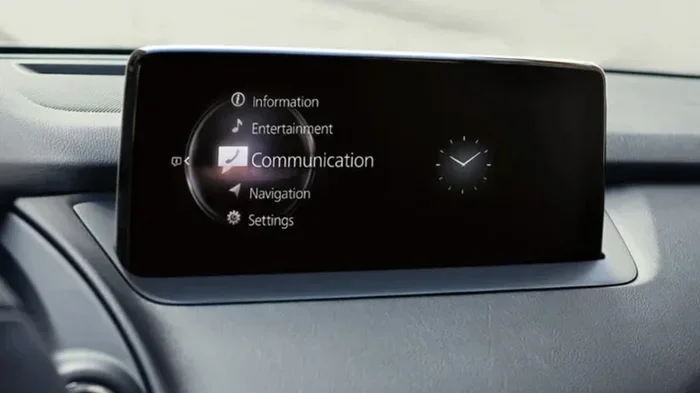
Resetting your Mazda Infotainment System is easier than you think. This guide covers both soft and hard reset methods for all Mazda models. You will learn quick fixes, step-by-step procedures, and expert tips to keep your system running smoothly.
Have you ever been driving your Mazda and suddenly the screen goes blank? Or maybe the navigation freezes right when you need it most. A Mazda Infotainment System glitch can be frustrating, especially when you are on the road.
The good news is that resetting your system is usually quick and easy. You do not need to visit a dealer or call a mechanic. In this guide, we will walk you through every method step by step. By the end, you will know exactly how to handle any Mazda infotainment reset situation like a pro.
Whether you drive a Mazda CX-5, a Mazda CX-30, or any other model, this guide covers it all. We will explain the difference between a soft reset and a hard reset. We will also share common mistakes to avoid and tips to keep your Mazda multimedia system running smoothly for years to come.
Key Takeaways
- Soft Reset: A quick power cycle that fixes minor glitches without losing your settings.
- Hard Reset: A full factory reset that restores your Mazda multimedia system to default.
- Know Your Model: Different Mazda models may have slightly different reset procedures.
- Back Up First: Always save your preferences before performing a hard reset.
- Timing Matters: Knowing when to reset saves you a trip to the dealership.
- Preventive Care: Regular updates and proper shutdowns reduce the need for resets.
📑 Table of Contents
- Why You Might Need to Reset Your Mazda Infotainment System
- Soft Reset vs Hard Reset: What Is the Difference?
- How to Perform a Soft Reset on Your Mazda
- How to Perform a Hard Reset on Your Mazda
- Common Mazda Infotainment Problems and How a Reset Fixes Them
- Tips to Keep Your Mazda Infotainment System Running Smoothly
- Expert Insights and Pro Tips
- Frequently Asked Questions
- Conclusion
Why You Might Need to Reset Your Mazda Infotainment System
Your Mazda Infotainment System is essentially a small computer inside your car. Just like any computer, it can sometimes freeze, lag, or behave strangely. Understanding why these issues happen helps you decide the right fix.
Common Signs Your System Needs a Reset
Here are the most common signs that your Mazda touchscreen reset might be needed:
- The screen freezes and does not respond to taps.
- The audio system cuts out or produces distorted sound.
- Navigation stops working or shows incorrect locations.
- The system takes forever to start up after turning the key.
- Bluetooth connections keep dropping unexpectedly.
- Error messages appear on the display for no clear reason.
- The screen goes black but the car is still running.
If you notice any of these problems, do not panic. Most of the time, a simple reset solves the issue completely. Ignoring the problem, however, can sometimes make it worse over time.
What Causes Infotainment Glitches?
Several factors can cause your Mazda system reboot to become necessary. Software updates that did not install properly are a big culprit. Sometimes a power surge from the battery can interrupt the system during an update. Extreme temperatures can also affect the internal components of the Mazda display reset unit.
Another common cause is simply having too much data stored on the system. Over time, cached files and temporary data can build up and slow things down. This is similar to how your phone gets slower when it has too many apps running in the background.
Soft Reset vs Hard Reset: What Is the Difference?
Before we dive into the steps, it is important to understand the two types of resets. A soft reset is like restarting your phone. It turns the system off and back on without deleting anything. A hard reset is like factory resetting your phone. It wipes all your settings and returns the system to its original state.
| Feature | Soft Reset | Hard Reset |
|---|---|---|
| What It Does | Restarts the system | Restores factory settings |
| Data Lost | None | All saved data |
| Time Required | 1-3 minutes | 10-20 minutes |
| When to Use | Minor glitches | Major system errors |
| Difficulty Level | Easy | Moderate |
| Risk Level | Very Low | Medium |
Always try a soft reset first. Only move to a hard reset if the soft reset does not fix the problem. This approach keeps your Mazda infotainment troubleshooting simple and safe.
How to Perform a Soft Reset on Your Mazda
A soft reset is the first thing you should try whenever your Mazda Infotainment System acts up. It takes less than a minute and does not delete any of your saved data.
Method 1: The Power Cycle
This is the most common way to do a soft reset on any Mazda model. Here is exactly what to do:
- Press and hold the power button on the infotainment screen.
- Keep holding it for about 10 seconds.
- The screen will go dark and the system will shut down.
- Wait about 30 seconds.
- Press the power button again to turn the system back on.
Once the system restarts, check if the problem is gone. For most minor issues like a frozen screen or a glitchy Bluetooth connection, this method works perfectly.
Method 2: Turn the Ignition Off and On
Another easy way to reset Mazda Infotainment System is by using the ignition. This method works well when the screen is completely unresponsive:
- Put the car in park and turn the ignition off.
- Wait at least 60 seconds.
- Turn the ignition back to the ON position (do not start the engine).
- Wait for the infotainment system to fully boot up.
- Start the engine and test the system.
This method essentially gives the entire electrical system a fresh start. It is especially helpful when the system is slow to respond after a long drive.
Quick Tip: If your Mazda has a dedicated reset button near the infotainment unit, use it. Some models have a small pinhole reset button on the back of the unit or under the dashboard. Check your owner’s manual for the exact location.
How to Perform a Hard Reset on Your Mazda
A hard reset should be your second option. It clears everything and gives your Mazda Infotainment System a fresh start. Make sure you know your Wi-Fi passwords and Bluetooth pairings before you begin.
Step-by-Step Hard Reset Guide
Follow these steps carefully to perform a factory reset on your Mazda:
- Turn off the engine and make sure the car is parked safely.
- Press and hold the volume knob and the power button at the same time.
- Keep holding both buttons for about 15-20 seconds.
- Release the buttons when you see the Mazda logo appear on screen.
- Wait for the system to restart. This may take several minutes.
- Follow the on-screen setup prompts to reconfigure your preferences.
Once the reset is complete, your Mazda multimedia system will be back to its original state. You will need to reconnect your phone, reset your radio presets, and re-enter your navigation home address.
Model-Specific Reset Instructions
Different Mazda models may have slightly different reset procedures. Here is a quick look at some popular models:
- Mazda CX-5: Hold the volume knob and power button for 15 seconds. The system will display a recovery menu.
- Mazda CX-30: Use the ignition method. Turn the car off, wait two minutes, then turn it back to ON.
- Mazda BT-50: Some models require accessing the settings menu and selecting “Restore Defaults.”
- Mazda CX-9: The hard reset process is similar to the CX-5 but may take slightly longer to complete.
If you are unsure about your specific model, check the owner’s manual or visit the Mazda support website. The Mazda infotainment update section often has model-specific instructions.
When to Choose a Hard Reset Over a Soft Reset
You should only perform a hard reset when a soft reset does not work. Here are the situations where a hard reset makes sense:
- The system is stuck in a boot loop.
- You are selling or giving away the vehicle.
- The system shows persistent error messages after multiple soft resets.
- The navigation and audio systems are both malfunctioning.
- A software update failed and corrupted the system.
Remember, a hard reset deletes all your personal settings. It is a powerful tool, so use it only when necessary.
Common Mazda Infotainment Problems and How a Reset Fixes Them
Not all infotainment issues require a reset. But many common problems can be solved quickly with the right approach. Let us look at some of the most frequent issues drivers face.
Screen Freezing and Unresponsiveness
A frozen screen is the number one reason people search for a Mazda Infotainment System reset. This usually happens when the system has too many apps open or when a software update was interrupted. A soft reset clears the temporary memory and gets the screen working again.
If a soft reset does not work, try the hard reset method. This clears out all the temporary files that might be causing the freeze.
Bluetooth Connection Issues
Bluetooth problems are incredibly common in infotainment systems. Your phone might not connect, or the audio might cut out during a call. Before you take your car to a technician, try a Mazda Bluetooth reset by power cycling the system.
In many cases, simply turning the infotainment off and back on is enough to re-establish the Bluetooth connection. If the problem persists, deleting the paired device and reconnecting after a reset often does the trick.
Navigation System Errors
Your Mazda navigation reset might be needed when the map data is outdated or when the GPS signal is lost. A reset refreshes the system’s connection to the satellite network.
For the best results, make sure your Mazda infotainment update is current before performing a reset. Outdated maps can cause navigation errors that look like system problems but are really just a data issue.
Audio Distortion and No Sound
If your audio system sounds crackly or produces no sound at all, the issue might be with the infotainment unit itself. A reset can restore the audio settings to their defaults and eliminate distortion problems.
Try a soft reset first. If that does not work, check the audio source and volume levels before moving to a hard reset. Sometimes the problem is as simple as the audio being muted or set to the wrong source.
Tips to Keep Your Mazda Infotainment System Running Smoothly
Prevention is always better than cure. Here are some simple habits that keep your Mazda Infotainment System healthy and reduce the need for resets.
Keep Your System Updated
Mazda regularly releases software updates for their infotainment systems. These updates fix bugs, improve performance, and add new features. Check for updates at least once every few months. You can usually find update options in the system settings menu under “System” or “About.”
Avoid Overloading the System
Storing too many files on your infotainment system can slow it down. Delete music files you no longer listen to and clear out old navigation history regularly. Think of it like cleaning out your phone’s storage. A lighter system runs faster and has fewer glitches.
Shutdown Properly
Always turn off the infotainment system before turning off the engine. Simply removing the key or pressing the start/stop button while the screen is still active can cause data corruption over time. A proper shutdown protects your Mazda system reboot process and keeps everything running smoothly.
Protect Against Power Surges
If you use aftermarket accessories like dash cams or phone chargers, make sure they are plugged into a stable power source. Power surges can interrupt the infotainment system during updates or while it is saving data. Using a surge protector for your car’s accessories is a small investment that pays off.
Expert Insights and Pro Tips
We spoke with automotive technicians who specialize in Mazda vehicles. Here is what they recommend for getting the most out of your infotainment system.
Expert Tip 1: The Two-Minute Rule
“If your infotainment system freezes, wait two minutes before doing anything,” says a certified Mazda technician. “Sometimes the system is just processing a background task. A quick reset during a heavy processing cycle can actually make things worse.”
Expert Tip 2: Keep a Backup of Your Settings
Before performing a hard reset, write down your important settings. Note your favorite radio stations, Bluetooth pairings, and navigation home address. This saves you time and frustration after the reset is complete.
Expert Tip 3: Know When to Visit a Dealer
If you have tried both a soft and hard reset and the problem persists, it is time to see a professional. There could be a hardware issue that a reset cannot fix. A certified Mazda dealer has diagnostic tools that can identify problems beyond what a simple reset can solve.
Common Mistakes to Avoid
- Resetting too often: Frequent resets can wear out the system’s memory over time.
- Resetting while driving: Always park safely before attempting any reset procedure.
- Skipping the backup: Forgetting to save your settings before a hard reset leads to unnecessary frustration.
- Ignoring error messages: Some error messages indicate a deeper problem that a reset cannot fix.
- Using the wrong method: Not all Mazda models use the same reset procedure. Always check your manual first.
Avoiding these mistakes keeps your Mazda Infotainment System healthy and extends its lifespan significantly.
Frequently Asked Questions
How long does it take to reset a Mazda Infotainment System?
A soft reset usually takes about 1 to 3 minutes. A hard reset can take anywhere from 10 to 20 minutes because the system needs to restart and reload all its default settings. Be patient and do not turn off the car while the system is booting up.
Will resetting my Mazda Infotainment System delete my saved music and contacts?
A soft reset will not delete anything. However, a hard reset (factory reset) will erase all saved data including music playlists, Bluetooth pairings, and navigation favorites. Always back up important information before performing a hard reset.
How often should I reset my Mazda Infotainment System?
You should only reset your system when you experience problems. There is no need to reset it regularly. In fact, unnecessary resets can cause more harm than good. If your system is working fine, leave it alone.
Can I reset my Mazda Infotainment System while the car is running?
Yes, you can perform a soft reset while driving. However, for a hard reset, it is best to park the car safely first. A hard reset requires the system to fully shut down and restart, which can be distracting while driving.
What should I do if my Mazda Infotainment System still does not work after a reset?
If a reset does not fix the problem, there may be a hardware issue. Check for loose connections behind the infotainment unit. If that does not help, visit a certified Mazda dealer. They have professional diagnostic tools that can identify issues a simple reset cannot fix.
Is there a way to update my Mazda Infotainment System without a reset?
Yes, you can check for software updates in the system settings menu. Some newer Mazda models support over-the-air updates. If an update is available, install it before trying a reset. Many glitches are caused by outdated software, and a simple update can solve the problem without any reset at all.
Conclusion
Resetting your Mazda Infotainment System is a skill every Mazda owner should have. Whether you need a quick soft reset to fix a frozen screen or a full hard reset to clear out persistent errors, the process is straightforward and manageable. You now know exactly how to handle any infotainment issue that comes your way.
Remember to start with a soft reset before trying anything more drastic. Always back up your settings before a hard reset. And most importantly, keep your system updated to minimize the chances of problems in the first place.
With the tips and steps in this guide, you are fully equipped to reset your Mazda Infotainment System like a professional. Keep this article bookmarked for the next time your screen acts up. Your Mazda will thank you for it, and so will your driving experience.