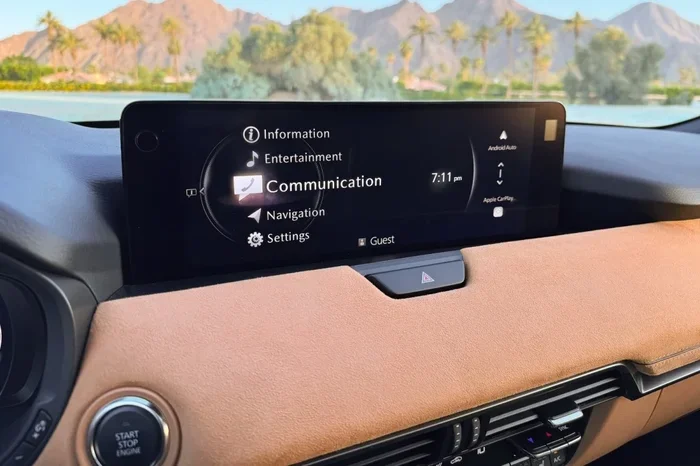
How to Restart Mazda Infotainment System for Beginners
Struggling with a frozen or unresponsive Mazda infotainment screen? This beginner-friendly guide shows you exactly how to restart Mazda infotainment system in simple steps. You will learn soft resets, hard resets, and quick fixes for common problems like freezing, black screens, and Bluetooth issues. Whether you drive a Mazda CX-5, CX-30, or another model, these tips will get your system running smoothly again fast.
Have you ever been driving your Mazda and the screen just freezes? Maybe the navigation stops working. Or the Bluetooth connection drops out of nowhere. It is frustrating, right? The good news is that you do not need to be a tech expert to fix this. Learning how to restart Mazda infotainment system is simple and takes just a few minutes.
This guide is made for beginners. We will walk you through every step. You will learn the soft reset method, the hard reset method, and when each one works best. We will also cover common problems that cause your Mazda screen to act up. By the end, you will feel confident fixing your infotainment system on your own.
Let us get started. No jargon. No confusing tech talk. Just clear, easy steps that actually work.
Key Takeaways
- A soft reset is the easiest way to restart Mazda infotainment system without losing any settings or saved data.
- A hard reset works like pulling the plug and can fix deeper system freezes or black screen problems.
- Common causes of infotainment issues include software glitches, outdated maps, and Bluetooth pairing errors.
- Regular updates and good habits keep your Mazda system running smoothly and reduce the need for frequent restarts.
- Knowing when to seek professional help saves time and money if simple restarts do not solve the problem.
📑 Table of Contents
- Why You Might Need to Restart Your Mazda Infotainment System
- How to Soft Restart the Mazda Infotainment System
- How to Perform a Hard Reset on Mazda Infotainment
- Common Mazda Infotainment Problems That Need a Restart
- Tips to Keep Your Mazda Infotainment System Running Smoothly
- When to Seek Professional Help for Mazda Infotainment Issues
- Key Takeaways
- Conclusion
Why You Might Need to Restart Your Mazda Infotainment System
Your Mazda infotainment system is a small computer. It runs the audio, navigation, Bluetooth, and sometimes even the rear camera display. Like any computer, it can slow down or freeze. Here are the most common reasons you might need to restart your Mazda infotainment system:
- The touchscreen becomes unresponsive and you cannot tap any buttons.
- The audio cuts out or sounds glitchy even after adjusting the volume.
- Bluetooth pairing fails or keeps disconnecting from your phone.
- The navigation system freezes and will not load maps or directions.
- A software update gets stuck and the screen shows no progress.
- The screen goes black but the system is still powered on.
- The system runs very slowly and takes forever to respond.
Most of these issues are temporary. A simple restart often fixes them right away. Think of it like restarting your phone when it acts weird. The same idea applies here.
Soft Reset vs. Hard Reset
Before we dive into the steps, let us understand the difference. A soft reset is like putting your computer to sleep and waking it back up. It refreshes the system without deleting anything. A hard reset is more like turning the computer off and on again from the power source. It clears deeper issues but may reset some of your preferences.
| Feature | Soft Reset | Hard Reset |
|---|---|---|
| What it does | Refreshes the system software | Fully powers down and restarts the system |
| Data loss | None | May reset some preferences |
| Time needed | About 30 seconds | 2 to 5 minutes |
| Best for | Minor freezes and slow performance | Black screens and deep system errors |
| Difficulty | Very easy | Easy, but takes a bit longer |
For most problems, start with the soft reset. It is quick and safe. If that does not work, move on to the hard reset.
How to Soft Restart the Mazda Infotainment System
A soft restart is the first thing you should try. It takes less than a minute and does not affect your saved settings. Here is exactly how to do it.
Step-by-Step Soft Reset Instructions
Follow these steps carefully. The exact button names may vary slightly depending on your Mazda model and year.
- Press and hold the power button. This button is usually on the left side of the infotainment screen or near the volume knob. Hold it for about 10 to 15 seconds.
- Wait for the screen to go dark. The display will turn off completely. This is normal. Do not panic.
- Wait another 10 seconds. Let the system fully power down. This gives the internal memory time to clear.
- Press the power button again. Hold it for a few seconds until the Mazda logo appears on screen.
- Wait for the system to boot up. This usually takes about 30 seconds to one minute.
- Test the system. Try playing music, using navigation, or connecting Bluetooth to see if the issue is resolved.
That is it! In most cases, a soft restart fixes minor glitches instantly. The screen should feel responsive again, and the audio should work normally.
Quick Tip: If your Mazda has a rotary controller, you can also try turning it and pressing it in as a reset method on some models. Check your owner’s manual for specific instructions.
Which Mazda Models Does This Work For?
The soft reset method works on most Mazda models. This includes the Mazda CX-5, Mazda CX-30, Mazda CX-50, Mazda Mazda3, Mazda Mazda6, and Mazda CX-90. The basic process is the same across these models. The only difference is the location of the power button.
If you are not sure where your power button is, look around the edges of the infotainment screen. It is usually a small circular or oval button. Some newer models may have the power button integrated into the volume knob.
How to Perform a Hard Reset on Mazda Infotainment
A hard reset is your next step if the soft restart does not work. This method fully cuts power to the system and forces it to reboot from scratch. It is safe and does not damage your Mazda.
Method 1: Disconnect the Battery Terminal
This is the most common way to perform a hard reset on your Mazda infotainment system.
- Turn off the engine and remove the key from the ignition.
- Open the hood and locate the car battery.
- Find the negative terminal. It is marked with a minus sign (-) and usually has a black cable.
- Use a wrench to loosen the nut on the negative terminal clamp.
- Carefully remove the cable from the terminal. Do not let it touch any metal parts.
- Wait at least 3 to 5 minutes. This lets all the remaining power drain from the system.
- Reconnect the cable to the negative terminal and tighten the nut.
- Start the engine and let the infotainment system boot up.
Once the system restarts, your Bluetooth pairings and radio presets may need to be set up again. The navigation map may also need a moment to reload. This is completely normal.
Method 2: Remove the Infotainment Fuse
Some Mazda owners prefer to remove the infotainment fuse instead of disconnecting the battery. This method is more targeted and avoids resetting other electronic systems in your car.
- Find the fuse box. In most Mazdas, the interior fuse box is under the dashboard on the driver’s side.
- Consult your owner’s manual to find the fuse for the infotainment system. It is usually labeled “AUDIO” or “INFOTAINMENT.”
- Use a fuse puller (or a pair of small tweezers) to carefully remove the fuse.
- Wait about 2 minutes.
- Reinsert the fuse firmly into the same slot.
- Start the car and check if the system restarts properly.
This method works great for Mazda CX-5 owners and other models with easily accessible fuse boxes. Just be gentle when removing and reinserting the fuse.
Common Mistakes to Avoid:
- Do not pull the positive battery terminal. Always work with the negative terminal to avoid short circuits.
- Do not skip the waiting time. The system needs a few minutes to fully discharge. Rushing this step can cause the reset to fail.
- Do not reconnect the battery while your hands are wet. Always dry your hands before working near the battery.
Common Mazda Infotainment Problems That Need a Restart
Not all infotainment problems require a restart, but many of the most common ones do. Let us look at specific issues and how a restart helps fix them.
Mazda Infotainment Black Screen
A black screen is one of the most alarming things you can see on your dashboard. The car seems to be on, but the display shows nothing. This is usually a software glitch, not a hardware failure.
How a restart helps: A hard reset forces the system to reboot and reload the display driver. In most cases, the screen comes back to life after the reset. If the black screen happens right after a software update, wait about 10 minutes first. Some updates take longer than expected to complete.
Mazda Infotainment Freezing or Lagging
If the touchscreen responds slowly or the system gets stuck on a loading screen, your infotainment software may be overloaded. This happens often after installing map updates or connecting multiple Bluetooth devices.
How a restart helps: A soft reset clears the temporary memory and gives the system a fresh start. It is like closing apps on your phone to free up space. The system should run much faster after the restart.
Bluetooth Connection Problems
Bluetooth issues are very common with infotainment systems. Your phone may not connect, or it keeps disconnecting mid-call. Sometimes the audio quality drops or there is static.
How a restart helps: A soft reset clears the Bluetooth cache and forces the system to re-establish connections. After the restart, try pairing your phone again. If the problem continues, delete the old pairing and create a new one.
Navigation System Not Working
If your Mazda GPS stops showing directions or the map will not load, the navigation software may have crashed. This is especially common in older Mazda models with outdated map data.
How a restart helps: A restart refreshes the navigation software and clears temporary errors. If the maps still do not load after a restart, check for a map update. Outdated maps are a leading cause of navigation problems.
Expert Insight: According to Mazda service technicians, about 70% of infotainment issues are resolved with a simple soft restart. Before visiting a dealership, always try restarting your system first. It saves time and money.
Tips to Keep Your Mazda Infotainment System Running Smoothly
Prevention is always better than cure. Here are some easy habits that keep your Mazda infotainment system healthy and reduce the need for frequent restarts.
Keep Your Software Updated
Mazda releases software updates for the infotainment system. These updates fix bugs, improve performance, and add new features. Check for updates through the Mazda Connect system or visit your local Mazda dealer. Keeping your system updated is one of the best ways to avoid glitches.
Do Not Overload the System
Your infotainment system has limited memory. If you store too many photos, music files, or apps on it, the system can slow down. Keep your media library lean. Use a USB drive for extra storage instead of filling the built-in memory.
Restart Your System Regularly
Just like your phone, your Mazda infotainment system benefits from regular restarts. Once a month, do a soft reset to clear out temporary files and refresh the system. This simple habit goes a long way in preventing problems.
Use Genuine Mazda Accessories
Aftermarket USB cables, chargers, and adapters can sometimes cause compatibility issues. Stick with genuine Mazda accessories or high-quality brands that are known to work with Mazda vehicles. Cheap accessories may save money but can create more problems in the long run.
Protect the System from Heat
Excessive heat can damage electronic components. If you park outside in direct sunlight for long periods, use a sunshade on your windshield. This keeps the interior cooler and protects your infotainment screen and internal electronics.
When to Seek Professional Help for Mazda Infotainment Issues
Most infotainment problems are easy to fix with a restart. But sometimes, the issue is deeper and needs professional attention. Here are signs that you should visit a Mazda dealer or certified technician:
- The screen stays black even after multiple hard resets. This could indicate a hardware failure in the display unit.
- The system keeps restarting on its own. A loop of automatic restarts suggests a deeper software or electrical problem.
- You see error codes on the screen. Messages like “System Error” or “Service Required” should be checked by a professional.
- The audio system produces distorted sound even after a restart. This could be a speaker or amplifier issue.
- The system will not turn on at all. No response when you press the power button means the problem may be with the wiring or the main unit.
Mazda dealerships have specialized diagnostic tools that can identify problems you cannot see with the naked eye. They can also perform a full Mazda infotainment reset or Mazda factory reset if needed. Do not hesitate to reach out to them if simple restarts do not solve your problem.
Quick Tip: Before visiting a dealer, write down the exact error messages you see on the screen. Take a photo if possible. This helps the technician diagnose the problem faster and may save you time and money.
How Mazda Infotainment System Restart Differs Across Models
Not all Mazda models have the same infotainment system. Newer models use the latest Mazda Connect system with a larger touchscreen and more features. Older models may have a simpler audio system with physical buttons instead of a touch interface.
Here is a quick comparison of the restart process across popular Mazda models:
- Mazda CX-5 (2016 and newer): Press and hold the power button for 10 seconds for a soft reset. The power button is located on the left side of the screen.
- Mazda CX-30: Same process as the CX-5. The system uses the same Mazda Connect platform.
- Mazda CX-50: Identical restart process to the CX-5 and CX-30. The power button placement is the same.
- Mazda Mazda3 (2018 and newer): The power button is near the climate controls on the left side of the center console.
- Mazda CX-90 (2024 and newer): Uses the latest infotainment platform. The soft reset process is the same, but the system boots faster thanks to improved hardware.
No matter which Mazda model you drive, the basic restart principles remain the same. The soft reset is always your first move, and the hard reset is your backup plan.
Key Takeaways
- A soft reset is the easiest way to restart Mazda infotainment system without losing any settings or saved data.
- A hard reset works like pulling the plug and can fix deeper system freezes or black screen problems.
- Common causes of infotainment issues include software glitches, outdated maps, and Bluetooth pairing errors.
- Regular updates and good habits keep your Mazda system running smoothly and reduce the need for frequent restarts.
- Knowing when to seek professional help saves time and money if simple restarts do not solve the problem.
Conclusion
Knowing how to restart Mazda infotainment system is a valuable skill for every Mazda owner. Whether you deal with a frozen screen, a black display, or Bluetooth connection issues, a simple restart often solves the problem in minutes. Start with the soft reset. If that does not work, move on to the hard reset. Both methods are safe, easy, and do not require any special tools.
Remember to keep your system updated and practice good habits like regular restarts. These small steps go a long way in keeping your Mazda infotainment system running at its best. And if the problem persists, do not hesitate to visit a Mazda dealer. They have the tools and expertise to handle more complex issues.
You now have everything you need to troubleshoot and fix most Mazda infotainment problems. The next time your screen freezes, you will know exactly what to do. Stay calm, follow the steps, and your system will be back to normal in no time.
Frequently Asked Questions
How long does it take to restart the Mazda infotainment system?
A soft restart takes about 30 seconds to one minute. A hard reset takes a bit longer, usually 2 to 5 minutes, because the system needs time to fully power down and reboot. The wait is worth it for a fully refreshed system.
Will restarting my Mazda infotainment system delete my saved data?
A soft restart will not delete any of your saved data, Bluetooth pairings, or radio presets. A hard reset may reset some preferences like the radio station memory or Bluetooth pairings. Your navigation history and saved addresses usually remain intact.
What should I do if the Mazda infotainment screen stays black after a restart?
If the screen stays black after both a soft and hard reset, try checking the fuse first. If the fuse is fine, the issue may be with the display hardware. In this case, it is best to visit a Mazda dealer for a professional diagnosis.
How often should I restart my Mazda infotainment system?
There is no need to restart your system regularly. A soft reset once a month is a good practice to keep things running smoothly. Otherwise, only restart when you notice performance issues or glitches.
Can I update the Mazda infotainment software myself?
Some Mazda models allow over-the-air updates through the Mazda Connect system. Other models require a visit to a Mazda dealer or a USB-based update. Check your owner’s manual or contact your local Mazda dealer to find out which method applies to your vehicle.
Is it safe to drive while the Mazda infotainment system is restarting?
No. Always restart your infotainment system when the car is parked and the engine is off. The screen may be unresponsive during the restart process, and you do not want to lose access to navigation or audio while driving.