How to Reset CarPlay in a Subaru Step by Step Guide
Resetting CarPlay in your Subaru is simpler than you think and can solve freezing screens, disconnections, and pairing problems in minutes. This guide walks you through every method — from a soft reset to a full factory reset — so your Subaru CarPlay works flawlessly again. Whether you drive a Forester, Outback, or Legacy, you will find the exact steps you need right here.
There is nothing more frustrating than trying to use Apple CarPlay in your Subaru and finding that it just will not cooperate. The screen freezes. The connection drops. Or worse, nothing happens at all when you plug in your iPhone. If you have been searching for how to reset CarPlay in a Subaru, you are in the right place.
This guide gives you every method you need to get your Subaru infotainment system working again. We cover soft resets, hard resets, and everything in between. You will learn why CarPlay problems happen, how to fix them step by step, and what you can do to prevent them in the future. Let us get your Subaru back on track.
Key Takeaways
- Soft Reset: A quick and easy way to restart CarPlay without losing any settings or data on your Subaru infotainment system.
- Factory Reset: The most thorough fix for persistent CarPlay issues, but it erases all paired devices and saved preferences.
- Common Causes: Outdated software, loose USB cables, and incompatible iPhone versions are the top reasons CarPlay fails in Subarus.
- Prevention Tips: Regular updates and clean USB connections keep your CarPlay running smoothly for months.
- Model-Specific Steps: Different Subaru models may have slightly different reset procedures, especially older versus newer infotainment systems.
📑 Table of Contents
- Why Does CarPlay Stop Working in a Subaru?
- How to Reset CarPlay in a Subaru: Soft Reset Method
- How to Reset CarPlay in a Subaru: Hard Reset Method
- How to Reset CarPlay in a Subaru: Factory Reset Method
- Common CarPlay Problems in Subaru Models
- Comparison Table: Soft Reset vs. Hard Reset vs. Factory Reset
- How to Prevent CarPlay Problems in the Future
- Expert Insights on Subaru CarPlay Maintenance
- Key Takeaways
- Conclusion
Why Does CarPlay Stop Working in a Subaru?
Before you dive into the reset process, it helps to understand what might be causing the problem. CarPlay not working in a Subaru can happen for several reasons. Most of them are simple and easy to fix.
Software Glitches
Like any digital system, the Subaru multimedia unit can experience temporary software hiccups. A CarPlay freeze or CarPlay disconnect often comes from a minor bug in the infotainment software. These glitches do not mean anything is broken. They just need a quick reset to clear out.
USB Connection Issues
The USB cable you use matters more than you might think. A worn-out cable, a dirty port, or a loose connection can all cause CarPlay not responding on your Subaru dashboard. Cheap or damaged cables are the number one culprit behind CarPlay problems.
Outdated Software
Both your iPhone and your Subaru system need to stay current. When either device runs outdated software, CarPlay pairing can fail. Subaru releases infotainment updates that improve compatibility with newer iOS versions. If you skip these updates, you might run into trouble.
Incompatible Devices
Not every iPhone works perfectly with every Subaru model. Older Subaru systems may not support the latest CarPlay features on newer iPhones. If you recently upgraded your phone and suddenly lost CarPlay, compatibility could be the issue.
How to Reset CarPlay in a Subaru: Soft Reset Method
A soft reset is the fastest and safest way to fix most CarPlay issues. It does not delete anything. It simply restarts the CarPlay connection and clears temporary glitches. This should always be your first step.
Step-by-Step Soft Reset Instructions
- Unplug your iPhone from the USB port in your Subaru.
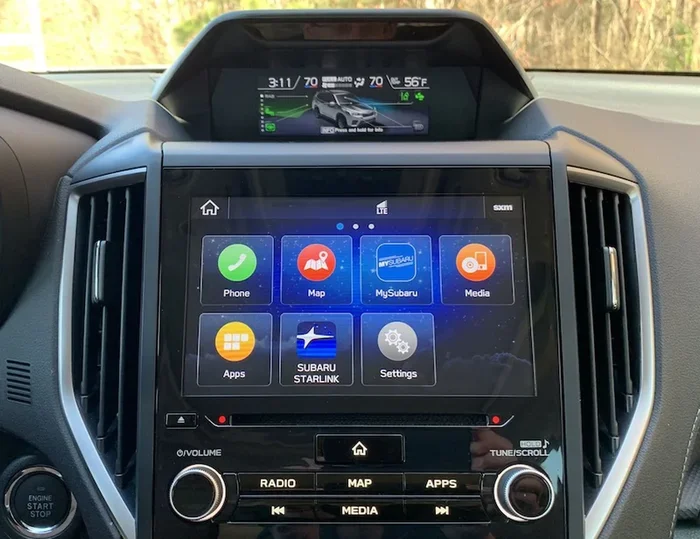
- Turn off the infotainment system by holding down the power button on the dashboard screen for about 10 seconds.
- Wait 30 seconds to let the system fully power down.
- Turn the infotainment system back on by pressing the power button again.
- Reconnect your iPhone using a certified USB cable.
- Check if CarPlay activates automatically or tap the CarPlay icon on the screen.
This method works for most Subaru Forester CarPlay and Subaru Outback CarPlay models. If the soft reset does not solve the problem, move on to the next method.
Quick Tip for Soft Resets
Always use an Apple-certified USB cable. Non-certified cables can cause intermittent CarPlay errors even when they seem to work fine for charging. A good cable saves you a lot of troubleshooting time.
How to Reset CarPlay in a Subaru: Hard Reset Method
A hard reset goes deeper than a soft reset. It clears more system data and can fix stubborn CarPlay problems that a soft reset cannot touch. Use this method when the soft reset fails.
Step-by-Step Hard Reset Instructions
- Turn off your Subaru engine and remove the key from the ignition.
- Unplug all USB devices from the infotainment system.
- Open the hood and locate the Subaru battery.
- Disconnect the negative battery terminal using a wrench. Wait at least 5 minutes.
- Reconnect the negative terminal and tighten it securely.
- Start the engine and turn on the infotainment system.
- Reconnect your iPhone and check if CarPlay works.
This method effectively resets the entire Subaru multimedia system. It clears cached data and forces the system to start fresh. Most users find that a hard reset resolves even the most persistent CarPlay freezing issues.
Important Warning
Disconnecting the battery may reset other settings in your Subaru, such as radio presets and clock time. Make sure you note down any important settings before starting. Also, some Subaru models have a security code for the radio. Check your owner manual if you are unsure.
How to Reset CarPlay in a Subaru: Factory Reset Method
A factory reset is the most powerful option. It wipes all infotainment settings and returns the system to its original state. You should only use this method if both the soft and hard resets fail.
When Should You Factory Reset?
Use a factory reset only when nothing else works. If your CarPlay error message keeps appearing, if the screen stays black every time you connect, or if the system crashes repeatedly, a factory reset can help. It is also useful before selling or trading in your Subaru.
Step-by-Step Factory Reset Instructions
- Park your Subaru and turn off the engine.
- Press the Home button on the infotainment screen to go to the main menu.
- Navigate to Settings using the touchscreen or control knob.
- Select System or System Settings, depending on your model.
- Choose Reset or Factory Reset.
- Confirm your choice when prompted. The system will restart automatically.
- Re-pair your iPhone after the system boots back up.
After a factory reset, you will need to set up your preferences again. This includes pairing your phone, adjusting display settings, and reconnecting to Wi-Fi if applicable. The upside is that your Subaru Starlink and CarPlay will run like new.
Quick Tip
Before factory resetting, write down your favorite radio stations and any custom settings. This saves you time when you need to set everything back up.
Common CarPlay Problems in Subaru Models
Different Subaru models can have different CarPlay quirks. Here are the most common issues drivers report and how to fix them.
Subaru Forester CarPlay Issues
Forester owners often report that CarPlay disconnects while driving. This usually happens with older firmware versions. Check for a system update through your Subaru dealer or the infotainment settings menu. A simple update can fix the problem completely.
Subaru Outback CarPlay Freezing
The Outback is a popular model, and with that comes a lot of CarPlay usage. Freezing screens often result from too many connected Bluetooth devices or a full iPhone storage. Keep your storage at least 10% free for smooth CarPlay performance.
Subaru Legacy CarPlay Not Responding
Legacy models with older infotainment systems may not support the latest CarPlay features. If your screen goes black when you connect, try a different USB port. Some Subarus have a dedicated charging port and a data port. Always plug into the data port for CarPlay.
Comparison Table: Soft Reset vs. Hard Reset vs. Factory Reset
| Method | Difficulty | Time Required | Data Lost | Best For |
|---|---|---|---|---|
| Soft Reset | Easy | 1-2 minutes | None | Minor freezes and disconnections |
| Hard Reset | Moderate | 5-10 minutes | Radio presets, clock | Persistent CarPlay errors |
| Factory Reset | Advanced | 15-20 minutes | All settings and pairings | Severe system failures |
Choose the method that matches the severity of your problem. Start with the soft reset and work your way up if needed. Most CarPlay troubleshooting situations are resolved with just the soft reset.
How to Prevent CarPlay Problems in the Future
Prevention is always better than fixing. Once you get your Subaru CarPlay working again, you want to keep it working. These simple habits make a big difference.
Keep Your Software Updated
Check for Subaru infotainment updates at least once a month. Apple also releases iOS updates that improve CarPlay compatibility. Keeping both devices current prevents most CarPlay connection issues.
Use Quality USB Cables
Invest in a high-quality, Apple-certified USB cable. Avoid cheap knockoff cables that may only charge and not transfer data. A good cable lasts longer and provides a stable CarPlay connection.
Clean Your USB Ports
Dust and debris can build up in USB ports over time. Use a soft brush or compressed air to clean the port in your Subaru regularly. A clean connection means fewer CarPlay errors.
Restart Your iPhone Weekly
A weekly iPhone restart clears temporary files and keeps the system running smoothly. This simple habit reduces the chances of CarPlay not working when you need it most.
Avoid Overheating
Extreme heat can affect both your iPhone and the Subaru infotainment system. Park in the shade when possible and avoid leaving your phone on the dashboard in direct sunlight. Cool devices connect better.
Expert Insights on Subaru CarPlay Maintenance
Automotive technicians who specialize in Subaru infotainment systems recommend a few extra steps for long-term reliability.
Regular system restarts are one of the best things you can do. Just like your phone, the Subaru multimedia unit benefits from a fresh start every few weeks. You do not need a full reset — simply turning the system off and back on clears minor glitches.
Keep your iPhone storage under 80% capacity. When your phone is nearly full, CarPlay performance drops noticeably. Delete unused apps, photos, and files regularly to maintain smooth operation.
Visit your Subaru dealer annually for a system check. Dealers can run diagnostic tests on your infotainment unit and apply any available updates. This proactive approach catches problems before they become serious.
Do not ignore error messages. If your screen displays a CarPlay error message, address it immediately. Ignoring errors can lead to bigger problems over time. A quick reset at the first sign of trouble saves hours of frustration later.
Key Takeaways
- Soft Reset: A quick and easy way to restart CarPlay without losing any settings or data on your Subaru infotainment system.
- Hard Reset: Disconnects the battery to clear deeper system issues. Use when the soft reset does not work.
- Factory Reset: The most thorough fix that erases all settings and pairings. Reserve for serious or persistent problems.
- Prevention Matters: Regular software updates, quality cables, and clean ports keep CarPlay running smoothly.
- Model Differences: Different Subaru models may require slightly different steps, especially for older infotainment systems.
- iPhone Maintenance: Keeping your iPhone updated and storage healthy directly impacts CarPlay performance in your Subaru.
Conclusion
Knowing how to reset CarPlay in a Subaru gives you the power to fix connection problems quickly and confidently. Whether a simple soft reset or a full factory reset does the job, you now have all the tools you need. The key is to start with the least invasive method and work your way up only if necessary.
Most CarPlay issues in Subarus resolve with a soft reset or a hard reset. Factory resets are rare but effective when nothing else works. By following the prevention tips in this guide, you can keep your Subaru infotainment system running smoothly for years to come.
Do not let a frozen screen or a dropped connection ruin your drive. Try these reset methods today and get back to enjoying your favorite apps, maps, and music through Apple CarPlay in your Subaru. Your next road trip deserves a flawless connection.
Frequently Asked Questions
How do I know if I need a soft reset or a hard reset for CarPlay in my Subaru?
Start with a soft reset every time. It takes less than two minutes and does not affect any of your settings. If CarPlay still does not work after a soft reset, try a hard reset by disconnecting the battery for five minutes. Only use a factory reset if both other methods fail.
Will resetting CarPlay delete my playlists and playlists on my iPhone?
No. Resetting CarPlay in your Subaru does not delete anything from your iPhone. Your music, playlists, podcasts, and apps stay exactly where they are. The reset only affects the infotainment system and its connection settings.
Why does CarKeep keep disconnecting in my Subaru while I am driving?
Frequent disconnections usually come from a loose USB cable or a software glitch. Try a different certified cable first. If that does not work, perform a soft reset or hard reset as described in this guide. Outdated infotainment software can also cause this issue.
Can I use a wireless CarPlay connection instead of a USB cable in my Subaru?
Some newer Subaru models support wireless CarPlay. Check your owner manual or visit a Subaru dealer to confirm compatibility. Wireless CarPlay eliminates cable-related problems but still requires occasional resets if connection issues arise.
How often should I update my Subaru infotainment system?
Check for updates at least once a month. Subaru releases infotainment updates that improve CarPlay compatibility and fix known bugs. You can check for updates in the settings menu of your infotainment system or ask your dealer during routine service visits.
What should I do if CarPlay still does not work after a factory reset?
If CarPlay still fails after a factory reset, the problem may be hardware-related. Visit a Subaru dealer for a professional diagnostic. The issue could be a faulty USB port, a defective infotainment unit, or an incompatible iPhone model. A dealer can identify and fix the problem quickly.