How to Set Cruise Control on Your 2021 Nissan Rogue
Setting cruise control on a 2021 Nissan Rogue is quick and easy once you know where the controls are located. This guide shows you how to activate standard cruise control and use the adaptive cruise control feature on your 2021 Nissan Rogue cruise control system. You will learn every step from turning the system on to adjusting your speed and following distance. Whether you drive highways daily or take occasional road trips, mastering cruise control makes your rides smoother and less tiring. By the end of this guide, you will feel confident using every cruise control function on your Rogue.
Setting cruise control on a 2021 Nissan Rogue is one of the simplest ways to make long drives more comfortable. The cruise control system on the 2021 Nissan Rogue gives you the ability to maintain a steady speed without keeping your foot on the accelerator. This feature is especially helpful on highway trips where you spend hours at the same pace. Once you learn the controls, you will wonder how you ever drove without them.
The 2021 Nissan Rogue comes with both standard cruise control and an optional adaptive cruise control system. Standard cruise control lets you set a fixed speed, while adaptive cruise control uses sensors to keep a safe distance from the vehicle ahead. Both systems are easy to use, but they work a little differently. This guide covers everything you need to know about setting cruise control on a 2021 Nissan Rogue, from the basic steps to advanced tips and safety reminders.
Key Takeaways
- Easy Activation: Setting cruise control on a 2021 Nissan Rogue takes just a few simple steps using the steering wheel controls.
- Adaptive Cruise Control Available: The 2021 Rogue offers adaptive cruise control that automatically adjusts your speed based on traffic.
- Safety First: Always keep your hands on the wheel and know how to cancel cruise control instantly.
- Fuel Savings: Using cruise control on highways can improve fuel efficiency on your 2021 Nissan Rogue.
- Customizable Settings: You can adjust the speed, following distance, and resume cruise control after braking.
- Common Mistakes Exist: Avoid using cruise control in heavy traffic, rain, or on winding roads.
📑 Table of Contents
- Understanding Cruise Control on the 2021 Nissan Rogue
- How to Set Cruise Control on a 2021 Nissan Rogue
- Using Adaptive Cruise Control on the 2021 Nissan Rogue
- How to Cancel, Resume, and Adjust Cruise Control
- Benefits of Using Cruise Control on the 2021 Nissan Rogue
- Common Mistakes When Using Cruise Control
- Expert Tips for Getting the Most from Cruise Control
- Comparison: Standard vs Adaptive Cruise Control on the 2021 Nissan Rogue
- Quick Tips for Cruise Control Success
- Frequently Asked Questions
- Key Takeaways
- Conclusion
Understanding Cruise Control on the 2021 Nissan Rogue
What Is Cruise Control?
Cruise control is a driver assistance feature that lets you set a specific speed for your vehicle. Once activated, the car maintains that speed automatically. You do not need to press the gas pedal to keep moving at the same pace. This is a great feature for long highway drives where you want to relax your foot and reduce fatigue.
The 2021 Nissan Rogue offers two types of cruise control systems. The standard system maintains a fixed speed you choose. The adaptive cruise control system, which may be available on higher trim levels, uses radar and cameras to detect vehicles ahead. It then adjusts your speed to keep a safe following distance. Both systems are designed to make driving easier and more enjoyable.
Where Are the Cruise Control Buttons on a 2021 Nissan Rogue?
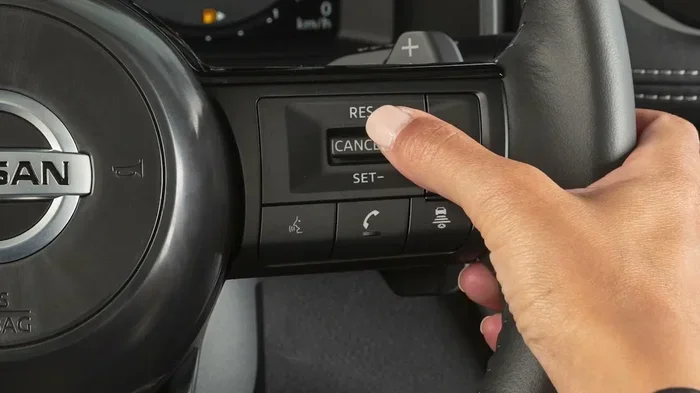
All cruise control controls on the 2021 Nissan Rogue are located on the steering wheel. The right side of the steering wheel has the cruise control buttons. You will find the on/off button, the set button, the resume button, and the cancel button. The left side may have additional controls depending on your trim level.
Here is a quick look at what each button does:
- On/Off Button: This turns the cruise control system on or off. When the system is off, the indicator light on the dashboard is not lit.
- Set Button: Pressing this button sets the current speed as your cruise control speed.
- Resume Button: This button brings back the previously set cruise control speed after you have canceled it.
- Cancel Button: Pressing this turns off cruise control temporarily without erasing your saved speed setting.
- Up/Down Arrow Buttons: These let you increase or decrease your set speed in small increments.
Take a moment to locate these buttons on your steering wheel before you start driving. Familiarity with the controls makes the whole process smoother and safer.
How to Set Cruise Control on a 2021 Nissan Rogue
Step 1: Turn On the Cruise Control System
Start by pressing the on/off button on the right side of the steering wheel. When you press it, the cruise control indicator light on your dashboard will turn on. This tells you the system is ready to use. The light is usually green or white when the system is active and ready.
At this point, the cruise control is on but not yet set to any speed. Your vehicle will continue to drive normally. You have not changed anything about how the car drives yet. This is simply the first step to activating cruise control.
Step 2: Reach Your Desired Speed
Now press the accelerator pedal and bring your 2021 Nissan Rogue up to the speed you want to maintain. This could be 60 mph, 65 mph, or whatever speed feels safe and legal for the road you are on. Make sure you are traveling at a steady speed before moving to the next step.
It is important to choose a speed that matches the flow of traffic and follows posted speed limits. Do not set cruise control at a speed that is too fast for the road conditions. Highway driving is the best environment for cruise control because the roads are straight and the traffic tends to move at a consistent pace.
Step 3: Press the Set Button
Once you are at your desired speed, press the set button on the steering wheel. You will hear a soft beep, and the cruise control indicator on the dashboard will change to show that a speed has been set. Your foot can now come off the accelerator pedal.
The 2021 Nissan Rogue will now maintain that speed all on its own. You can take your foot off the gas and let the car do the work. This is the moment when cruise control really starts to feel convenient. Your leg gets a break, and you can focus more on steering and watching the road.
Step 4: Adjust the Speed If Needed
After setting your cruise control speed, you can make small adjustments using the up and down arrow buttons on the steering wheel. Each press of an arrow changes the speed by about 1 mph. If you want a bigger change, you can press and hold the arrow to adjust the speed more quickly.
Some drivers like to set their cruise control at the speed limit and then make minor tweaks based on traffic flow. This is a smart approach because it keeps you at a legal and safe speed without needing to constantly adjust. The 2021 Nissan Rogue makes this process very simple and responsive.
Using Adaptive Cruise Control on the 2021 Nissan Rogue
What Makes Adaptive Cruise Control Different?
Adaptive cruise control, or ACC, is a more advanced version of standard cruise control. While standard cruise control holds a fixed speed, adaptive cruise control uses sensors and cameras to detect vehicles ahead. If the car in front of you slows down, your 2021 Nissan Rogue will automatically slow down too. When the road clears, it will speed back up to your set speed.
This feature is a game-changer for stop-and-go highway traffic or long road trips where traffic flow varies. Adaptive cruise control takes a lot of the mental load off the driver. You still need to steer and stay alert, but you do not have to constantly adjust your speed to match the car ahead.
How to Set Adaptive Cruise Control
The process for setting adaptive cruise control is similar to standard cruise control. First, press the on/off button for the cruise control system. Then, press the adaptive cruise control button, which is usually labeled with a car icon and a distance gauge. Your dashboard will show that adaptive cruise control is active.
Next, accelerate to your desired speed and press the set button. Now, instead of just holding a fixed speed, the system will also maintain a following distance from the vehicle ahead. You can adjust this following distance using the distance button on the steering wheel. Most 2021 Nissan Rogue models offer multiple distance settings, usually ranging from short to long.
Setting the Following Distance
The following distance is a critical part of adaptive cruise control. A longer following distance gives you more time to react if the car ahead brakes suddenly. A shorter distance keeps you closer to traffic flow but requires more attention.
Here are some general guidelines for setting your following distance:
- Short Distance: Best for light traffic where you want to stay close to the flow of vehicles.
- Medium Distance: A good all-around setting for most highway driving conditions.
- Long Distance: Ideal for high speeds, bad weather, or when you want extra safety margin.
Experiment with different following distances to find what feels most comfortable. The 2021 Nissan Rogue makes it easy to switch between settings while driving. Just press the distance button to cycle through the options.
How to Cancel, Resume, and Adjust Cruise Control
Canceling Cruise Control
There are several ways to cancel cruise control on a 2021 Nissan Rogue. The most common way is to press the cancel button on the steering wheel. This turns off cruise control temporarily. Another way to cancel it is by pressing the brake pedal. Both methods will deactivate the system, but the saved speed setting remains in memory.
It is important to know that pressing cancel does not erase your set speed. The system remembers the last speed you had set. This is useful because you can resume cruise control at that same speed later without having to set it all over again.
Resuming Cruise Control
After canceling cruise control, you can resume it by pressing the resume button on the steering wheel. The 2021 Nissan Rogue will automatically accelerate back to your previously set speed. This is very convenient when you temporarily turn off cruise control to pass another vehicle and then want to return to your set speed.
Just make sure the road ahead is clear and you are at a safe speed before pressing resume. The car will accelerate to the saved speed, so be aware of your surroundings when you do this.
Adjusting Speed While Driving
You can adjust your cruise control speed at any time while driving. Use the up and down arrow buttons on the steering wheel to increase or decrease the set speed. Each press changes the speed by 1 mph, and holding the button makes the adjustment faster.
This feature is especially useful when you approach a slower stretch of road or when speed limits change. Instead of canceling cruise control and then setting a new speed, you can just tap the arrow and keep driving smoothly.
Benefits of Using Cruise Control on the 2021 Nissan Rogue
Improved Fuel Efficiency
One of the best benefits of using cruise control on your 2021 Nissan Rogue is improved fuel economy. When you maintain a steady speed, your engine works more efficiently. Constantly accelerating and braking, which happens naturally in regular driving, wastes fuel. Cruise control eliminates those unnecessary speed changes and helps you get more miles per gallon.
Studies have shown that steady highway driving with cruise control can improve fuel efficiency by 7 to 14 percent compared to manual speed control. Over long road trips, these savings add up quickly. If you frequently drive long distances on highways, cruise control is one of the easiest ways to save money on gas.
Reduced Driver Fatigue
Long drives can be tiring, especially on straight, flat highways where you are constantly pressing the gas pedal. Cruise control takes the workload off your right foot and lets you focus on steering and scanning the road. This reduction in physical effort helps you stay less fatigued on long trips.
Less fatigue means a safer drive. When your leg does not cramp up from holding the pedal, you can stay more alert and react better to changes in traffic. The 2021 Nissan Rogue makes this experience even better with comfortable seats and a smooth ride that pairs well with cruise control.
Consistent Speed and Smooth Driving
Cruise control helps you maintain a perfectly consistent speed. This is not only good for fuel economy but also makes for a smoother, more pleasant driving experience. You avoid the small speed fluctuations that happen when you manually control the throttle.
Other drivers on the road also benefit from your consistent speed. It is easier for surrounding vehicles to predict your movement when you are maintaining a steady pace. This contributes to overall traffic flow and can reduce the chance of sudden braking situations.
Common Mistakes When Using Cruise Control
Mistake 1: Using Cruise Control in Heavy Traffic
This is the most important mistake to avoid. Cruise control is designed for open roads with steady traffic flow. Using it in heavy city traffic or congested highway conditions is dangerous. The system will not slow down for sudden stops unless you have adaptive cruise control, and even then, it may not react quickly enough in stop-and-go traffic.
Always turn off cruise control when traffic slows down or when you are driving in busy areas. The brake pedal is your best friend in these situations. Keep your right foot ready to hit the brakes at all times.
Mistake 2: Ignoring Road and Weather Conditions
Cruise control is a convenience feature, not a safety feature. It does not replace your attention or your judgment. In wet, icy, or snowy conditions, using cruise control can be risky. If your 2021 Nissan Rogue starts to skid, the system may continue to accelerate, which can make the situation worse.
Always turn off cruise control when road conditions are poor. Rain, snow, ice, and even strong crosswinds can make cruise control unsafe. Use your best judgment and keep your foot near the pedals at all times in challenging conditions.
Mistake 3: Not Knowing the Cancel Button
Many drivers do not realize how important the cancel button is. In an emergency or unexpected situation, you need to be able to turn off cruise control instantly. Make it a habit to know exactly where the cancel button is on your steering wheel.
You should also know that pressing the brake pedal automatically cancels cruise control. This is a built-in safety feature. Always keep your right foot near the brake pedal when cruise control is active, even if you are not actively braking.
Expert Tips for Getting the Most from Cruise Control
Use It on Long Highway Drives
The best time to use cruise control is on long, open highway stretches. The 2021 Nissan Rogue handles highway cruising beautifully, and cruise control makes those miles feel shorter. If you are planning a road trip, set your cruise control early and enjoy a more relaxed drive.
Try to avoid using cruise control on roads with lots of curves, hills, or intersections. These types of roads require more active driving and frequent speed adjustments. Cruise control works best on flat, straight highways where the speed limit stays consistent.
Pair It with the Navigation System
If your 2021 Nissan Rogue has a navigation system, you can pair it with cruise control for an even better driving experience. Set your route first, then activate cruise control. The navigation system can alert you to speed limit changes, which gives you a cue to adjust your cruise control speed.
This combination of navigation and cruise control turns a long drive into a much more pleasant experience. You stay on track, maintain a steady speed, and reduce the mental effort of managing both directions and speed.
Keep Your Hands on the Wheel
This might sound obvious, but it is worth repeating. Cruise control does not steer the car. You must always keep both hands on the steering wheel when cruise control is active. The 2021 Nissan Rogue does not have a fully autonomous driving system, so you are still the driver and responsible for steering at all times.
Some drivers get too comfortable with cruise control and start to let their attention drift. This is a dangerous habit. Treat cruise control as a helper, not a replacement for your driving skills. Stay alert, stay engaged, and enjoy the added comfort it provides.
Comparison: Standard vs Adaptive Cruise Control on the 2021 Nissan Rogue
| Feature | Standard Cruise Control | Adaptive Cruise Control |
|---|---|---|
| Speed Setting | Fixed speed set by driver | Fixed speed with automatic adjustment |
| Following Distance | Not applicable | Adjustable distance from vehicle ahead |
| Best For | Open highways, light traffic | Heavy traffic, varying speeds |
| Sensor Technology | None | Radar and camera sensors |
| Availability | Standard on all trims | Available on select trims |
| Driver Effort | Low | Very low |
| Safety Features | Basic speed maintenance | Automatic braking, distance maintenance |
Both systems offer great benefits, but adaptive cruise control adds a layer of smart automation that makes driving even more effortless. If your 2021 Nissan Rogue trim includes adaptive cruise control, it is well worth using it on your daily commute and long trips alike.
Quick Tips for Cruise Control Success
- Always check your mirrors before setting cruise control and make sure the road ahead is clear.
- Keep your foot near the brake pedal at all times when cruise control is active.
- Use the cancel button whenever road conditions change suddenly.
- Adjust the following distance on your adaptive cruise control based on weather and traffic.
- Turn off cruise control in rain, snow, or icy conditions for safety.
- Practice in light traffic first if you are new to using cruise control on your 2021 Nissan Rogue.
Frequently Asked Questions
Can I set cruise control below 25 mph on a 2021 Nissan Rogue?
No, the cruise control system on the 2021 Nissan Rogue requires a minimum speed of about 25 mph to activate. If you are driving below that speed, the system will not engage. This is a safety feature designed to ensure cruise control is only used at appropriate highway speeds.
Does cruise control on the 2021 Nissan Rogue work in the rain?
It is not recommended to use cruise control in rainy conditions. Wet roads increase the risk of hydroplaning, and if your wheels lose traction, the cruise control system may continue to accelerate. Turn it off in wet weather and drive manually for better control.
How do I know if my 2021 Nissan Rogue has adaptive cruise control?
Check your vehicle’s trim level and feature list. Adaptive cruise control is typically available on higher trims or as part of a technology package. You can also look for the adaptive cruise control button on your steering wheel, which has a car icon with a distance gauge symbol.
What happens if I brake while cruise control is active?
Pressing the brake pedal automatically cancels cruise control on the 2021 Nissan Rogue. This is a built-in safety feature. Your previously set speed is saved in memory, so you can press the resume button to return to that speed once you are ready.
Can I use cruise control on mountain roads with steep hills?
It is best to avoid using cruise control on steep mountain roads. On downhill slopes, the system may cause your vehicle to pick up speed beyond your set limit. On uphill slopes, the engine may work harder than needed. Manual control is safer in these situations.
How do I turn off cruise control completely on the 2021 Nissan Rogue?
Press the on/off button on the steering wheel to turn off the cruise control system completely. This erases your current settings and turns off the indicator light on the dashboard. You can also turn it off by pressing the cancel button and then the on/off button.
Key Takeaways
- Simple Activation: Setting cruise control on a 2021 Nissan Rogue requires just three steps: turn on the system, reach your speed, and press set.
- Adaptive Cruise Control Adds Smart Features: The adaptive system automatically adjusts your speed based on traffic, making it ideal for highway driving.
- Safety Should Always Come First: Keep your hands on the wheel, your foot near the brake, and turn off cruise control in bad weather or heavy traffic.
- Fuel Savings Are Real: Using cruise control on highways helps your 2021 Nissan Rogue use less fuel by maintaining a steady speed.
- Know Your Buttons: Familiarize yourself with the set, cancel, resume, and speed adjustment buttons on the steering wheel before you need them.
- Practice Makes Perfect: Try cruise control in light traffic first to build confidence before using it on long highway drives.
Conclusion
Setting cruise control on a 2021 Nissan Rogue is a straightforward process that can transform your driving experience. Whether you use standard cruise control for steady highway cruising or adaptive cruise control for smart speed adjustments in traffic, the 2021 Nissan Rogue makes it easy and intuitive. The steering wheel controls are well-designed and simple to use, even for first-time cruise control users.
Remember that cruise control is a helpful tool, not a replacement for attentive driving. Always stay alert, keep your hands on the wheel, and turn off the system when conditions require manual control. By following the tips and steps in this guide, you will get the most out of your 2021 Nissan Rogue cruise control system while staying safe on every trip.
Take some time to practice using cruise control on your next highway drive. Once you experience the comfort and convenience it provides, you will wonder how you ever drove without it. The 2021 Nissan Rogue is a great vehicle, and mastering its cruise control features is one of the best ways to enjoy everything it has to offer.