How Do I Check My Toyota Warranty by VIN Right Here
Checking your Toyota warranty by VIN is fast, free, and gives you peace of mind. You can use Toyota’s official online tools, visit a local dealer, or try third-party lookup services to find your exact coverage dates, warranty type, and remaining protection. This guide walks you through every method so you know exactly what your Toyota warranty by VIN covers and when it expires.
So you just bought a Toyota or maybe you are thinking about picking one up used. The first thing you probably want to know is simple: what does my warranty cover, and is it still active? The answer is easier than you think. You can check your Toyota warranty by VIN in just a few minutes from your couch or at the dealer down the street.
Your vehicle identification number is like your car’s fingerprint. Every Toyota ever made has a unique VIN that holds all sorts of important details. From manufacturing dates to warranty start dates, this little string of characters unlocks a treasure trove of information. Let us walk through exactly how to use it to find your warranty details.
Whether you own a brand-new Toyota Camry or a pre-owned RAV4, understanding your warranty coverage matters. It protects you from surprise repair bills and helps you make smart decisions about maintenance. Below, you will find every method to look up your Toyota warranty by VIN, along with tips to make the process smooth and stress-free.
Key Takeaways
- VIN lookup is the fastest way to confirm your Toyota warranty status and coverage details.
- Toyota’s official website and dealer portals offer the most accurate warranty information.
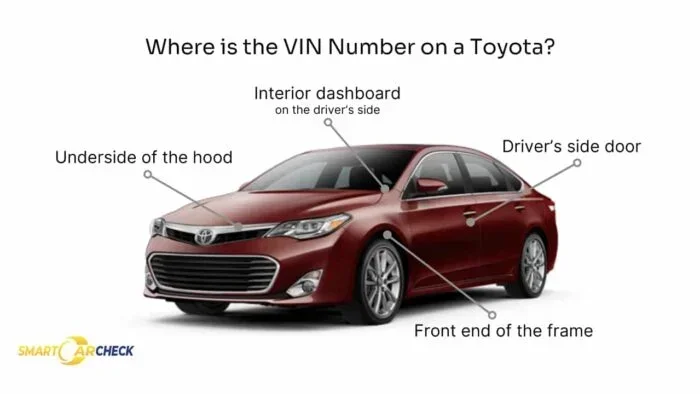
- Your VIN is found on the dashboard, driver’s side door jamb, and vehicle registration documents.
- Factory warranties typically cover 3 years or 36,000 miles for bumper-to-bumper and 5 years or 60,000 miles for powertrain.
- Certified Pre-Owned Toyotas come with extended warranty coverage that can be verified the same way.
- Keeping your VIN handy saves time whether you are checking online, calling a dealer, or filing a claim.
- Regular maintenance records tied to your VIN help protect your warranty rights.
📑 Table of Contents
- What Is a VIN and Why Does It Matter for Warranty Lookup?
- How to Check Your Toyota Warranty by VIN Online
- Checking Warranty Through a Toyota Dealer
- Third-Party VIN Lookup Tools for Toyota Warranty
- Understanding Your Toyota Warranty Coverage
- Common Mistakes to Avoid When Checking Your Warranty
- Tips to Protect and Maximize Your Toyota Warranty
- How Warranty Transfer Works for Used Toyotas
- Toyota Warranty and Recall Information
- Frequently Asked Questions About Toyota Warranty and VIN Lookups
- Final Thoughts on Checking Your Toyota Warranty by VIN
What Is a VIN and Why Does It Matter for Warranty Lookup?
Before you dive into the lookup process, let us talk about what a VIN actually is. Your vehicle identification number is a 17-character code made up of letters and numbers. Each section of that code tells you something specific about your vehicle. The first three characters identify the manufacturer and country of origin. Characters four through eight describe the vehicle type, body style, and engine. The ninth character is a check digit that confirms the VIN is valid. The tenth character tells you the model year. And the last six characters are the sequential production number.
When it comes to your Toyota warranty by VIN, this number is your golden ticket. Toyota’s system links every VIN to a specific warranty record. That record includes the warranty start date, the type of coverage, and the mileage limits. Without your VIN, you are essentially guessing about your protection. With it, you get precise, reliable information every single time.
Where to Find Your VIN
You can locate your VIN in several places. The most common spot is on the dashboard on the driver’s side. Stand outside your vehicle and look through the windshield at the lower corner of the dashboard. You will see a small metal plate or sticker with the 17-character code. Another easy spot is on the driver’s side door jamb. Open your door and look for a sticker that lists the VIN along with tire pressure information.
You can also find your VIN on your vehicle registration card, insurance documents, and the title. If you are shopping for a used Toyota online, the seller should provide the VIN in the listing. Keep it handy because you will need it for every lookup method below.
How to Check Your Toyota Warranty by VIN Online
The easiest and most popular way to verify your warranty is through Toyota’s official online tools. Toyota offers a VIN decoder and warranty lookup feature on their website. You do not need to create an account or pay any fees. Here is how to do it step by step.
Step 1: Go to Toyota’s Official Website
Open your web browser and navigate to toyota.com. Look for the “Own” or “Vehicle” section in the main menu. There you will find a tool called the VIN decoder or warranty lookup. This tool is designed specifically to help owners check their Toyota warranty by VIN quickly.
Step 2: Enter Your VIN
Type your 17-character VIN into the search field. Double-check for typos because even one wrong character will give you incorrect results. If you are unsure about a character, refer back to where you found your VIN on the dashboard or door jamb.
Step 3: Review Your Warranty Details
Once you submit the VIN, the system pulls up your vehicle’s warranty information. You should see the warranty start date, the type of coverage, and the expiration mileage or date. Some results also show whether your vehicle is still under the original factory warranty or if it has already expired.
Quick Tip: If the online tool does not return results, try removing any stickers or covers that might be obscuring part of the VIN. Also make sure you are entering the correct characters and not confusing the letter “I” with the number “1” or the letter “O” with the number “0.”
Checking Warranty Through a Toyota Dealer
If the online tools do not work or you prefer a personal touch, your local Toyota dealer is an excellent resource. Dealers have access to Toyota’s internal database, which means they can pull up your exact warranty records using your VIN. This method is especially helpful if you bought your vehicle from a different dealer or if you have recently moved.
What to Bring to the Dealer
Walk into your Toyota dealer with your VIN ready. You should also bring your vehicle registration and a photo ID. The service advisor will enter your VIN into their system and pull up your warranty status within minutes. They can tell you the exact coverage type, the remaining mileage, and the expiration date.
Can You Check Warranty Over the Phone?
Yes, you can. Call your nearest Toyota dealer and ask the service department to look up your warranty by VIN. Have your VIN written down or saved on your phone so you can read it to them quickly. Most dealers are happy to help with this over the phone at no charge. This is a great option if you cannot visit in person.
Expert Insight: Many owners do not realize that their Toyota dealer can also check warranty claim history and service records using the VIN. This is incredibly useful when buying a used Toyota because you can verify whether previous warranty claims were filed and whether the vehicle had regular maintenance performed.
Third-Party VIN Lookup Tools for Toyota Warranty
Not everyone wants to go through Toyota’s official channels. There are several reputable third-party tools that can also help you check your Toyota warranty by VIN. These services often provide additional details like vehicle history, accident reports, and recall information alongside warranty data.
Popular Third-Party Options
Websites like Carfax, AutoCheck, and VINCheckPro offer vehicle history reports that include warranty information. You typically pay a small fee for a full report, but the information is comprehensive. These tools pull data from multiple sources including Toyota’s database, insurance records, and service centers.
Some free tools like the National Highway Traffic Safety Administration (NHTSA) VIN lookup can also be useful. While they focus mainly on recall information, they do confirm your VIN is valid and match it to a Toyota vehicle. This gives you a starting point before diving deeper into warranty specifics.
Are Third-Party Tools Reliable?
Most third-party tools are reliable but they may not always have the most up-to-date warranty information. Toyota’s official system is the gold standard because it goes directly to the source. Use third-party tools as a supplement, not a replacement, for the official Toyota lookup. If you are making a major decision like purchasing a used Toyota, combining multiple sources gives you the fullest picture.
Understanding Your Toyota Warranty Coverage
Once you have checked your Toyota warranty by VIN, you will want to understand what the results actually mean. Toyota offers several types of warranty coverage, and knowing the differences helps you make the most of your protection.
Bumper-to-Bumper Warranty
The bumper-to-bumper warranty is the most comprehensive coverage Toyota offers. It covers almost all parts and systems on your vehicle except for routine maintenance items like brake pads and wiper blades. For most Toyota models, this warranty lasts 3 years or 36,000 miles, whichever comes first. This is often called the “limited warranty” in the documentation.
Powertrain Warranty
The powertrain warranty covers the major components that make your vehicle move. This includes the engine, transmission, and drivetrain. Toyota’s powertrain warranty is longer than the bumper-to-bumper coverage, typically lasting 5 years or 60,000 miles. This gives you extended protection for the parts that are most expensive to repair.
ToyotaCare Maintenance Plan
New Toyota vehicles come with a ToyotaCare maintenance plan that covers routine maintenance for 2 years or 25,000 miles. This includes oil changes, tire rotations, and multi-point inspections. The ToyotaCare plan is not a warranty in the traditional sense, but it is a valuable benefit that keeps your vehicle running smoothly during the early ownership period.
Roadside Assistance
Toyota also provides roadside assistance as part of the ToyotaCare plan. This covers towing, flat-tire changes, jump-starts, and lockout services for 2 years or 25,000 miles. This benefit is tied to your VIN and is active as long as your ToyotaCare plan is in effect.
Certified Pre-Owned Warranty
If you buy a Certified Pre-Owned (CPO) Toyota, you get an extended warranty that goes beyond the original factory coverage. CPO vehicles undergo a rigorous 160-point inspection and come with a limited warranty that can extend coverage up to 7 years or 100,000 miles from the original in-service date. You can verify CPO warranty status the same way you check a standard warranty: by entering the VIN into Toyota’s lookup tool.
Common Mistakes to Avoid When Checking Your Warranty
Checking your Toyota warranty by VIN is straightforward, but people do make mistakes that cause frustration. Here are the most common errors and how to avoid them.
- Entering the wrong VIN. Even one character off will give you results for a completely different vehicle. Always double-check your VIN before submitting it.
- Confusing the VIN with the engine number. The engine number is different from the VIN. Always use the 17-character VIN for warranty lookups.
- Assuming the online tool is always up to date. Sometimes there is a lag between when a warranty is registered and when it shows up in online tools. If the results seem off, contact your dealer directly.
- Forgetting to check the warranty start date. The warranty start date is based on the vehicle’s in-service date, not the purchase date. This means a vehicle that sat on a lot for months might have a warranty that started before you bought it.
- Not verifying mileage limits. Warranty coverage is based on whichever limit you reach first. If you drive a lot of miles, the mileage limit may expire before the time limit.
Common Mistake: Many owners assume their warranty is still active because they recently purchased the vehicle. However, if the previous owner used the vehicle for several years, the warranty clock may have already started ticking. Always verify the start date and remaining coverage using your VIN.
Tips to Protect and Maximize Your Toyota Warranty
Once you know your warranty status, you want to protect that coverage. Here are some practical tips to get the most out of your Toyota warranty.
Keep All Maintenance Records
Toyota requires that you follow the recommended maintenance schedule to keep your warranty valid. Save every receipt and record every service visit. When you check your Toyota warranty by VIN in the future, these records will help prove that you maintained the vehicle properly.
Address Warning Signs Immediately
If your check engine light comes on or you notice unusual sounds, do not ignore them. Delaying repairs can turn a small covered issue into a big uncovered one. Bring your vehicle to a Toyota dealer as soon as you notice any problems.
Know What Is Not Covered
Every warranty has exclusions. Routine maintenance, wear items like brake pads and tires, and damage from accidents or misuse are typically not covered. Read your warranty booklet carefully so you know exactly what to expect.
Consider an Extended Warranty if Needed
If your factory warranty is about to expire and you want continued protection, consider an extended warranty. Toyota offers certified extended warranty plans through their dealers. You can check your current coverage and compare extended options by entering your VIN on Toyota’s website.
Quick Tip: The best time to explore extended warranty options is before your factory warranty expires. Waiting until after it ends may limit your choices or increase the cost.
How Warranty Transfer Works for Used Toyotas
If you are buying a used Toyota, you might wonder whether the original warranty transfers to you. The answer depends on the vehicle’s age and mileage. Toyota’s factory warranty is transferable to subsequent owners during the coverage period. This means if you buy a used Toyota that is still within the 3-year bumper-to-bumper or 5-year powertrain window, the remaining coverage passes to you.
To verify transfer eligibility, simply check the Toyota warranty by VIN using the lookup tools described above. The system will show you the original warranty start date and how much coverage remains. This is one of the biggest advantages of buying a Toyota, because the warranty adds real value to the vehicle even after the original owner.
Toyota Warranty and Recall Information
Your VIN also connects you to important recall information. Toyota issues recalls when a safety defect or non-compliance issue is identified. You can check for open recalls by entering your VIN on Toyota’s recall lookup page or on the NHTSA website. Recalls are repaired at no cost to the owner, and they do not affect your warranty coverage.
Staying on top of recalls is an important part of vehicle ownership. Set a reminder to check your VIN for recalls at least twice a year. This simple habit keeps you and your passengers safe and ensures your Toyota operates at its best.
Frequently Asked Questions About Toyota Warranty and VIN Lookups
Can I check my Toyota warranty by VIN for free?
Yes, checking your Toyota warranty by VIN is completely free through Toyota’s official website and at any Toyota dealer. You do not need to pay for this service. Third-party tools may charge a fee for full vehicle history reports, but the basic warranty lookup costs nothing.
What if my VIN does not return any warranty results?
If your VIN returns no results, first double-check that you entered it correctly. If the VIN is correct and still shows no results, contact Toyota customer service or visit your local dealer. They can access the internal database and resolve any issues with your warranty record.
Does the Toyota warranty cover maintenance costs?
The bumper-to-bumper warranty covers repairs for defective parts and systems but does not cover routine maintenance. The ToyotaCare maintenance plan, however, covers scheduled maintenance services like oil changes and tire rotations for the first 2 years or 25,000 miles.
Can I check the warranty on a Toyota I am thinking of buying used?
Absolutely. You can check the warranty status of any Toyota by entering its VIN into the official Toyota lookup tool or a third-party VIN decoder. This helps you understand how much factory warranty coverage remains on a used vehicle before you make a purchase decision.
How long does a Toyota factory warranty last?
Toyota’s factory bumper-to-bumper warranty lasts 3 years or 36,000 miles, whichever comes first. The powertrain warranty lasts longer at 5 years or 60,000 miles. Certified Pre-Owned vehicles may have extended coverage that goes up to 7 years or 100,000 miles from the original in-service date.
What should I do if my warranty claim is denied?
If your warranty claim is denied, ask the dealer for a written explanation of the reason. You can contact Toyota customer service to dispute the decision. Keep all your maintenance records and VIN documentation handy because they can help support your claim if the denial was made in error.
Final Thoughts on Checking Your Toyota Warranty by VIN
Checking your Toyota warranty by VIN is one of the simplest and most valuable things you can do as a vehicle owner. It takes just a few minutes, costs nothing, and gives you clear answers about your coverage. Whether you use Toyota’s official online tools, visit your local dealer, or try a third-party VIN lookup, the process is straightforward and rewarding.
Your VIN is the key that unlocks all of this information. Keep it saved on your phone, write it down and store it in your glove box, and use it whenever you need to verify your warranty status. With the right information in hand, you can drive your Toyota with confidence knowing exactly what protection you have.
Take a few minutes today to check your Toyota warranty by VIN. It is one of the smartest things you can do for your vehicle and your wallet. The peace of mind you get from knowing your coverage is well worth the effort. Your Toyota is a reliable machine, and your warranty is there to keep it that way.