How Do I Factory Reset Toyota Hybrid Connect Device
Factory resetting your Toyota Hybrid Connect device is a simple process that can solve many connectivity issues and restore your car to its original settings. Whether you are troubleshooting a frozen screen, clearing error messages, or preparing your vehicle for a new owner, this guide covers every step you need. We will walk you through the exact methods, explain when a reset is necessary, and share expert tips to avoid common mistakes. By the end, you will feel confident handling the reset yourself without visiting a dealer. Let us get your Toyota Hybrid Connect running smoothly again.
If you own a Toyota hybrid and use the Toyota Hybrid Connect system, you may have run into a situation where your device needs a fresh start. Maybe the screen freezes, the app stops syncing, or your connected services just stop working for no clear reason. Whatever the cause, knowing how to factory reset Toyota Hybrid Connect can save you time, money, and a lot of frustration.
This guide is designed for Toyota owners who want a clear, step-by-step path to resetting their Hybrid Connect device. We will explain what a factory reset actually does, when you should do one, and exactly how to perform it. You do not need to be a tech expert or visit a dealer to get this done. Let us dive right in.
Key Takeaways
- Multiple Reset Methods: You can factory reset Toyota Hybrid Connect using the touchscreen menu, the physical reset button, or by contacting a Toyota dealer.
- Solves Common Issues: A reset fixes frozen screens, login problems, GPS errors, and connectivity glitches with the Toyota app.
- Back Up First: Always save your settings, paired devices, and preferences before performing a factory reset to avoid losing important data.
- No Technical Skills Needed: The process is straightforward and does not require advanced knowledge or special tools.
- Reset Time Varies: The full reset typically takes 15 to 45 minutes depending on your Toyota model and the method you choose.
- Post-Reset Setup Is Key: After resetting, you will need to reconfigure your Wi-Fi, Bluetooth, and app preferences to restore full functionality.
📑 Table of Contents
- What Is Toyota Hybrid Connect and Why Reset It?
- How to Factory Reset Toyota Hybrid Connect: Step-by-Step Guide
- Before You Reset: What You Need to Know
- What Happens After a Factory Reset?
- When to Contact a Toyota Dealer Instead
- Tips to Avoid Future Connectivity Issues
- Frequently Asked Questions
- Final Thoughts
What Is Toyota Hybrid Connect and Why Reset It?
Toyota Hybrid Connect is Toyota’s connected car technology that lets you monitor and control certain features of your hybrid vehicle remotely. Through a dedicated app and onboard system, you can check battery status, locate your car, schedule service appointments, and even start the engine from your phone. It is a powerful tool that makes owning a hybrid more convenient and efficient.
Over time, however, any digital system can develop glitches. Software updates, corrupted data, or simply too many stored settings can cause the system to slow down or behave unexpectedly. This is where a Toyota Hybrid Connect reset comes in. A factory reset wipes the system clean and restores it to the original factory settings, clearing out any software conflicts or corrupted files that may be causing problems.
Common Signs You Need a Reset
Not sure whether your Toyota Hybrid Connect needs a reset? Here are some clear signs to watch for:
- The touchscreen becomes unresponsive or freezes frequently
- The Toyota app fails to connect or sync with your vehicle
- GPS navigation shows incorrect locations or takes forever to load
- You cannot log into your Toyota account through the infotainment system
- Connected services like remote start or climate control stop working
- Error messages appear on the dashboard related to connectivity
- The system runs unusually slow or lags during basic operations
If you notice any of these issues, a factory reset is often the quickest and most effective solution. Before you try more complicated fixes, this should be your first step.
How to Factory Reset Toyota Hybrid Connect: Step-by-Step Guide
Resetting your Toyota Hybrid Connect device is easier than most people think. There are a few different methods you can use depending on your vehicle model and the type of issue you are experiencing. We will cover each one in detail below.
Method 1: Reset Through the Infotainment System
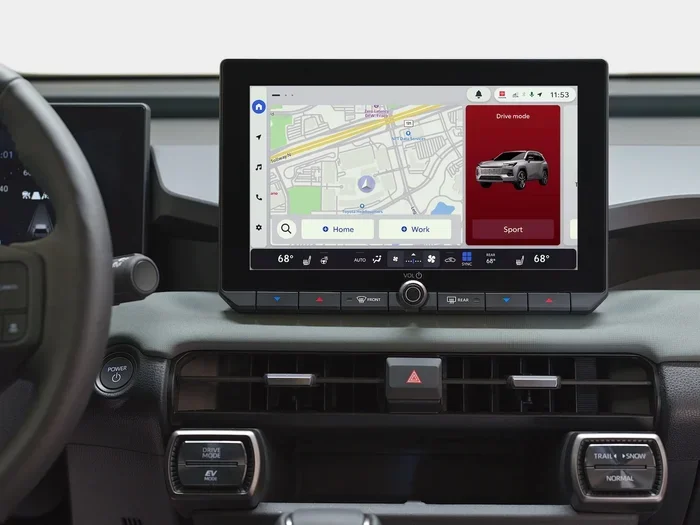
This is the most common way to perform a Toyota Hybrid Connect factory reset. It uses the built-in touchscreen and does not require any extra tools. Here is how to do it:
- Start your Toyota hybrid and let the engine run
- Press the Home button on the infotainment touchscreen to go to the main menu
- Navigate to Settings and select it
- Look for System Settings or Setup
- Find the option labeled Initialize or Factory Reset
- Select Initialize All or Factory Reset All
- Confirm your choice when prompted
- Wait for the system to complete the reset process
Once the reset finishes, your vehicle will restart automatically. The entire process usually takes about 15 to 30 minutes. After the reboot, you will need to set up your preferences again, including Wi-Fi, Bluetooth, and your Toyota account login.
Method 2: Use the Physical Reset Button
Some Toyota hybrid models have a physical reset button located in the engine bay or near the fuse box. This method is helpful if your touchscreen is completely unresponsive and you cannot navigate the menu. Here is what to do:
- Turn off the engine and remove the key from the ignition
- Open the hood and locate the reset button near the fuse box
- Press and hold the button for about 10 to 15 seconds
- Wait for the dashboard lights to flash, which indicates the reset has started
- Start the engine and let the system reboot
Important: This method resets the entire system, not just the Hybrid Connect module. Make sure you have your radio presets and other settings saved if possible before trying this approach.
Method 3: Reset Through the Toyota App
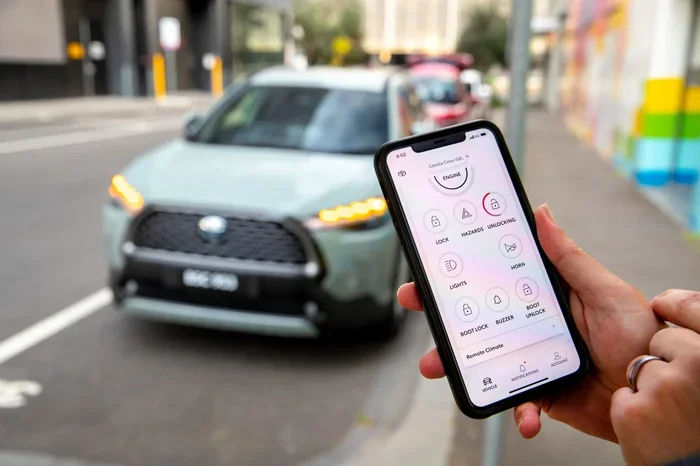
If you primarily use the Toyota app to manage your Hybrid Connect features, you can also try resetting your connection through the app itself. This method is great for resolving sync issues without touching the car’s internal system:
- Open the Toyota app on your smartphone
- Log out of your Toyota account completely
- Clear the app cache or uninstall and reinstall the app
- Restart your phone
- Log back into your Toyota account
- Go to Vehicle Settings and select Disconnect Vehicle
- Follow the prompts to re-pair your phone with the vehicle
This method refreshes the connection between your phone and the Hybrid Connect system. It is a softer reset compared to a full factory reset but works well for minor connectivity issues.
Before You Reset: What You Need to Know
A factory reset is powerful, but it also comes with some important things to keep in mind. Taking a few minutes to prepare before you reset can save you a lot of headaches afterward.
Back Up Your Settings
Before you perform any Toyota Hybrid Connect reset, make sure you back up your important settings. Write down your Wi-Fi passwords, Bluetooth pairings, and any personalized preferences. Once the reset is complete, these will all be gone and you will need to enter them again.
Check for Software Updates
Sometimes the issues you are experiencing are caused by outdated software rather than corrupted data. Before resetting, check if there is a software update available for your Toyota infotainment system. Updating the software might solve the problem without needing a full reset.
Have Your Toyota Login Details Ready
After a factory reset, you will need to log back into your Toyota account. Make sure you know your username and password before you start. If you have trouble remembering your login details, reset your password through the Toyota website before you begin the reset process.
What Happens After a Factory Reset?
Once the reset is complete, your Toyota Hybrid Connect system will return to its original out-of-the-box state. Here is what you can expect and what you will need to do next:
System Reboot and Setup
Your vehicle will restart and display the initial setup screen. This is similar to what you saw when you first drove the car off the lot. You will need to:
- Select your language and region
- Connect to your Wi-Fi network
- Pair your Bluetooth devices again
- Log into your Toyota account
- Re-enable connected services like remote start and GPS
The setup process usually takes about 10 to 20 minutes. Take your time and make sure each step is completed correctly to avoid issues later.
Re-Pairing Your Phone
One of the most important steps after a reset is re-pairing your smartphone with the Hybrid Connect system. Go to the Bluetooth settings on both your phone and the vehicle’s infotainment system. Search for available devices, select your phone, and enter the pairing code if prompted. Once paired, your app should sync automatically.
Testing Connected Services
After everything is set up, test each connected service to make sure it is working properly. Try remote starting the engine, checking the battery status through the app, and using the GPS navigation. If everything works smoothly, your reset was successful.
When to Contact a Toyota Dealer Instead
Most factory resets can be done at home without any professional help. However, there are certain situations where you should reach out to a Toyota dealer or service center:
- The reset process fails or gets stuck halfway through
- You still experience the same issues after completing the reset
- Your vehicle shows hardware error messages that a software reset cannot fix
- You are not comfortable performing the reset yourself
- Your vehicle is still under warranty and you want professional assistance
Toyota dealers have specialized diagnostic tools that can identify deeper issues with the Hybrid Connect system. They can also perform a Toyota Hybrid Connect reset for you quickly and safely. If you are unsure, it is always better to ask for help than to risk damaging the system.
Tips to Avoid Future Connectivity Issues
Once you have successfully reset your Toyota Hybrid Connect, you will want to keep it running smoothly. Here are some practical tips to prevent future problems:
Keep Your Software Updated
Toyota regularly releases software updates that fix bugs and improve performance. Check for updates at least once a month or whenever you notice a new issue. Keeping your system current is the best way to avoid the need for frequent resets.
Clear Cache Regularly
Just like your phone, the Toyota infotainment system stores temporary data that can build up over time. Clearing the cache every few months helps keep the system running fast and prevents glitches.
Avoid Force Restarting
If the system freezes, resist the urge to force restart it repeatedly. A single restart is usually fine, but multiple force restarts in a short period can cause data corruption. If a restart does not fix the issue, try a factory reset instead.
Use Genuine Toyota Accessories
Using non-Toyota accessories or third-party apps can sometimes interfere with the Hybrid Connect system. Stick to genuine Toyota products and approved apps to ensure compatibility and stability.
Frequently Asked Questions
How long does it take to factory reset Toyota Hybrid Connect?
The factory reset process typically takes between 15 and 45 minutes. The exact time depends on your Toyota model, the method you use, and the current state of the system. After the reset, you will also need about 10 to 20 minutes to set everything up again.
Will a factory reset delete my Toyota account information?
Yes, a factory reset will remove your Toyota account login details and paired devices from the system. You will need to log back in and re-pair your phone after the reset is complete. Your account itself on Toyota’s servers remains safe and unaffected.
Can I reset Toyota Hybrid Connect without going to a dealer?
Absolutely. You can perform a factory reset at home using the infotainment system menu, the physical reset button, or the Toyota app. Dealer visits are only necessary if the reset fails or if you are dealing with a hardware problem that a software reset cannot fix.
How often should I factory reset my Toyota Hybrid Connect?
You should only perform a factory reset when you are experiencing persistent connectivity issues or software glitches. There is no need to reset regularly. In fact, unnecessary resets can cause more problems than they solve. A reset is a troubleshooting tool, not a routine maintenance task.
What is the difference between a soft reset and a factory reset?
A soft reset simply restarts the system without erasing any data or settings. A factory reset wipes everything and restores the system to its original state. Use a soft reset for minor freezes or slow performance, and a factory reset for deeper software issues that a simple restart cannot fix.
Is it safe to factory reset Toyota Hybrid Connect while the battery is low?
No, it is not safe. Always make sure your Toyota hybrid battery is fully charged or at least above 50 percent before starting a factory reset. If the battery dies during the reset process, it can cause serious software problems that may require professional repair at a dealer.
Final Thoughts
Resetting your Toyota Hybrid Connect device does not have to be a stressful experience. With the right steps and a little preparation, you can handle the entire process from the comfort of your home. Whether you use the infotainment menu, the physical reset button, or the Toyota app, each method is designed to be simple and effective.
Remember to back up your settings first, make sure your battery is charged, and take your time during the setup process after the reset. If you ever feel stuck or unsure, your local Toyota dealer is always there to help. A clean, properly functioning Hybrid Connect system makes your hybrid driving experience so much better, and now you have the knowledge to keep it running at its best.
Keep this guide handy for the next time your Toyota Hybrid Connect needs a fresh start. A little maintenance goes a long way, and your connected car services will thank you for it.