How Do I Know If My Toyota Has Remote Start Features
Figuring out whether your Toyota has remote start can feel confusing, but it does not have to be. This guide walks you through every reliable method to check for Toyota remote start features, from your key fob to your vehicle’s trim level. You will learn how to verify remote engine start using simple steps, whether you own a new model or a used Toyota.
You just got behind the wheel of your Toyota on a freezing morning. You wish you could warm up the engine without stepping outside. So you wonder, does my Toyota have remote start? The answer might be closer than you think.
Toyota has offered remote start features on many of its models for years. However, not every Toyota comes equipped with this convenience. Whether you bought your vehicle new or used, knowing whether you have remote engine start can save you time, money, and frustration. This guide covers every practical way to find out if your Toyota supports this feature.
We will walk you through checking your key fob, reading your owner’s manual, using the Toyota app, and visiting a dealer. By the end, you will know exactly what your Toyota can do and how to use it. Let us get started.
Key Takeaways
- Check your key fob: The simplest way to identify Toyota remote start is by looking for a dedicated remote start button on your key fob.
- Consult your owner’s manual: Your manual lists all factory-installed features and confirms whether remote engine start came with your vehicle.
- Use the Toyota app: If your Toyota supports connected services, the Toyota app will show remote start as an available feature.
- Know your trim level: Certain Toyota trims and model years include factory remote start as standard or optional equipment.
- Visit a Toyota dealer: A dealer can pull up your Vehicle Identification Number and confirm every feature your Toyota was built with.
- Aftermarket options exist: If your Toyota lacks factory remote start, you can still add a quality aftermarket remote start system.
📑 Table of Contents
- Check Your Key Fob for the Remote Start Button
- Read Your Toyota Owner’s Manual
- Use the Toyota App and Connected Services
- Know Your Toyota Trim Level and Model Year
- Visit a Toyota Dealer for Confirmation
- Adding Remote Start to a Toyota That Does Not Have It
- Common Mistakes People Make When Checking for Remote Start
- Expert Insights on Toyota Remote Start
- Key Takeaways
- Conclusion
Check Your Key Fob for the Remote Start Button
The fastest way to determine if your Toyota has remote start is to look at your key fob. Most Toyota models that include factory remote engine start have a specific button dedicated to this function. The button is usually marked with a circular arrow or the letters “R” and “ST.”
What to Look For on Your Key Fob
Hold your key fob in your hand and examine the buttons carefully. On many Toyota models with remote start, you will find a button near the top of the fob. Here is what to look for:
- A circular arrow icon: This is the most common symbol for Toyota remote start.
- A letter “R” inside a circle: Some Toyota fobs use this symbol.
- A separate button away from the lock/unlock buttons: It is usually not grouped with your other controls.
If you see one of these symbols, your Toyota likely supports remote engine start. However, the presence of the button alone does not always mean the feature is active. Some Toyotas include the button on the fob but require a specific trim level or package to use it. We will cover that in more detail below.
How to Test the Remote Start Button
Once you locate the button, you can do a quick test. Follow these steps:
- Make sure you are within range of your Toyota (typically within 100 feet).
- Press and release the remote start button once.
- Your Toyota’s headlights should flash, and the engine should start.
- Press the button again to turn the engine off.
If nothing happens, your Toyota may not have remote start enabled, or the feature may not be factory-installed. Do not worry. There are other ways to confirm. Let us move to the next method.
Read Your Toyota Owner’s Manual
Your Toyota owner’s manual is one of the most underused resources. It contains a complete list of every feature your vehicle was built with, including remote engine start. Most people toss the manual in the glove box and never open it again. But if you want to know your Toyota’s full capabilities, this is the place to look.
Where to Find Remote Start Information in the Manual
Open your owner’s manual and search for the index. Look for terms like “remote start,” “remote engine start,” or “keyless start system.” The manual will direct you to the correct section. In that section, you will find detailed instructions on how the feature works and whether your specific model includes it.
Here are some things to check in the manual:
- Remote start procedures: Step-by-step instructions confirm the feature exists.
- Compatible models and trims: The manual lists which Toyota models support remote start.
- Requirements and limitations: You will learn about transmission type, outdoor temperature limits, and other rules.
- Smart Key system details: If your Toyota uses a Toyota Smart Key, the manual explains how it interacts with remote start.
If your manual does not mention remote start anywhere, your Toyota likely does not have factory-installed remote engine start. But before you give up, there are still more ways to check.
Use the Toyota App and Connected Services
Modern Toyotas come with Toyota connected services that let you control many features from your smartphone. If your Toyota supports these services, you can check for remote start directly through the app. This method works especially well for newer Toyota models.
How to Check Remote Start Through the Toyota App
Download the Toyota app on your smartphone if you have not already. Sign in with your Toyota account. Once logged in, navigate to the vehicle settings or feature list. Look for options like “Remote Start,” “Engine Start,” or “Climate Control.”
If you see remote start listed as an available feature, your Toyota supports it. If the option is grayed out or missing entirely, your model may not include this feature. Here is a quick checklist:
- Do you have a Toyota account? You need one to access connected services.
- Is your vehicle linked to the app? The app must be paired with your Toyota’s vehicle identification number.
- Is your subscription active? Some Toyota connected services require a paid subscription for full feature access.
Toyota Entune and Remote Start
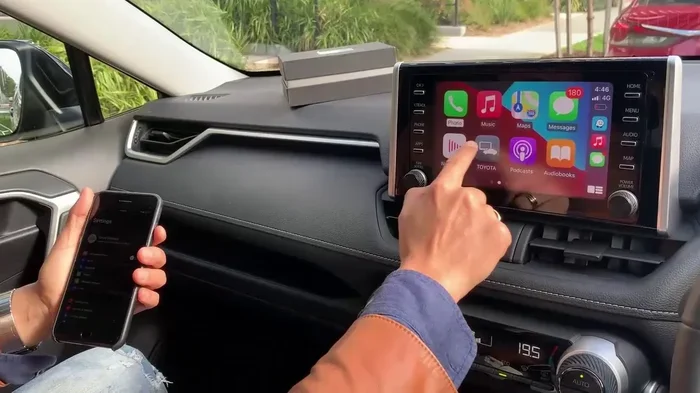
Many Toyotas use the Toyota Entune infotainment system. This system integrates with connected services and often includes remote engine start as a supported feature. If your Toyota has Entune, check the app or the system’s settings menu on the touchscreen for remote start options.
Keep in mind that older Entune versions may have limited functionality. If your Toyota is several years old, the app may not show remote start even if the hardware supports it. In that case, the key fob method or a dealer visit will give you a definitive answer.
Know Your Toyota Trim Level and Model Year
Not every Toyota trim comes with remote start. The feature is often tied to specific trim levels, packages, or model years. Understanding which trims include factory remote start can help you figure out if your Toyota has it.
Toyota Models That Commonly Include Remote Start
Certain Toyota models are more likely to include remote engine start than others. Here is a general overview:
- Toyota Camry: Many trim levels include remote start, especially higher trims like XLE and XSE.
- Toyota RAV4: The RAV4 often offers remote start as part of convenience packages.
- Toyota Highlander: Higher trims frequently include remote engine start as a standard feature.
- Toyota Tacoma: Some trims and model years offer remote start, but it is not universal.
- Toyota Tundra: Certain trims include remote start, particularly in colder climate packages.
- Toyota Corolla: Newer models may include remote start depending on the trim and package.
Check Your Vehicle’s Window Sticker or Build Sheet
If you bought your Toyota new, you may still have the window sticker. This sticker lists every option and package included with your vehicle. Look for “Remote Start,” “Remote Engine Start,” or “Keyless Enter-N-Go with Remote Start.”
If you do not have the original sticker, you can request a build sheet from a Toyota dealer using your vehicle identification number. The dealer will pull up the original factory order and show you every feature your Toyota was built with. This is one of the most accurate ways to confirm remote start availability.
Visit a Toyota Dealer for Confirmation
When in doubt, your local Toyota dealer can give you a definitive answer. Dealers have access to Toyota’s internal database and can look up your vehicle by vehicle identification number. This method is foolproof and takes only a few minutes.
What to Bring to the Dealer
Before you visit, gather the following items:
- Your vehicle registration: This confirms ownership.
- Your Toyota key fob: The dealer may need it to run a diagnostic check.
- Your vehicle identification number: You can find this on your dashboard or driver’s side door jamb.
Ask the service advisor or sales representative to check whether your Toyota includes factory remote start. They can also tell you if any software updates or subscriptions are needed to activate the feature. In some cases, a simple software flash can unlock remote engine start capabilities that were included in your vehicle but not activated.
Cost Considerations at the Dealer
Most Toyota dealers will check your vehicle’s features at no charge. However, if you need a new key fob or software update, there may be a fee. Aftermarket remote start installation is another option if your Toyota does not come with factory remote start. We will cover aftermarket options in a moment.
Adding Remote Start to a Toyota That Does Not Have It
If you discover your Toyota does not have factory remote start, do not worry. You can still add this feature. Many aftermarket remote start systems work with Toyota vehicles and provide similar functionality.
Types of Aftermarket Remote Start Systems
There are two main types of aftermarket remote start systems for Toyotas:
- Plug-and-play systems: These kits connect to your Toyota’s existing wiring without cutting or splicing. They are easier to install and work well with many Toyota models.
- Professional installation systems: These require a trained technician to wire the system into your Toyota’s electrical system. They offer more features and reliability.
Popular Aftermarket Remote Start Brands
Several brands are well-known for Toyota remote start compatibility:
- Compustar: Offers reliable remote engine start systems with long-range capabilities.
- Viper: Known for high-quality aftermarket remote start kits with smartphone integration.
- Directed Electronics (Clifford): Provides solid remote start options for Toyota owners.
- Pandora: Offers budget-friendly remote start systems that work well with Toyotas.
Things to Consider Before Installing Aftermarket Remote Start
Before you install an aftermarket remote start system, keep these points in mind:
- Warranty implications: Aftermarket installations may affect your Toyota’s factory warranty. Check with your dealer first.
- Installation quality: Poor installation can cause electrical issues. Always use a certified technician.
- Compatibility: Make sure the system is compatible with your specific Toyota model and year.
- Local laws: Some areas have regulations about remote engine start idling times and emissions.
If you live in a cold climate, remote start can be a game-changer. A warm engine and heated cabin make winter driving far more comfortable. Even in moderate climates, cooling your Toyota before you drive on a hot day is a nice perk.
Quick Tips for Using Toyota Remote Start
Whether your Toyota has factory or aftermarket remote start, these tips will help you get the most out of the feature:
- Always start your Toyota in a well-ventilated area: Never run the engine in an enclosed garage.
- Set your climate controls before leaving the vehicle: This ensures the system heats or cools your Toyota properly.
- Know the time limit: Most Toyota remote start systems run the engine for 10 to 20 minutes before shutting off automatically.
- Keep your key fob inside the vehicle: The system will not work if you walk away with the fob.
- Check your fuel level: Remote start uses fuel, so make sure you have enough gas.
Common Mistakes People Make When Checking for Remote Start
Many Toyota owners make mistakes when trying to figure out if their vehicle has remote start. Avoid these common pitfalls:
- Assuming all Toyotas have remote start: This is simply not true. Remote start is a feature, not a standard across all models.
- Confusing keyless entry with remote start: Having a smart key does not mean your Toyota has remote engine start.
- Ignoring the owner’s manual: The manual has the most accurate information about your specific Toyota.
- Relying only on the key fob button: Some Toyotas have the button but require a subscription or activation.
- Not checking the model year: Toyota added and removed remote start across different model years and trims.
By avoiding these mistakes, you will save time and get a clear answer about your Toyota’s remote engine start capabilities.
Expert Insights on Toyota Remote Start
According to Toyota service advisors and automotive experts, remote start is one of the most requested convenience features among Toyota owners. Many drivers do not realize their Toyota already has the hardware for remote engine start but simply need to activate it or update the software.
Experts also recommend checking your Toyota connected services subscription status regularly. Toyota has updated its connected service offerings over the years, and some older models gained remote start capabilities through software updates that owners may not know about.
If you are shopping for a used Toyota, always ask the seller whether the vehicle has remote start. Check the key fob, the owner’s manual, and the vehicle identification number report before making a purchase. This simple step can save you from buying a Toyota that lacks a feature you want.
Key Takeaways
- Check your key fob: The simplest way to identify Toyota remote start is by looking for a dedicated remote start button on your key fob.
- Consult your owner’s manual: Your manual lists all factory-installed features and confirms whether remote engine start came with your vehicle.
- Use the Toyota app: If your Toyota supports connected services, the Toyota app will show remote start as an available feature.
- Know your trim level: Certain Toyota trims and model years include factory remote start as standard or optional equipment.
- Visit a Toyota dealer: A dealer can pull up your Vehicle Identification Number and confirm every feature your Toyota was built with.
- Aftermarket options exist: If your Toyota lacks factory remote start, you can still add a quality aftermarket remote start system.
Conclusion
Now you know exactly how to find out if your Toyota has remote start features. Whether you check your key fob, read your owner’s manual, use the Toyota app, or visit a dealer, you have multiple reliable methods at your disposal. Toyota remote start is a fantastic convenience that makes your daily drive more comfortable in any season.
If your Toyota does not have factory remote engine start, remember that aftermarket options are widely available and can bring this feature to your vehicle. Always work with a qualified professional to ensure safe and proper installation.
Take a few minutes today to check your Toyota. You might be surprised to find that remote start is already there, waiting to be used. Once you experience the comfort of stepping into a warm or cool Toyota without ever leaving your house, you will wonder how you ever lived without it.
Frequently Asked Questions
Does every Toyota model have remote start?
No, not every Toyota model includes factory remote start. The feature depends on your trim level, model year, and optional packages. Always check your specific vehicle using the methods described in this guide.
Can I add remote start to my Toyota if it does not have it?
Yes, you can add aftermarket remote start to most Toyota models. Professional installation ensures compatibility and avoids electrical issues. Check with your Toyota dealer about warranty implications before proceeding.
How far can I start my Toyota remotely?
Most Toyota remote start systems work within 100 to 300 feet, depending on the system and any obstacles like buildings or terrain. Aftermarket systems may offer longer ranges of up to 3,000 feet with a smartphone connection.
Is Toyota remote start safe for my engine?
Yes, factory remote engine start is designed to be safe for your Toyota’s engine. The system monitors oil pressure, coolant temperature, and other sensors to prevent damage during remote start cycles.
Do I need a subscription for Toyota remote start?
Some Toyota models require an active Toyota connected services subscription to use remote start through the app. Factory remote start using the key fob typically does not require a subscription.
How long does Toyota remote start run the engine?
Most Toyota remote start systems run the engine for 10 to 20 minutes before automatically shutting off. You can usually extend the runtime or turn it off manually using your key fob or the Toyota app.