Does A 2017 Bmw 430I Have Apple Carplay?
Yes, a 2017 BMW 430i can support Apple CarPlay, but it depends on your specific package and trim level. Some models come with Apple CarPlay built right in, while others need a simple upgrade or retrofit. In this guide, we break down everything you need to know about BMW Apple CarPlay compatibility for the 2017 model year, including how to check your current setup and what options are available if your car does not have it yet.
So you just got behind the wheel of a 2017 BMW 430i. It looks great. It drives even better. But then you reach for your iPhone and think, does this thing have Apple CarPlay? You are not alone. This is one of the most common questions BMW owners ask, especially when they are used to seamless smartphone integration.
The short answer is yes, but with a few catches. Not every 2017 BMW 430i comes with Apple CarPlay out of the box. It depends on the trim level, the options package, and the infotainment system installed. Let us walk through everything you need to know so you are never left guessing again.
Key Takeaways
- Stock Availability: The 2017 BMW 430i may come with Apple CarPlay depending on the package you selected when purchasing the vehicle.
- iDrive System Matters: The iDrive 6.0 system supports Apple CarPlay, but older iDrive versions may not.
- USB Connection Is Key: You need a compatible USB cable to activate Apple CarPlay on your BMW.
- Aftermarket Upgrades Work: If your 2017 BMW 430i does not have Apple CarPlay, you can add it through an aftermarket head unit or software update.
- Wireless Options Exist: Some upgrades allow for wireless Apple CarPlay, giving you a cleaner dashboard.
- Check Your VIN: The easiest way to confirm Apple CarPlay support is to check your Vehicle Identification Number with a BMW dealer.
- iOS Compatibility: Apple CarPlay works with iPhone 5 and later, running iOS 7.1 or newer.
📑 Table of Contents
- Understanding the 2017 BMW 430i Infotainment System
- How to Check if Your 2017 BMW 430i Has Apple CarPlay
- What If Your 2017 BMW 430i Does Not Have Apple CarPlay?
- Setting Up Apple CarPlay in Your 2017 BMW 430i
- Common Issues and Troubleshooting
- Benefits of Apple CarPlay in the 2017 BMW 430i
- Expert Tips for Getting the Most Out of Apple CarPlay
- How the 2017 BMW 430i Compares to Other Years for Apple CarPlay
- Conclusion
Understanding the 2017 BMW 430i Infotainment System
The 2017 BMW 430i uses the iDrive infotainment system. This is BMW’s central dashboard technology that controls everything from navigation to music to phone connectivity. The specific version of iDrive in your car determines whether Apple CarPlay is available.
iDrive 6.0 and Apple CarPlay
The 2017 BMW 430i typically comes with iDrive 6.0 or iDrive 7.0, depending on the options chosen. Both of these systems support Apple CarPlay. iDrive 6.0 was a big step forward for BMW. It introduced a cleaner interface and better smartphone integration than earlier versions. If your 430i has iDrive 6.0 or newer, you are in good shape.
Here is what you need to look for on your dashboard:
- A touchscreen display that responds to taps and swipes
- A controller knob between the front seats
- The iDrive menu button on the left side of the controller
- A text input system for entering addresses and messages
If you see these features, your BMW likely has the hardware needed for Apple CarPlay. But having the right hardware is only half the battle. You also need the right software and connection.
What Version of iDrive Do You Have?
Not sure which iDrive version is in your car? There are a few easy ways to check. First, look at the center console. Cars with iDrive 6.0 or later have a larger, higher-resolution screen. Older versions like iDrive 5.0 have a smaller display with fewer features.
You can also check your owner’s manual. The manual will list the exact iDrive version. Another option is to visit a BMW dealership. They can pull up your vehicle information using the VIN and tell you exactly what system you have.
How to Check if Your 2017 BMW 430i Has Apple CarPlay
Before you spend a dime, it is worth confirming whether your car already supports Apple CarPlay. Many 2017 BMW 430i owners are surprised to find out they already have it. The feature may be sitting there unused, just waiting to be activated.
The USB Cable Test
The simplest way to check is to plug your iPhone into the USB port. The USB port in the 2017 BMW 430i is usually located in the center console or the armrest area. Use a certified Lightning cable. Once plugged in, look at the iDrive screen.
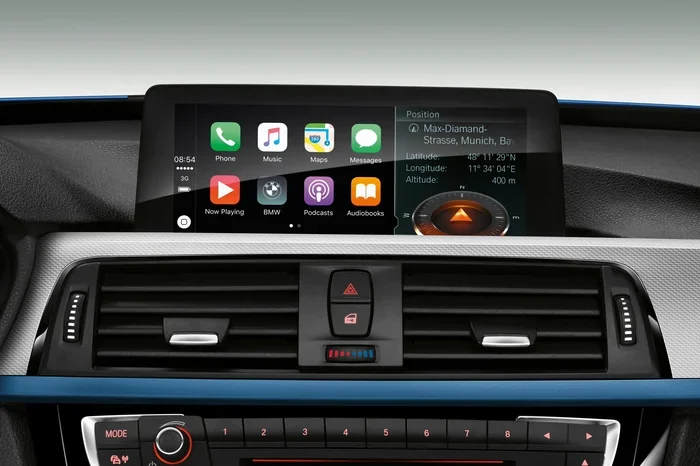
If Apple CarPlay is supported, you will see the Apple CarPlay icon appear on the display. Tap it, and your phone’s interface will mirror onto the BMW screen. You will see your apps, your music, and your navigation all displayed in a car-friendly format.
Here are a few things to keep in mind during this test:
- Use an Apple-certified cable. Cheap cables may not transfer data properly.
- Make sure your iPhone is unlocked. You may need to trust the device on your phone screen.
- Check that Siri is enabled. Apple CarPlay relies on Siri for voice commands.
- Try a different USB port if one does not work. Some BMWs have multiple ports with different functions.
Checking Through the iDrive Menu
You can also check Apple CarPlay support through the iDrive settings menu. Follow these steps:
- Press the iDrive button on the controller
- Navigate to Settings
- Look for a section called Phone or Connections
- Check if Apple CarPlay is listed as an available option
If Apple CarPlay appears in the settings, your 2017 BMW 430i supports it. If you do not see the option, your car may not have the feature enabled from the factory. Do not worry. There are still solutions, which we will cover below.
What If Your 2017 BMW 430i Does Not Have Apple CarPlay?
This is where things get interesting. Maybe your 430i did not come with Apple CarPlay from the dealership. Or maybe the feature was disabled. Either way, you have options. You are not stuck without smartphone integration.
BMW Software Updates
Sometimes Apple CarPlay is available in the hardware but not activated in the software. BMW releases periodic software updates that can unlock new features. Visit a BMW dealer and ask about available updates for your iDrive system.
In many cases, a simple software update can activate Apple CarPlay at no extra cost. This is the easiest and most affordable solution. It takes about 30 minutes at the dealership, and you walk out with a fully updated system.
Aftermarket Head Unit Upgrades
If a software update does not work, you can install an aftermarket head unit. This replaces the stock iDrive screen with a new unit that supports Apple CarPlay. There are several brands that make BMW-specific head units.
Popular options include:
- AAST Android Auto/Apple CarPlay units designed specifically for BMW models
- Alpine iLX-507 with a BMW integration kit
- Pioneer DMH-ZF9350BT with wireless Apple CarPlay support
- Xtrons and Joying Android-based units for a full infotainment overhaul
An aftermarket head unit gives you more than just Apple CarPlay. You also get better graphics, faster processing, and sometimes even wireless charging. The downside is the cost. A quality head unit with professional installation can run between 500 and 1500 dollars. But for many owners, the upgrade is well worth it.
Retrofit Kits and Modules
Another option is a retrofit module. These small devices plug into your existing BMW system and add Apple CarPlay capability without replacing the entire head unit. Brands like CCC-Automotive and iCarHQ offer plug-and-play solutions.
Retrofit kits are more affordable than full head unit replacements. They also preserve the original BMW look and feel of your dashboard. However, they may not offer the same level of functionality as a full upgrade. You might lose some features like the original touchscreen controls.
Setting Up Apple CarPlay in Your 2017 BMW 430i
Once you have confirmed Apple CarPlay support, setting it up is straightforward. Whether it came from the factory or you added it through an upgrade, the process is similar across all BMW models.
Wired Apple CarPlay Setup
Wired Apple CarPlay uses a USB cable to connect your iPhone to the BMW. Here is how to get it running:
- Park your 2017 BMW 430i and turn on the ignition
- Plug your Lightning cable into your iPhone
- Connect the other end to the USB port in the center console
- Wait for the Apple CarPlay icon to appear on the iDrive screen
- Tap the icon and follow the on-screen prompts
- Allow permissions for Phone, Music, and Maps when prompted
Once connected, you can use Siri, make calls, send messages, and navigate using the BMW screen and controller. The interface is designed to be safe and easy to use while driving.
Wireless Apple CarPlay Setup
Wireless Apple CarPlay is a game changer. You do not need to fumble with cables every time you get in the car. However, wireless Apple CarPlay is not available on all stock 2017 BMW 430i systems. It typically requires either a newer iDrive version or an aftermarket head unit.
If your system supports wireless Apple CarPlay, the setup is even simpler:
- Make sure Bluetooth is enabled on both your iPhone and your BMW
- Park the car and turn on the ignition
- Apple CarPlay should connect automatically
- If it does not, go to the Phone settings in iDrive and select your iPhone
Wireless connectivity means no cable clutter and a cleaner center console. It also charges your phone if you have a wireless charging pad installed. This is one of the best upgrades you can make to a 2017 BMW 430i.
Customizing Apple CarPlay Settings
Apple CarPlay lets you customize which apps appear on the BMW screen. You can rearrange app icons, set default apps for music and navigation, and choose which notifications come through. To access these settings:
- Open Settings on your iPhone
- Tap General
- Select CarPlay
- Choose your BMW from the list
- Customize your preferred apps and layout
Taking a few minutes to personalize your CarPlay setup makes a big difference in daily usability. You will wonder how you ever drove without it.
Common Issues and Troubleshooting
Apple CarPlay is generally reliable, but every now and then, you may run into issues. Here are the most common problems BMW 430i owners face and how to fix them.
Apple CarPlay Not Connecting
If Apple CarPlay will not connect, start with the basics. Try a different USB cable. A damaged or non-certified cable is the number one cause of connection problems. Also, restart your iPhone and try again. Sometimes a simple reboot fixes everything.
You should also check your BMW iDrive system. Make sure the software is up to date. An outdated iDrive system can cause compatibility issues with newer iPhone models.
Apple CarPlay Keeps Disconnecting
A loose connection is usually to blame here. Check that the USB cable is firmly seated in both the iPhone and the BMW port. Dust or debris in the USB port can also interfere with the connection. Use a toothpick or compressed air to clean it out gently.
If the problem persists, try resetting the BMW iDrive system. You can do this by holding the power button for 10 to 15 seconds. The screen will go dark and then restart. This clears temporary glitches and often resolves disconnection issues.
Siri Not Working with Apple CarPlay
Siri is a core part of the Apple CarPlay experience. If Siri is not responding, check your iPhone settings. Go to Settings, then Siri & Search, and make sure Siri is turned on. Also check that “Listen for Hey Siri” is enabled if you want hands-free activation.
On the BMW side, make sure the voice command button on the iDrive controller is working. Press it and wait for the Siri prompt. If nothing happens, the issue may be a Bluetooth pairing problem rather than a Siri issue.
Benefits of Apple CarPlay in the 2017 BMW 430i
Adding Apple CarPlay to your 2017 BMW 430i brings a range of practical benefits. It is not just about showing your phone screen on a bigger display. It fundamentally changes how you interact with your phone while driving.
First, safety improves significantly. Apple CarPlay limits what you can do on your phone while driving. You can only access approved apps and use Siri voice commands. This reduces distractions and keeps your eyes on the road.
Second, navigation becomes more powerful. You can use Google Maps, Waze, or Apple Maps on the BMW screen. These apps often have better real-time traffic data than the built-in BMW navigation system. Many drivers prefer third-party apps for directions.
Third, music and podcast access is seamless. Apple CarPlay gives you direct access to Spotify, Apple Music, Podcasts, and Audible. You can search for content using Siri, browse by category, and control playback all from the iDrive screen or the controller knob.
Finally, messaging becomes safer. Apple CarPlay reads your incoming messages aloud through the BMW speakers. You can reply using Siri voice commands without ever touching your phone. This is especially useful for commuters and long-distance drivers.
Expert Tips for Getting the Most Out of Apple CarPlay
Here are some practical tips from experienced BMW owners and tech enthusiasts who use Apple CarPlay daily in their 430i models.
Buy a premium USB cable. Not all cables are created equal. Apple-certified cables provide better data transfer and more reliable connections. Brands like Anker and Belkin make excellent options that cost around 15 to 25 dollars.
Keep your iPhone updated. Apple regularly releases iOS updates that improve Apple CarPlay performance. Staying current ensures you get the best experience with your BMW.
Use Siri for hands-free control. The safest way to use Apple CarPlay while driving is through voice commands. Say “Hey Siri” and tell it what you need. You can make calls, send texts, set navigation, and play music without lifting a finger.
Organize your CarPlay apps. Not every app on your iPhone needs to be on CarPlay. Keep only the ones you actually use while driving. This keeps the interface clean and reduces clutter on the BMW screen.
Consider a wireless CarPlay adapter. If your 2017 BMW 430i has wired Apple CarPlay but you want wireless, adapters from brands like Carlinkit are affordable and easy to install. They plug into the USB port and create a wireless connection to your iPhone.
How the 2017 BMW 430i Compares to Other Years for Apple CarPlay
Apple CarPlay availability has changed across BMW model years. Understanding where the 2017 430i stands helps you make informed decisions about upgrades and compatibility.
| Model Year | iDrive Version | Apple CarPlay | Wireless CarPlay |
|---|---|---|---|
| 2015 BMW 430i | iDrive 5.0 | Not Available | No |
| 2016 BMW 430i | iDrive 6.0 | Available (wired) | No |
| 2017 BMW 430i | iDrive 6.0 / 7.0 | Available (wired) | With upgrade |
| 2018 BMW 430i | iDrive 6.0 / 7.0 | Available (wired) | Available |
| 2019+ BMW 430i | iDrive 7.0 | Available | Standard |
As you can see, the 2017 BMW 430i sits in a transition period. Wired Apple CarPlay is available, but wireless CarPlay typically requires an upgrade. If wireless connectivity is important to you, an aftermarket head unit is the best path forward.
Conclusion
So, does a 2017 BMW 430i have Apple CarPlay? The answer is yes, in most cases. Whether it comes standard or needs a simple upgrade depends on your specific trim and options. The good news is that even if your car does not have it yet, adding Apple CarPlay is straightforward and affordable.
Start by checking your current setup using the USB cable test or the iDrive menu. If Apple CarPlay is already there, great. You are ready to go. If not, consider a software update from your BMW dealer or an aftermarket head unit for a more comprehensive upgrade.
Apple CarPlay transforms your daily driving experience. It makes navigation easier, communication safer, and entertainment more accessible. For a 2017 BMW 430i owner, it is one of the best upgrades you can make. Take a few minutes today to check your setup and get connected. Your driving experience will never be the same.
Frequently Asked Questions
Can I add Apple CarPlay to my 2017 BMW 430i if it did not come with it?
Yes, you absolutely can. The most common ways to add Apple CarPlay are through a BMW software update at the dealership or by installing an aftermarket head unit. Retrofit kits are also available and are a more budget-friendly option. Check with a BMW specialist to find the best solution for your specific setup.
Do I need a special cable for Apple CarPlay in my 2017 BMW 430i?
You need an Apple-certified Lightning cable. Any standard Lightning cable will work, but certified cables provide more reliable data transfer and fewer connection issues. Avoid cheap, uncertified cables as they are the most common cause of Apple CarPlay connection problems.
Is wireless Apple CarPlay available on the 2017 BMW 430i?
Wireless Apple CarPlay is not available on all stock 2017 BMW 430i systems. It depends on the iDrive version and options installed. However, you can add wireless Apple CarPlay through an aftermarket head unit or a wireless CarPlay adapter that plugs into the existing USB port.
Will Apple CarPlay work with any iPhone in the 2017 BMW 430i?
Apple CarPlay works with iPhone 5 and later models running iOS 7.1 or newer. For the best experience, Apple recommends using an iPhone with iOS 13 or later. Always keep your iPhone updated for optimal compatibility and performance with your BMW.
Does using Apple CarPlay drain my iPhone battery faster?
Yes, Apple CarPlay uses more battery than normal phone use because it keeps the screen active and maintains a constant data connection. However, the battery drain is moderate. Using a USB cable while driving actually charges your phone at the same time, which helps offset the extra battery usage.
Can I use both BMW navigation and Apple CarPlay navigation at the same time?
No, you cannot run both simultaneously. When Apple CarPlay is active, it takes over the iDrive display. You will need to switch back to the BMW navigation system if you want to use the built-in maps. Many drivers prefer Apple CarPlay navigation because it offers real-time traffic updates and more frequent map updates than the factory BMW system.