Can You Turn Off Auto Stop on Your 2019 Cadillac XT5
Yes, you can turn off auto stop on a 2019 Cadillac XT5 using a simple dashboard button or through the infotainment settings. This feature, also known as the stop-start system, is designed to improve fuel economy but can feel annoying in heavy traffic or cold weather. In this guide, we walk you through every method to disable the auto stop function on your 2019 Cadillac XT5, explain why it exists, and share expert tips to get the best driving experience.
If you own a 2019 Cadillac XT5, you have probably noticed that your engine shuts off automatically when you come to a complete stop. This is the auto stop feature, also called the stop-start system. It is designed to save fuel and reduce emissions. But many drivers find it annoying, especially in stop and go traffic or during cold mornings. So the big question is: can you turn off auto stop on a 2019 Cadillac XT5? The short answer is yes. There are simple ways to disable this feature, and we will walk you through every single one. In this article, we cover the methods, the reasons you might want to turn it off, what happens when you do, and common problems you may face.
The 2019 Cadillac XT5 is a popular luxury crossover SUV. It comes packed with modern technology and driver assistance features. Among these features is the idle stop technology, which automatically shuts down the engine when the vehicle is stationary. While this automatic engine shutoff system helps with fuel economy, not everyone likes it. Some drivers report that the engine restart feels jarring. Others worry about wear on the starter motor and transmission settings. Whatever your reason, this guide will help you take full control of the auto stop function on your 2019 Cadillac XT5.
Key Takeaways
- Easy to Disable: The auto stop on a 2019 Cadillac XT5 can be turned off with a single dashboard button or through the infotainment screen.
- Fuel Economy Trade-Off: Disabling auto stop may slightly reduce fuel savings, but many drivers prefer the smoother experience.
- Cold Weather Impact: The stop-start system may behave differently in freezing temperatures, which is a common reason drivers want to turn it off.
- No Permanent Damage: Turning off auto stop will not harm your engine or transmission when done correctly.
- System May Reset: The auto stop setting can sometimes revert after a full vehicle shutdown, so know how to re-disable it each time.
- Multiple Methods Available: You have more than one way to control the auto stop feature on the 2019 Cadillac XT5.
- Driver Preference Matters: Whether to keep auto stop on or off depends on your driving habits and comfort level.
📑 Table of Contents
- What Is the Auto Stop Feature on the 2019 Cadillac XT5
- Can You Turn Off Auto Stop on a 2019 Cadillac XT5
- Step-by-Step Guide to Disabling Auto Stop
- Why Drivers Want to Disable Auto Stop
- Does Turning Off Auto Stop Affect Fuel Economy
- Common Problems and Troubleshooting
- Expert Tips and Best Practices
- Conclusion
What Is the Auto Stop Feature on the 2019 Cadillac XT5
The auto stop feature on the 2019 Cadillac XT5 is part of the vehicle’s stop-start system. When you come to a full stop and release the accelerator pedal, the system automatically shuts off the engine. This is called engine auto shutdown. When you press the gas pedal again, the engine restarts instantly. The goal is to reduce the time the engine idles. Idling wastes fuel and produces extra emissions. The stop-start system is now common in many modern vehicles, including luxury brands like Cadillac.
How the Stop-Start System Works
The stop-start system relies on several sensors working together. The brake pedal sensor detects when your foot is on the brake. The push button start system confirms the vehicle is running. The transmission must be in gear or the vehicle must be in park. When all these conditions are met, the system cuts fuel delivery to the engine. The engine shuts off completely. When you lift your foot off the brake or press the gas pedal, the engine restart process begins. A powerful starter motor spins the engine back up in less than a second.
Why Auto Stop Exists
Automakers add the auto stop feature to meet strict fuel economy standards. The 2019 Cadillac XT5 was designed with fuel economy in mind. The stop-start system can improve city fuel economy by 3 to 10 percent. In heavy urban traffic, this adds up over time. The system also helps reduce exhaust emissions. Every second the engine is off at a red light is one less second of pollution. For the average commuter, the idle stop technology makes a meaningful difference in daily driving.
Can You Turn Off Auto Stop on a 2019 Cadillac XT5
The short and clear answer is yes. You can turn off auto stop on a 2019 Cadillac XT5. General Motors designed the 2019 Cadillac XT5 with a driver-controlled auto stop button. This means you are not stuck with the stop-start system running all the time. You have the power to disable it whenever you want. The button is easy to find and simple to use. Let us look at exactly how to do it.
The Official Method to Disable Auto Stop
The 2019 Cadillac XT5 includes a dedicated auto stop button on the dashboard controls. This button is usually located near the push button start or on the center console. When you press it, a light on the dashboard illuminates. This light tells you the auto stop feature has been disabled. The engine will no longer shut off at red lights or stop signs. You can press the button again at any time to re-enable the stop-start system.
Using the Infotainment System
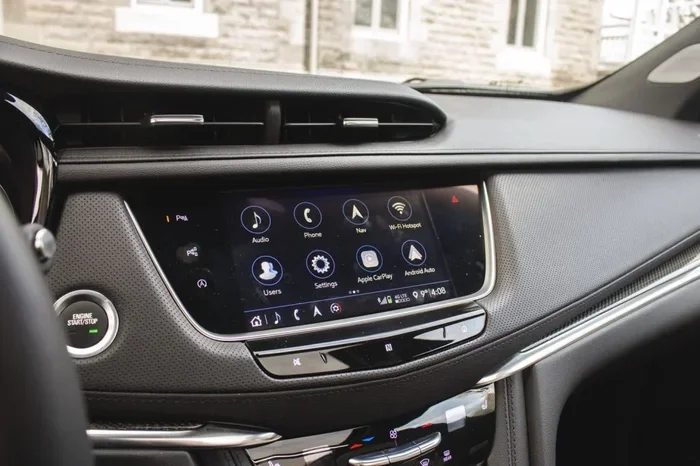
In addition to the physical button, the 2019 Cadillac XT5 lets you manage vehicle settings through the infotainment system. You can access the driver preferences menu on the touchscreen display. From there, you can navigate to the vehicle settings section. Look for the auto stop or stop-start option. Toggle it off to disable the feature. This method gives you more control over related settings. You can also adjust eco mode and other transmission settings from this same menu.
Step-by-Step Guide to Disabling Auto Stop
Let us walk through the process of turning off auto stop on your 2019 Cadillac XT5 step by step. Follow these instructions carefully to make sure you do it right.
Method One: The Dashboard Button
This is the fastest way to disable auto stop on your 2019 Cadillac XT5. Here is what to do:
- Start your vehicle using the push button start.
- Make sure the vehicle is in drive or park.
- Look for the auto stop button on the dashboard or center console.
- Press the button firmly until you see a light appear on the dashboard.
- The light confirms the auto stop feature has been turned off.
- Now drive as normal. The engine will no longer shut off at stops.
Quick Tip: If you cannot find the button, check the area around the steering column or the left side of the center console. On some 2019 Cadillac XT5 models, the button is located near the gear shifter. Refer to your owner’s manual for the exact location on your specific trim level.
Method Two: Through the Infotainment System
If you prefer using the touchscreen, this method gives you more options:
- Press the home button on the infotainment system to open the main menu.
- Navigate to Settings or Vehicle Settings.
- Look for Driver Assistance or Engine Settings.
- Find the Auto Stop or Stop-Start System option.
- Toggle the switch to Off.
- Exit the menu and resume driving.
Quick Tip: You can also adjust eco mode settings at the same time. Some drivers find that combining the auto stop disable with eco mode adjustments gives them the best overall driving experience.
What Happens After You Turn It Off
Once you disable the auto stop feature on your 2019 Cadillac XT5, the engine will behave like a traditional vehicle. It will keep running when you brake to a stop. You will not hear the engine cut out at red lights. The engine restart process will no longer be automatic. Instead, the engine stays on continuously. This means the alternator keeps charging the battery as normal. The power steering and power brakes remain fully functional at all times.
Why Drivers Want to Disable Auto Stop
There are several reasons why 2019 Cadillac XT5 owners choose to turn off auto stop. Understanding these reasons can help you decide if disabling the feature is right for you. Let us look at the most common motivations.
Cold Weather Concerns
Many drivers report that the auto stop feature feels especially annoying in cold weather. When temperatures drop below freezing, the engine restart can feel harsh. The cabin may take longer to warm up because the engine shuts off at every stop. In very cold climates, drivers worry that frequent engine auto shutdown cycles could cause extra wear. The starter motor has to work harder in freezing conditions. This is one of the top reasons people look for ways to turn off auto stop on a 2019 Cadillac XT5.
Transmission and Engine Wear
Some owners are concerned about long-term transmission wear caused by the stop-start system. Every time the engine restarts, there is a brief jolt transmitted through the drivetrain. Over thousands of stops, this could add stress to the torque converter and flywheel. While Cadillac engineered the system to handle this, frequent stop and go traffic can accelerate wear. Drivers who commute long distances in heavy traffic may prefer to keep the auto stop disabled to protect their vehicle.
Traffic and Daily Driving Experience
The most common complaint is simply comfort. The engine restart can feel abrupt and jarring. In stop and go traffic, you may experience the engine shutting off and restarting dozens of times during a single commute. This can be tiring and distracting. Some drivers also report that the auto stop feature causes slight delays when pulling away from a light. For these drivers, disabling auto stop on the 2019 Cadillac XT5 makes daily driving much more pleasant.
Does Turning Off Auto Stop Affect Fuel Economy
This is one of the most frequently asked questions about the auto stop feature. The answer depends on your driving habits and conditions. Let us break it down.
Real-World Fuel Economy Impact
When the stop-start system is active, it saves fuel by shutting off the engine at stops. When you turn off auto stop, the engine keeps idling. Idling does consume fuel, but the amount is relatively small. In pure city driving with many stops, the difference can be noticeable. You might see a drop of 1 to 3 miles per gallon in heavy urban traffic. On highways and rural roads, there is virtually no difference because you are not stopping frequently.
When Auto Stop Actually Helps
The auto stop feature provides the most benefit in dense urban environments. If you drive through busy city streets with many traffic lights, the idle stop technology can save a meaningful amount of fuel. In suburban or highway driving, the benefit is minimal. If your daily commute is mostly highway miles, there is little reason to keep the stop-start system enabled. The comfort trade-off may not be worth the small fuel savings.
| Driving Condition | Fuel Savings with Auto Stop | Benefit of Turning Off |
|---|---|---|
| Heavy City Traffic | 3-10% improvement | Minimal fuel loss when disabled |
| Suburban Commuting | 1-5% improvement | Slight comfort improvement |
| Highway Driving | No benefit | No impact either way |
| Cold Weather City | Reduced effectiveness | Better cabin warmth |
| Short Trips | Limited benefit | Less engine wear from restarts |
Common Problems and Troubleshooting
Sometimes the auto stop feature on the 2019 Cadillac XT5 can act up. Here are the most common issues and how to address them.
Auto Stop Button Not Working
If pressing the auto stop button does not disable the feature, try a few things first. Make sure the vehicle is fully started and running. Check that the brake pedal is pressed when you push the button. Sometimes the dashboard controls need a moment to register the command. If the button still does not work, try turning the vehicle off and back on. A full system reset often resolves minor electrical glitches.
System Reactivating on Its Own
Some 2019 Cadillac XT5 owners report that the auto stop feature turns back on after a full vehicle shutdown. This is normal behavior for many General Motors vehicles. The stop-start system defaults to the “on” position each time you start the engine. This means you may need to disable auto stop every time you start your 2019 Cadillac XT5. It is a small inconvenience but worth knowing about so you are not caught off guard.
Warning Lights on the Dashboard
If you see a warning light related to the stop-start system, do not ignore it. The auto stop feature may have detected a problem with the battery, alternator, or brake pedal sensor. Common reasons the system disables itself include a low battery charge, a faulty brake light switch, or extreme temperatures. When the automatic engine shutoff turns off on its own, it is usually trying to protect the vehicle. Have a certified Cadillac technician inspect the system if warning lights persist.
Expert Tips and Best Practices
Here are some expert-recommended tips for managing the auto stop feature on your 2019 Cadillac XT5. These tips come from experienced mechanics and long-time Cadillac owners.
Quick Tips for 2019 Cadillac XT5 Owners
- Check your owner’s manual for the exact location of the auto stop button on your specific trim level.
- Keep the button accessible so you can reach it easily while driving.
- Monitor your battery health regularly. A weak battery can cause the stop-start system to malfunction.
- Use the infotainment menu to explore other driver preferences that complement your auto stop settings.
- Consider your commute when deciding whether to keep auto stop on or off. Highway drivers benefit less from the feature.
- Clean the brake pedal sensor area to ensure the stop-start system reads your inputs correctly.
- Visit a certified Cadillac dealer for software updates that may improve auto stop performance.
Common Mistakes to Avoid
- Assuming the system stays disabled: The auto stop resets when you restart the engine. Always check that it is off before driving.
- Ignoring warning lights: Dashboard warnings about the stop-start system should be addressed promptly.
- Forcing the button repeatedly: If the auto stop button does not respond, do not press it aggressively. Try a system reset instead.
- Neglecting battery maintenance: The auto stop feature relies heavily on a healthy battery. A weak battery can cause system errors.
Expert Insights
According to Cadillac service advisors, the 2019 Cadillac XT5 stop-start system is reliable when properly maintained. Most issues stem from battery degradation or sensor problems. Experts recommend replacing the battery every 4 to 5 years to keep the auto stop feature working smoothly. They also advise drivers to use the dashboard controls to manage the auto stop rather than disconnecting any wiring. Simple button presses are the safest and most effective way to control the stop-start system on your 2019 Cadillac XT5.
Conclusion
Can you turn off auto stop on a 2019 Cadillac XT5? Absolutely. The 2019 Cadillac XT5 gives you full control over the auto stop feature through a simple dashboard button or the infotainment system. Whether you want to disable it for comfort, cold weather driving, or personal preference, the process is quick and straightforward. The stop-start system is designed to help with fuel economy, but it is not mandatory to keep it active. By following the steps in this guide, you can tailor your driving experience to match your preferences. Remember to check the auto stop setting each time you start your vehicle, as it defaults back to “on” after a full shutdown. Take control of your 2019 Cadillac XT5 and enjoy every drive on your own terms.
Frequently Asked Questions
How do I turn off auto stop on a 2019 Cadillac XT5?
Press the auto stop button located on the dashboard or center console of your 2019 Cadillac XT5. A light will illuminate on the dashboard to confirm the feature is disabled. You can also access the setting through the infotainment system under vehicle settings.
Does turning off auto stop hurt the engine on a 2019 Cadillac XT5?
No, turning off the auto stop feature does not damage the engine or transmission. The stop-start system is designed to be used or disabled at the driver’s discretion. The engine and starter motor are built to handle normal operation with or without the system active.
Why does my auto stop turn back on after I turn off the engine?
The auto stop feature on the 2019 Cadillac XT5 defaults to the “on” position each time you start the vehicle. This is standard behavior for most General Motors vehicles. You will need to press the auto stop button again after each ignition cycle to keep it disabled.
Will disabling auto stop reduce my fuel economy on a 2019 Cadillac XT5?
Disabling the stop-start system may reduce fuel economy slightly in heavy city traffic, typically by 1 to 3 miles per gallon. On highways and in suburban driving, the difference is negligible. The comfort benefit often outweighs the small fuel cost for most drivers.
Where is the auto stop button on a 2019 Cadillac XT5?
The auto stop button is typically located near the push button start or on the center console. On some trim levels, it may be near the gear shifter or on the dashboard near the steering column. Check your owner’s manual for the exact location on your specific model.
Can I permanently disable the auto stop feature on my 2019 Cadillac XT5?
There is no permanent factory setting to keep the auto stop feature off on the 2019 Cadillac XT5. The system resets each time you start the vehicle. However, you can make it a habit to press the auto stop button every time you start your car. Some aftermarket solutions exist, but they are not recommended by Cadillac and may void your warranty.
=== CONCLUSION ===
Turning off auto stop on a 2019 Cadillac XT5 is simple, safe, and fully supported by the manufacturer. Whether you use the dashboard button or the infotainment system, you have complete control over the stop-start system. Understanding how the auto stop feature works and why you might want to disable it helps you make informed decisions about your daily driving experience. Keep the tips and troubleshooting advice from this guide handy, and enjoy a more comfortable ride in your 2019 Cadillac XT5. Take a moment today to locate the auto stop button and test it out so you are prepared whenever you need it.