How Do I Turn On Cruise Control on My Toyota Camry
Learning how do I turn on cruise control on my Toyota Camry is simple once you know where the controls are and what each button does. Whether you drive a 2018, 2020, or 2023 model, the process is nearly the same across most years. This guide walks you through every step, from locating the cruise control stalk to setting your preferred speed and using adaptive cruise control features. You will also learn common troubleshooting tips, safety best practices, and expert advice to make your highway drives more comfortable and efficient.
There is something truly satisfying about cruising down a long highway with your hands off the throttle for a while. If you have been asking yourself, how do I turn on cruise control on my Toyota Camry, you are in the right place. The Toyota Camry has been a favorite sedan for decades, and its cruise control system is one of the features that makes long drives so much more enjoyable. Whether you are planning a road trip or just commuting on the interstate, knowing how to use cruise control properly can save your foot from fatigue and your fuel tank from unnecessary waste.
The process of activating cruise control on a Toyota Camry is straightforward, but the exact steps can vary slightly depending on your model year. Older models use a traditional stalk on the steering column, while newer versions may have buttons on the steering wheel. In this article, we will cover everything you need to know. You will learn where the controls are, how to set your speed, how to adjust it on the fly, and what to do if something goes wrong. By the end, you will feel confident using cruise control every time you hit the open road.
Key Takeaways
- Easy Access: The cruise control stalk is located on the right side of the steering column in most Toyota Camry models.
- Simple Steps: Turning on cruise control involves pressing the ON button, accelerating to your desired speed, and pressing the SET button.
- Adaptive Option: Newer Toyota Camry models come with dynamic radar cruise control that automatically adjusts your speed based on traffic.
- Safety First: Always keep your hands on the wheel and stay alert even when cruise control is active.
- Troubleshooting Help: Common issues like a blown fuse or faulty switch are easy to diagnose and fix.
- Fuel Efficiency: Using cruise control on highways can improve your fuel economy by maintaining a steady speed.
- Cancel and Resume: You can easily cancel and resume cruise control using the steering wheel buttons at any time.
📑 Table of Contents
- Understanding Cruise Control on the Toyota Camry
- Locating the Cruise Control Controls on Your Toyota Camry
- Step-by-Step Guide to Turning On Cruise Control
- Using Adaptive Cruise Control on Newer Toyota Camry Models
- Troubleshooting Common Cruise Control Issues
- Benefits of Using Cruise Control on Your Toyota Camry
- Safety Tips for Using Cruise Control
- Expert Tips for Getting the Most Out of Cruise Control
- Frequently Asked Questions
- Conclusion
Understanding Cruise Control on the Toyota Camry
Before you dive into the steps, it helps to understand what cruise control actually does and what types are available on the Toyota Camry. Cruise control is a system that maintains your vehicle’s speed without you needing to keep your foot on the accelerator pedal. It is especially useful on highways and long stretches of road where you want a consistent pace.
Standard Cruise Control vs. Dynamic Radar Cruise Control
Most Toyota Camry models come with standard cruise control as a base feature. This system lets you set a fixed speed, and the car will hold that speed until you tap the brake or press the cancel button. However, if you have a newer Toyota Camry, you might also have dynamic radar cruise control, which is a more advanced system. This feature uses a radar sensor to detect the speed of the vehicle ahead of you and automatically slows down or speeds up to maintain a safe following distance.
The dynamic radar cruise control system is sometimes called adaptive cruise control or full-speed dynamic radar cruise control in Toyota documentation. It is available on higher trims like the XSE and XLE, especially in the 2018 model year and newer. If your Camry has this feature, you will see a radar icon on your dashboard when the system is active.
What Cruise Control Is Not
It is important to understand that cruise control is not a self-driving system. You still need to steer, watch the road, and stay alert at all times. Cruise control simply takes over the throttle. It does not apply the brakes automatically unless you have the dynamic radar cruise control system, and even then, it only works at certain speeds. Always keep your hands on the steering wheel and your eyes on the road.
Locating the Cruise Control Controls on Your Toyota Camry
The first step in learning how do I turn on cruise control on my Toyota Camry is finding the controls. Where they are located depends on your model year and trim level. Let us break it down.
Steering Column Stalk (Older Models)
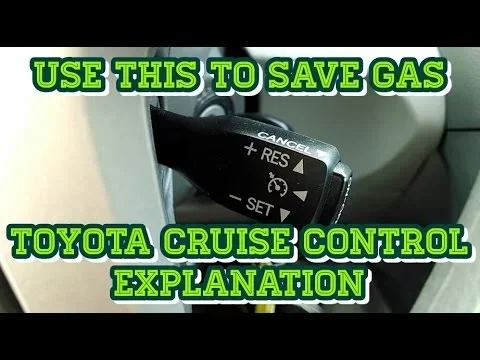
If you drive a Toyota Camry from the 2010 to 2017 model years, your cruise control lever is on the right side of the steering column. It looks like a small lever that you can pull toward you or push away from you. The lever has several buttons built into it, including ON/OFF, SET, RESUME, CANCEL, and COAST. You will also notice a thumb wheel on the underside of the lever that lets you adjust your speed up or down.
Steering Wheel Buttons (Newer Models)
On Toyota Camry models from 2018 onward, the cruise control buttons are located on the right side of the steering wheel. You will see a series of buttons arranged in a cluster. The buttons typically include ON, OFF, SET, RESUME, CANCEL, and up/down arrow buttons for adjusting speed. The layout is slightly different from the stalk system, but the functions work the same way.
Dashboard Indicators
Once you turn on cruise control, you will see a green cruise icon appear on your dashboard. This tells you the system is active and ready to be set. If you see a white or gray cruise icon, the system is on but has not yet been set to a speed. If the icon flashes or turns red, there may be an issue that you need to address.
Step-by-Step Guide to Turning On Cruise Control
Now that you know where the controls are, let us walk through the exact process. Here is how to turn on cruise control on a Toyota Camry step by step.
Step 1: Press the ON Button
Start by pressing the ON button on your cruise control stalk or steering wheel. This turns on the cruise control system. You will see a white or gray cruise icon light up on your dashboard. At this point, the system is ready but not yet controlling your speed.
Step 2: Accelerate to Your Desired Speed
Drive your Toyota Camry until you reach the speed you want to maintain. This could be the highway speed limit or any steady speed you prefer. Make sure you are on a flat, straight road for the best results. Avoid setting cruise control on winding roads or in heavy traffic.
Step 3: Press the SET Button
Once you are at your desired speed, press the SET button. On older models with a stalk, this is usually a button on the side of the lever. On newer models with steering wheel buttons, it is labeled SET. When you press SET, the green cruise icon will appear on your dashboard, and your Toyota Camry will maintain that speed without you touching the accelerator.
Step 4: Adjust Speed If Needed
If you need to adjust your speed after setting cruise control, you have a couple of options. On models with a stalk, use the thumb wheel to increase or decrease speed in small increments. On models with steering wheel buttons, use the up and down arrow buttons. Each press typically changes your speed by one mile per hour. You can also hold the button down for faster adjustments.
Step 5: Cancel or Resume Cruise Control
If you need to temporarily disable cruise control, tap the brake pedal or press the CANCEL button. The green cruise icon will disappear, but your set speed is still stored in the system. To resume, simply press the RESUME button, and your Toyota Camry will accelerate back to the previously set speed.
Using Adaptive Cruise Control on Newer Toyota Camry Models
If your Toyota Camry has dynamic radar cruise control, you get access to some really smart features that go beyond simple speed maintenance. Let us look at how to use them.
Setting a Following Distance
With adaptive cruise control, you can set a following distance between your Camry and the vehicle ahead of you. The system uses a radar sensor mounted behind the front grille to detect other vehicles. You can typically choose from several distance settings, ranging from short to long. On the steering wheel controls, look for a button with a car icon and distance bars. Press it to cycle through the options.
How the System Reacts to Slower Traffic
When the car ahead of you slows down, your Toyota Camry will automatically reduce speed to maintain the set following distance. Once the road clears and the vehicle ahead accelerates, your Camry will return to your set cruising speed. This makes stop-and-go highway traffic much less stressful.
Limitations of Adaptive Cruise Control
Adaptive cruise control works best on highways and roads with consistent traffic patterns. It may not perform well in heavy rain, snow, or fog because the radar sensor can get blocked or confused. Always check your owner’s manual for specific limitations. And remember, this system is a driver assistance feature, not a replacement for attentive driving.
Troubleshooting Common Cruise Control Issues
Sometimes cruise control does not work as expected. Here are some common problems and what you can do about them.
Cruise Control Will Not Turn On
If pressing the ON button does nothing, check a few things first. Make sure your brake pedal is not stuck or partially pressed. The cruise control system automatically disables when the brake is applied. Also, check your fuse box for a blown cruise control fuse. A blown fuse is one of the most common reasons the system will not power on. You can find the fuse location in your Toyota Camry owner’s manual.
Cruise Control Will Not Set
If you are at the right speed and pressing SET but nothing happens, the system might not be detecting a consistent speed. Cruise control typically will not set if you are going below about 25 miles per hour. Also, make sure you are on a relatively flat road. If you are going uphill or downhill at a steep angle, the system may refuse to set. Try accelerating to a higher steady speed on a flat stretch and pressing SET again.
Cruise Control Keeps Cancelling
If your cruise control keeps turning off unexpectedly, the brake light switch could be faulty. This switch tells the cruise control system when you are pressing the brake. If it is malfunctioning, it may send a false signal that makes the system think you are braking. A mechanic can test and replace the brake light switch relatively cheaply. Another possible cause is a problem with the throttle body or electronic throttle control system.
Dashboard Warning Light Flashing
A flashing cruise control warning light usually indicates a system error. This could be caused by a faulty speed sensor, a problem with the radar module (on models with adaptive cruise control), or a wiring issue. When you see a flashing light, it is a good idea to have your Toyota Camry inspected by a qualified technician. Do not ignore warning lights, as they often point to issues that can worsen over time.
Benefits of Using Cruise Control on Your Toyota Camry
Using cruise control is not just about convenience. There are real benefits that come with this feature.
Improved Fuel Efficiency
One of the biggest advantages of cruise control is better fuel economy. When you maintain a steady speed, your engine does not have to work as hard. This is especially true on highways where you would otherwise be constantly adjusting your speed. Studies show that using cruise control on highways can improve fuel efficiency by up to 15 percent on some drives.
Reduced Driver Fatigue
Long drives can be tiring, especially on straight highways where you are constantly managing your speed. Cruise control takes the workload off your right foot, which helps reduce leg fatigue over long distances. This makes road trips more comfortable and helps you arrive feeling less tired.
Consistent Speed and Safer Driving
When you manually control your speed, it is easy to unintentionally speed up or slow down. Cruise control keeps your speed consistent, which helps you avoid speeding tickets and reduces the risk of sudden speed changes that can confuse other drivers on the road.
Safety Tips for Using Cruise Control
Cruise control is a great tool, but it comes with responsibilities. Here are some safety tips to keep in mind.
- Always keep your hands on the steering wheel. Even with cruise control active, you need to be ready to steer at all times.
- Stay alert and avoid drowsiness. Cruise control can make you feel too relaxed on long drives. Take breaks every two hours or so.
- Do not use cruise control in heavy traffic. The system is designed for steady-speed driving, not stop-and-go situations (unless you have adaptive cruise control).
- Avoid using cruise control in bad weather. Wet, icy, or snowy roads require you to have full control of your speed and braking.
- Know how to cancel quickly. Always be ready to tap the brake or press CANCEL if something unexpected happens on the road.
- Do not use cruise control on winding roads. The system is designed for straight, flat roads. Using it on curves can be dangerous.
Expert Tips for Getting the Most Out of Cruise Control
Here are some practical tips from experienced Toyota Camry drivers to help you get the most out of your cruise control system.
Plan your speed before setting cruise control. Rather than setting it at the exact speed limit every time, consider setting it a few miles per hour under the limit. This gives you a buffer and can help you avoid speeding tickets. It also reduces the chance of getting a ticket if you unintentionally accelerate due to a slight downhill slope.
Use the coast function wisely. On older Toyota Camry models with a stalk, the COAST button lets you reduce your speed without tapping the brake. Press it once to reduce speed by a small amount, or hold it down to slow down more quickly. However, be aware that coasting uses gravity to slow you down, so use it carefully on hills and inclines.
Keep your sensors clean. If your Camry has adaptive cruise control, the radar sensor in the front grille needs to stay clean. Dirt, snow, or debris on the sensor can cause the system to malfunction or shut off. Give the front of your car a quick wipe during your regular car wash routine.
Update your software. Toyota occasionally releases software updates for the cruise control system. Check with your dealer to see if any updates are available for your model. These updates can improve system performance and fix known issues.
Frequently Asked Questions
Can I use cruise control in the rain on my Toyota Camry?
It is not recommended to use cruise control on wet roads. When the roads are slippery, you need to have full control over your speed and braking. If you hydroplane or lose traction, cruise control may not respond quickly enough. Save cruise control for dry, clear conditions to stay safe.
What is the difference between cruise control and adaptive cruise control on the Toyota Camry?
Standard cruise control maintains a fixed speed that you set. It does not adjust for vehicles ahead of you. Adaptive cruise control, also called dynamic radar cruise control, uses a radar sensor to detect the speed of the car in front of you and automatically adjusts your speed to maintain a safe following distance.
Why does my cruise control keep turning off when I press the brake?
This is normal and by design. Pressing the brake pedal is one of the primary ways to cancel cruise control. The system is programmed to disengage whenever the brake is applied for safety reasons. If your cruise control is turning off unexpectedly without you pressing the brake, you may have a faulty brake light switch.
Can I set cruise control below 25 miles per hour on my Toyota Camry?
No, the cruise control system on most Toyota Camry models requires a minimum speed of about 25 miles per hour to set. If you are driving below that speed, the system will not engage. For lower speeds, consider using the dynamic radar cruise control on newer models, which can work at lower speeds in stop-and-go traffic.
How do I turn off cruise control completely on my Toyota Camry?
To turn off cruise control entirely, press the OFF button on your cruise control stalk or steering wheel. You can also turn it off by pressing the CANCEL button or tapping the brake pedal. The cruise icon on your dashboard will disappear when the system is fully off.
Is it safe to use cruise control on long road trips with my Toyota Camry?
Yes, using cruise control on long road trips is generally safe and can reduce driver fatigue. Just make sure you take regular breaks, stay alert, and keep your hands on the steering wheel. Avoid using cruise control in adverse weather conditions or on unfamiliar roads with sharp curves.
Conclusion
Learning how do I turn on cruise control on my Toyota Camry is one of the simplest and most rewarding things you can do as a Camry owner. The process is quick, intuitive, and makes a huge difference on long drives. Whether you have a standard cruise control system or the more advanced dynamic radar cruise control, the basic steps are the same: press ON, accelerate to your speed, press SET, and enjoy the ride. Remember to use cruise control responsibly, keep your hands on the wheel, and stay alert at all times. With the tips and troubleshooting advice in this guide, you are now fully equipped to make the most of your Toyota Camry’s cruise control system. So next time you hit the highway, set your speed, relax your foot, and enjoy the drive.