How Do You Start a Keyless Toyota Highlander Easy Guide
Wondering how do you start a keyless Toyota Highlander? This guide walks you through everything from the basics of the push-button start system to handling a dead key fob battery. We cover step-by-step startup procedures, smart key tips, and emergency methods so you are never left stranded.
Key Takeaways
- Push Button Start: The Toyota Highlander uses a smart key system that lets you start the car with the press of a button.
- Key Fob Battery: A dead key fob battery is the most common reason the start button won’t work.
- Emergency Start: You can still start your Highlander even with a dead fob using the hidden key slot and backup methods.
- Smart Key System: The vehicle detects your key fob’s proximity and allows doors to unlock and the engine to start automatically.
- Battery Replacement: Replacing the key fob battery is quick, easy, and costs just a few dollars.
- Remote Start: Many Highlander models support remote start through the Toyota app or aftermarket systems.
- Professional Help: When in doubt, visit a Toyota dealer or qualified mechanic for smart key issues.
📑 Table of Contents
- How Do You Start a Keyless Toyota Highlander Easy Guide
- Understanding the Smart Key System in Your Toyota Highlander
- Step-by-Step: How to Start Your Keyless Toyota Highlander
- What to Do When Your Key Fob Battery Is Dead
- How to Replace Your Key Fob Battery
- Remote Start and Other Useful Features
- Common Mistakes and How to Avoid Them
- Expert Tips for Long-Term Key Fob Care
- Key Takeaways
- Conclusion
How Do You Start a Keyless Toyota Highlander Easy Guide
If you just bought a Toyota Highlander or you are switching from a traditional car, the keyless system might feel a little confusing at first. Don’t worry. It is way simpler than it looks. The how do you start a keyless Toyota Highlander process only takes a few seconds once you know the steps.
Modern Toyota vehicles use what is called a smart key system. This means your key fob communicates with the car wirelessly. You just walk up, the doors unlock, and you press a button to start the engine. But what happens when things don’t go as smoothly? What if your fob battery dies in the middle of a cold morning? That is exactly why we wrote this guide.
This article covers everything you need to know about the keyless ignition system in your Toyota Highlander. We will walk you through the normal startup process, what to do when the fob battery is dead, how to replace it, and some handy tips that every Highlander owner should know. By the end, you will feel like a pro.
Understanding the Smart Key System in Your Toyota Highlander
Before we jump into the steps, it helps to understand how the system actually works. Toyota calls this feature the Smart Key System. It uses radio frequency signals between your key fob and the car’s computer.
When your fob is within a certain range, usually about three to five feet, the car recognizes it. The proximity sensor near the door handle detects the fob and unlocks the doors automatically. Once inside, the car continues to communicate with the fob and lets you start the engine with the push button start.
How the Proximity Sensor Works
The proximity sensor is a small but powerful piece of technology. It sits near the driver’s side door handle or the front bumper depending on your model year. When it picks up the signal from your fob, it sends a command to the car’s body control module. That module then unlocks the doors and arms the security system.
This whole process happens in under a second. You barely notice it. But if the signal is weak or the fob battery is low, you might run into issues. That brings us to the next section.
What Makes the Key Fob Special
Your Toyota Highlander key fob does more than just unlock doors. It also handles the following functions:
- Remote lock and unlock from up to about 100 feet away
- Trunk release with a single button press
- Panic alarm to locate your car in a crowded parking lot
- Remote engine start on models that support it
- Window and sunroof control in some trims
All of this runs on a small coin battery, usually a CR2032 or CR2025. These batteries are cheap and easy to replace. More on that later.
Step-by-Step: How to Start Your Keyless Toyota Highlander
Now let us get to the good stuff. Here is the exact process for starting your Toyota Highlander using the keyless system. These steps apply to most model years including the 2020, 2021, 2022, 2023, and 2024 models.
Normal Startup Procedure
- Walk up to your car with the fob in your pocket or bag. The doors will unlock automatically within a few feet of the vehicle.
- Open the door and sit in the driver’s seat. The interior lights will turn on briefly.
- Press your foot on the brake pedal. This is required. The car will not start without it.
- Press the start button. You will hear the engine turn over and the dashboard lights up fully.
- Shift into drive and release the parking brake. You are good to go.
That is it. Five simple steps and your Toyota Highlander is running. The whole thing takes less than ten seconds once you do it a few times.
What If the Start Button Does Not Respond?
Sometimes you press the push button start and nothing happens. Before you panic, check these things first:
- Is your foot firmly on the brake pedal?
- Is the gear shift in Park?
- Is the steering wheel locked?
- Is the fob inside the car?
If all of those check out but the button still does not respond, your key fob battery is probably low. Move on to the next section for the fix.
What to Do When Your Key Fob Battery Is Dead
A dead key fob battery is the number one reason people get stuck trying to start their Highlander. The good news is this problem is very easy to fix. Here is what you need to know about emergency start methods when your fob is not working.
Using the Hidden Key Slot
Every Toyota Highlander has a backup key slot on the driver’s side door handle. It is hidden behind a small plastic cover. Here is how to use it:
- Slide or pop off the small cover on the door handle to reveal the key slot.
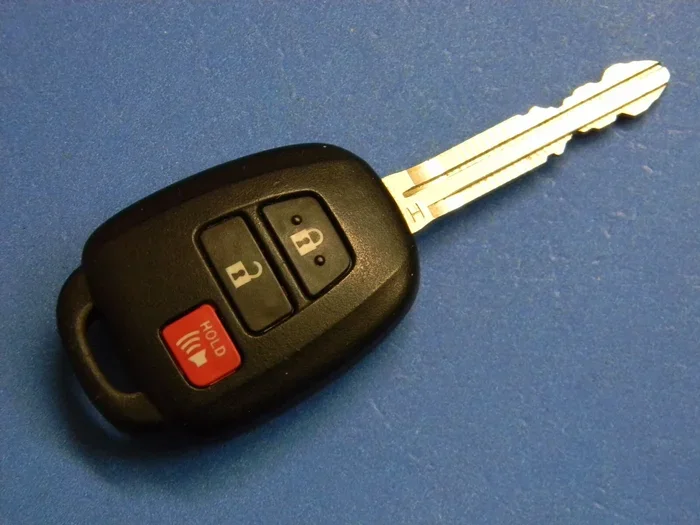
- Take the mechanical key out of your fob. You do this by pressing the small button on the side of the fob.
- Insert the key into the slot and turn it. This unlocks the door manually.
- Once inside, look for the emergency start slot. It is usually located near the steering column or center console.
- Place your fob directly against the start button and press the button while stepping on the brake.
The car can still detect the fob’s RFID signal even with a dead battery when it is held right against the start button. This vehicle startup backup method works in almost every situation.
Quick Tip: Keep a Spare Fob
If you have a second fob, try using that one. Sometimes the problem is not the battery but a signal interference issue. A spare fob can save you a lot of headache. Also, keep the Toyota key fob battery fresh by replacing it at least once a year even if it seems fine.
How to Replace Your Key Fob Battery
Replacing the key fob battery on a Toyota Highlander is one of the easiest car maintenance tasks you can do at home. You do not need any special tools. Just a new battery and about two minutes of your time.
Step-by-Step Battery Replacement
- Find the small notch on the side of your key fob. This is where the mechanical key slides out.
- Pull out the mechanical key by pressing the release button.
- Use the key or a flat screwdriver to pry open the fob case. Start at the notch where the key came out. The case pops apart with a light snap.
- Remove the old battery. It is a CR2032 or CR2025 coin cell. Note which side faces up.
- Insert the new battery with the positive side facing up, matching the old battery’s orientation.
- Snap the case back together. Press firmly around the edges until it clicks.
- Test the fob by pressing the lock and unlock buttons. The car should respond immediately.
New batteries cost under five dollars at any grocery store, auto parts shop, or online. This small investment keeps your keyless entry system running smoothly all year long.
Best Batteries to Use
Stick with well-known brands like Energizer, Duracell, or Panasonic. Cheap no-name batteries can leak and damage your fob’s internal circuit. Quality matters even for something as small as a coin cell battery.
Remote Start and Other Useful Features
Many Toyota Highlander owners love the remote start feature. It lets you start your car from a distance, which is amazing during hot summer days or freezing winter mornings. Here is how it works.
Using the Toyota Entune App
If your Highlander is equipped with the Toyota Entune system, you can use the Toyota app on your phone to start the car remotely. Here is the basic process:
- Download the Toyota Entune app from the App Store or Google Play.
- Create an account and link it to your vehicle.
- Open the app and select your Highlander from your garage.
- Tap the remote start button.
- Your car will start and the climate control will adjust to your preset temperature.
You can do this from anywhere as long as your phone has a signal. It is a game changer for parents and anyone who wants a comfortable car interior before they even step inside.
Aftermarket Remote Start Systems
If your model does not come with factory remote start, you can install an aftermarket remote start system. Popular brands include Compustar, Viper, and Avital. Installation usually takes one to two hours at a local auto shop. Costs range from 200 to 600 dollars depending on the system and your vehicle’s complexity.
Before installing any aftermarket system, make sure it is compatible with your specific Highlander model year. A professional installer can confirm this and ensure everything works correctly with your smart key fob.
Common Mistakes and How to Avoid Them
Even though the push button start system is user-friendly, many Highlander owners make simple mistakes that cause confusion. Here are the most common ones and how you can avoid them.
Forgetting to Press the Brake
This is the number one mistake. The Toyota Highlander requires your foot to be on the brake before the engine will start. If you press the button and nothing happens, check your foot first. It is a safety feature designed to prevent accidental starts.
Leaving the Fob Too Far Away
The smart key system has a range. If you leave the fob in another room or in the trunk, the car might not detect it. Always keep the fob with you inside the cabin. If you need to put something in the trunk, open it quickly and get back inside.
Ignoring Low Battery Warnings
Your dashboard will show a warning when your fob battery gets low. Do not ignore it. Replace the battery right away. Waiting too long can lead to a situation where you cannot start your car at all.
Using the Wrong Battery Type
As we mentioned earlier, your fob takes either a CR2032 or CR2025 battery. Check your owner’s manual to confirm which one your specific model uses. Putting in the wrong size can damage the fob’s internal components.
Expert Tips for Long-Term Key Fob Care
Taking care of your Toyota key fob extends its life and keeps your vehicle access reliable for years. Here are some tips from experienced Toyota mechanics and tech experts.
Keep It Away from Water and Extreme Heat
While most key fobs have some level of water resistance, they are not fully waterproof. Avoid taking them into the shower or swimming pool. Also, never leave them on a dashboard in direct sunlight. Extreme heat can damage the internal electronics and drain the battery faster.
Do Not Throw It Against Hard Surfaces
The fob is not as tough as it looks. A hard fall can crack the case and damage the circuit board inside. If you drop it and notice a crack, take it to a Toyota dealer for inspection. A damaged fob might stop working entirely.
Store It Properly at Night
Many people place their fobs on a kitchen counter or near a television. This is actually bad for the battery. Electronic devices emit signals that can interfere with your fob and slowly drain the battery overnight. Store your fob in a drawer or a dedicated holder away from electronics.
Get Professional Reprogramming When Needed
If you buy a used Highlander or need to add a new fob, you will need to reprogram the smart key system. This is not a DIY task. Visit a Toyota dealer or a certified mechanic who has the proper tools and software. Attempting to reprogram it yourself without the right equipment can lock you out of your own car.
Key Takeaways
Starting your Toyota Highlander with the keyless system should feel natural after a few days. But until then, keep these important points in mind:
- The Smart Key System works automatically when your fob is within range. Just walk up and the doors unlock.
- Always press the brake pedal before pressing the start button. The car will not start without it.
- A dead fob battery is the most common issue. Keep spare batteries on hand and replace them yearly.
- The emergency start slot near the steering column lets you start the car even with a completely dead fob.
- Remote start through the Toyota app adds convenience, especially in extreme weather.
- Professional help is always available at your local Toyota dealer for any smart key issues.
Conclusion
So there you have it. You now know exactly how do you start a keyless Toyota Highlander and what to do when things go wrong. From the basic push-button start process to handling a dead fob and replacing the battery, you are fully covered.
The smart key system in your Highlander is designed to make your life easier. Once you get used to it, you will probably wonder how you ever lived with a traditional key. Just remember to keep that fob battery fresh, store the fob properly, and know the emergency start method for those rare moments when things do not go as planned.
Share this guide with a friend or family member who just got a Highlander. It might save them a lot of stress one day. And if you run into any issues beyond what we covered, your Toyota dealer is always just a phone call away. Happy driving.
Frequently Asked Questions
How do you start a keyless Toyota Highlander if the key fob is completely dead?
If your fob is completely dead, remove the mechanical key from the fob and use it to unlock the driver’s door through the hidden key slot. Once inside, hold the fob directly against the push start button and press it while stepping on the brake pedal. The car can still read the fob’s RFID signal this way and start the engine.
How do you start a Toyota Highlander without the key fob inside the car?
You cannot start a Toyota Highlander without the key fob inside the vehicle. The smart key system requires the fob to be within the cabin for the car to detect it. If the fob is in the trunk or back seat, bring it inside before attempting to start the engine.
What battery does the Toyota Highlander key fob use?
Most Toyota Highlander key fobs use a CR2032 or CR2025 coin cell battery. The exact type depends on your model year. Check your owner’s manual to confirm. Replacement batteries are inexpensive and can be bought at any grocery store or auto parts shop.
How do you start a Toyota Highlander 2024 with the push button start?
To start a 2024 Toyota Highlander, sit in the driver’s seat with the fob in your pocket or bag. Press your foot firmly on the brake pedal, then press the push button start on the center console. The engine will turn over and the dashboard will light up fully. Make sure the gear shift is in Park before starting.
Can you start a Toyota Highlander remotely without the key fob?
Yes, if your Highlander is equipped with Toyota Entune or an aftermarket remote start system. Use the Toyota app on your phone to start the car from a distance. The vehicle must have a working key fob inside for the remote start function to operate properly.
What should you do if the start button flashes red and will not start the car?
A flashing red start button usually means the car cannot detect your key fob. Check that the fob is inside the vehicle and that the battery is not completely dead. Try holding the fob directly against the start button. If the problem continues, replace the fob battery or visit a Toyota dealer for a diagnostic check.