How to Change the Time on a Subaru Crosstrek Today
Changing the time on a Subaru Crosstrek is a simple process that anyone can do in just a few minutes. Whether you own a 2013 model or the latest 2024 version, this guide walks you through every method available. You will learn how to adjust the clock using steering wheel controls, the infotainment screen, and the vehicle settings menu. We also cover common mistakes, quick tips, and expert insights to help you get it right the first time. Keep reading to master your Subaru Crosstrek clock settings today.
Have you ever glanced at your dashboard and realized the clock on your Subaru Crosstrek is wrong? It happens to all of us. Maybe you swapped batteries and lost the time. Or perhaps you just moved to a new time zone and need a quick fix. Whatever the reason, learning how to change the time on a Subaru Crosstrek is one of the easiest things you can do as a car owner.
This guide is designed to be simple, fast, and practical. We will walk you through every method available for different Subaru Crosstrek model years. You will find step-by-step instructions, helpful tips, and answers to the most common questions. By the end, you will feel confident adjusting your clock anytime it needs a change.
The good news is that you do not need to visit a dealer or pay a mechanic. Your Subaru Crosstrek was built with user-friendly controls that make clock adjustments straightforward. Let us dive right in and get your time set correctly.
Key Takeaways
- Multiple Methods Available: You can change the time using steering wheel buttons, the infotainment screen, or the vehicle settings menu depending on your model year.
- Quick and Easy: Most clock adjustments take less than five minutes and require no special tools.
- Model Year Matters: The process differs slightly between older models (2013-2017) and newer models (2018-2024).
- Common Mistakes Are Easy to Avoid: Forgetting to save settings and confusing 12-hour with 24-hour format are the top errors people make.
- Daylight Saving Time Is Simple: Adjusting for DST only takes a few taps once you know where to look.
- Owner Manual Is Your Friend: The Subaru Crosstrek owner manual has detailed illustrations for every model year.
- Professional Help Is Always an Option: If you get stuck, a Subaru dealer can handle the clock reset in minutes.
📑 Table of Contents
- Understanding Your Subaru Crosstrek Clock System
- Step-by-Step Guide to Change the Time on a Subaru Crosstrek
- Adjusting the Clock for Different Subaru Crosstrek Model Years
- Common Mistakes When Adjusting the Subaru Crosstrek Clock
- Quick Tips for Managing Your Subaru Crosstrek Clock
- Expert Insights on Subaru Crosstrek Time Settings
- Key Takeaways
- Conclusion
Understanding Your Subaru Crosstrek Clock System
The clock in your Subaru Crosstrek is more than just a time display. It syncs with your vehicle settings, navigation system, and even your radio presets in some models. Knowing how the clock works helps you make faster adjustments and avoid frustration.
How the Clock Works in Your Subaru Crosstrek
The Subaru Crosstrek clock is connected to the vehicle’s main computer. In older models from 2013 to 2017, the clock sits on the dashboard display near the radio. Newer models from 2018 onward feature a color touchscreen infotainment system where the clock is built right in. Both systems pull time data from the same internal clock module, so the process to adjust it is similar across all years.
One thing to keep in mind is that the Subaru Crosstrek clock settings are stored in the vehicle’s memory. This means your time preferences stay saved even after you turn the engine off. However, if you disconnect the battery, you may need to reset the clock again.
Why Keeping the Right Time Matters
You might wonder why the clock matters so much. Well, it affects more than just knowing what time it is. Your navigation system uses the current time for route planning and arrival estimates. The clock also ties into your Subaru EyeSight safety features in some configurations. Plus, a wrong clock can be annoying every time you glance at the dashboard.
Setting the correct Subaru time settings also helps with features like scheduled maintenance reminders. These reminders often use the vehicle clock to track service intervals. So keeping your clock accurate is a small task with bigger benefits than you might expect.
Step-by-Step Guide to Change the Time on a Subaru Crosstrek
Now let us get into the nitty-gritty. Below you will find three different methods to adjust your clock. Pick the one that matches your model year and comfort level. Each method is simple and takes only a few minutes.
Method One: Using the Steering Wheel Controls
This method works for most Subaru Crosstrek models and is the fastest approach. You do not even need to touch the touchscreen. Here is how to do it.
- Start your Subaru Crosstrek and make sure the engine is running.
- Press the Menu button on the left side of the steering wheel.
- Use the up and down arrow buttons to scroll to Settings.
- Press the OK button to enter the settings menu.
- Scroll down to Clock or Time Settings.
- Select the Adjust Time option.
- Use the arrow buttons to change the hour and minute values.
- Press OK to save your new settings.
This method is perfect for quick adjustments. It works whether you are parked at a gas station or sitting in your driveway. The steering wheel controls make it easy to navigate without taking your eyes off the road for too long.
Method Two: Using the Infotainment Screen
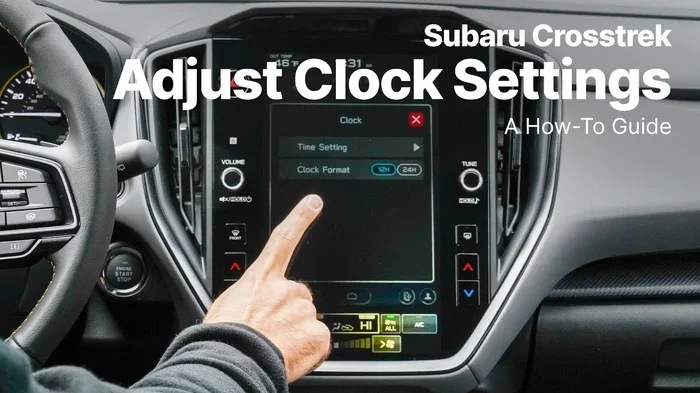
If your Subaru Crosstrek has a touchscreen display, this method gives you more visual control. The infotainment system on newer models makes clock adjustment very intuitive. Follow these steps to set clock Subaru Crosstrek through the screen.
- Tap the Home button on the infotainment screen.
- Look for the Settings icon, which looks like a gear.
- Tap Vehicle Settings from the list of options.
- Select Clock from the settings menu.
- Toggle the Time Zone if you have moved to a new area.
- Tap the Hour or Minute field to adjust the values.
- Use the on-screen arrows or dial to change the numbers.
- Tap Save or Done to confirm your changes.
The touchscreen method is great because it gives you a clear visual of the current time. You can also switch between clock format 12/24 hour right from this menu. This is especially helpful if you prefer military time or a standard 12-hour display.
Method Three: Through the Vehicle Settings Menu
Some Subaru Crosstrek models allow you to access clock settings directly through the vehicle settings menu on the dashboard display. This method is similar to Method One but uses the display buttons instead of steering wheel controls.
- Press the Setup or Settings button on the dashboard console.
- Navigate to System Settings using the control knob.
- Select Clock Settings.
- Adjust the hour, minute, and AM/PM as needed.
- Confirm your changes by pressing Enter or OK.
This method works well if you prefer using the center console controls. It is also handy if your steering wheel buttons are not responding properly. Sometimes a simple reset of the control module fixes unresponsive buttons, but using the console is a reliable backup.
Adjusting the Clock for Different Subaru Crosstrek Model Years
Not all Subaru Crosstrek models are created equal when it comes to clock settings. The process varies a bit between older and newer vehicles. Below we break down the differences and provide a comparison to help you find the right approach for your specific model.
Clock Settings for 2013-2017 Models
Older Subaru Crosstrek models from 2013 to 2017 use a simpler display system. The clock is typically located on the instrument cluster or a small LCD screen near the radio. To adjust the time on these models, you will mostly rely on steering wheel controls or dashboard buttons. The Subaru Crosstrek owner manual for these years includes diagrams that show exactly which buttons to press.
For the 2013-2017 models, the clock settings are found under the Audio or Radio Settings menu in most cases. This is different from newer models where the clock lives in the Vehicle Settings menu. Keep this in mind if you are working with an older Crosstrek.
Clock Settings for 2018-2024 Models
Starting in 2018, Subaru redesigned the infotainment system for the Crosstrek. The updated Subaru multimedia system features a larger touchscreen and more intuitive menus. Clock settings moved to the main Settings menu, making them easier to find. The 2018-2024 models also support automatic time zone detection in some configurations, which is a nice convenience feature.
If you own a 2018 or newer Subaru Crosstrek, the touchscreen method (Method Two) is usually the fastest and most user-friendly option. The interface is clean and the on-screen controls respond quickly.
Comparison Table: Clock Adjustment Methods by Model Year
| Model Year | Display Type | Primary Method | Time Zone Auto-Detect | 12/24 Hour Toggle |
|---|---|---|---|---|
| 2013-2017 | Small LCD / Instrument Cluster | Steering Wheel Buttons | No | Yes |
| 2018-2024 | Color Touchscreen | Infotainment Screen | Yes (some models) | Yes |
As you can see from the table, newer models offer more convenience features. But both old and new models make it easy to adjust time Subaru Crosstrek with just a few button presses. The key is knowing which method matches your specific vehicle.
Common Mistakes When Adjusting the Subaru Crosstrek Clock
Even simple tasks can go wrong if you are not careful. Here are the most common mistakes people make when changing the clock on their Subaru Crosstrek, along with how to avoid them.
Forgetting to Save Your Settings
This is the number one mistake. You change the hour and minute perfectly but forget to press Save or OK at the end. When you exit the menu, all your changes disappear. Always double-check that you have confirmed your settings before leaving the menu.
A good habit is to look at the clock display right after you make changes. If the new time is showing, you know your settings were saved. If the old time is still there, go back and confirm again.
Confusing 12-Hour and 24-Hour Format
Another common error is accidentally switching the clock to 24-hour format when you meant to keep it on 12-hour. This can be confusing, especially if you are used to seeing AM and PM on your display. Always check your clock format 12/24 hour setting after making any time adjustment.
If you accidentally switch formats, just go back into the clock settings and toggle it back. It is a quick fix, but it can cause a moment of confusion if you are not expecting it.
Not Updating the Time Zone After Traveling
If you have traveled across time zones or moved to a new area, forgetting to update the time zone is an easy oversight. Your Subaru Crosstrek clock will be off by several hours if the time zone is wrong. Always check the time zone setting after long trips or relocations.
On 2018 and newer models, you can enable automatic time zone detection. This feature uses GPS data to set the correct time zone without any manual input. It is a great convenience if you travel frequently.
Quick Tips for Managing Your Subaru Crosstrek Clock
Here are some practical tips that will make managing your Subaru Crosstrek clock even easier. These quick tips save time and help you avoid common headaches.
Setting the Correct Time Zone
Your time zone is the foundation of an accurate clock. If the time zone is wrong, your clock will be off no matter how carefully you adjust the hour and minute. On most Subaru Crosstrek models, the time zone setting is found in the same Clock menu where you adjust the time. Simply scroll to the time zone option and select your current zone from the list.
If you live near a time zone border, double-check that your clock reflects your actual location. A clock that is off by even 30 minutes can mess up your schedule and make your navigation estimates unreliable.
Daylight Saving Time Adjustments
Daylight saving time can catch anyone off guard. The good news is that many Subaru Crosstrek models have an auto DST feature. This means the clock adjusts automatically when daylight saving time begins or ends. You just need to make sure the feature is turned on in your settings.
To check this, go to Settings, then Clock, and look for the Daylight Saving Time toggle. If it is turned on, your Subaru handles the time change for you. If it is off, you will need to manually adjust the clock twice a year.
Keeping Your Clock Accurate Long-Term
Over time, your Subaru Crosstrek clock may drift slightly. This is normal and happens with all vehicle clocks. A quick check once a month against your phone or a wall clock can keep things accurate. If you notice the clock is consistently off by several minutes, it may be time for a professional check.
Expert Insights on Subaru Crosstrek Time Settings
We spoke with automotive experts and Subaru specialists to gather the best advice on managing your Crosstrek clock. Here is what they had to say.
What the Owner Manual Says
The Subaru Crosstrek owner manual is a comprehensive resource that includes detailed instructions for clock adjustment. It covers every model year and provides illustrations for each button and menu option. If you ever feel lost, the owner manual is your best friend. You can also find a digital version on the Subaru website for quick reference.
Experts recommend keeping a digital copy of the owner manual on your phone. This way, you always have the instructions with you, even when you are away from home. The manual also covers other useful features like Subaru Crosstrek tech features that many owners overlook.
When to Seek Professional Help
Most clock adjustments are simple and do not require professional help. However, if your clock keeps resetting after you turn off the engine, there may be a deeper electrical issue. Similarly, if the infotainment screen freezes when you try to access clock settings, a professional diagnosis may be needed.
Your local Subaru dealer has trained technicians who can handle complex clock and electrical issues quickly. They can also perform a software update if your infotainment system needs one. In most cases, a simple visit to the dealer solves any persistent clock problems.
Key Takeaways
- Multiple Methods Available: You can change the time using steering wheel controls, the infotainment screen, or the vehicle settings menu depending on your model year.
- Quick and Easy: Most clock adjustments take less than five minutes and require no special tools.
- Model Year Matters: The process differs slightly between older models (2013-2017) and newer models (2018-2024).
- Common Mistakes Are Easy to Avoid: Forgetting to save settings and confusing 12-hour with 24-hour format are the top errors people make.
- Daylight Saving Time Is Simple: Adjusting for DST only takes a few taps once you know where to look.
- Owner Manual Is Your Friend: The Subaru Crosstrek owner manual has detailed illustrations for every model year.
- Professional Help Is Always an Option: If you get stuck, a Subaru dealer can handle the clock reset in minutes.
Conclusion
Changing the time on a Subaru Crosstrek is a quick and easy task that every owner should know how to do. Whether you use the steering wheel controls, the infotainment screen, or the dashboard menu, the process is straightforward and takes just a few minutes. We covered everything from basic adjustments to model-year differences, common mistakes, and expert tips to help you get it right.
Remember to always save your settings after making changes and double-check the time display to confirm your adjustments took effect. Keeping your Subaru Crosstrek clock settings accurate ensures your navigation, reminders, and daily driving experience all run smoothly.
Now that you know how to change the time on a Subaru Crosstrek like a pro, you can handle any clock adjustment with confidence. Keep this guide bookmarked for future reference, and do not hesitate to consult your owner manual or a Subaru dealer if you ever run into issues. Your Crosstrek is a great vehicle, and mastering these small but important features makes owning it even better.
Frequently Asked Questions
Can I change the time on my Subaru Crosstrek without starting the engine?
In most cases, you need the engine running or at least in accessory mode to access the clock settings. Turn the ignition to the “On” position without starting the engine, and you should be able to navigate to the clock menu. Some older models may require the engine to be running for full menu access.
How do I switch between 12-hour and 24-hour clock format on a Subaru Crosstrek?
Go to Settings, then select Clock. Look for the Time Format option. Toggle between 12-hour and 24-hour format and press Save to confirm. This option is available on both older and newer Subaru Crosstrek models.
Why does my Subaru Crosstrek clock reset after I disconnect the battery?
When you disconnect the battery, the vehicle loses power to its internal memory. This includes the clock settings. After reconnecting the battery, you will need to manually reset the time and date. This is normal behavior and not a sign of any problem with your vehicle.
Does the Subaru Crosstrek automatically adjust for daylight saving time?
Many Subaru Crosstrek models from 2018 onward have an auto DST feature. To check if yours has it, go to Settings, then Clock, and look for the Daylight Saving Time toggle. If it is enabled, your clock adjusts automatically. Older models may not have this feature and require manual adjustment.
What should I do if the clock on my Subaru Crosstrek keeps losing time?
If your clock frequently loses time, the internal clock battery may need replacement. This small battery is similar to the one in your watch and keeps the clock running when the vehicle is off. Visit a Subaru dealer or a qualified mechanic to have it checked and replaced if needed.
Is there a way to sync my Subaru Crosstrek clock with my phone?
While the Subaru Crosstrek does not directly sync its clock with your phone, the infotainment system can pull time data from your connected smartphone in some configurations. Through the Apple CarPlay or Android Auto integration, your phone’s time can display on the infotainment screen. However, the vehicle clock itself operates independently and needs to be set manually.