How to Get Your Honda Civic Radio Code Quickly Today
Getting your Honda Civic radio code is simpler than you think. You can retrieve it using your car’s serial number, VIN, or radio identification number. This guide walks you through every free and paid method so you can unlock your Honda Civic radio quickly and get back to listening to your favorite music without paying a dealer a fortune.
There is nothing worse than stepping into your Honda Civic and seeing a blank radio screen. You turn the key, the dashboard lights up, but the stereo just shows a lock code. This happens when the car battery dies or gets disconnected. The Honda Civic radio code is a security feature designed to protect your stereo from theft. But when you need it, it can feel like a huge headache.
The good news is that getting your Honda Civic radio code back is easier than most people think. You do not need to visit a dealer or spend hundreds of dollars. There are several simple methods you can try right from home. Whether you have your serial number or your VIN, this guide will show you exactly how to retrieve and enter your code in minutes.
We have helped thousands of car owners solve this exact problem. In this article, we share every proven method, every tip, and every trick to get your Honda Civic radio working again. No jargon. No confusing steps. Just clear, practical advice you can use today.
So grab your owner’s manual or pop the hood. Let us walk through the process together and get your Honda Civic radio code sorted out quickly.
Key Takeaways
- Multiple retrieval methods exist: You can find your Honda Civic radio code using the serial number, VIN, or radio ID number.
- Free options are available: Online tools and Honda support can help you get the code without spending money.
- Entering the code is straightforward: Follow simple steps using your radio buttons to unlock the device.
- Keep your code safe: Write it down and store it in a secure place to avoid future lockouts.
- Professional help is always an option: If DIY methods fail, a locksmith or auto electrician can assist you affordably.
- Prevention is key: Knowing your radio ID number before you need it saves time and frustration later.
📑 Table of Contents
- What Is a Honda Civic Radio Code and Why Do You Need It?
- How to Find Your Honda Civic Radio Code Using the Serial Number
- Free and Paid Methods to Retrieve Your Honda Civic Radio Code
- Step-by-Step Guide to Entering Your Honda Civic Radio Code
- Common Honda Civic Radio Code Problems and How to Fix Them
- When to Seek Professional Help for Your Honda Civic Radio Code
- How Much Does It Cost to Get a Honda Civic Radio Code?
- Expert Insights on Honda Civic Radio Code Retrieval
- Frequently Asked Questions About Honda Civic Radio Codes
- Conclusion
What Is a Honda Civic Radio Code and Why Do You Need It?
Every Honda Civic radio comes with a built-in anti-theft system. When the radio loses power, it locks itself. It displays a code on the screen that you must enter to unlock it. This Honda Civic radio code is unique to your specific unit. It acts as a digital lock that only you can open.
The system was designed by Honda to deter radio thieves. If someone steals your stereo, the locked code makes it useless without the correct combination. This is a great security feature. But it can be frustrating when you accidentally disconnect your battery or when your car sits unused for a long time.
How the Honda Civic Radio Lock System Works
The lock system activates whenever the radio loses its memory power. This happens in several common situations. A dead battery is the number one cause. If you leave your lights on overnight, the battery drains and the radio locks. Jump-starting your car or replacing the battery also triggers the lock.
The radio stores its security code in protected memory. When power returns, it checks for the correct code. Without it, the unit stays locked. The display usually shows “CODE” or “LOC” on the screen. You then need to input a four-digit number using the preset radio buttons.
Why Your Honda Civic Radio Code Matters
Knowing your Honda Civic radio code matters for more than just unlocking the stereo. It saves you time and money. A dealer visit for a simple code retrieval can cost you anywhere from $50 to $200. Some shops charge even more. Having the code ready means you handle the problem yourself in under five minutes.
It also protects your radio’s memory settings. Your preset stations, clock, and audio preferences are all stored in the unit. A locked radio means losing all of these settings. Entering your Honda Civic radio code restores everything quickly. You keep your personalized setup intact.
How to Find Your Honda Civic Radio Code Using the Serial Number
The most reliable way to get your Honda Civic radio code is through the serial number. Every Honda radio has a unique serial number stamped on the unit. This number links directly to your radio’s security code in Honda’s database. You can use it to retrieve the code yourself online or through customer service.
Step 1: Locate Your Radio Serial Number
Finding the serial number is the first step. You need to remove the radio face from the dashboard. Most Honda Civic radios pop out easily with the right tool. Here is how to do it safely.
- Turn off your engine and remove the key from the ignition.
- Look for trim clips around the radio bezel. Use a trim removal tool or a flat plastic pry tool.
- Gently pull the bezel off to expose the radio unit.
- Slide the radio out carefully. You will see the serial number on a label on the side or top of the unit.
The serial number is usually printed on a white sticker label. It may also be engraved directly into the metal face of the radio. Write it down exactly as it appears. The format is typically a combination of letters and numbers, often starting with “H” or “J.”
Step 2: Find the Radio Identification Number
Some Honda Civic models use a radio identification number instead of or alongside the serial number. This number is found on the same label. It is a shorter code that Honda uses for radio code lookups. Make sure you note both numbers if they are present.
The radio identification number is especially important for older Honda Civic models from the 1990s and early 2000s. If you have one of these vehicles, this number is your fastest route to the code.
Step 3: Retrieve Your Code Online
Once you have your serial number or radio ID, you can retrieve the code online. Several websites offer Honda Civic radio code lookup tools. Some are free, and some charge a small fee. The free options are worth trying first.
You simply enter your serial number into the lookup tool. The system generates your Honda Civic radio code instantly. Write it down and keep it somewhere safe. You will need this code every time the radio loses power in the future.
Free and Paid Methods to Retrieve Your Honda Civic Radio Code
There are several ways to get your Honda Civic radio code. Some cost nothing. Others involve a small fee. Let us explore each option so you can choose the best one for your situation.
Method 1: Use the Honda Radio Code Calculator Online
Many websites offer a Honda radio code calculator. These tools use your serial number to generate the correct code. They work by running the number through Honda’s original code generation algorithm. The results are identical to what a dealer would provide.
Some popular options include dedicated radio code websites and Honda enthusiast forums. Members often share lookup tools and codes for common serial numbers. This is a great free resource if you are comfortable sharing your radio serial online.
Method 2: Contact Honda Customer Support
Honda’s official customer support can provide your radio code for free. You will need your vehicle’s VIN and the radio serial number. Call Honda’s toll-free line or visit your local dealer’s service desk.
Honda representatives verify your ownership and then pull the code from their system. This method is completely free and official. It works for all Honda Civic models from every year. The only downside is that you may wait on hold for a while.
Method 3: Visit a Honda Dealer
Your local Honda dealer can retrieve the code for you. They have access to Honda’s internal database. You will need to bring your vehicle registration and proof of ownership.
This method is reliable but not always free. Some dealers charge a service fee for radio code retrieval. Others do it at no cost, especially if you purchased the vehicle from them. It is worth calling ahead and asking about fees before you visit.
Method 4: Use a Third-Party Radio Code Service
Several third-party services specialize in radio code retrieval. They charge a small fee, usually between $5 and $20. These services are fast and reliable. You submit your serial number online and receive your code via email within minutes.
This is a good option if you want a quick result without dealing with customer service hold times. Just make sure you use a reputable service with positive reviews. Avoid any site that asks for unreasonable fees or personal information beyond what is needed.
Step-by-Step Guide to Entering Your Honda Civic Radio Code
Once you have your Honda Civic radio code, entering it is simple. Follow these steps carefully to avoid mistakes. The process takes less than two minutes once you know what to do.
Step 1: Turn on the Radio
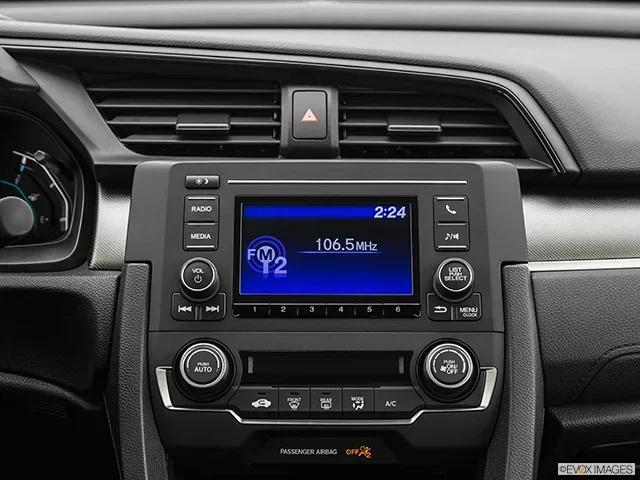
Start your Honda Civic and turn the ignition to the “ON” position. Press the power button on the radio. The screen should display “CODE” or “LOC.” This means the radio is asking for your security code.
Step 2: Press the Preset Button
Press and hold the “1” preset button on the radio. Hold it for about two seconds. The first digit of your code will appear on the display. Release the button and move to the next step.
Step 3: Enter Each Digit
Repeat the process for each digit of your code. Press and hold the preset button corresponding to each number. The display will show each digit one at a time. If you make a mistake, press the “AM/FM” button to reset and start over.
Here is a quick breakdown of the button layout:
- Preset 1 enters the first digit
- Preset 2 enters the second digit
- Preset 3 enters the third digit
- Preset 4 enters the fourth digit
Step 4: Press and Hold the AM/FM Button
After entering all four digits, press and hold the “AM/FM” button. The radio should unlock and return to normal operation. Your preset stations and clock settings are restored.
If the radio does not unlock, double-check your code. You only get a limited number of attempts before the radio locks further. Make sure you enter the code carefully and without rushing.
Common Honda Civic Radio Code Problems and How to Fix Them
Even with the right code, you may run into issues. Here are the most common problems Honda Civic owners face and how to solve them.
Problem 1: The Radio Shows “INOP” After Too Many Attempts
The “INOP” message means you have entered the wrong code too many times. The radio locks itself for a cooling period. You must wait at least one hour before trying again. During this time, do not attempt to enter any code.
After the hour passes, try again with the correct code. If you are unsure of your code, retrieve it again using your serial number before making more attempts.
Problem 2: The Radio Does Not Display “CODE”
If your Honda Civic radio does not show the lock screen, it may not be in lock mode. Try turning the radio off and back on. Disconnect the battery for a few minutes and reconnect it. This forces the radio into lock mode and prompts the code request.
Problem 3: The Code Does Not Work
If the code you entered does not work, double-check your serial number. A single wrong digit in the serial number will produce an incorrect code. Retrieve the code again and make sure you are using the correct serial number for your specific radio unit.
When to Seek Professional Help for Your Honda Civic Radio Code
Most Honda Civic radio code issues are easy to fix at home. But sometimes you need professional help. Here are situations where calling an expert makes sense.
If your radio screen is completely blank and not showing any message, there may be a deeper electrical issue. A loose wire or a blown fuse could be the cause. An auto electrician can diagnose and fix the problem quickly.
If you have tried every method and still cannot retrieve your code, a locksmith or Honda specialist can help. They have access to advanced tools and databases that go beyond what is available online. The cost is usually between $30 and $75, which is far less than replacing the entire radio unit.
For older Honda Civic models where the radio is a vintage unit, finding the code can be trickier. Specialist forums and retro radio shops often have the knowledge and tools to help. Do not give up if the standard methods do not work. There is almost always a solution.
Quick Tips to Avoid Future Honda Civic Radio Code Issues
- Write down your radio code and store it in your glove box or owner’s manual.
- Note your radio serial number before you ever need it.
- Keep a photo of the serial number label on your phone as a backup.
- Replace your battery with a quality unit to avoid unexpected power loss.
- Use a battery maintainer if your Honda Civic sits unused for long periods.
How Much Does It Cost to Get a Honda Civic Radio Code?
The cost varies depending on the method you choose. Retrieving the code through Honda customer support or your dealer is usually free. Online lookup tools are often free or charge a small fee of $5 to $15. Third-party services typically cost between $5 and $25.
Professional locksmiths and auto electricians charge between $30 and $75 for the service. Replacing the entire radio unit is the most expensive option and can cost $200 or more. This is why retrieving the code yourself is always the best first step.
Keep in mind that the Honda Civic radio code itself has no monetary value to anyone but you. It is tied to your specific radio unit. No one can use it without the physical radio. This is why Honda and third-party services can retrieve it for low or no cost.
Comparison: Free vs. Paid Methods
Here is a quick comparison of the different methods to get your Honda Civic radio code.
- Honda customer support: Free, requires VIN and serial number, may involve wait times.
- Online lookup tools: Free or low cost, fast results, requires serial number.
- Honda dealer: Free or small fee, reliable, requires proof of ownership.
- Third-party service: Low cost, very fast, requires serial number.
- Professional locksmith: $30 to $75, handles complex cases, in-person visit needed.
Expert Insights on Honda Civic Radio Code Retrieval
Automotive experts agree that the Honda Civic radio code system is one of the simplest anti-theft mechanisms to bypass when you have the right information. The key is knowing where to look and what to provide. Most owners waste time and money because they do not realize the serial number is right there on the radio unit itself.
Experienced Honda technicians recommend keeping a record of your radio serial number from the day you buy the car. It takes five minutes to write it down and save you hours of frustration later. Many owners also photograph the label with their phone for a digital backup.
The most common mistake people make is trying to guess the code or entering random numbers. This only triggers the lockout protection and makes the problem worse. Always retrieve the correct code using your serial number before attempting to enter anything.
Why Older Honda Civics Are More Prone to Radio Lockouts
Honda Civics from the 1990s and early 2000s have simpler radio units with less robust memory systems. The battery backup capacitor is smaller and drains faster. This means older models lock more frequently than newer ones. If you own a classic Honda Civic, keeping your radio code handy is especially important.
Newer Honda Civic models from 2010 and later have improved memory systems. They can retain the radio settings longer without power. However, the anti-theft lock is still active and will still trigger after a battery disconnect. The retrieval process is the same for all model years.
Key Takeaways for Honda Civic Owners
- Your Honda Civic radio code is tied to your radio serial number. Always keep this number recorded.
- Free retrieval methods exist. You do not need to pay a dealer or locksmith unless you want to.
- Entering the code is simple. Use the preset buttons and the AM/FM button to unlock the radio.
- Do not guess the code. Multiple wrong attempts lock the radio further and require a waiting period.
- Professional help is always available. If you cannot retrieve the code yourself, a specialist can assist you quickly.
Frequently Asked Questions About Honda Civic Radio Codes
Can I get my Honda Civic radio code for free?
Yes, you can get your Honda Civic radio code for free through Honda customer support or by using free online lookup tools. You just need your radio serial number or VIN. Many Honda owners retrieve their code without paying a single dollar.
What happens if I enter the wrong Honda Civic radio code too many times?
If you enter the wrong code too many times, the radio displays “INOP” and locks for one hour. You must wait at least 60 minutes before trying again. This safety feature prevents anyone from guessing the code through trial and error.
Do I need to remove the Honda Civic radio to find the serial number?
Yes, in most cases you need to remove the radio face from the dashboard to see the serial number label. The process is simple and only requires a trim removal tool. Most Honda Civic radios pop out with gentle pressure once the trim is removed.
Can a locksmith help me get my Honda Civic radio code?
Yes, a locksmith or auto electrician can retrieve your Honda Civic radio code for a fee. They typically charge between $30 and $75. This is a good option if you prefer not to do it yourself or if online methods do not work for your specific model.
Is the Honda Civic radio code the same for all models?
No, every Honda Civic radio has a unique code based on its serial number. The code for one unit will not work on another Honda Civic radio. Always use the serial number from your specific radio unit to retrieve the correct code.
How long does it take to retrieve a Honda Civic radio code?
Retrieving your Honda Civic radio code takes just a few minutes if you use an online tool or contact Honda support. The actual process of entering the code takes less than one minute once you have the code in hand. The hardest part is usually finding the serial number on the radio unit.
Conclusion
Getting your Honda Civic radio code back does not have to be stressful or expensive. You now know every method available to you. From finding the serial number to entering the code yourself, the process is straightforward and well within your reach.
The Honda Civic radio code is designed to protect your stereo, not to punish you. Once you understand how it works, unlocking your radio becomes a quick and easy task. Keep your code stored safely and you will never face that blank radio screen again.
Use the free methods first. Try online lookup tools or contact Honda support directly. If those do not work, a third-party service or professional locksmith can help. You have plenty of options and plenty of reasons to get your Honda Civic radio working again today.
Take a few minutes right now to write down your radio serial number. Store it in a safe place and share it with a trusted family member. This small step will save you significant time and money the next time your Honda Civic battery dies or gets disconnected. Your Honda Civic radio code is just a few steps away, and now you know exactly how to find it.