Can You See Tire Pressure Readings on the Toyota App
Yes, you can see tire pressure on the Toyota app. The Toyota app tire pressure feature provides real-time readings for compatible models, helping you maintain tire pressure levels and avoid low tire pressure warnings. In this guide, I’ll show you exactly how to check tire pressure readings, which Toyota models support it, and how to interpret TPMS alerts from your phone.
Many Toyota owners wonder if they can check tire pressure without leaving the house. The answer is yes, but it depends on your model and year. The Toyota app tire pressure feature connects to your vehicle’s tire pressure monitoring system, giving you instant access to tire health data right on your smartphone.
You don’t need a physical tire pressure gauge anymore for a quick check. The Toyota app displays real-time tire pressure readings, helping you spot low tire pressure before it becomes a safety issue. I’ll walk you through exactly how this works, which models support it, and how to read the data.
Key Takeaways
- Yes, the Toyota app displays tire pressure: You can view real-time tire pressure data for compatible models directly on your phone.
- TPMS integration: The app connects to your vehicle’s tire pressure monitoring system, showing pressure levels and warnings.
- Model compatibility matters: Not all Toyota vehicles support tire pressure display; check your model year and trim.
- Easy step-by-step access: I’ll walk you through the exact taps to find tire pressure in the Toyota app dashboard.
- Safety and maintenance benefits: Monitoring tire pressure helps prevent blowouts, improve fuel economy, and extend tire life.
- Quick Tips and Common Mistakes: I’ll share practical advice to avoid errors and get accurate readings.
📑 Table of Contents
- How the Toyota App Displays Tire Pressure
- Which Toyota Models Support Tire Pressure Monitoring on the App
- Step-by-Step: How to Check Tire Pressure on the Toyota App
- Benefits of Monitoring Tire Pressure Through the App
- Common Mistakes When Using the Toyota App for Tire Pressure
- Expert Insights and Quick Tips for Accurate Tire Pressure Checks
- Conclusion
How the Toyota App Displays Tire Pressure
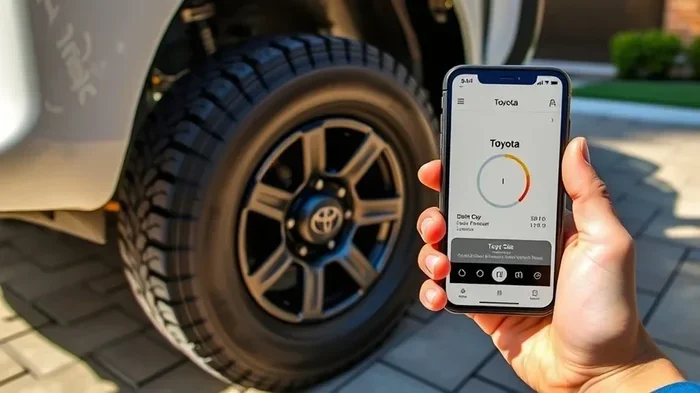
The Toyota app uses your vehicle’s tire pressure monitoring system to send data to your phone. When you open the app, you can see a tire pressure screen that shows the current level for each tire. The display uses simple icons and numbers, so you don’t need to be a mechanic to understand it.
Understanding TPMS Data in the Toyota App
Your Toyota’s tire pressure monitoring system uses sensors inside each wheel. These sensors measure the air pressure and send the information to the car’s computer. The Toyota app then pulls that data through a Bluetooth or cellular connection. You can see the tire pressure level in pounds per square inch or kilopascals, depending on your settings.
The app also shows a tire pressure status indicator. A green icon means all tires are in the safe range. A yellow or red icon means one or more tires are underinflated. This immediate visual feedback helps you take action before a flat tire or blowout occurs.
What Tire Pressure Readings Look Like on Your Screen
On the Toyota app dashboard, the tire pressure section shows four numbers, one for each wheel. For example, you might see 32 PSI for the front left, 33 PSI for the front right, and so on. The app also shows the recommended tire pressure for your specific vehicle, which you can find on the driver’s side door jamb.
You can tap on any individual tire to see more details. Some models show the tire pressure sensor battery status as well. This is helpful because a dead sensor battery can cause false warnings. The Toyota app tire pressure feature makes it easy to spot a slow leak early.
Which Toyota Models Support Tire Pressure Monitoring on the App
Not every Toyota vehicle can display tire pressure readings in the app. The feature depends on the model year and whether the car has the necessary hardware. I’ll break down the compatibility so you know what to expect.
Compatible Toyota Vehicles and Trim Levels
Most Toyota models from 2019 onward with the Toyota Connected Services package support tire pressure display in the app. Popular models like the Camry, RAV4, Corolla, and Highlander typically show tire pressure data. The app works best with vehicles that have a digital instrument cluster or a multimedia screen that can relay tire pressure information.
Here is a quick comparison of some common Toyota models:
| Toyota Model | Tire Pressure Display | TPMS Alerts |
|---|---|---|
| Camry (2019+) | Yes | Yes |
| RAV4 (2019+) | Yes | Yes |
| Corolla (2020+) | Yes | Yes |
| Highlander (2020+) | Yes | Yes |
| Tacoma (2016-2023) | No | Warning only |
Always check your owner’s manual or the Toyota app support page to confirm your specific trim. Some base trims may not include the digital feature even if the car has TPMS sensors.
Models Without Direct Tire Pressure Display
Older Toyota trucks and some sedans only have a basic TPMS warning light. In these vehicles, the app can still notify you if a tire is low, but it won’t show the exact pressure number. You would still need a manual tire pressure gauge to check the exact level. The Toyota app tire pressure feature is a premium convenience for newer models.
Step-by-Step: How to Check Tire Pressure on the Toyota App
Checking your tire pressure takes only a few taps once you know where to look. I’ll guide you through the process from opening the app to reading the results.
Navigating the Toyota App Dashboard
First, open the Toyota app on your phone and log in. Make sure your phone is connected to your vehicle. On the home screen, look for the vehicle health or maintenance section. Tap on it, and you should see a menu with options like engine oil, tire pressure, and battery status.
Select tire pressure. The app will load the current readings from your car’s sensors. If the connection is slow, try toggling your phone’s Bluetooth or moving closer to the vehicle. The data updates automatically whenever you open the screen.
Interpreting Tire Pressure Warnings
The app uses color-coded alerts to tell you the condition of each tire. A green checkmark means the pressure is within the recommended range. A yellow exclamation mark means the pressure is low, and a red icon means the pressure is critically low. You can tap on any tire to see the exact PSI number and the recommended pressure.
If you see a warning, I recommend checking the tire with a physical gauge as soon as possible. The app is a great first alert, but a manual check confirms the reading. This two-step approach keeps you safe and prevents unnecessary trips to the service center.
Benefits of Monitoring Tire Pressure Through the App
Using the Toyota app to watch your tire pressure offers several real advantages. It turns your phone into a powerful vehicle maintenance tool that you can carry anywhere.
Safety, Fuel Efficiency, and Tire Longevity
Low tire pressure is a leading cause of tire blowouts. By monitoring tire pressure regularly, you reduce the risk of a dangerous accident. Properly inflated tires also improve your car’s fuel economy. Even a small drop in pressure can lower your miles per gallon, costing you money at the pump.
Tires last longer when you keep the pressure right. Underinflated tires wear out the outer edges of the tread, while overinflated tires wear the center. The Toyota app helps you maintain the ideal tire pressure level, which extends the life of your tires and saves you money on replacements.
Real-World Example: A Toyota RAV4 Owner’s Experience
One RAV4 owner shared that the app alerted him to a slow leak in the rear passenger tire. He noticed the tire pressure reading had dropped 4 PSI over a week. He checked the tire with a gauge and found a small nail puncture. Because he caught it early, he avoided a roadside flat and a costly tire replacement. This is exactly why the Toyota app tire pressure feature is so valuable.
Common Mistakes When Using the Toyota App for Tire Pressure
Even with a great tool, people make mistakes that lead to confusion or inaccurate readings. Here are the most common pitfalls I see.
Ignoring Sensor Calibration and Other Pitfalls
One mistake is assuming the app reading is always perfect. Tire pressure sensors can drift over time, especially after temperature changes. Cold weather can cause a temporary drop in pressure that triggers a false warning. I recommend checking your tires with a reliable gauge once a month to confirm the app readings.
Another mistake is ignoring the sensor battery. The TPMS sensor battery typically lasts 5 to 7 years. When the battery dies, the app may show no data or a sensor fault message. In that case, you need a dealer to replace the sensor. Don’t ignore this warning, or you’ll lose your tire pressure monitoring until it’s fixed.
Expert Insights and Quick Tips for Accurate Tire Pressure Checks
I’ve worked with many Toyota owners who want to get the most from their app. Here are some expert-backed tips to improve your experience.
How to Ensure Your Tire Pressure Sensor Is Working
To keep your tire pressure sensor working well, drive your car for at least 15 minutes after checking the app. This allows the sensors to recalibrate. Also, make sure your tires are cold when you check them. Driving heats up the air inside the tire, which can raise the pressure reading by 2 to 4 PSI.
Quick Tips:
- Check tire pressure once a month and before long trips.
- Keep a spare tire pressure gauge in your glovebox for backup.
- Reset the TPMS after you inflate or rotate your tires.
- Update the Toyota app regularly to get the latest bug fixes.
- Use the app’s maintenance log to track pressure changes over time.
When to Visit a Dealer for TPMS Service
If the Toyota app shows a sensor fault or no data at all, it’s time to see a dealer. They have the tools to test each sensor and replace the battery if needed. A dealer can also reprogram the sensors after a tire rotation or new tire installation. This keeps your Toyota app tire pressure feature working accurately.
Conclusion
The Toyota app tire pressure feature is a powerful tool for any Toyota owner. You can see tire pressure readings, get instant warnings, and stay ahead of tire problems. Not every model supports the full display, but most recent Toyotas do. By following the steps I shared, you can check your tire pressure from your phone and enjoy safer, more efficient driving.
Take a moment today to open the Toyota app and look at your tire pressure screen. It only takes a few seconds, and it could save you from a dangerous flat tire. Keep your tires healthy, and your Toyota will reward you with better performance and peace of mind.
Frequently Asked Questions
How do I check tire pressure on the Toyota app?
Open the Toyota app, log in, and tap on the vehicle health section. Select tire pressure to see the current readings for all four tires. The app pulls data directly from your car’s TPMS sensors.
Can I see tire pressure on older Toyota models?
Older models may only show a low-pressure warning in the app, not the exact PSI number. Full tire pressure display is typically available on Toyota models from 2019 onward with the Connected Services package.
What does a low tire pressure warning mean in the app?
A low tire pressure warning means one or more tires are below the recommended pressure. The app will show a yellow or red icon next to the affected tire. You should check the tire with a gauge and add air if needed.
Does the Toyota app show tire pressure for all tires at once?
Yes, the app displays the pressure for all four tires on a single screen. You can tap on any individual tire to see the exact PSI and the recommended pressure for your vehicle.
How accurate is the Toyota app tire pressure reading?
The app readings are very accurate because they come directly from your car’s tire pressure sensors. However, I recommend confirming with a manual gauge once a month, especially if you notice a sudden change.
Can I reset the TPMS light through the app?
The Toyota app can reset the TPMS warning light after you have inflated your tires to the correct pressure. Look for the reset option in the vehicle health menu. If the light stays on, a dealer may need to inspect the sensors.