How to Set the Clock on a Volkswagen Passat Correctly
Setting the clock on your Volkswagen Passat is simple once you know the right steps. Whether you drive a newer model with a digital infotainment screen or an older Passat with a traditional instrument cluster, this guide walks you through every method. You will learn how to adjust the time, switch between 12-hour and 24-hour formats, and fix common clock problems in minutes.
There is something oddly satisfying about seeing the correct time glowing on your car dashboard. It is one of those small things that makes driving feel right. If you have been squinting at a wrong time every time you get behind the wheel of your Volkswagen Passat, you are not alone. Many Passat owners face this simple but annoying issue at some point. The good news is that how to set the clock on a Volkswagen Passat is easier than you might think.
This guide covers everything you need to know. Whether you drive a brand-new 2024 Passat or a classic model from the early 2000s, you will find clear steps that work for your vehicle. We will walk through each method, share common mistakes to avoid, and give you practical tips to keep your car clock running accurately. No mechanic visit required. No confusing jargon either. Just straightforward instructions that anyone can follow.
Before we dive in, let us talk about why this matters. Your car clock does more than just tell time. It controls your radio presets, trip calculations, and even some navigation features in newer models. A wrong clock can throw off your entire driving experience. So let us fix it right now and get you back on the road with confidence.
Key Takeaways
- Multiple methods exist: You can set the clock through the steering wheel buttons, the infotainment system, or the instrument cluster depending on your Passat model year.
- Model year matters: Newer Passats (2015+) use the digital infotainment screen, while older models rely on physical buttons near the clock display.
- Common issues are fixable: A dead battery, blown fuse, or incorrect settings often cause clock problems and are easy to resolve.
- Automatic time sync is available: Some Passat models support GPS-based time updates that keep your clock accurate without manual input.
- Regular maintenance helps: Replacing the car battery and checking fuses periodically prevents clock resets and accuracy issues.
- Quick tips save time: Keeping your owner manual handy and noting your Passat’s specific model year streamlines the process.
📑 Table of Contents
- Why Setting the Correct Time on Your Passat Matters
- How to Set the Clock on a Volkswagen Passat: Step-by-Step Guide
- Setting the Clock on Different Passat Model Years
- Common Problems When Adjusting the Passat Clock
- Tips to Keep Your Passat Clock Accurate
- When to Seek Professional Help for Clock Issues
- Final Thoughts
Why Setting the Correct Time on Your Passat Matters
You might wonder why we are dedicating a full section to this. The truth is that the clock in your Volkswagen Passat does more work than you realize. It is not just a decorative feature on your dashboard. It connects to several systems that affect your daily driving.
First, your Passat’s infotainment system uses the clock to organize your radio stations, Bluetooth pairing history, and even your last visited media source. When the time is wrong, some of these features can behave unpredictably. Second, if your Passat has a navigation system, the GPS time sync depends on your internal clock being accurate. A mismatched clock can cause navigation delays or incorrect route calculations.
Third, let us talk about safety. Your Passat may have features like automatic high beams or adaptive cruise control that log data based on timestamps. If you ever need to review driving logs or share data with a mechanic, incorrect timestamps can create confusion. Finally, some insurance systems and telematics devices track driving behavior by time of day. An inaccurate clock could skew your data.
So setting the clock is not just about convenience. It is about keeping your Passat running smoothly across all its systems. Once you learn how to set the clock on a Volkswagen Passat, you will wonder why you did not do it sooner.
How to Set the Clock on a Volkswagen Passat: Step-by-Step Guide
Here is where the real action happens. We will break this down into the most common methods. Since Passat models vary by year and trim level, we will cover each approach separately. Find the one that matches your vehicle and follow along.
Method 1: Using the Steering Wheel Controls (Most Passat Models)
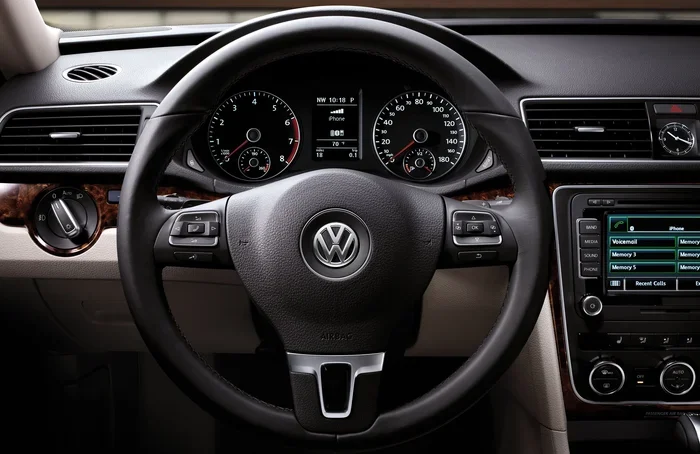
This is the most common way to adjust the clock on a Volkswagen Passat. Almost every Passat model from the past two decades supports this method. Here is how it works:
- Turn the ignition to the “ON” position. You do not need to start the engine. Just press the start button or turn the key to the accessory mode.
- Locate the steering wheel controls. Most Passat models have buttons on the left side of the steering wheel. Look for a button labeled “MODE” or one with a clock icon.
- Press and hold the MODE button for three seconds. The clock display on your instrument cluster should start blinking. This tells you that you are in adjustment mode.
- Use the arrow buttons to adjust the hours. Press the up or down arrows to set the correct hour.
- Press the MODE button again to move to minutes. Use the arrows to set the correct minutes.
- Press and hold the MODE button for three seconds to save. The clock will stop blinking and lock in your new setting.
This method works on the 2012 Passat, 2015 Passat, and most models in between. It is quick, intuitive, and does not require you to dig through any menus.
Method 2: Through the Infotainment Screen (Passat Models 2015 and Newer)
If you drive a newer Volkswagen Passat, your vehicle likely has a touchscreen infotainment system. The process is slightly different but just as simple.
- Tap the screen to wake it up. Make sure the vehicle is in the “ON” or “Run” mode.
- Swipe to the Settings menu. Look for a gear icon on the bottom or top of the screen. Tap it to open the settings panel.
- Select “Vehicle Settings” or “Car Settings.” This option may also be labeled “System Settings” depending on your Passat’s software version.
- Tap “Clock” or “Time & Date.” You will see options for hours, minutes, AM/PM, and time format.
- Adjust the time using the on-screen controls. Tap the up or down arrows next to the hours and minutes fields.
- Toggle between 12-hour and 24-hour format if needed. Some drivers prefer the 24-hour format, especially if they are used to it from traveling internationally.
- Tap “Save” or “Apply.” The new time will display immediately on your dashboard.
Quick Tip: If your Passat has a “Auto Sync” or “GPS Time” option, turn it on. This lets your car automatically update the clock based on your location and time zone. It is a game changer for frequent travelers.
Method 3: Using the Instrument Cluster Buttons (Older Passat Models)
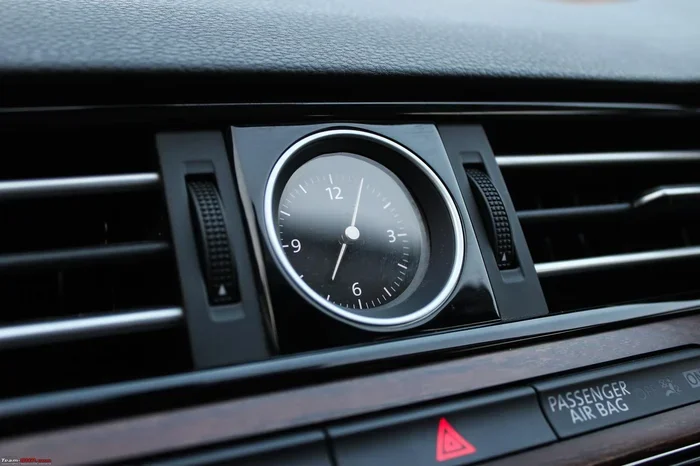
If you own a classic Volkswagen Passat from the 2000s or early 2010s, you might have a simpler setup. Older models often have small buttons on the instrument cluster itself, usually on the left side of the dashboard.
- Turn the ignition to the “ON” position.
- Locate the small buttons near the clock display. You will typically see a button with a “SET” label or a small triangular button.
- Press the SET button once. The hour digits will start blinking.
- Press the SET button again to switch to minutes.
- Use the arrow buttons or the trip odometer reset button to adjust the time.
- Press SET once more to confirm and save your settings.
This method is straightforward and does not require any screens or menus. It is how many Passat owners have been setting their clocks for years.
Method 4: Through the Multifunction Display (Certain Passat Trims)
Some higher-end Passat trims come with a multifunction display between the analog gauges. This screen offers additional customization options for the clock.
- Press the button on the left side of the instrument panel. This button usually controls the display view.
- Scroll through the menu options using the scroll wheel or arrows. Look for the “Settings” or “Setup” option.
- Select “Time Settings.” You will see the current clock display along with adjustment options.
- Use the scroll wheel to change hours and minutes. Confirm your selection by pressing the wheel or tapping “OK.”
This method gives you more control over display preferences, including the ability to switch between digital and analog clock views on some models.
Setting the Clock on Different Passat Model Years
Not all Volkswagen Passat models are created equal when it comes to clock settings. The method you use depends heavily on your model year and the features your car has. Here is a breakdown to help you find the right approach for your specific vehicle.
Passat B6 (2006-2010)
The B6 generation uses a relatively simple setup. Most B6 models have physical buttons near the instrument cluster. You will find a small “SET” button that activates the clock adjustment mode. Use the trip odometer controls to change the time. This method is reliable and does not require any technical knowledge.
Passat B7 (2011-2014)
The B7 model introduced more digital controls. You can set the clock using the steering wheel buttons or the multifunction display. Some B7 trims also support the infotainment screen method, especially if your car came with the Discover Pro navigation system.
Passat B8 (2015-2020)
The B8 Passat brought a modern touchscreen interface. Most B8 models use the infotainment screen method described above. The steering wheel controls also work well. Some B8 trims even offer automatic time zone detection, which adjusts the clock based on your GPS location.
Passat B9 (2021-Present)
The latest Passat generation features the most advanced digital systems. The B9 uses a large touchscreen with VW’s latest MIB3 software. Setting the clock is done entirely through the settings menu. The B9 also supports Apple CarPlay and Android Auto, which can sometimes sync your phone’s clock to the car’s display.
Common Problems When Adjusting the Passat Clock
Even with clear instructions, things can go wrong. Here are the most common issues Passat owners face when trying to set the clock, along with practical solutions.
The Clock Resets After Turning Off the Car
This is the most frustrating problem. You set the clock perfectly, turn off the engine, and when you come back, the time is wrong again. The most common cause is a weak or dying car battery. When the battery voltage drops, the clock loses its stored memory. How to set the clock on a Volkswagen Passat will not help if the root cause is a battery problem. Try testing your battery voltage with a multimeter. A healthy car battery should read around 12.6 volts when the engine is off. If it reads below 12.0 volts, it is time for a replacement.
The Clock Display Is Not Responding to Button Presses
If the clock display does not react when you press buttons, try these steps. First, make sure the ignition is in the “ON” position, not “OFF” or “ACC.” Second, check if there is a blown fuse related to the instrument cluster. The fuse box in a Passat is usually located under the dashboard on the driver’s side. Refer to your owner manual for the specific fuse number. Third, try disconnecting the battery for five minutes and reconnecting it. This soft reset can often fix unresponsive electronics.
The Time Zone Is Wrong After Traveling
If you have traveled across time zones and your Passat clock does not update automatically, you may need to manually adjust the time zone setting. On newer Passat models with infotainment systems, go to Settings, then Time & Date, and select your current time zone. On older models, you will need to manually add or subtract hours from your clock.
The Clock Shows the Wrong Time After a Battery Replacement
This happens to almost every car owner at some point. When you replace your car battery, the clock resets to a default time, usually 12:00. Simply follow the steps in this guide to set it again. This is a normal and expected behavior, not a sign of anything wrong with your Passat.
Common Mistake to Avoid: Do not try to adjust the clock while the car is in “Accessory” mode on some older Passat models. The system may not register your button presses properly. Always switch to the full “ON” mode for the best results.
Tips to Keep Your Passat Clock Accurate
Once you have set the clock correctly, you want to keep it that way. Here are some practical tips to maintain clock accuracy in your Volkswagen Passat.
- Check your battery regularly. A healthy battery is the foundation of a working car clock. Have your battery tested at every oil change or service visit.
- Enable automatic time sync if available. On newer Passat models, this feature uses GPS data to keep your clock accurate without any manual input.
- Keep your infotainment system updated. Volkswagen occasionally releases software updates that improve clock accuracy and add new features.
- Note your Passat’s model year. Knowing your exact model year helps you find the right instructions quickly when you need to adjust the clock.
- Store your owner manual digitally. Many Passat owners lose their physical manuals. Save a PDF version on your phone for easy reference anytime.
- Avoid disconnecting the battery unnecessarily. Every time you disconnect the battery, the clock resets. Only disconnect it when absolutely needed for repairs.
Expert Insight: According to Volkswagen service technicians, the most common reason for repeated clock resets is a parasitic battery drain. If your clock keeps resetting even with a new battery, have your technician check for electrical drains in the system. This is a quick diagnostic that can save you a lot of frustration.
When to Seek Professional Help for Clock Issues
Most clock problems on a Volkswagen Passat are simple to fix at home. But there are times when professional help is the right call. If you have tried all the methods in this guide and the clock still does not work, there may be a deeper issue at play.
Signs that you need a professional include a completely blank instrument cluster, a clock that flashes continuously and will not hold a setting, or electrical problems that affect multiple systems beyond just the clock. These could indicate a wiring issue, a faulty instrument cluster, or a more serious electrical problem in your Passat.
Before visiting a dealer, consider checking online forums for your specific Passat model year. Many Passat communities share troubleshooting tips that can save you time and money. Sometimes the fix is as simple as a software update or a loose connection behind the dashboard.
Remember, how to set the clock on a Volkswagen Passat is just the first step. If the clock works but behaves erratically, it is worth investigating further. A professional diagnosis can identify issues that go beyond simple time settings.
Final Thoughts
Setting the clock on your Volkswagen Passat is one of those small maintenance tasks that makes a big difference in your daily driving experience. Whether you use the steering wheel buttons, the infotainment screen, or the instrument cluster controls, the process is straightforward and takes just a few minutes. We have covered every method for every Passat generation, so you should have no trouble finding the approach that works for your vehicle.
The key is to act now. Do not let a wrong clock distract you every time you start your car. Follow the steps in this guide, apply the quick tips, and enjoy a perfectly accurate time display on your dashboard. Your Passat deserves to be running at its best, and that starts with the little things like getting the clock right.
Share this guide with fellow Passat owners who might be struggling with their clock. Sometimes the simplest solutions are the ones we overlook. And if you ever run into a problem that this guide does not cover, do not hesitate to reach out to your local Volkswagen dealer or a trusted mechanic. They have the tools and expertise to handle even the most stubborn clock issues.
Now go ahead, set your clock, and hit the road with confidence. Your Volkswagen Passat is ready, and so are you.
Frequently Asked Questions
How do I set the clock on a Volkswagen Passat B7?
To set the clock on a Passat B7, turn the ignition to the “ON” position. Use the steering wheel controls to access the clock menu, or navigate to the infotainment screen and select “Vehicle Settings,” then “Clock.” Adjust the hours and minutes using the arrow buttons and save your settings. This method works for most B7 trims from 2011 to 2014.
Why does my Passat clock keep resetting to 12:00?
A clock that keeps resetting to 12:00 is usually a sign of a weak or dying car battery. When the battery voltage drops below a certain level, it cannot maintain the clock’s memory. Try testing your battery with a multimeter. If the voltage is below 12.0 volts, replacing the battery should fix the problem. You may also want to check for parasitic electrical drains in the system.
Can I set the clock on my Passat without starting the engine?
Yes, you can. Most Volkswagen Passat models allow you to adjust the clock in the “ON” or “Accessory” mode without starting the engine. Simply turn the ignition key to the “ON” position or press the start button without pressing the brake pedal. The dashboard will power on and you can access the clock settings using the steering wheel or instrument cluster buttons.
How do I switch my Passat clock from 12-hour to 24-hour format?
On newer Passat models with a touchscreen infotainment system, go to Settings, then Time & Date, and look for the “Format” or “Display” option. Toggle between 12-hour and 24-hour format. On older Passat models, this option may be located in the instrument cluster settings menu or controlled by a small button near the clock display. Refer to your owner manual for the exact location on your model.
What should I do if the clock buttons on my Passat are not working?
If the clock buttons are unresponsive, first make sure the ignition is fully in the “ON” position. Next, check the fuse box under the dashboard for a blown fuse related to the instrument cluster. You can also try a soft reset by disconnecting the car battery for five minutes and reconnecting it. If none of these steps work, the issue may be with the instrument cluster itself, and you should consult a Volkswagen technician.
Does the Volkswagen Passat have an automatic clock update feature?
Yes, many newer Passat models from 2015 onward include an automatic clock sync feature that uses GPS data to update the time and time zone. To enable this, go to the infotainment Settings menu, select “Time & Date,” and turn on “Auto Sync” or “GPS Time.” This feature is especially useful for drivers who frequently travel across different time zones.