How to Turn Off BMW Interior Lights Once and for All
BMW interior lights can be a real headache when they refuse to turn off or stay on far too long. Whether you are dealing with a dome light that won’t dim or a dashboard glow that keeps you awake, learning how to manage your car’s lighting is essential. This guide will show you exactly how to turn off BMW interior lights using simple methods that work across every model. You will discover hidden settings, quick fixes, and expert tips that most BMW owners never learn. By the end, you will have full control over your vehicle’s interior illumination.
There is nothing more frustrating than walking away from your car only to realize the interior lights are still blazing. You hop back in, fumble around, and wonder why your BMW interior lights refuse to go dark. This happens to BMW owners more often than you might think. The good news is that fixing this problem is usually simple. Whether you drive a sleek 3 Series or a rugged X5, understanding how your BMW interior lights work puts you back in control. In this guide, we will walk you through every method, setting, and trick you need to turn off those lights for good.
Your BMW is a finely engineered machine. Every light, every switch, and every sensor serves a purpose. The BMW interior lights are designed to provide convenience and safety. They help you find your keys in the dark. They illuminate the cabin when you open a door. But when they malfunction or stay on too long, they become a nuisance. Worse yet, they can drain your car battery and leave you stranded. That is exactly why we created this comprehensive guide. By the time you finish reading, you will know everything there is to know about managing and turning off your BMW interior lights.
Key Takeaways
- Multiple methods exist: You can turn off BMW interior lights through the control stalk, iDrive system, door switches, or fuse removal depending on your model.
- Light delay settings matter: Most BMWs have a configurable delay timer that controls how long the lights stay on after you exit the vehicle.
- Battery drain is real: Leaving interior lights on can drain your car battery within hours, especially in older models without automatic shutoff.
- Model-specific differences exist: Different BMW series (3 Series, 5 Series, X Series) have unique lighting controls and settings you should know about.
- Fuse removal is a last resort: If all else fails, removing the interior light fuse guarantees the lights stay off, but it also disables other functions.
- Ambient lighting adds complexity: Modern BMWs feature customizable ambient lighting that operates separately from traditional interior lights.
- Regular maintenance helps: Checking door switches, light bulbs, and wiring regularly prevents common BMW interior light problems.
📑 Table of Contents
- Understanding Your BMW Interior Lights
- How to Turn Off BMW Interior Lights: Step-by-Step Methods
- BMW Interior Light Delay Settings Explained
- Model-Specific Guide to BMW Interior Lights
- Troubleshooting Common BMW Interior Light Problems
- Preventing Battery Drain from Interior Lights
- Expert Tips for Customizing Your BMW Interior Lighting
- Key Takeaways
- Conclusion
Understanding Your BMW Interior Lights
Before you can fix a problem, you need to understand how the system works. BMW interior lights are not just one single bulb. They are a network of lights spread throughout your cabin. Each one has a specific job and a specific trigger.
Types of BMW Interior Lights
Your BMW comes with several different light sources inside the cabin. Here is a quick breakdown of what you will find:
- Dome light: This is the big light in the center of the cabin. It usually sits on the ceiling near the rearview mirror. It turns on when you open a door or press a button.
- Door courtesy lights: These small lights are located near each door. They illuminate the floor when you open the door to step in or out.
- Dashboard lights: Also called instrument panel lights, these illuminate your gauges and controls. They are essential for night driving.
- Reading lights: Found on the ceiling near the front and rear seats. These can usually be toggled on and off individually.
- Trunk light: Located in the trunk or cargo area. It turns on when you open the trunk lid.
- Glove box light: A small light inside the glove compartment. It turns on when you open the glove box door.
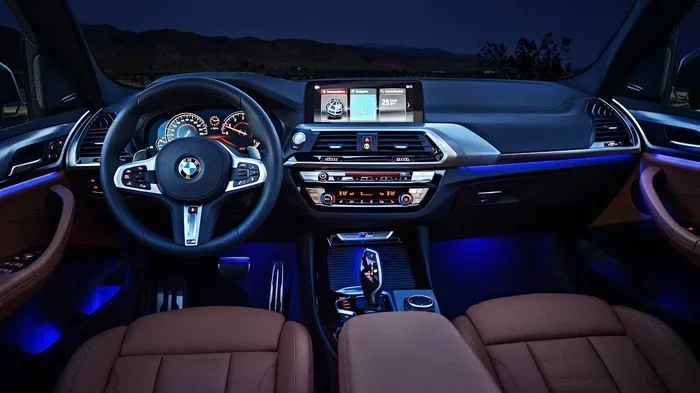
- Ambient lighting: Modern BMWs feature soft LED strips that create a mood lighting effect throughout the cabin. These are separate from traditional interior lights.
How BMW Interior Lights Are Controlled
Your BMW uses a combination of manual switches, automatic sensors, and electronic controls to manage the BMW interior lights. The main controls include:
- Door switches: These are small plastic switches located near each door latch. When you open a door, the switch triggers the corresponding light to turn on.
- Light control stalk: This is the lever on the left side of the steering column. It controls your exterior lights and sometimes has settings for interior lighting behavior.
- iDrive system: The infotainment system in your BMW allows you to adjust many lighting settings. This includes light delay timers and ambient lighting preferences.
- Fuse box: Every light in your car is powered through a fuse. Removing the interior light fuse will kill all power to the BMW interior lights.
How to Turn Off BMW Interior Lights: Step-by-Step Methods
Now that you understand the basics, let us get into the specifics. There are several ways to turn off your BMW interior lights. The method you choose depends on your model, the situation, and what is causing the lights to stay on.
Method 1: Use the Light Control Stalk
The most straightforward way to manage your BMW interior lights is through the light control stalk. This is the lever located on the left side of your steering column. Here is what to do:
- Make sure your vehicle is parked and the engine is off or in accessory mode.
- Locate the light stalk on the left side of the steering column.
- Push the stalk down to the first position. This turns off all exterior lights and usually sets the interior lights to automatic mode.
- Pull the stalk toward you to activate the parking lights. Push it back to turn them off.
- Rotate the stalk to the “Auto” position if your BMW has automatic light control. This allows the car to decide when to turn lights on and off based on ambient light.
In most BMW models, the interior dome light will turn off automatically when all doors are closed. If it does not, the problem might be with the door switch, which we will cover later.
Method 2: Adjust the Light Delay Setting
One of the most common reasons BMW interior lights stay on after you exit the vehicle is the light delay setting. This feature keeps the lights illuminated for a set period after you lock the car or close the doors. Here is how to adjust it:
- Press the iDrive button to access the main menu.
- Navigate to “Settings” and then “Vehicle Settings.”
- Look for “Lighting” or “Interior Lighting.”
- Find the “Light Delay” or “Cockpit Delay” option.
- Adjust the timer to your preference. You can usually set it to 0 seconds, 30 seconds, 1 minute, or 2 minutes.
- Some BMW models allow you to disable the delay entirely. Set it to zero to turn off the lights immediately.
This simple adjustment solves the problem for most BMW owners. If your BMW interior lights were staying on for two minutes after you left the car, setting the delay to zero will fix it instantly.
Method 3: Use the Individual Light Switches
Your BMW has individual switches for different lights inside the cabin. Check these locations:
- Dome light switch: Look near the dome light itself on the ceiling. There is usually a small switch with three positions: Door, On, and Off. Move it to “Off” to kill the dome light.
- Reading light switches: Each reading light has its own toggle switch. Simply flip it to the “Off” position.
- Door panel switches: Some BMW models have a small button on the door panel near the latch. Pressing this can override the door switch and keep the light off even when the door is open.
These manual switches give you direct control over each light source. They are especially useful when you want to turn off just one light without affecting the others.
Method 4: Adjust Settings Through iDrive
The iDrive system in your BMW is a powerful tool for managing BMW interior lights. Beyond the light delay setting, you can customize many aspects of your cabin lighting:
- Go to Settings > Vehicle > Lighting.
- Here you can toggle the welcome lighting feature on or off. Welcome lighting illuminates the floor when you approach the car.
- Adjust the ambient lighting color and intensity. This does not turn off the lights but changes their behavior.
- Set the dashboard illumination brightness. Lowering this to zero effectively turns off the dashboard lights when the engine is off.
- Check the automatic interior light setting. Make sure it is set to “Off” if you want the lights to respond only to manual controls.
Taking a few minutes to explore the iDrive lighting menu can save you a lot of frustration. Many BMW owners do not realize how much control they actually have over their BMW interior lights.
Method 5: Remove the Interior Light Fuse
If none of the above methods work, you can always go to the source. Every light in your BMW is powered through a fuse. Removing the interior light fuse will completely disable all BMW interior lights. Here is how:
- Turn off the engine and remove the key from the ignition.
- Open the fuse box cover. In most BMWs, the interior fuse box is located under the dashboard on the driver’s side.
- Consult your owner’s manual to identify the correct fuse for the interior lights. It is usually labeled “Interior Lights” or “Cabin Lighting.”
- Use the fuse puller tool (often included with the fuse box) to gently remove the fuse.
- Test the lights to confirm they are off.
Keep in mind that removing the fuse also disables other functions connected to that circuit. Your glove box light, trunk light, and dome light will all stop working. This is a temporary fix and should only be used when other methods fail.
BMW Interior Light Delay Settings Explained
The light delay setting is one of the most misunderstood features in BMW vehicles. When you walk away from your car and close the doors, the BMW interior lights do not turn off immediately. Instead, they stay on for a preset amount of time. This delay serves a practical purpose. It gives you time to gather your belongings or check your mirrors before the light goes dark.
However, this feature can become a problem if the delay is set too long. A two-minute delay might seem harmless, but it can drain your battery over time, especially if you leave your car parked for days. The good news is that every BMW allows you to adjust or completely disable this delay.
Here is a quick comparison of delay settings across popular BMW models:
| BMW Model | Default Delay | Adjustable Range | Can Disable Completely |
|---|---|---|---|
| 3 Series (F30/F31) | 30 seconds | 0 to 120 seconds | Yes |
| 5 Series (F10/F11) | 60 seconds | 0 to 180 seconds | Yes |
| X3 (F25) | 30 seconds | 0 to 120 seconds | Yes |
| X5 (F15) | 60 seconds | 0 to 180 seconds | Yes |
| 7 Series (G11) | 90 seconds | 0 to 300 seconds | Yes |
As you can see, the delay varies by model and year. Newer BMWs tend to have longer default delays and wider adjustment ranges. If you are unsure about your specific model, check your owner’s manual or consult your local BMW dealer.
Model-Specific Guide to BMW Interior Lights
Not all BMWs are created equal when it comes to interior lighting controls. Different series and model years have unique features and settings. Here is a closer look at how to manage BMW interior lights across some of the most popular models.
BMW 3 Series Interior Lights
The BMW 3 Series is one of the best-selling luxury sedans in the world. Its interior lights are straightforward and easy to manage. The dome light is located on the ceiling between the front seats. It has a three-position switch: Door, On, and Off. The 3 Series also features individual reading lights for the driver and passenger. These can be toggled off independently. The light delay setting is accessible through the iDrive system under Settings > Lighting.
One thing to note about the 3 Series is the ambient lighting package. Higher trims come with multi-color ambient lights that can be customized through the iDrive system. These ambient lights are separate from the traditional BMW interior lights and operate on their own dimmer settings.
BMW 5 Series Interior Lights
The BMW 5 Series offers a more premium lighting experience. The interior lights in the 5 Series are brighter and more refined. The dome light features a sleek design that blends seamlessly with the cabin aesthetic. The 5 Series also includes ambient lighting with up to 12 colors in higher trims.
To turn off the BMW interior lights in a 5 Series, use the same methods described above. The light delay setting is found in the iDrive menu. The dome light switch on the ceiling provides manual override. The ambient lighting can be turned off through the Settings > Lighting menu by selecting “Ambient Light” and setting it to “Off.”
BMW X Series Interior Lights
The BMW X Series includes the X1, X3, X4, X5, X6, and X7 SUVs. These vehicles have slightly different interior light configurations compared to sedans. The dome light in X Series models is often located on the ceiling near the rearview mirror. The door courtesy lights are positioned on the A-pillars. The trunk light is larger in SUVs due to the bigger cargo area.
X Series models also feature a unique “welcome lighting” function. When you approach your BMW with the key fob, the BMW interior lights and exterior lights illuminate briefly to welcome you. This feature is controlled through the iDrive system and can be turned off if you find it unnecessary.
Troubleshooting Common BMW Interior Light Problems
Sometimes turning off your BMW interior lights is not as simple as flipping a switch. If your lights refuse to turn off or behave erratically, there is usually an underlying cause. Here are the most common problems and how to fix them.
The Dome Light Won’t Turn Off
This is the most common complaint among BMW owners. The dome light stays on even when all doors are closed. The most likely culprit is a faulty door switch. Each door has a small switch that tells the car whether the door is open or closed. When this switch fails, it sends a signal that the door is always open, which keeps the light on.
To fix this, locate the door switch near the door latch. It is a small plastic component that gets pressed when the door closes. You can test it by pressing the switch manually with your finger. If the light turns off, the switch is working. If it does not, the switch needs to be replaced. Door switches are inexpensive and easy to swap out. You can find replacement switches for under $10 at most auto parts stores.
The Interior Lights Stay On After Locking
If your BMW interior lights remain on after you lock the car, the light delay setting is probably too long. Go to the iDrive menu and reduce the delay to 0 seconds. If the lights still stay on after this adjustment, there may be a wiring issue or a faulty control module.
Another possible cause is a malfunctioning central locking system. When the car locks, it should send a signal to turn off all interior lights. If the locking system is not sending this signal, the lights will stay on. This is a more complex issue that may require a visit to a BMW technician.
Dashboard Lights Are Too Bright at Night
Bright dashboard lights can be distracting and strain your eyes during night driving. Most BMWs allow you to adjust the dashboard brightness through the iDrive system. Go to Settings > Lighting and reduce the instrument panel brightness to a comfortable level. If your BMW has a manual dimmer knob, you can also use that to adjust the brightness.
Ambient Lighting Flickers or Does Not Work
Ambient lighting issues are common in BMWs with the ambient lighting package. Flickering can be caused by a loose connection or a failing LED strip. If your ambient lighting is flickering, try resetting the iDrive system by holding the power button for 10 seconds. If the problem persists, the LED strip may need to be replaced. Contact a qualified BMW technician for assistance with ambient lighting repairs.
Preventing Battery Drain from Interior Lights
One of the biggest risks of malfunctioning BMW interior lights is battery drain. A single interior light left on overnight can drain a significant portion of your car battery. If this happens repeatedly, it can kill the battery entirely and leave you unable to start your car.
Here are some practical steps to prevent battery drain from your BMW interior lights:
- Always check your lights before leaving the car. Make it a habit to glance up at the ceiling before you walk away.
- Set the light delay to zero. This ensures the lights turn off immediately when you close the doors.
- Install a battery maintainer. If you park your BMW for extended periods, a battery maintainer will keep your battery charged.
- Check the door switches regularly. A faulty door switch is the number one cause of lights staying on accidentally.
- Use the auto-lock feature. Most BMWs can be set to automatically lock after a certain period. This triggers the interior lights to turn off.
- Turn off the ignition completely. Leaving the car in accessory mode can keep some interior lights powered even when you are not driving.
Taking these precautions will protect your battery and ensure your BMW interior lights never cause you a headache again.
Expert Tips for Customizing Your BMW Interior Lighting
Once you know how to turn off your BMW interior lights, you might want to take things a step further. Modern BMWs offer incredible customization options for cabin lighting. Here are some expert tips to help you get the most out of your BMW interior lights.
Create a Custom Ambient Lighting Profile
Your BMW’s iDrive system allows you to save custom lighting profiles. You can create different profiles for different driving situations. For example, create a “Night Driving” profile with dimmed dashboard lights and soft blue ambient lighting. Create a “Day Driving” profile with brighter lights for better visibility. Switching between profiles takes just a few taps on the iDrive controller.
Upgrade to LED Bulbs
If your BMW still uses traditional incandescent bulbs for the interior lights, consider upgrading to LED bulbs. LED bulbs are brighter, last longer, and consume far less power than traditional bulbs. This means your BMW interior lights will be more effective and less likely to drain your battery. LED bulbs are available for most BMW models and are easy to install.
Use the Light Timer Feature
Some BMW models have a built-in light timer that automatically turns off all interior lights after a set period. Check your iDrive system to see if your BMW has this feature. If it does, enable it for peace of mind. This is especially useful if you tend to forget to turn off your lights manually.
Keep Your Interior Clean
This might sound unrelated, but a clean interior helps your BMW interior lights work better. Dust and debris can accumulate on light sensors and switches, causing them to malfunction. Regularly wipe down the dome light, door switches, and sensor areas with a soft cloth. This simple maintenance task can prevent many common lighting problems.
Key Takeaways
- Multiple methods exist: You can turn off BMW interior lights through the control stalk, iDrive system, door switches, or fuse removal depending on your model.
- Light delay settings matter: Most BMWs have a configurable delay timer that controls how long the lights stay on after you exit the vehicle.
- Battery drain is real: Leaving interior lights on can drain your car battery within hours, especially in older models without automatic shutoff.
- Model-specific differences exist: Different BMW series (3 Series, 5 Series, X Series) have unique lighting controls and settings you should know about.
- Fuse removal is a last resort: If all else fails, removing the interior light fuse guarantees the lights stay off, but it also disables other functions.
- Ambient lighting adds complexity: Modern BMWs feature customizable ambient lighting that operates separately from traditional interior lights.
- Regular maintenance helps: Checking door switches, light bulbs, and wiring regularly prevents common BMW interior light problems.
Conclusion
Managing your BMW interior lights does not have to be complicated. With the right knowledge and a few simple adjustments, you can take full control of your cabin lighting. Whether you use the light control stalk, the iDrive system, or manual switches, there is a method that works for every BMW owner. The key is understanding how your specific model handles interior lighting and making the right adjustments to match your preferences.
Remember to check your door switches regularly, set your light delay to a comfortable level, and take steps to prevent battery drain. These small habits will keep your BMW interior lights working perfectly for years to come. If you ever encounter a problem that none of these methods fix, do not hesitate to consult a BMW technician. They have the expertise and diagnostic tools to handle even the most stubborn lighting issues.
Your BMW is more than just a car. It is a carefully crafted machine designed to provide comfort, safety, and enjoyment. The BMW interior lights play an important role in that experience. By following the tips and methods in this guide, you ensure that your lights enhance your driving experience rather than detract from it. Take control today, and enjoy a perfectly lit cabin every time you get behind the wheel.
Frequently Asked Questions
Why won’t my BMW interior lights turn off when I close the doors?
The most common reason is a faulty door switch. Each door has a small switch that signals whether the door is open or closed. When this switch malfunctions, it keeps the BMW interior lights on even when the doors are shut. You can test the switch by pressing it manually. If the light does not turn off, the switch likely needs replacement. This is a quick and inexpensive fix that most car shops can handle.
Can I turn off BMW interior lights permanently without removing the fuse?
Yes, you can. The easiest way is to adjust the light delay setting in your iDrive system to zero seconds. You can also switch the dome light to the “Off” position using the manual switch on the ceiling. For a more permanent solution, some owners install a retrofit module that automatically cuts power to the interior lights when the ignition is off. This avoids the need to remove the fuse entirely.
Do BMW interior lights drain the battery if left on overnight?
Absolutely. A single interior light left on overnight can drain a significant portion of your battery. If the lights stay on for multiple nights, the battery may not have enough charge to start the car. This is why adjusting your BMW interior lights settings and regularly checking that all lights are off before leaving your vehicle is so important. A dead battery is one of the most common and frustrating problems BMW owners face.
How do I turn off the ambient lighting in my BMW?
Ambient lighting is controlled separately from traditional interior lights. To turn it off, go to Settings > Vehicle > Lighting on your iDrive system. Look for the “Ambient Lighting” option and set it to “Off.” You can also reduce the brightness to zero if you prefer a dimmer cabin. Note that ambient lighting features vary by model and trim level, so your exact menu options may differ slightly.
Is it safe to remove the interior light fuse in my BMW?
Yes, it is generally safe but not recommended as a permanent solution. Removing the fuse will turn off all interior lights including the dome light, door lights, trunk light, and glove box light. This means you will have no interior illumination when you need it. It is best used as a temporary troubleshooting step or when parking your car for an extended period. Always refer to your owner’s manual before removing any fuses.
What should I do if my BMW interior lights keep flickering?
Flickering BMW interior lights are usually caused by a loose bulb, a faulty socket, or a wiring issue. Start by checking that all bulbs are securely seated in their sockets. If the flickering persists, inspect the wiring harness for any visible damage or loose connections. In some cases, a software update for the iDrive system can resolve flickering issues. If none of these solutions work, take your BMW to a certified technician for a thorough diagnosis.