How to Check If Your Car Has Remote Start Installed
Learning how to check if your car has remote start is easier than most drivers think. You can use your owner’s manual, look for physical buttons on the dash or key fob, check your trim level, or inspect for aftermarket installations. This guide walks you through every method step by step so you can confirm your car’s remote start status quickly and confidently.
Have you ever watched someone start their car from across the parking lot and thought, “I wish my car could do that”? Or maybe you bought a used vehicle and are not sure if the previous owner added a remote start system. Either way, you are in the right place.
Figuring out whether your car has remote start does not have to be confusing. There are several straightforward ways to find out, and this guide will walk you through each one. By the end, you will know exactly what your vehicle offers and how to use it to your advantage.
Remote start is a feature that lets you start your car’s engine from a distance using a key fob or a smartphone app. It is especially helpful in cold winter months or hot summer days when you want your car warmed up or cooled down before you get in. But not every vehicle comes with this feature from the factory. Some cars have it as a standard option, while others need an aftermarket remote start kit installed.
So how do you know if your car has it? Let us dive into the different methods you can use to find out.
Key Takeaways
- Check the owner’s manual: The manual is the most reliable source for factory remote start information.
- Look for physical buttons: A remote start button on the dash or steering column is a clear sign.
- Verify your trim level: Higher trims and packages often include remote start as a standard feature.
- Inspect the key fob: A dedicated remote start button on the fob confirms the system exists.
- Look for aftermarket signs: Aftermarket remote start modules leave visible wiring and components under the hood.
- Use online tools: VIN decoders and manufacturer websites can confirm features by vehicle identification number.
- Ask a dealer: Your local dealer can look up your exact vehicle’s features using the VIN.
📑 Table of Contents
- What Is Remote Start and Why Does It Matter?
- How to Check If Your Car Has Remote Start Using the Owner’s Manual
- Look for Physical Remote Start Buttons and Features
- Check Your Car’s Trim Level and Package Details
- Aftermarket Remote Start: How to Tell If It Was Added
- Common Signs Your Car Does NOT Have Remote Start
- Quick Tips for Checking Remote Start
- Expert Insights on Remote Start Systems
- Key Takeaways
- Final Thoughts
What Is Remote Start and Why Does It Matter?
Remote start is a vehicle feature that allows the engine to start without actually being inside the car. You press a button on your key fob or use a mobile app, and the engine turns over. The car stays locked, and the climate control system can begin warming or cooling the cabin.
Here is why this feature matters so much to car owners:
- Comfort: You walk into a warm car in winter and a cool car in summer.
- Convenience: You do not have to wait for the car to warm up while you stand outside.
- Safety: Some systems allow you to defrost the windshield before you drive.
- Engine health: Letting the oil circulate before driving can reduce wear in cold weather.
Not every car comes with remote engine start built in. Many base model vehicles skip this feature to keep costs lower. Understanding whether your car has it can change your daily driving experience significantly.
How to Check If Your Car Has Remote Start Using the Owner’s Manual
The owner’s manual is your first and best resource. Every new car comes with one, and it contains detailed information about every feature your vehicle offers. If you still have the physical book, great. If not, most manufacturers offer a digital version on their website.
Where to Look in the Manual
Open the manual and search for the index. Look up terms like “remote start,” “remote engine start,” or “keyless entry.” The manual will tell you exactly which buttons and features your car supports. It may also explain how to program the remote start system and what the range is.
If you bought a used car and do not have the manual, do not worry. You can almost always download a free PDF from the automaker’s website. Just enter your car’s year, make, and model, and you will find the manual in seconds.
What the Manual Tells You
The manual will clarify important details, such as:
- Whether remote start is a standard or optional feature
- How far away you can be from the car when using it
- How long the engine can run remotely before shutting off
- Any safety requirements, like making sure the car is in park
Reading the manual takes just a few minutes, but it gives you the most accurate answer. This is especially helpful if you are trying to figure out how to check if your car has remote start on a factory installed system.
Look for Physical Remote Start Buttons and Features
One of the fastest ways to find out if your car has remote start is to look for physical buttons. Car manufacturers usually place a remote start button in one of a few common locations.
Check the Key Fob
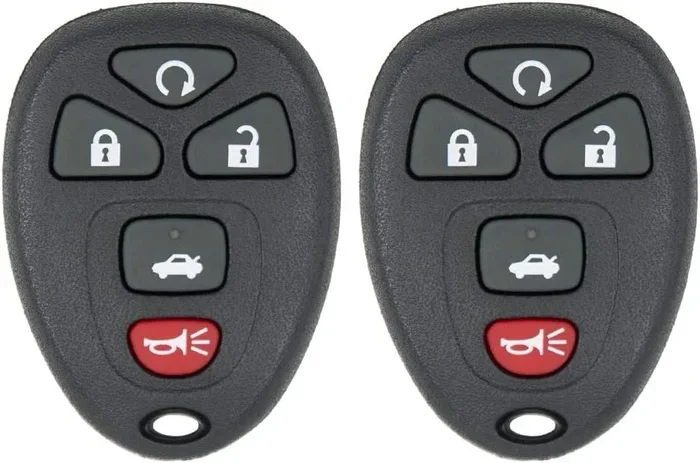
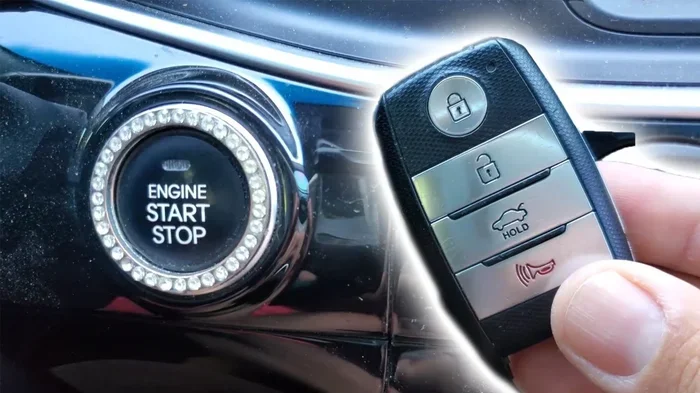
Pick up your key fob and examine it carefully. Many cars with remote start have a dedicated button labeled with a circular arrow or the word “START.” On some vehicles, you may need to press the lock button first and then press the remote start button. On others, you simply press and hold the remote start button for a few seconds.
If your key fob does not have a separate button for remote start, that does not necessarily mean your car lacks the feature. Some manufacturers integrate the function into a combo button or use a smartphone app instead.
Check the Dashboard and Steering Column
Sit in the driver’s seat and look around the dashboard. Some vehicles have a small remote start button on the left side of the steering column or on the center console. It might be labeled “Remote Start” or have a symbol that looks like a car with curved arrows.
If you see this button, your car almost certainly has remote start. If you do not see it, move on to the next method. Not having a visible button does not always mean the feature is missing, but it is a strong clue.
Check for a Push Button Start with Remote Capabilities
Many modern cars use a push button start system instead of a traditional key ignition. Some of these systems include remote start functionality built into the push button. Check your manual to see if pressing the push button start while standing outside the car triggers the engine.
This is a common setup on vehicles from brands like Toyota, Honda, Ford, and Chevrolet. The push button start feature and remote start often work together, but they are not always the same thing.
Check Your Car’s Trim Level and Package Details
Another reliable way to determine if your car has remote start is to check the trim level and package information. Automakers often group features into packages or trim levels, and remote start is frequently part of a convenience or premium package.
Find Your Trim Level
You can find your car’s trim level in a few places:
- The door jamb sticker on the driver’s side door
- The vehicle identification number (VIN) decoder on the manufacturer’s website
- The original purchase paperwork or window sticker
- The dashboard display or infotainment system settings
Once you know the trim level, look up the feature list for that trim online. Most automakers publish detailed spec sheets for every trim level on their websites. Search for your car’s year, make, model, and trim, and look for “remote start” in the features list.
Look for Convenience or Premium Packages
Many cars with remote start get the feature through an optional package. Common package names include:
- Convenience Package
- Premium Package
- Cold Weather Package
- Technology Package
If your car has one of these packages, there is a good chance it includes remote engine start. Check the package description online or ask a dealer to confirm.
Use a VIN Decoder
Your vehicle identification number is a 17-character code that contains a wealth of information about your car. You can enter your VIN into a free online decoder, and it will pull up the original factory options for your vehicle.
Websites like the manufacturer’s own site, AutoCheck, or CARFAX offer VIN lookup tools. Look for the “factory options” or “equipment list” section. If remote start appears there, your car has it from the factory.
Aftermarket Remote Start: How to Tell If It Was Added
Not every car comes with remote start from the factory. Many owners add an aftermarket remote start system themselves or have a shop install one. If your car does not have factory remote start, it might still have it thanks to an aftermarket kit.
Signs of an Aftermarket Remote Start System
Here are some clues that an aftermarket remote start was added to your vehicle:
- Extra wiring under the hood: Look for additional wires connected to the ignition system or bypass module. Aftermarket installations often leave visible wiring harnesses.
- A separate control module: Many remote start kits include a small black box mounted under the dashboard or near the steering column.
- An additional key fob: If you have more than one key fob and one of them has a different brand or look, it might be the remote start fob.
- New buttons on the dash: Aftermarket installers sometimes add a small toggle switch or button for the remote start function.
- A smartphone app: Many modern aftermarket remote start systems pair with an app on your phone. If you see a new app you do not recognize, check if it controls your car’s remote start.
Ask the Previous Owner or Mechanic
If you bought a used car and suspect an aftermarket remote start was installed, ask the previous owner or check your service records. A reputable auto shop will have records of any modifications made to the vehicle.
If you cannot find anyone who knows, you can always pop the hood and look for the signs mentioned above. An experienced mechanic can also quickly identify whether an aftermarket remote start module is present.
Popular Aftermarket Remote Start Brands
Some of the most common aftermarket remote start brands include Compustar, Viper, Directed Electronics (Python), and Avital. If you see any of these brand names on a fob or module, your car has an aftermarket remote start system installed.
Common Signs Your Car Does NOT Have Remote Start
Sometimes the easiest way to confirm whether your car has remote start is to look for signs that it does not. If you notice any of the following, your car likely lacks this feature:
- No remote start button on the key fob: Most cars with remote start have a dedicated button on the fob.
- No mention in the owner’s manual: If the manual does not mention remote start anywhere, your car probably does not have it.
- No button on the dash or steering column: A missing physical button is a strong indicator.
- Base trim level: Many base trims do not include remote start as an available option.
- No smartphone app from the manufacturer: Some cars with remote start come with a branded app like FordPass, MyChevrolet, or Toyota Remote Connect.
If you checked all of these and still are not sure, your best option is to contact a dealership. Provide them with your VIN, and they can look up every factory option your car was built with.
Quick Tips for Checking Remote Start
Here are some fast tips to help you check your car’s remote start status quickly:
- Start with the key fob. Look for a dedicated remote start button. This is the fastest method.
- Check the owner’s manual index. Look up “remote start” for official confirmation.
- Use your VIN. A VIN decoder gives you the definitive factory feature list.
- Pop the hood. Look for aftermarket wiring or a remote start module.
- Visit your dealer. They can look up your exact vehicle in their system for free.
These tips work for almost any car, truck, or SUV on the road today. Whether you drive a sedan, a pickup, or a compact SUV, the process is similar.
Expert Insights on Remote Start Systems
Automotive experts agree that remote start is one of the most useful features a car can have, especially in regions with harsh winters. According to many mechanics and car specialists, having a remote engine start system properly installed can also extend the life of your engine by allowing the oil to circulate before you drive.
However, experts also caution that aftermarket remote start installations should always be done by a professional. Poor wiring can lead to electrical issues or even void your car’s warranty. If you are considering adding remote start to a car that does not have it, consult a trusted auto shop first.
Another expert tip: always check your local laws regarding remote start usage. Some areas have idling restrictions that may apply when using remote start in public parking lots.
Key Takeaways
- Check the owner’s manual: The manual is the most reliable source for factory remote start information.
- Look for physical buttons: A remote start button on the dash or steering column is a clear sign.
- Verify your trim level: Higher trims and packages often include remote start as a standard feature.
- Inspect the key fob: A dedicated remote start button on the fob confirms the system exists.
- Look for aftermarket signs: Aftermarket remote start modules leave visible wiring and components under the hood.
- Use online tools: VIN decoders and manufacturer websites can confirm features by vehicle identification number.
- Ask a dealer: Your local dealer can look up your exact vehicle’s features using the VIN.
Final Thoughts
Knowing how to check if your car has remote start installed gives you a real advantage as a car owner. Whether you are trying to figure out a used vehicle you just bought or exploring features on your current car, the methods in this guide will help you find the answer quickly.
Start with the key fob and the owner’s manual. Those two steps will solve the mystery for most vehicles. If you still are not sure, check your trim level, look for aftermarket signs, or use a VIN decoder. And when all else fails, your local dealer is always a phone call away.
Remote start is a fantastic feature that adds comfort and convenience to your daily drive. Once you confirm your car has it, take some time to learn how to use it properly. You will wonder how you ever lived without it.
Now that you know exactly what to look for, you can check your car with confidence. Happy driving!
Frequently Asked Questions
Can I add remote start to my car if it does not have it?
Yes, you can add an aftermarket remote start system to most vehicles. Aftermarket kits from brands like Compustar and Viper are widely available. Have a professional installer handle the setup to avoid electrical problems and protect your car’s warranty.
Is remote start bad for my car’s engine?
No, remote start is not bad for your engine. In fact, it can be beneficial in cold weather because it allows the engine to warm up and the oil to circulate before you drive. Modern cars are designed to handle remote start without any issues.
How far can I be from my car when using remote start?
The range depends on your car and its system. Most factory remote start systems work from about 200 to 500 feet away. Aftermarket systems may have a similar range. Check your owner’s manual or product specs for the exact distance.
Do all new cars come with remote start?
No, not all new cars include remote start. It is often part of a convenience or premium package and may be standard on higher trims but optional or unavailable on base models. Always check the feature list for your specific trim level.
Will remote start work with my keyless entry system?
In most cases, yes. Remote start and keyless entry are separate but often complementary features. Your key fob usually handles both. Some cars require you to have the key fob inside the vehicle for the engine to stay running after remote start.
Can I use my phone to start my car remotely?
Many newer cars offer smartphone remote start through a manufacturer’s app, such as FordPass or MyChevrolet. Aftermarket systems also often include app-based control. Check if your car’s brand offers a compatible mobile app for this feature.