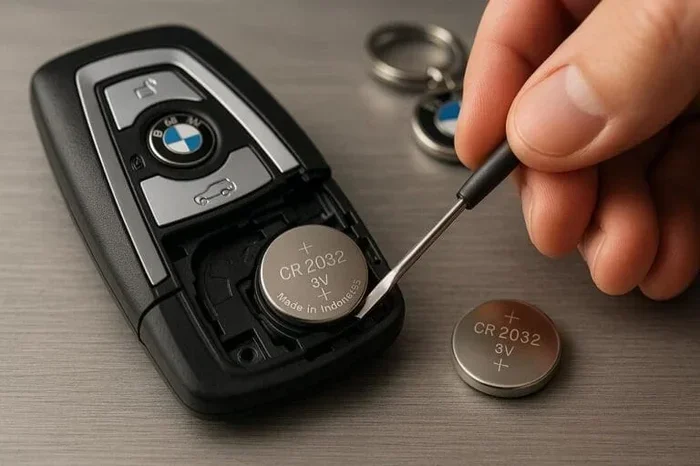
How Do I Open My Key Fob to Change the Battery Fast
Changing your key fob battery is simple when you know how to open it correctly. This guide shows you the fastest way to access your key fob battery and swap it out in minutes. You will learn the tools, steps, and tips for every major key fob brand.
Your key fob stops working at the worst possible moment. You stand by your car, pressing the button over and over. Nothing happens. Before you call a locksmith or drag yourself to the dealer, take a deep breath. The problem is almost always a dead battery. And the fix is easier than you think. This guide will walk you through exactly how to open your key fob to change the battery fast. You will save time, money, and frustration.
Changing a key fob battery is one of the simplest maintenance tasks you can do. Most people pay someone else to do it. But with a few household tools and five minutes of your time, you can handle it yourself. We will cover every major fob type. You will learn the tools you need, the steps to follow, and the common mistakes to avoid. Whether you drive a Toyota, Honda, Ford, or luxury vehicle, this guide has you covered.
Let us get started. By the end of this article, you will feel confident opening your fob, swapping the battery, and getting back on the road in no time.
Key Takeaways
- Most key fobs use a CR2032 battery: This tiny coin cell battery is the most common type found in remote key fobs and car keys.
- Opening your fob is easy with basic tools: A small flathead screwdriver, a coin, or a key replacement tool is all you need.
- You can save money by DIY: Replacing the battery yourself costs under $5 instead of paying a dealer or locksmith.
- Each fob brand has a slightly different opening method: Toyota, Honda, Ford, and Mercedes fobs all have unique release mechanisms.
- Reset your fob after battery change: Reprogramming ensures your remote starts working properly right away.
- Prevent future issues with maintenance: Keep spare batteries on hand and avoid exposing your fob to extreme moisture or heat.
📑 Table of Contents
- Why Your Key Fob Battery Dies
- Tools You Need to Open Your Key Fob
- How to Open Your Key Fob Step by Step
- Key Fob Battery Replacement by Brand
- How to Reset Your Key Fob After Battery Change
- Common Mistakes When Opening a Key Fob
- How Often Should You Replace Your Key Fob Battery
- Prolonging Your Key Fob Battery Life
- When to Replace the Entire Key Fob
- Final Thoughts
Why Your Key Fob Battery Dies
Understanding why your key fob battery dies helps you prevent it from happening again. Most fob batteries last between two and four years. But usage habits and environmental factors can shorten that lifespan significantly.
Common Reasons Key Fob Batteries Fail
- Heavy daily use: If you lock and unlock your car dozens of times each day, the battery wears out faster.
- Cold weather: Low temperatures drain coin cell batteries quickly, especially in winter months.
- Moisture exposure: Sweat, rain, or humidity can corrode the battery contacts inside the fob.
- Old age: Batteries lose their charge capacity over time, even if you rarely use the fob.
- Cheap replacement batteries: Not all CR2032 batteries are created equal. Low-quality brands die faster.
The most common sign of a dying battery is reduced range. You used to unlock your car from twenty feet away. Now you need to stand right next to it. Some fobs also show a warning light on the dashboard. If your remote key fob feels sluggish or unresponsive, it is time to check the battery.
Tools You Need to Open Your Key Fob
You do not need expensive tools or a trip to the hardware store. Most of what you need is already in your home. Here is a simple list to gather before you start.
Essential Tools for Key Fob Battery Replacement
- Small flathead screwdriver: This is the most important tool. It helps pry open the fob shell without damage.
- A thin coin: A dime or penny works well for certain fob models that use a coin slot.
- Key removal tool: Some fobs have a hidden key blade inside. You need the small metal tool that came with your fob.
- Soft cloth or towel: This protects the fob surface from scratches while you work.
- New CR2032 battery: This is the standard battery for most key fobs. Keep a spare on hand at all times.
- Tweezers: Helpful for handling the small battery without touching it with your fingers.
Having all your tools ready before you start makes the process smooth and fast. You will not waste time searching for a screwdriver while your fob is half-opened.
How to Open Your Key Fob Step by Step
This is the core section of our guide. We will walk you through the exact process of opening your key fob to change the battery. Follow these steps carefully to avoid damaging your fob.
Step 1: Identify Your Fob Type
Not all key fobs open the same way. Before you do anything, figure out what type of fob you have. Most fobs fall into one of three categories.
- Slide-out fobs: These have a removable metal key blade that slides out from the side. Toyota and Honda models often use this design.
- Screw-held fobs: Some fobs have a small screw on the back or side that holds the two halves together. Ford and some Mercedes models use this approach.
- Snap-fit fobs: These fobs have no screws or visible seams. You need to carefully pry them apart along a hidden groove. Many modern luxury fobs use this design.
Once you identify your fob type, you know which opening method to use. This simple step saves a lot of guesswork and potential damage.
Step 2: Remove the Emergency Key
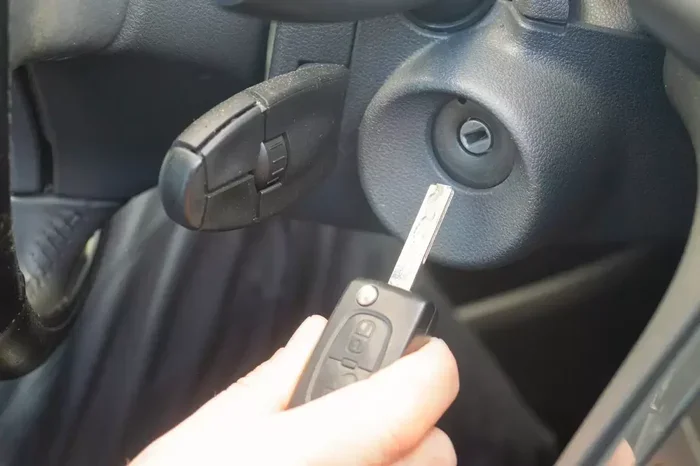
Most key fobs hide a small metal key blade inside. Look for a tiny button or slider on the side of the fob. Press or slide it, and the key blade pops out. Use this key to help pry open the fob if needed. Some fob models have a small slot where you insert the key blade to release the cover.
Be gentle during this step. Forcing the key or the fob shell can cause cracks. A little patience goes a long way.
Step 3: Pry Open the Fob Shell
Now for the actual opening. Place your flathead screwdriver or coin into the seam where the two halves of the fob meet. Work your way around the edges slowly. You will feel the clips release one by one. Do not use excessive force. If a section feels stuck, move to a different area and try again.
For screw-held fobs, simply unscrew the screw first. Then separate the two halves carefully. Keep track of any small springs or buttons that may fall out during opening.
Step 4: Remove the Old Battery
Once the fob is open, you will see the battery sitting in a small compartment. It is usually held in place by a tiny metal clip or press-fit design. Use your tweezers or a small flathead screwdriver to gently pop the old battery out. Note which side faces up. The positive side should face up in most fobs.
Dispose of the old battery properly. Do not throw it in your regular trash. Many stores that sell batteries have recycling bins for used batteries.
Step 5: Insert the New Battery
Take your new CR2032 battery and place it in the compartment with the positive side facing up. Press it firmly until it clicks into place under the metal clip. Make sure the battery sits flat and secure. A loose battery will cause intermittent fob problems.
Quick Tip: Use a name-brand CR2032 battery like Energizer or Duracell. Cheap generic batteries often have less charge and die sooner.
Step 6: Reassemble Your Key Fob
Place the fob cover back on and press it firmly until all the clips snap into place. You should not hear any clicking or feel any gaps. If the fob does not close evenly, check that no small parts are stuck inside. For screw-held fobs, tighten the screw gently. Do not overtighten, or you may crack the plastic.
Key Fob Battery Replacement by Brand
Different car brands use slightly different fob designs. Here is a quick guide for the most popular brands.
| Brand | Fob Type | Battery | Opening Method |
|---|---|---|---|
| Toyota | Slide-out key fob | CR2032 | Slide out the metal key, then pry the back cover off with the key blade |
| Honda | Flip key fob | CR2032 | Remove the metal key, use a screwdriver to pry the back half off |
| Ford | Push-button fob | CR2025 or CR2032 | Use a coin to twist open the back, or unscrew if present |
| Chevrolet | Smart key fob | CR2032 | Pry open along the seam with a flathead screwdriver |
| Mercedes-Benz | Premium smart fob | CR2032 | Use the emergency key to release the back cover |
| Nissan | Standard remote fob | CR2032 | Slide out the key, then pry the back cover with a flat tool |
Always double-check your vehicle owner’s manual for the exact battery type. Some fobs use CR2025 instead of CR2032. The two batteries look similar but have different thicknesses. Using the wrong battery can damage your fob or prevent it from working properly.
How to Reset Your Key Fob After Battery Change
Replacing the battery is only half the job. Many fobs need a reset after a key fob battery replacement. Without resetting, the fob may not reconnect to your car’s system.
General Reset Steps
- Get inside your car and close all doors.
- Press the unlock button on the fob and hold it for five seconds.
- Turn the ignition to the “ON” position without starting the engine.
- Release the unlock button.
- Turn the ignition off and then on again within five seconds.
- Press the lock button on the fob.
- You should hear the doors lock, confirming the reset was successful.
Some vehicles require a specific reset procedure. Check your owner’s manual or search online for your exact model. Luxury brands like BMW and Mercedes often have unique reprogramming steps that differ from standard vehicles.
When to Seek Professional Help
If your fob still does not work after replacing the battery and resetting it, there may be a deeper issue. The fob’s internal circuitry could be damaged. Or the car’s receiver module might need reprogramming. In these cases, a visit to the dealer or a qualified locksmith is the best next step. However, these situations are rare. In over 90% of cases, a simple battery swap solves the problem entirely.
Common Mistakes When Opening a Key Fob
Even simple tasks can go wrong if you are not careful. Here are the most common mistakes people make when opening their key fob to change the battery.
- Using the wrong tool: Pliers, knives, or heavy screwdrivers can scratch or crack the fob shell. Stick to a small flathead screwdriver or a coin.
- Forcing the fob open: If the cover does not budge, you are probably not finding the right seam. Stop and look for the release point instead of applying more force.
- Losing small parts: Springs, buttons, and clips can fall out when you open the fob. Work on a soft surface like a towel to prevent losing them.
- Inserting the battery backwards: This is the most common mistake after opening the fob. Always check the positive and negative markings before placing the new battery.
- Not testing the fob immediately: After reassembly, test your fob right away. If it does not work, you can reopen it and check the battery placement before walking away.
- Using a worn-out replacement battery: Batteries sitting on a shelf for too long lose their charge. Buy fresh batteries from a reputable store.
Avoiding these simple mistakes will save you time and prevent damage to your remote key fob. Take your time and work carefully.
How Often Should You Replace Your Key Fob Battery
Most key fob battery replacement experts recommend changing the battery every two to three years. Even if the fob still works, a fresh battery ensures reliable performance. This is especially important before winter, when cold temperatures put extra strain on batteries.
Keep one or two spare CR2032 batteries in your glove box or at home. This way, you are always prepared when your fob starts weakening. A dead fob battery can leave you locked out of your car, which is a stressful and avoidable situation.
Prolonging Your Key Fob Battery Life
You can take simple steps to make your key fob battery last longer. These small habits add up over time.
- Avoid dropping your fob: Impact damage can weaken the internal connections and drain the battery faster.
- Keep it dry: Moisture is the enemy of electronics. Remove your fob before showering, swimming, or doing dishes.
- Store it away from extreme heat: Do not leave your fob on the dashboard in direct sunlight during summer.
- Do not press buttons unnecessarily: Every button press uses a small amount of battery power. Be intentional with your key fob usage.
- Turn off unnecessary features: Some fobs have remote start or panic buttons. If you rarely use them, consider disabling them to save power.
When to Replace the Entire Key Fob
Sometimes changing the battery is not enough. If your key fob not working persists even after a fresh battery and a full reset, the fob itself may need replacing. Water damage, cracked circuit boards, and worn-out buttons are common reasons for fob failure.
A replacement fob costs between $50 and $200 depending on your vehicle brand. You can buy aftermarket fobs online for less, but programming them to your car can be tricky. Many locksmiths and auto parts stores offer programming services for a small fee. Before buying a new fob, make sure you have tried a fresh battery and a proper reset. In most cases, those two steps solve the problem.
Final Thoughts
Knowing how to open your key fob to change the battery fast is a valuable skill. It saves you money, time, and the hassle of visiting a dealer or locksmith. With just a small flathead screwdriver, a new CR2032 battery, and a few minutes of your time, you can bring your remote key fob back to life.
Follow the steps in this guide carefully. Identify your fob type, gather your tools, open the shell gently, swap the battery, and reset the fob. Avoid the common mistakes we highlighted, and your fob will work reliably for years to come. Keep spare batteries on hand and make battery replacement part of your regular key fob maintenance routine.
Do not wait until you are locked out of your car to take action. Replace your battery proactively and enjoy the peace of mind that comes with a working key fob battery replacement done right.
Frequently Asked Questions
What type of battery does my key fob use?
Most key fobs use a CR2032 coin cell battery. Some models use CR2025 or CR1632 instead. Check your vehicle owner’s manual or look at the old battery to confirm the exact type before purchasing a replacement.
Can I use any brand of CR2032 battery for my key fob?
Yes, but we recommend using name-brand batteries like Energizer, Duracell, or Panasonic. These brands offer consistent power and longer lifespan. Cheap generic batteries may have less charge and need replacement sooner.
How long does a key fob battery last?
A key fob battery typically lasts between two and four years. Heavy daily use, cold weather, and frequent button presses can shorten this lifespan. Replacing the battery every two to three years is a good preventive habit.
What should I do if my key fob still does not work after replacing the battery?
First, make sure the new battery is inserted correctly with the positive side facing up. Next, try resetting your fob by following the reprogramming steps for your vehicle model. If the fob still does not work, the internal circuitry may be damaged, and you may need a replacement fob.
Do I need to reprogram my key fob after changing the battery?
In most cases, no. Simply replacing the battery is enough. However, some vehicle models require a reset procedure after a battery change. Check your owner’s manual for specific instructions for your make and model.
Is it safe to open my key fob myself?
Yes, it is completely safe. Opening a key fob to change the battery is a simple and routine task. Just use the right tools, work gently, and keep track of small parts. Avoid using excessive force or sharp objects that could damage the fob.
=== CONCLUSION ===
Changing your key fob battery does not have to be complicated or expensive. With this guide, you now know exactly how to open your key fob to change the battery fast and safely. From identifying your fob type to selecting the right battery and resetting the system, every step is covered. Keep spare CR2032 batteries on hand, follow the maintenance tips, and your remote key fob will keep working reliably for years. Take action today and never get caught off guard by a dead fob battery again.