Will Disconnecting Your Car Battery Reset The Radio
Will disconnecting your car battery reset the radio? The short answer is yes, but there is more to it than you might think. When you disconnect car battery, the radio memory often clears, including your saved stations and presets. However, some car audio systems require a radio security code after a power loss. This guide walks you through everything you need to know about reset car radio procedures, common mistakes, and expert tips to avoid frustration.
Have you ever wondered whether will disconnecting car battery reset radio systems in your vehicle? It is a question many car owners ask before they pop the hood. The truth is, the answer depends on your car, your radio type, and a few other factors. Some people disconnect their battery for maintenance, storage, or to clear electrical issues. Whatever your reason, understanding what happens to your radio is important.
In this guide, we will cover everything you need to know. You will learn how car battery disconnect affects your radio, what to expect during the process, and how to avoid common pitfalls. We will also share practical tips that make the whole experience smoother. Let us dive right in.
Key Takeaways
- Yes, it resets: Disconnecting your car battery will typically reset the radio and clear saved stations.
- Security codes matter: Many vehicles require a radio code after battery disconnection.
- Presets are lost: Your favorite radio stations and presets will disappear after a power loss.
- Aftermarket radios differ: Factory and aftermarket car stereos behave differently after a reset.
- Simple steps work: Reconnecting the battery and entering a code (if needed) is usually all it takes.
- Prevention is key: Writing down your radio code before disconnecting saves time and stress.
📑 Table of Contents
- How Does Disconnecting a Car Battery Affect the Radio?
- Will Disconnecting Your Car Battery Reset The Radio?
- What Happens to Radio Presets After a Battery Disconnect?
- Step-by-Step: How to Reset Your Radio After Disconnecting the Battery
- Common Mistakes People Make When Disconnecting Their Battery
- How to Prevent Radio Reset Problems in the Future
- Does Every Car Radio Require a Security Code After a Reset?
- Key Takeaways
- Conclusion
How Does Disconnecting a Car Battery Affect the Radio?
When you disconnect your car battery, you cut power to the entire electrical system. This includes the car stereo, the dashboard display, and all memory functions. Think of it like unplugging a television. When you plug it back in, it starts fresh. The same thing happens with your vehicle’s radio display and audio system.
Here is what typically happens when you disconnect car battery:
- Saved radio stations are erased. All your preset stations disappear from memory.
- The radio clock resets. You will need to set the time again.
- Bluetooth pairings may clear. Some systems forget connected devices.
- Anti-theft codes may activate. Many factory radios lock after a power loss.
- Equalizer settings return to default. Any custom sound adjustments are wiped.
These effects are normal and expected. They happen because the radio memory relies on constant power from the battery. Once that power is gone, the memory resets. This is true for most vehicles on the road today.
Why Do Radios Have Memory Functions?
Modern car audio systems are designed to remember your preferences. They store your favorite stations, sound settings, and even phone connections. This convenience depends on a small amount of power called battery standby voltage. When you disconnect the battery, you remove this standby power completely.
The vehicle electrical system uses a tiny constant power draw to keep these memories alive. It is similar to how a computer retains its settings when plugged in. Once you unplug it, the memory goes blank. Your car radio works the same way.
Will Disconnecting Your Car Battery Reset The Radio?
The direct answer is yes. Will disconnecting car battery reset radio systems? Absolutely. But the full story is a bit more nuanced. The reset process varies depending on your vehicle make, model, and radio type. Let us break this down.
For most factory car radios, disconnecting the battery will fully reset the unit. When you reconnect the battery, the radio will turn on but may show a blank screen or a security prompt. This is normal behavior and not something to worry about.
However, aftermarket car stereos sometimes behave differently. High-end units from brands like Pioneer, Kenwood, or Alpine may retain some settings through a small internal battery. These backup batteries help preserve memory during short power interruptions. But even these systems will eventually lose their saved data after a full battery disconnect.
Factory Radio vs. Aftermarket Radio Reset Behavior
Understanding the difference between factory and aftermarket systems helps set expectations. Here is a quick comparison:
- Factory radios almost always reset completely after a battery disconnect. They also frequently require a radio security code to unlock.
- Aftermarket radios may partially retain settings if they have an internal backup battery. However, a full power loss will still reset most functions.
- Premium audio systems (like Bose, Bang & Olufsen, or Mark Levinson) often have more complex reset procedures.
Knowing which type of radio you have helps you prepare for what comes next. Always check your vehicle manual for specific guidance on car stereo reset procedures.
What Happens to Radio Presets After a Battery Disconnect?
Your radio presets are among the first things to go after a car battery disconnect. These are the stations you saved for quick access while driving. Losing them can be annoying, especially if you have spent time curating your perfect station lineup.
Here is what you need to know about radio station presets after a reset:
- AM and FM presets are cleared. Stations you saved on buttons 1 through 6 will disappear.
- Satellite radio presets may also be lost. If you use SiriusXM or a similar service, your saved channels reset.
- Recently tuned stations are forgotten. The radio will not remember the last station you were listening to.
- You will need to reprogram everything. This takes only a few minutes once you reconnect the battery.
The good news is that reprogramming presets is simple. Once your radio is back on, just tune to your favorite station and hold down the preset button. It is a quick process that most people complete in under five minutes.
Pro Tip: Write Down Your Radio Code Before Disconnecting
Many factory radios require a radio security code after a power loss. This code is unique to your vehicle and radio unit. If you do not have it, you may need to visit a dealer or locksmith to unlock the system.
Here is how to find your code:
- Check your owner’s manual. The code is often printed on a card inside the manual.
- Look for a sticker in the glove box. Some manufacturers place the code there.
- Call your dealership. Provide your vehicle identification number (VIN) and radio serial number.
- Check online resources. Some manufacturers offer code retrieval tools on their websites.
Taking five minutes to find and write down your radio security code before disconnecting the battery saves a lot of headaches later. Trust us on this one.
Step-by-Step: How to Reset Your Radio After Disconnecting the Battery
If you have already disconnected your battery or are planning to, here is a simple step-by-step guide. Following these steps ensures a smooth car radio reset process every time.
Step 1: Disconnect the Negative Terminal First
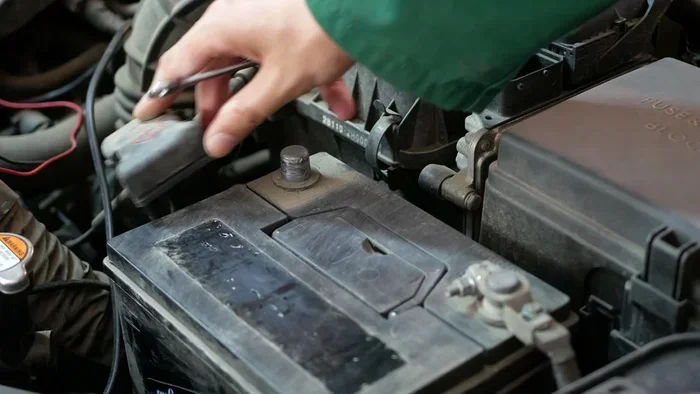
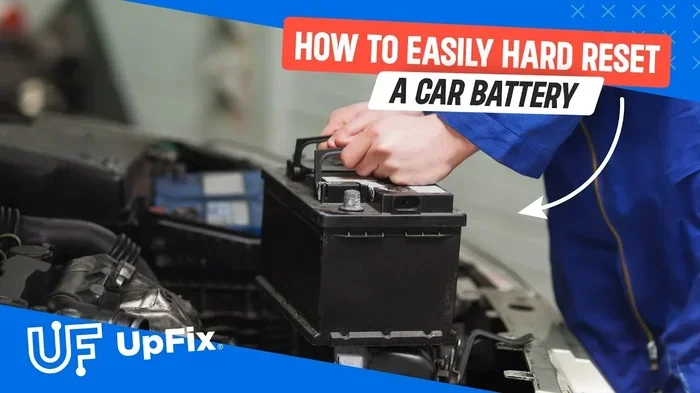
Always start by disconnecting the negative battery terminal (the one marked with a minus sign). This is the safest approach because it prevents electrical shorts. Use a wrench to loosen the nut and carefully lift the cable off the terminal.
Quick Tip: Wrap the disconnected cable in a cloth or tape it away from the terminal. You do not want it to accidentally touch the battery again while you work.
Step 2: Wait for at Least 15 Minutes
After disconnecting, wait at least 15 minutes before reconnecting. This gives the vehicle electrical system time to fully discharge. It also ensures that all capacitors in the radio and other modules are completely drained.
Some experts recommend waiting up to 30 minutes for a full reset. The longer you wait, the more thorough the reset will be. This is especially true for vehicles with complex computer systems.
Step 3: Reconnect the Negative Terminal
After waiting, reconnect the negative terminal. Tighten the nut securely but do not overtighten. You should hear or see the radio power on briefly. This is a normal part of the power loss and recovery process.
Step 4: Enter Your Radio Security Code (If Required)
If your radio asks for a code, enter it now. Use the preset buttons or the tuning knob to input each digit. If you do not have the code, refer back to the section above on how to retrieve it.
Once you enter the correct code, the radio should unlock and return to normal operation. You will see the radio display light up with the default screen.
Step 5: Reprogram Your Presets and Settings
Finally, reprogram your favorite stations and adjust any sound settings. This is the part most people find the least exciting but the most rewarding. You get a fresh start with a clean slate for your car audio system.
Common Mistakes People Make When Disconnecting Their Battery
Many car owners make avoidable mistakes during the battery disconnect process. These mistakes can lead to frustration, extra costs, or even damage to your car electrical system. Let us look at the most common ones.
Mistake 1: Forgetting the Radio Code
This is the number one mistake people make. They disconnect the battery without writing down the radio security code. Then they are locked out of their own radio. Always retrieve and record your code before you start any work on the battery.
Mistake 2: Disconnecting the Wrong Terminal
Some people disconnect the positive terminal first. This increases the risk of electrical shorts and sparks. Always disconnect the negative terminal first and reconnect it last. This is a basic safety rule that every car owner should know.
Mistake 3: Not Waiting Long Enough
Reconnecting the battery too quickly after disconnecting can prevent a full reset. The car stereo reset process needs time to complete. Waiting at least 15 to 30 minutes ensures a thorough reset of all memory functions.
Mistake 4: Ignoring Other Affected Systems
Disconnecting the battery affects more than just the radio. Your power windows, sunroof, navigation system, and even your engine’s idle relearn process may need attention. Be prepared for a broader reset across your vehicle’s systems.
Mistake 5: Using the Wrong Tools
Using corroded or improper tools can damage the battery terminals. Always use a properly sized wrench and inspect your tools before starting. Clean terminals also ensure a better connection after reconnecting.
Expert Insight: When to Disconnect vs. When Not To
Not every situation requires a full battery disconnect. Sometimes a simple radio reset can be done without touching the battery at all. Many radios have a reset button or a specific button combination that clears the memory. Check your owner’s manual first. Only disconnect the battery if the manual recommends it or if you are performing other electrical work that requires it.
How to Prevent Radio Reset Problems in the Future
Once you have gone through the process of resetting your radio after a car battery disconnect, you probably want to avoid doing it again unnecessarily. Here are some practical steps to prevent future headaches.
- Keep a record of your radio code. Store it in your glove box, on your phone, or in your owner’s manual.
- Use a battery tender for long-term storage. If you store your car for weeks or months, a trickle charger keeps the radio memory alive.
- Avoid unnecessary battery disconnects. Only disconnect the battery when it is truly needed for maintenance or repairs.
- Label your fuses. Knowing which fuse controls your radio can help you troubleshoot without a full reset.
- Consider a memory saver device. These small gadgets maintain power to your radio and other systems while you work on the battery.
Taking these simple precautions protects your car audio system and saves you time. A little preparation goes a long way toward a smooth experience.
Does Every Car Radio Require a Security Code After a Reset?
Not every vehicle requires a radio security code after a car battery disconnect. The need for a code depends on your car manufacturer and the specific radio unit installed. Here is a general breakdown:
- European brands like BMW, Mercedes-Benz, Audi, and Volkswagen often require a code after power loss.
- Japanese brands like Honda, Toyota, and Nissan sometimes require a code but not always.
- American brands like Ford, Chevrolet, and Jeep vary widely. Some require codes, others do not.
- Aftermarket radios rarely require a security code since they are not tied to the vehicle’s anti-theft system.
If your radio does require a code, it is usually a four-digit number. Some systems use a six-digit code. The code is tied to the specific radio unit, not just the vehicle. This means if you replace your radio, the old code will not work with the new unit.
What If You Cannot Find Your Radio Code?
Losing your radio security code is stressful but not the end of the world. You have several options:
- Contact your dealership. They can look up the code using your VIN and radio serial number.
- Check online code generators. Some websites and apps can calculate your code for free or a small fee.
- Visit an auto audio shop. Many independent shops can retrieve or bypass the code for you.
- Refer to your owner’s manual. Sometimes the code is hidden in the manual or on a separate card included with the vehicle.
Having a backup plan before you disconnect the battery is always the smartest move. It removes the guesswork and keeps you from being stranded with a locked radio.
Key Takeaways
- Disconnecting resets the radio: A car battery disconnect will reset your radio and clear saved stations, presets, and settings.
- Security codes are common: Many vehicles require a radio security code after a power loss. Always have yours ready.
- Presets are lost: Your saved radio station presets will disappear and need to be reprogrammed.
- Factory and aftermarket radios differ: Factory systems reset fully; aftermarket systems may partially retain some data.
- The reset process is simple: Disconnect, wait, reconnect, enter code (if needed), and reprogram.
- Prevention saves time: Write down your code and use a memory saver device to avoid problems.
Conclusion
Will disconnecting your car battery reset the radio? Yes, it will. The process clears your radio memory, erases your presets, and may trigger a security lock on factory systems. But with the right preparation, it is a straightforward process that takes only a few minutes to complete.
The key is to be proactive. Write down your radio security code before you disconnect anything. Wait long enough for a full reset. And when you reconnect, be ready to enter your code and reprogram your favorite stations. These small steps make a huge difference in your overall experience.
Whether you are performing routine car maintenance, storing your vehicle, or troubleshooting an electrical issue, understanding what happens to your radio after a battery disconnect gives you confidence. You will not be caught off guard by a blank screen or a security prompt. You will know exactly what to do and how to do it.
Take the time to prepare. Your future self will thank you the next time you need to disconnect car battery and reset your car audio system. A little planning today saves frustration tomorrow.
Frequently Asked Questions
How long does it take for the radio to reset after disconnecting the battery?
The radio usually resets within a few minutes of reconnecting the battery. However, if your vehicle requires a security code, you will need to enter it before the radio becomes fully functional. The entire process from disconnect to full operation typically takes about 10 to 15 minutes.
Will I lose my Bluetooth connections after disconnecting the battery?
In most cases, yes. Disconnecting the battery clears Bluetooth pairings from your car audio system. You will need to re-pair your phone or device after reconnecting the battery. This is a quick process that usually takes less than a minute.
Can I reset my radio without disconnecting the battery?
Some radios have a factory reset option in the settings menu. You can also try holding down the power button or a specific button combination. Check your owner’s manual for the exact method. However, a full battery disconnect is the most thorough way to reset the system.
What should I do if my radio asks for a code and I do not have it?
Do not panic. You can retrieve your code by contacting your dealership with your VIN and radio serial number. Many online resources and auto audio shops can also help. Keeping your code written down in advance prevents this situation entirely.
Does disconnecting the battery reset the radio in all car brands?
Most car brands will reset the radio after a battery disconnect. However, the need for a security code varies by manufacturer. European brands like BMW and Mercedes are more likely to require a code than some Japanese or American brands. Always check your specific vehicle’s manual.
Is it safe to disconnect my car battery for radio reset purposes?
Yes, it is generally safe if you follow proper procedures. Always disconnect the negative terminal first, wait at least 15 minutes, and reconnect carefully. Avoid touching metal surfaces around the battery to prevent shorts. If you are unsure, consult a professional mechanic.