How to Reset Tire Pressure on Your 2020 Honda Civic
Learn how to reset tire pressure on your 2020 Honda Civic with this complete, step-by-step guide. We walk you through the TPMS reset process, common mistakes to avoid, and expert tips to keep your Honda running safely. Whether the warning light is on or you just changed your tires, this guide has you covered.
Driving a 2020 Honda Civic is a great experience. The car feels smooth, handles well, and gets good gas mileage. But one thing that can ruin your day is seeing the tire pressure warning light pop up on your dashboard. If you have ever wondered how to reset tire pressure on a 2020 Honda Civic, you are in the right place.
This guide will walk you through every step of the process. We will cover the TPMS reset, explain what the tire pressure light means, and give you practical tips to keep your car running safely. Whether you are a first-time car owner or a seasoned Honda driver, this article will help you fix the problem fast.
The good news is that resetting the tire pressure on your 2020 Honda Civic is easy. You do not need expensive tools or a trip to the dealer. With a few simple steps, you can clear the warning light and get back on the road. Let us dive in and show you exactly how to do it.
Key Takeaways
- Easy DIY Process: Resetting tire pressure on a 2020 Honda Civic is simple and takes just a few minutes.
- Two Reset Methods Available: You can use the steering wheel controls or the infotainment screen to reset TPMS.
- Proper Tire Pressure Matters: Keeping tires at the recommended PSI improves fuel economy and safety.
- Common Mistakes Happen: Avoid driving with low pressure and always check sensor batteries regularly.
- When in Doubt, Seek Help: Some TPMS issues need a professional mechanic or dealer visit.
- Regular Maintenance Helps: Routine tire checks prevent warning lights and extend tire life significantly.
📑 Table of Contents
- Understanding Tire Pressure on Your 2020 Honda Civic
- How to Reset Tire Pressure on a 2020 Honda Civic: The Complete Guide
- Step-by-Step TPMS Reset Process for Your 2020 Honda Civic
- Common Mistakes When Resetting Tire Pressure on a 2020 Honda Civic
- When to See a Professional for Tire Pressure Issues
- Maintaining Proper Tire Pressure for Your Honda Civic
- Conclusion
Understanding Tire Pressure on Your 2020 Honda Civic
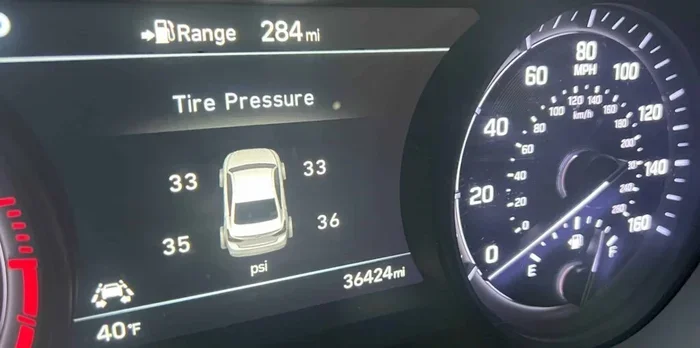
Before you learn how to reset tire pressure on a 2020 Honda Civic, it helps to understand what the system does. Your car has a tire pressure monitoring system, also known as TPMS. This system uses sensors inside each tire to check the air pressure. When the pressure drops too low, the dashboard light turns on.
The 2020 Honda Civic comes with a direct TPMS. This means each wheel has its own sensor. The sensor sends real-time data to your car’s computer. If one tire is underinflated, you will see the warning right away. This is a great safety feature that helps prevent accidents caused by blowouts or poor handling.
What Does the Tire Pressure Warning Light Look Like?
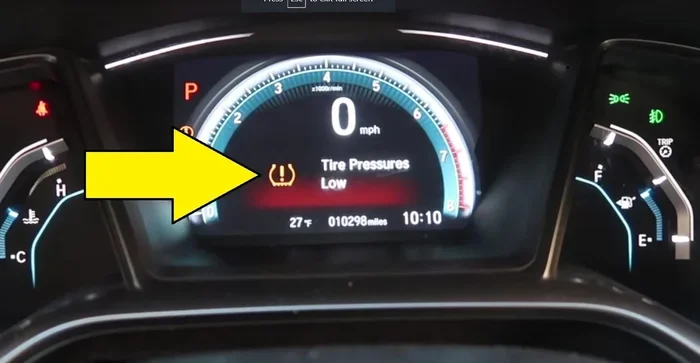
The tire pressure warning light looks like a horseshoe shape with an exclamation mark in the middle. It appears on your Honda dashboard when the system detects a problem. Sometimes the light stays on constantly. Other times, it flashes for a few seconds and then stays solid.
A flashing light often means a sensor malfunction. A solid light usually means low tire pressure. Either way, you should check your tires right away. Ignoring the light can lead to uneven tire wear, reduced fuel economy, and unsafe driving conditions.
Recommended Tire Pressure for the 2020 Honda Civic
The recommended tire pressure for a 2020 Honda Civic is typically 32 PSI for all four tires. You can find the exact number on the driver’s side door jamb. Look for a small sticker that lists the tire pressure settings for front and rear tires.
Keeping your tires at the right pressure does more than just clear the warning light. Proper inflation improves fuel economy. It also makes your car safer to drive. Underinflated tires wear out faster and can lead to blowouts, especially at highway speeds.
Use a tire pressure gauge to check your tires at least once a month. A digital gauge gives the most accurate reading. You can find one at any auto parts store for under fifteen dollars. Make it a habit to check your tires when the weather changes too. Cold temperatures can cause tire pressure to drop significantly.
How to Reset Tire Pressure on a 2020 Honda Civic: The Complete Guide
Now that you understand the system, let us get into the reset process. There are two main ways to perform a TPMS reset on a 2020 Honda Civic. You can use the steering wheel controls, or you can use the infotainment screen. Both methods work well. We will cover each one in detail below.
Method 1: Using the Steering Wheel Controls
This is the most common way to reset tire pressure on a 2020 Honda Civic. The steering wheel reset method is quick and straightforward. Follow these steps carefully:
- Start your car and let the engine run for a few minutes.
- Locate the steering wheel controls on the left side.
- Press and hold the TPMS reset button. It is usually labeled with a tire icon.
- Hold the button for about three to five seconds.
- You should hear a beep. The tire pressure light will start to blink.
- Release the button. The system will now begin the reset process.
- Drive the car for about 20 minutes at speeds above 20 mph.
- The warning light should turn off once the system completes its recalibration.
If the light does not turn off after driving, do not panic. Try the second method below. Sometimes the system needs a second attempt to fully reset. Also, make sure you are not driving on a truly flat tire. A flat tire will keep the light on no matter how many times you reset the system.
Method 2: Using the Infotainment Screen
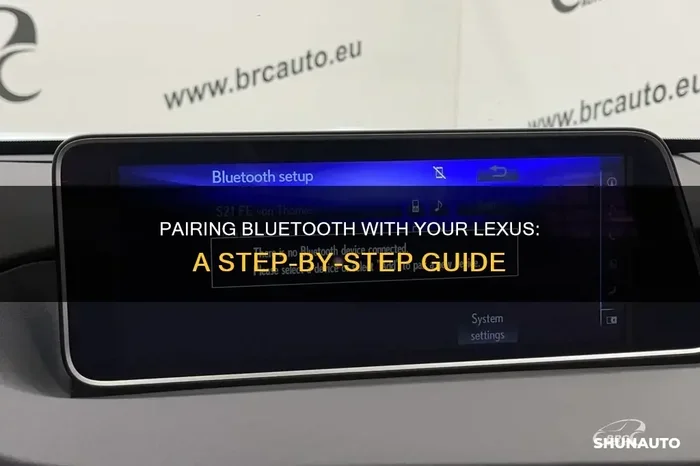
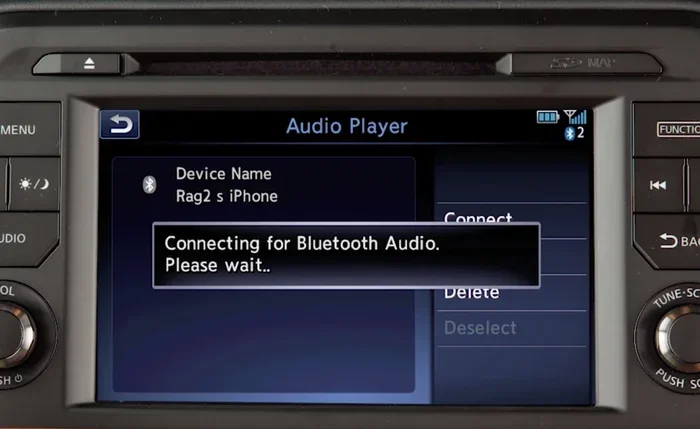
The 2020 Honda Civic has a modern infotainment system. You can also use this screen to reset the TPMS. This method is great if you prefer visual step-by-step instructions on the screen. Here is how:
- Press the home button on the infotainment screen.
- Navigate to the Settings menu.
- Scroll down and select Vehicle Settings.
- Look for the TPMS or Tire Pressure option.
- Select Initialize Tire Pressure Monitor System.
- Confirm your selection when prompted.
- The system will start the reset process.
- Drive the car for 20 minutes to complete the calibration.
Both methods achieve the same result. Choose the one that feels more comfortable to you. The steering wheel method is faster, but the infotainment method gives you more control and visual confirmation at each step.
Quick Tips for a Successful TPMS Reset
Here are some quick tips that make the reset process smoother and more reliable:
- Make sure all tires are at the correct pressure before you start the reset.
- Turn the ignition to the ON position before pressing the reset button.
- Drive on highways or open roads during the 20-minute calibration period.
- Avoid turning the car off during the reset process.
- If the light returns after a few days, check all tire pressures again.
- Keep your owner’s manual nearby for model-specific instructions.
Step-by-Step TPMS Reset Process for Your 2020 Honda Civic
Let us walk through the full process one more time. This section gives you a complete overview of the tire pressure sensor reset procedure. Follow along carefully for the best results.
Step 1: Check Your Tire Pressure First
Before you reset anything, make sure your tires are properly inflated. Use a tire pressure gauge to check all four tires. Compare the readings to the recommended PSI on the door jamb.
If any tire is low, fill it up first. Resetting the system with a flat tire will not solve the problem. The light will just come back on after a short while. This is the most important step that many people skip entirely.
Step 2: Start the Car and Prepare the System
Turn the ignition to the ON position. Do not start the engine yet. Wait for the dashboard lights to come on fully. This tells the TPMS that you are ready to begin the reset. The system will power up and prepare for the initialization process.
Step 3: Initiate the Reset
Use either the steering wheel button or the infotainment screen to start the reset. Hold the button for the required amount of time. You should hear a confirmation beep. The tire pressure warning light will begin to flash. This means the system has entered reset mode and is ready to learn the current tire values.
Step 4: Drive to Complete the Reset
This step is very important. You must drive the car for at least 20 minutes after initiating the reset. The system needs this time to recalibrate the tire pressure monitoring sensors. Drive at speeds between 20 and 50 mph. Avoid sudden stops and sharp turns. Let the car cruise smoothly on a straight road. This helps the sensors communicate properly with the car’s computer.
Some drivers find it helpful to take a short highway drive during this period. The steady speed and smooth road conditions allow the system to calibrate more effectively. Avoid heavy city traffic during the calibration window if possible.
Step 5: Verify the Reset Was Successful
After 20 minutes of driving, check the dashboard. The tire pressure light should be off. If it is still on, repeat the process from the beginning. Sometimes the system needs two attempts to fully reset.
If the light keeps coming back after multiple resets, there may be a deeper issue. Move on to the next sections to learn when to seek professional help.
Common Mistakes When Resetting Tire Pressure on a 2020 Honda Civic
Many people make avoidable mistakes when trying to reset their TPMS. Knowing what not to do is just as important as knowing the right steps. Here are the most common errors and how to prevent them.
Mistake 1: Resetting Without Checking Tire Pressure
This is the number one mistake. Some drivers reset the light without ever checking if the tires actually have enough air. If a tire is truly low, the light will come back within a few miles. Always check your tire pressure first with a reliable gauge. This simple step saves time and prevents frustration.
Mistake 2: Not Driving Long Enough After Reset
The TPMS reset requires a driving period to complete. Some drivers reset the system and then immediately turn off the car. This does not give the sensors enough time to recalibrate. Always drive for at least 20 minutes after resetting. The system needs this time to learn the current tire pressure values.
Mistake 3: Ignoring a Flashing Light
A flashing tire pressure light means something is wrong with the sensor itself. It is not just a low-pressure issue. Ignoring a flashing light can lead to bigger problems down the road. Have a mechanic check the sensors if the light flashes continuously instead of staying solid.
Mistake 4: Using the Wrong Reset Method
Not all Honda Civics use the same reset method. The 2020 model year uses either the steering wheel controls or the infotainment screen. Using the wrong method will not work. Make sure you are following the correct steps for your specific model year and trim level.
Mistake 5: Forgetting About Sensor Batteries
TPMS sensors run on small batteries. These batteries last about five to seven years. If your sensors are old, the battery may be dying. A dead battery will cause the warning light to stay on no matter how many times you reset the system. Replacing the sensor battery or the entire sensor is the only fix for this issue.
Expert Insight: According to Honda service advisors, the most common TPMS issue on the 2020 Civic is a dead sensor battery. If your car is more than five years old and the light keeps returning, have the sensors tested first before trying another reset.
When to See a Professional for Tire Pressure Issues
Most of the time, you can fix the tire pressure light yourself. But there are situations where you need a professional. Knowing when to visit a mechanic can save you time and money.
Signs You Need Professional Help
Watch for these warning signs that indicate a deeper problem with your Honda Civic:
- The tire pressure light stays on even after a full reset.
- The light flashes repeatedly instead of staying solid.
- One tire consistently loses air faster than the others.
- You hear a hissing sound coming from a tire.
- The TPMS sensor error appears on the dashboard.
- The reset button on the steering wheel does not respond.
What a Mechanic Will Do
A professional mechanic has special tools to diagnose TPMS issues. They can scan each sensor to check its battery level and signal strength. If a sensor is faulty, they can replace it quickly. Most sensor replacements take less than an hour per wheel.
Visiting a Honda dealer is another option. Honda dealers have factory-level diagnostic equipment. They can reprogram the entire TPMS system if needed. This is especially helpful if you have replaced tires or sensors recently. The dealer can also check for any software updates that might affect the tire pressure monitoring system.
Do not ignore persistent TPMS warnings. Driving on underinflated tires is dangerous. It reduces your stopping distance and increases the risk of a blowout. When in doubt, get a professional opinion. It is always better to be safe than sorry.
Maintaining Proper Tire Pressure for Your Honda Civic
Prevention is always better than cure. Keeping your tires at the right pressure helps you avoid TPMS warnings altogether. Here are some simple habits that make a big difference in the long run.
Check Your Tires Monthly
Get into the habit of checking your tire pressure every month. The easiest time to do this is when you fill up gas. A quick check takes less than five minutes and can prevent many problems. Set a reminder on your phone if you tend to forget.
Check the pressure when the tires are cold. Driving heats up the air inside the tires and gives a false reading. Morning checks are ideal. Also, check the pressure before long road trips. This ensures your tires are ready for the extra miles ahead.
Keep a Tire Pressure Gauge in Your Trunk
Invest in a good-quality tire pressure gauge and keep it in your trunk. You never know when you will need it. A digital gauge is more accurate than a pencil-style gauge. Look for one that reads in PSI and has a backlit display. Some gauges also have a lighted nozzle that makes it easy to read in the dark.
Know the Recommended PSI for Your Honda Civic
The recommended tire pressure for a 2020 Honda Civic is listed on the driver’s side door jamb. The sticker shows the PSI for both front and rear tires. Make sure you follow these numbers exactly.
Do not rely on the numbers printed on the tire sidewall. Those numbers represent the maximum pressure the tire can handle. The recommended pressure for your car is always lower and is listed in the owner’s manual or on the door jamb sticker. Using the wrong pressure can affect handling and safety.
Rotate Your Tires Regularly
Tire rotation helps your tires wear evenly. It also gives you a chance to inspect each tire for damage. Most experts recommend rotating your tires every 5,000 to 7,500 miles. This aligns with your regular oil change schedule. Many tire shops will rotate your tires for free if you bought them from them.
Replace Old Sensors When Needed
TPMS sensors have a limited lifespan. After five to seven years, the batteries start to weaken. If you notice the tire pressure light returning frequently, it might be time to replace the sensors. A mechanic can test each sensor and recommend replacements if needed. New sensors cost between 50 and 100 dollars each, depending on the brand.
Comparison: Manual vs. Infotainment TPMS Reset Methods
| Feature | Manual Reset (Steering Wheel) | Infotainment Screen Reset |
|---|---|---|
| Ease of Use | Very easy, quick access | Simple but requires menu navigation |
| Time Required | About 2 minutes | About 3 minutes |
| No Tools Needed | Yes | Yes |
| Drives After Reset | 20 minutes required | 20 minutes required |
| Works on 2020 Honda Civic | Yes | Yes |
| Best For | Quick resets on the go | Users who prefer screen-based controls |
Both methods work equally well. Choose the one that fits your comfort level. The steering wheel method is faster, but the screen method gives you a visual confirmation of each step. Either way, you will successfully reset your TPMS and clear the warning light.
Conclusion
Resetting the tire pressure on your 2020 Honda Civic is a straightforward process. You do not need to be a mechanic to do it. With the steps in this guide, you can clear the warning light and get back to driving with confidence.
Remember to always check your tire pressure before resetting. Drive for at least 20 minutes after the reset to let the system recalibrate. Avoid the common mistakes we covered, and do not hesitate to see a professional if the light keeps coming back.
Taking care of your tires is one of the simplest ways to maintain your Honda Civic. Proper tire pressure improves safety, boosts fuel economy, and extends the life of your tires. Keep this guide handy for your next TPMS reset and you will always know exactly what to do.
Now that you know how to reset tire pressure on a 2020 Honda Civic, you are prepared for any tire pressure warning. Stay safe on the road and keep those tires properly inflated.
Frequently Asked Questions
How do I know if my tire pressure is low on a 2020 Honda Civic?
The tire pressure warning light on your dashboard will illuminate. You can also use a tire pressure gauge to check each tire manually. The recommended PSI is listed on the driver’s side door jamb. Checking your tires monthly helps you catch low pressure early.
Can I drive with the tire pressure light on?
It is not recommended. Driving on underinflated tires reduces fuel efficiency and increases the risk of a blowout. If the light comes on, check your tire pressure as soon as possible and inflate to the recommended level before driving long distances.
How much does it cost to replace a TPMS sensor on a 2020 Honda Civic?
Individual TPMS sensors typically cost between 50 and 100 dollars each. Labor for installation usually adds another 20 to 50 dollars per sensor. Some tire shops offer bundled pricing if you need to replace multiple sensors at once.
Why does my tire pressure light keep coming back after resetting?
This usually means one of your tires is still underinflated or a sensor battery is dying. Check all tire pressures with a gauge first. If the pressure is correct, the sensor battery may need replacement. A professional mechanic can scan and test each sensor for you.
Do I need to reset TPMS after changing tires on my Honda Civic?
Yes, it is a good practice to reset the TPMS after installing new tires. The system may need to relearn the new tire pressure values. Follow the reset steps outlined in this guide for your 2020 Honda Civic.
How often should I check my tire pressure?
You should check your tire pressure at least once a month. Also check before long road trips and when the seasons change. Cold weather can cause tire pressure to drop, which may trigger the TPMS warning light unexpectedly.