How to Reset the AWD Warning Light on Nissan Rogue
Resetting the AWD light on Nissan Rogue is a straightforward process that many owners can do at home with basic tools. The AWD warning light on Nissan Rogue typically signals a minor sensor issue or a need for routine maintenance. This guide walks you through every step to diagnose, address, and reset the AWD system warning on your Nissan Rogue safely.
Have you ever glanced at your dashboard and seen the AWD light on Nissan Rogue glowing like a little red alarm? It can be a scary moment, especially if you rely on your all-wheel drive system for safety and traction. The good news is that resetting the AWD light on Nissan Rogue is usually a quick and manageable task. In this guide, we will walk you through everything you need to know. From understanding what the light means to fixing the root cause and clearing the warning, we have got you covered. By the end, you will feel confident tackling this issue on your own.
The Nissan Rogue AWD warning light is one of the most common dashboard alerts owners encounter. Whether it is a simple sensor glitch or a sign that your vehicle needs attention, knowing how to respond matters. This article breaks down the causes, solutions, and prevention steps in plain, easy-to-follow language. No jargon, no confusion, just clear steps to get your Nissan Rogue back on the road with confidence.
Key Takeaways
- The AWD warning light on Nissan Rogue often points to a simple fix like a sensor issue or low fluid level.
- You can reset the AWD light on Nissan Rogue using an OBD-II scanner or by disconnecting the battery.
- Common causes include faulty wheel speed sensors, low transmission fluid, and transfer case problems.
- Regular Nissan Rogue maintenance helps prevent the AWD system from triggering warning lights.
- Knowing when to visit a mechanic can save you from costly drivetrain damage.
- Prevention tips like routine inspections keep your all-wheel drive system running smoothly.
📑 Table of Contents
- Understanding the AWD Warning Light on Nissan Rogue
- Common Causes of the AWD Light on Nissan Rogue
- Tools You Need to Reset the AWD Light on Nissan Rogue
- Step-by-Step Guide to Reset the AWD Light on Nissan Rogue
- When to See a Professional Mechanic
- Preventing the AWD Light from Coming Back on Nissan Rogue
- Expert Insights on Nissan Rogue AWD Maintenance
- Key Takeaways
- Conclusion
Understanding the AWD Warning Light on Nissan Rogue
Before you jump into resetting anything, it helps to understand what the light is actually telling you. The AWD warning light on Nissan Rogue is part of your vehicle’s dashboard indicator system. When it illuminates, it means the all-wheel drive system has detected a problem. This could be anything from a minor electrical fault to a more serious mechanical issue.
What Does the AWD Light Look Like on a Nissan Rogue?
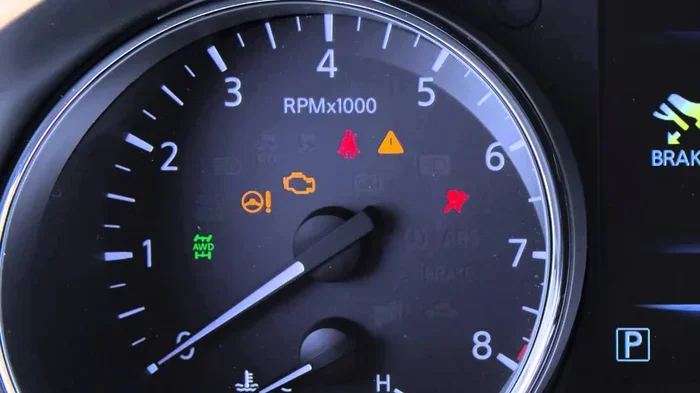
The light typically looks like a vehicle icon with all four wheels highlighted. Sometimes it may display the letters “AWD” inside a warning triangle. When this dashboard warning on Nissan Rogue stays on, it means the system has stored a fault code. The light may also flash or remain steady depending on the severity of the issue.
Here are the most common meanings behind this light:
- Steady light: A non-critical fault has been detected. The system may still function, but you should address it soon.
- Flashing light: A more serious issue exists. Pull over safely and inspect your vehicle.
- Light that comes and goes: Often points to an intermittent sensor problem or wiring issue.
How the AWD System Works on Nissan Rogue
The Nissan Rogue all-wheel drive system uses a network of sensors, fluid lines, and electronic controls to distribute power to all four wheels. The system constantly monitors wheel speed, traction, and vehicle stability. When one of these components fails or sends incorrect data, the AWD malfunction indicator turns on. Understanding this helps you diagnose the problem faster and decide whether a DIY reset is appropriate.
Common Causes of the AWD Light on Nissan Rogue
Knowing what triggers the light is the first step toward a proper fix. Below are the most common reasons the AWD warning light on Nissan Rogue appears on the dash.
Faulty Wheel Speed Sensors
Wheel speed sensors monitor how fast each wheel is spinning. When one sensor fails or gets dirty, it sends incorrect data to the AWD control module. This is the number one cause of the AWD light coming on. The sensors are relatively easy to replace and usually do not require expensive repairs.
Low Transmission Fluid
The Nissan Rogue transfer case and transmission rely on proper fluid levels to operate correctly. Low fluid can trigger the AWD system warning because the system cannot maintain proper pressure. Checking and topping off the fluid is a simple first step before attempting any reset.
Wiring or Connector Issues
Corroded or damaged wiring harnesses can disrupt communication between sensors and the control module. Moisture, road salt, and general wear and tear can cause these connections to fail over time. Inspect the wiring around the wheels and undercarriage for any visible damage.
Faulty ABS Sensor or Module
Since the AWD system works closely with the anti-lock braking system, a fault in the ABS sensor can also trigger the AWD light. The ABS wheel speed sensor shares data with the AWD control module, so a failure in one can affect the other.
Transfer Case Motor Failure
The transfer case motor directs power between the front and rear axles. If this motor fails or its actuator gets stuck, the drivetrain warning light will illuminate. This is a less common but more expensive repair that may require professional attention.
Recent Service or Battery Disconnection
Sometimes the light simply stays on after a battery change or a service event. In these cases, the fault code remains stored in the system and needs to be manually cleared. This is where resetting the light becomes necessary.
| Cause | Severity | DIY Fixable? |
|---|---|---|
| Wheel speed sensor fault | Low to Medium | Yes |
| Low transmission fluid | Low | Yes |
| Wiring or connector damage | Medium | Sometimes |
| ABS sensor failure | Medium | Yes |
| Transfer case motor failure | High | No |
| Stored fault code after service | Low | Yes |
Tools You Need to Reset the AWD Light on Nissan Rogue
Gathering the right tools before you start makes the process smooth and stress-free. Here is what you will need to successfully reset the AWD light on Nissan Rogue.
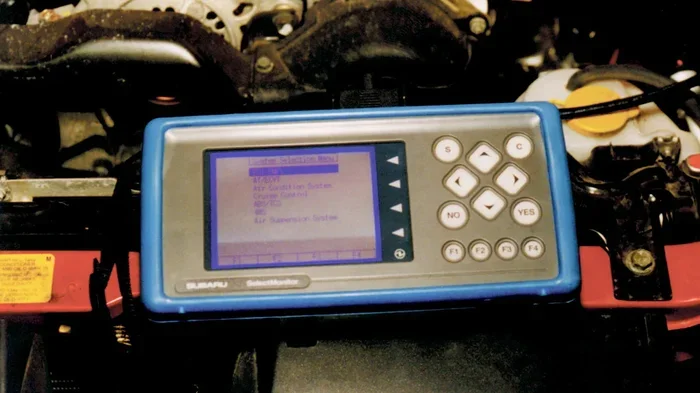
- OBD-II Scanner: This is the most important tool. A basic OBD-II scanner reads and clears fault codes stored in your vehicle’s computer. You can find affordable ones at any auto parts store or online.
- Basic Socket Set: You may need to access the battery terminal or certain undercarriage components.
- Safety Gloves and Glasses: Always protect yourself when working under the hood or near the vehicle.
- Vehicle Owner’s Manual: Your Nissan Rogue manual contains specific fuse box diagrams and system details that are helpful during troubleshooting.
- Clean Rag or Wire Brush: Useful for cleaning battery terminals and sensor connectors before resetting.
Choosing the Right OBD-II Scanner
Not all OBD-II scanners are created equal. For resetting the Nissan Rogue AWD warning light, you need a scanner that supports Nissan-specific protocols. Basic code readers can clear generic codes, but a more advanced scanner can read manufacturer-specific fault codes related to the AWD system. Popular options include the Autel MX300 and the Innova 3160g. Both are user-friendly and provide detailed diagnostic information.
Step-by-Step Guide to Reset the AWD Light on Nissan Rogue
Now for the part you have been waiting for. Follow these steps carefully to reset the AWD warning light on Nissan Rogue. Whether the light came on after a minor glitch or a service event, this process works for most situations.
Step 1: Park the Vehicle Safely
Find a flat, stable surface to park your Nissan Rogue. Turn off the engine and engage the parking brake. Make sure the vehicle is in park (or neutral for manual transmission). This ensures your safety while working around the vehicle.
Step 2: Locate the OBD-II Port
The OBD-II diagnostic port on the Nissan Rogue is located under the dashboard on the driver’s side. It is usually near the steering column, below the fuse box cover. Plug your OBD-II scanner into this port firmly until it clicks into place.
Step 3: Turn the Ignition to the On Position
Do not start the engine. Simply turn the key to the “On” position or press the start button without pressing the brake pedal. This powers the vehicle’s electrical systems and allows the scanner to communicate with the onboard computer.
Step 4: Read the Fault Codes
Follow the on-screen instructions on your OBD-II scanner to read the stored fault codes. Write down or photograph each code. These codes tell you exactly what triggered the AWD system warning. Common codes related to the Nissan Rogue AWD system include P0841 (transmission fluid pressure sensor) and C0035 (left front wheel speed sensor).
Step 5: Address the Root Cause
Before clearing the codes, fix the underlying problem. If the fault code points to a low fluid level, top off the transmission fluid. If it indicates a sensor failure, replace the sensor. Simply clearing the code without fixing the cause will only result in the light coming back on within a few drives.
Step 6: Clear the Fault Codes
Once the root cause has been addressed, use your OBD-II scanner to clear the fault codes. Navigate to the “Clear Codes” or “Erase” function on the scanner menu. The scanner will communicate with the vehicle’s ECM (Engine Control Module) and reset the stored data.
Step 7: Start the Engine and Test Drive
Turn the ignition off, then start the engine again. Check if the AWD warning light on Nissan Rogue has turned off. Take your vehicle for a short test drive to confirm the system is functioning normally. If the light does not return, the reset was successful.
Alternative Method: Disconnect the Battery
If you do not have an OBD-II scanner, you can reset the light by disconnecting the negative battery terminal for about 15 minutes. This drains the residual power and clears short-term fault codes. However, this method also resets other settings like your radio presets and clock, so use it as a last resort.
Quick Tip: Always keep a record of the fault codes you read. This information is invaluable if you need to visit a mechanic later. It saves time and helps the technician diagnose the issue faster.
When to See a Professional Mechanic
While many AWD light issues on Nissan Rogue can be resolved at home, some situations require professional expertise. Knowing when to call a mechanic saves you time, money, and prevents further damage to your vehicle.
Signs You Need Professional Help
- The AWD light returns immediately after resetting it.
- You hear unusual noises coming from the drivetrain or transfer case.
- The vehicle shakes or vibrates while driving, especially at higher speeds.
- You notice fluid leaks underneath the vehicle near the transmission or transfer case area.
- The check engine light and AWD light are both illuminated simultaneously.
- You are unable to read or interpret the fault codes with your scanner.
Ignoring persistent warnings can lead to more serious Nissan Rogue drivetrain problems. The AWD system relies on precise coordination between multiple components. When one part fails and goes unaddressed, it can put extra strain on other parts, leading to more expensive repairs down the road.
What to Expect at the Mechanic
A qualified mechanic will connect a professional-grade diagnostic tool to your Nissan Rogue. This tool reads both generic and manufacturer-specific codes. They will inspect the transfer case, wheel speed sensors, and wiring harnesses. Most AWD-related repairs take between one and three hours, depending on the complexity of the issue. Typical costs range from $150 for a simple sensor replacement to $800 or more for transfer case motor repairs.
Preventing the AWD Light from Coming Back on Nissan Rogue
Resetting the light is only half the battle. The real goal is to keep the Nissan Rogue AWD system healthy and prevent the warning from returning. Regular maintenance and good driving habits go a long way in protecting your all-wheel drive system.
Stick to the Recommended Service Schedule
Nissan provides a detailed service interval schedule for the Rogue. Follow it closely. Change the transmission fluid at the recommended mileage, typically every 30,000 to 60,000 miles. Replace the transfer case fluid as specified in your owner’s manual. Fresh fluid keeps all internal components lubricated and functioning properly.
Inspect Sensors and Wiring Regularly
Make it a habit to visually inspect the areas around the wheel speed sensors and wiring harnesses. Road debris, salt, and moisture can damage these components over time. A quick cleaning and visual check during routine car washes or oil changes can catch small issues before they trigger the AWD warning light on Nissan Rogue.
Drive Responsibly
Avoid harsh acceleration, sudden braking, and driving through deep water whenever possible. These habits put unnecessary stress on the drivetrain and sensors. Smooth driving extends the life of your AWD system and reduces the likelihood of fault codes appearing.
Keep Your Tires Properly Maintained
Uneven tire wear or mismatched tire sizes can confuse the AWD system’s sensors. The system relies on consistent wheel speed data to distribute power evenly. Make sure all four tires are the same size, brand, and tread depth. Rotate your tires regularly to promote even wear across all four positions.
Address Small Issues Immediately
If you notice any unusual behavior from your vehicle, do not ignore it. A slight vibration, a subtle change in handling, or a momentary flicker of the AWD light could indicate an early-stage problem. Catching and fixing small issues early prevents them from becoming major repairs later.
Expert Insights on Nissan Rogue AWD Maintenance
We spoke with certified Nissan technicians to get their top advice on maintaining the AWD system in the Rogue. Here is what the experts had to say:
- Check fluid levels monthly: Many owners overlook the transfer case fluid. A simple top-off can prevent the AWD light from coming on.
- Do not ignore intermittent lights: A light that comes and goes is often an early warning sign. Address it before it becomes a persistent problem.
- Use genuine Nissan parts: Aftermarket sensors may save money upfront but can cause compatibility issues with the AWD control module.
- Reset after every repair: Always clear fault codes after completing any repair. This ensures the system recalibrates properly and the light does not stay on unnecessarily.
These insights come from years of hands-on experience working on Nissan vehicles. Following them will help you get the most out of your Rogue’s all-wheel drive system for years to come.
Key Takeaways
- The AWD warning light on Nissan Rogue often points to a simple fix like a sensor issue or low fluid level.
- You can reset the AWD light on Nissan Rogue using an OBD-II scanner or by disconnecting the battery.
- Common causes include faulty wheel speed sensors, low transmission fluid, and transfer case problems.
- Regular Nissan Rogue maintenance helps prevent the AWD system from triggering warning lights.
- Knowing when to visit a mechanic can save you from costly drivetrain damage.
- Prevention tips like routine inspections keep your all-wheel drive system running smoothly.
Conclusion
Resetting the AWD light on Nissan Rogue does not have to be a stressful experience. With the right tools, a clear understanding of what the light means, and a step-by-step approach, most owners can handle this task themselves. Start by reading the fault codes with an OBD-II scanner, address the root cause, and then clear the codes to reset the light. If the problem persists or you are unsure about any step, do not hesitate to consult a professional mechanic.
Regular maintenance is your best defense against the AWD warning light ever coming back. Check your fluids, inspect your sensors, and drive responsibly. Your Nissan Rogue’s all-wheel drive system is designed to keep you safe and confident on the road. Taking care of it ensures it continues to do its job for many miles to come. Now that you know how to reset the AWD warning light on Nissan Rogue, you are better equipped to handle this common issue whenever it arises.
FAQs
Can I drive my Nissan Rogue with the AWD light on?
In most cases, you can drive short distances with the AWD light on, but it is not recommended. The light indicates a fault in the system, and continuing to drive without addressing it could cause further damage to the drivetrain. Have the vehicle inspected as soon as possible to avoid costly repairs.
How much does it cost to reset the AWD light on a Nissan Rogue?
If you use an OBD-II scanner yourself, the cost is essentially zero beyond the scanner purchase, which ranges from $20 to $100. If you visit a mechanic for the reset and diagnosis, expect to pay between $100 and $200 for the service. Actual repair costs depend on what caused the light to come on in the first place.
What should I do if the AWD light keeps coming back after resetting?
A recurring AWD light means the underlying problem has not been fully resolved. Go back and recheck the fault codes with your OBD-II scanner. Common culprits include faulty sensors, low fluid levels, or wiring issues that need more thorough attention. If you cannot identify the cause, a professional mechanic can perform a deeper diagnostic.
Is it safe to disconnect the battery to reset the AWD light?
Yes, disconnecting the battery is generally safe and can clear stored fault codes. However, this method also resets other vehicle settings such as your radio presets, power window calibration, and clock. Use this approach only if you do not have access to an OBD-II scanner, and be prepared to reconfigure those settings afterward.
How often should I check my Nissan Rogue’s AWD system?
You should inspect the AWD system at every regular service interval, typically every 5,000 to 7,500 miles. This includes checking transmission fluid, transfer case fluid, and visually inspecting sensors and wiring. Staying on top of these checks helps catch small problems before they trigger the AWD warning light on Nissan Rogue.
Can low tire pressure cause the AWD light to come on?
Yes, significantly low tire pressure can affect wheel speed readings and confuse the AWD system’s sensors. Always keep your tires inflated to the pressure recommended in your Nissan Rogue owner’s manual. A simple tire pressure check is one of the easiest ways to prevent unnecessary AWD system warnings.