Can I Get an App for My Car A Simple Guide to Get Started
Yes, you can absolutely get an app for your car, and it is easier than most people think. Whether you want to track maintenance, monitor fuel economy, or connect your phone to your vehicle, there is a car app for nearly every need. This guide walks you through the options, setup steps, and tips to get the most out of your car apps.
Can I Get an App for My Car? The short answer is a resounding yes. Whether your car is brand new or has been on the road for years, you can find a car app that fits your needs. From simple fuel trackers to full-blown diagnostic tools, the world of automotive apps has grown fast in recent years.
You do not need a fancy new vehicle to enjoy smart car features. Even older cars can become smarter with the right tools and a little know-how. This guide will show you exactly how to get started, what options are out there, and how to pick the best car app for your situation.
Think of this as your friendly roadmap to car smartphone integration. We will cover everything from basic connectivity to advanced telematics. By the end, you will know exactly what is possible and how to make it work for you.
Key Takeaways
- Car apps are widely available: Most modern vehicles and older cars can use apps through OBD2 scanners, Android Auto, Apple CarPlay, or manufacturer-specific platforms.
- You have several options to choose from: Apps range from free basic tools to premium diagnostic suites, so there is something for every budget.
- Setup is usually simple: Most car apps connect via Bluetooth, Wi-Fi, or a small hardware adapter plugged into your car’s OBD2 port.
- Car connectivity brings real benefits: You can monitor engine health, track fuel usage, find your car, and even control certain features remotely.
- Compatibility matters: Not every app works with every car, so check your vehicle make, model, and year before downloading.
- Security is important: Only download apps from trusted sources and review permissions carefully to protect your car and personal data.
📑 Table of Contents
- What Does It Mean to Get an App for Your Car?
- Types of Car Apps You Can Get
- How to Choose the Right App for Your Car
- Setting Up Your Car App: A Step-by-Step Guide
- Common Mistakes to Avoid When Using Car Apps
- Expert Insights on Car Apps and Vehicle Technology
- How Car Apps Save You Money
- The Future of Car Apps and Connected Vehicles
- Conclusion
What Does It Mean to Get an App for Your Car?
When people ask about getting an app for their car, they usually mean one of two things. First, they might want a mobile app that connects to their vehicle to show data or control features. Second, they might want an app they can use inside the car, like a navigation or entertainment tool. Both types are very real and very useful.
Car connectivity has come a long way. A few years ago, you needed expensive factory tech to get any kind of smart features. Today, a simple OBD2 scanner and a free app can give you engine diagnostics on your phone. That is a huge shift for car owners.
Vehicle apps work by talking to your car’s computer system. Most cars built after 1996 have an OBD2 port, which is a standardized diagnostic connector. You plug a small adapter into that port, and the adapter sends data to your phone through Bluetooth or Wi-Fi. It is surprisingly simple.
Why Car Apps Are Growing So Fast
The demand for smart car features has exploded. People want to know more about their vehicles, save money on repairs, and stay connected on the road. Car manufacturers have responded by building app ecosystems into their newer models. Even independent developers have jumped in to create useful tools for everyday drivers.
Here are some reasons why car apps have become so popular:
- Cost savings: You can catch small problems before they turn into expensive repairs.
- Convenience: You can check your car’s health from your couch, not just at the mechanic.
- Safety: Some apps track driving habits and alert you to potential issues.
- Entertainment: In-car apps make long drives more enjoyable for everyone.
- Peace of mind: GPS tracking and remote lock features help you feel more in control.
Types of Car Apps You Can Get
Not all car apps do the same thing. There are several categories to be aware of, and each serves a different purpose. Let us break them down so you can find what fits your needs.
Diagnostic Apps
Diagnostic apps are among the most popular vehicle apps available. They read error codes from your car’s onboard computer and explain what they mean. You can check engine lights, monitor engine performance, and even clear certain codes right from your phone.
Popular diagnostic apps include Torque Pro, Carly, and OBD Fusion. Most of these work with a compatible OBD2 Bluetooth adapter. The app itself is often free or very cheap, but the adapter usually costs between 20 and 100 dollars.
Maintenance and Tracking Apps
These apps help you keep up with your car’s service schedule. They remind you when it is time for an oil change, tire rotation, or other routine maintenance. Some apps also track your fuel economy over time, which can help you save money at the pump.
Examples include aCar, Drivvo, and AutoCare. These are great for people who want to stay on top of their car’s health without visiting a shop every few weeks.
Infotainment and Connectivity Apps
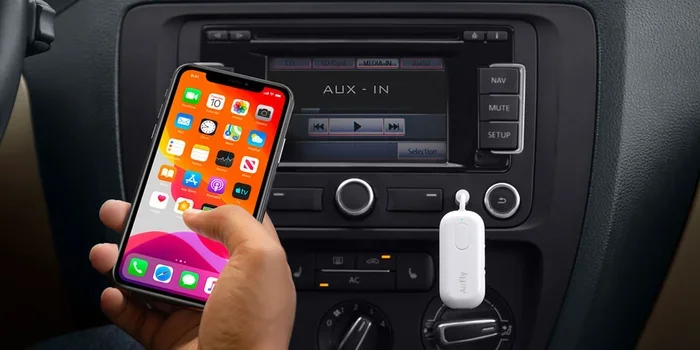
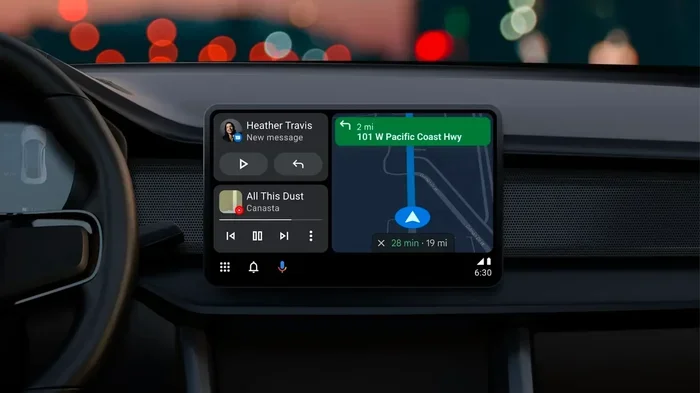
If you want to use your phone while driving safely, infotainment apps are the way to go. Android Auto and Apple CarPlay are the two biggest names here. They let you access navigation, music, calls, and messages through your car’s screen or your phone’s speaker.
Many car makers also offer their own apps. BMW has the BMW app, Ford has FordPass, and Toyota has the Toyota App. These give you features like remote start, lock/unlock, and vehicle tracking right from your phone.
Safety and Tracking Apps
Safety-focused car apps include GPS trackers, dash cams, and driving behavior monitors. Apps like Life360 help families track each other’s locations, while apps like AutoForward monitor driving habits like hard braking and speeding.
Some insurance companies even offer their own apps that reward safe driving with lower premiums. These telematics apps have become a big part of the connected car experience.
Entertainment Apps
Let us not forget fun. Music streaming apps like Spotify, podcast apps like Pocket Casts, and even gaming apps can make your drives more enjoyable. Just remember to keep your eyes on the road and use hands-free controls whenever possible.
How to Choose the Right App for Your Car
With so many options out there, picking the right app can feel overwhelming. Here are some things to consider before you download anything.
Check Your Car’s Compatibility
Not every app works with every car. Some apps require specific OBD2 protocols, and older cars may not support all features. Before you buy anything, check the app’s compatibility list and match it to your car’s make, model, and year.
For Android Auto and Apple CarPlay, your car needs a compatible infotainment system. Most cars from 2016 onward support at least one of these platforms. If your car does not have built-in support, you can still use these apps on your phone screen.
Decide What You Actually Need
Do you want to diagnose engine problems? Track your fuel usage? Remotely start your car? Make a list of what matters most to you. This will help you narrow down the options and avoid paying for features you do not need.
Read Reviews and Check Ratings
Always check user reviews before downloading. Look for apps with high ratings and a large number of downloads. Pay attention to comments about reliability, customer support, and ease of use. A well-reviewed app is much more likely to give you a good experience.
Consider the Cost
Many car apps are free, but some charge monthly or yearly fees for premium features. OBD2 adapters range in price too. Set a budget before you start shopping so you do not overspend on features you will never use.
Setting Up Your Car App: A Step-by-Step Guide
Getting started with a car app is usually straightforward. Here is a simple walkthrough to help you set things up the right way.
Step 1: Get the Right Hardware (If Needed)
If you are using a diagnostic app, you will need an OBD2 adapter. Plug it into the port under your dashboard, usually near the driver’s side knee area. Turn your car’s ignition to the on position (do not start the engine yet).
For infotainment apps like Android Auto or Apple CarPlay, you may need a USB cable or a wireless connection, depending on your car and phone.
Step 2: Download the App
Go to the Google Play Store or Apple App Store and search for the app you want. Make sure it is from a trusted developer. Read the description to confirm it supports your car model.
Step 3: Pair and Connect
Open the app and follow the on-screen instructions to pair your device. For OBD2 adapters, this usually means turning on Bluetooth and selecting the adapter from the list of available devices. For Android Auto or Apple CarPlay, follow the setup prompts on your phone.
Step 4: Explore and Customize
Once connected, take some time to explore the app’s features. Check your car’s data, set up alerts, and customize the dashboard to show the information you care about most.
Common Mistakes to Avoid When Using Car Apps
Even though car apps are generally easy to use, there are some common pitfalls to watch out for.
- Ignoring compatibility: Not all apps work with all cars. Always double-check before you buy.
- Using cheap adapters: A low-quality OBD2 adapter can give inaccurate readings or disconnect frequently. Stick with reputable brands.
- Ignoring app permissions: Some car apps ask for access to your contacts, location, and other data. Only grant permissions that make sense for the app’s function.
- Over-relying on apps instead of professionals: Car apps are great for monitoring and basic diagnostics, but they are not a replacement for a qualified mechanic.
- Forgetting to update: App updates often include bug fixes and new features. Keep your apps up to date for the best experience.
- Using your phone while driving: Even with hands-free setups, try to minimize distractions. Pull over if you need to interact with your app in detail.
Expert Insights on Car Apps and Vehicle Technology
We spoke with a few automotive tech experts to get their take on where car apps are headed. The consensus is clear: connected car technology is only going to get better.
“The biggest trend right now is integration,” says one industry expert. “Car manufacturers are working harder than ever to make their apps seamless with the vehicle’s built-in systems. We are moving toward a future where your phone and your car feel like one device.”
Another expert highlighted the importance of data security. “As cars become more connected, the amount of personal data they collect grows too. Users should be aware of what data their car apps are collecting and how it is being used.”
The rise of electric vehicles has also changed the app landscape. EV owners use apps to monitor battery levels, find charging stations, and even pre-condition their car’s temperature before a drive. These features are becoming standard expectations among new car buyers.
How Car Apps Save You Money
One of the biggest benefits of using car apps is the potential to save money over time. Here is how they help.
- Early problem detection: Catching a small issue early can prevent a costly repair later.
- Fuel economy tracking: Monitoring your driving habits can reveal ways to use less fuel.
- Reminder systems: Staying on top of maintenance keeps your car running efficiently and avoids big breakdowns.
- Insurance discounts: Some telematics apps qualify you for safe-driving discounts on your car insurance.
- Reduced shop visits: With diagnostic data in hand, you can skip unnecessary trips to the mechanic.
Over a year, these savings can add up to hundreds of dollars. That alone makes investing in a good car app worthwhile for most drivers.
The Future of Car Apps and Connected Vehicles
What does the future hold for car apps? The outlook is exciting. Automakers are investing heavily in connected car technology, and the results are already visible in newer models.
We are seeing features like over-the-air software updates, which means your car can get new capabilities without visiting a dealership. Some luxury brands already offer this, and it is trickling down to more affordable vehicles every year.
Artificial intelligence is also making its way into car apps. AI-powered assistants can predict maintenance needs, suggest the nearest gas station or charging point, and even adjust your driving style for better fuel economy. These smart car features will make driving safer, easier, and more enjoyable.
As 5G networks expand, car connectivity will become faster and more reliable. This means real-time data, smoother streaming, and better integration between your phone and your vehicle. The connected car experience is just getting started.
Conclusion
So, can I get an app for my car? Absolutely. The options are vast, the setup is simple, and the benefits are real. Whether you want to monitor your engine health, track your fuel usage, or just enjoy a smarter driving experience, there is a car app out there for you.
Start by figuring out what you need, check your car’s compatibility, and pick a well-reviewed app. With the right tools, your car can become smarter, safer, and more efficient than ever before. The world of automotive apps is wide open, and there has never been a better time to explore it.
Take a few minutes today to look into your options. You might be surprised at how much your car can do with the right app in your pocket. The road ahead is connected, and it starts with a single download.
Frequently Asked Questions
Can I get an app for my car if it is an older model?
Yes, you can. Most cars built after 1996 have an OBD2 port, which allows you to connect diagnostic and tracking apps. You will just need a compatible OBD2 Bluetooth adapter. Even older cars without that port can use infotainment apps directly on your phone.
Do I need a special adapter to use car apps?
It depends on the type of app. Diagnostic apps require an OBD2 adapter, which costs around 20 to 100 dollars. Infotainment apps like Android Auto and Apple CarPlay usually just need a USB cable or a wireless connection. Check the app’s requirements before you buy anything.
Are car apps safe to use?
Yes, as long as you download them from trusted sources like the Google Play Store or Apple App Store. Always review the permissions the app requests and stick with well-known developers. Avoid apps from unknown sources that ask for excessive access to your personal data.
Can car apps help me save money on fuel?
They can. Many car apps track your fuel economy and driving habits. By reviewing this data, you can identify ways to drive more efficiently, such as reducing aggressive acceleration and maintaining steady speeds. Over time, these small changes can lead to noticeable savings at the pump.
Do I need a smartphone to use car apps?
Most car apps are designed for smartphones, so yes, you will need one. However, some newer vehicles come with built-in screens and apps that work without a phone. If your car has a smart infotainment system, you may be able to use certain features without bringing your phone along.
Can I control my car remotely with an app?
Many manufacturer apps allow remote features like starting the engine, locking doors, and locating your car on a map. These features work through the car’s built-in cellular connection. Check your vehicle’s manual or the manufacturer’s website to see what remote features are available for your specific model.