What the Lane Assist Symbol Looks Like on Your Dashboard
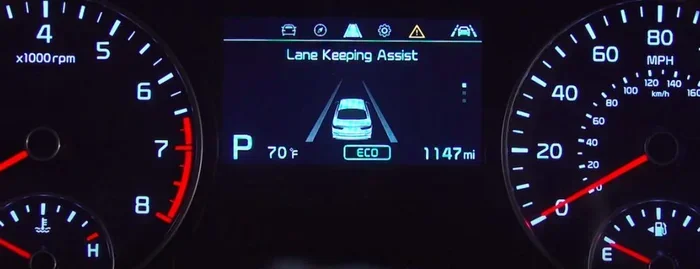
The lane assist symbol appears as a car icon with lane lines on your dashboard. It shows your lane departure warning system is active and monitoring road markings. Understanding this dashboard icon helps you drive safer and respond correctly to alerts.
You are driving down the highway. Your eyes stay on the road. Then you notice a small light on your dash. It looks like a car sitting between two lines. This is the lane assist symbol. Many drivers see it every day but do not know what it means. If you have ever wondered what the lane assist symbol looks like on your dashboard, you are in the right place.
Lane assist is a smart safety feature found in modern cars. It helps keep your vehicle centered in your lane. The dashboard icon tells you when this system is working. But it also warns you when something is wrong. Understanding this symbol can make you a better, safer driver. Let us break it all down in simple terms.
Key Takeaways
- Visual Shape: The lane assist symbol typically looks like a car between two curved lane lines.
- Color Changes: Green or white means the system is active; yellow or red means there is a warning or issue.
- Different Brands: Each car maker has its own version of the lane assist symbol on the dashboard.
- Warning Alerts: The symbol may flash or change shape when the system detects you are drifting out of your lane.
- Common Mistakes: Ignoring the symbol or confusing it with other dashboard lights can lead to safety risks.
- Maintenance: Keeping your lane departure camera clean ensures the symbol works properly.
- Driver Awareness: Knowing what the symbol means helps you react quickly and stay safe on the road.
📑 Table of Contents
- What Does the Lane Assist Symbol Look Like?
- How Lane Assist Works Behind the Symbol
- Lane Assist Symbols Across Different Car Brands
- Common Lane Assist Symbols and What They Mean
- Why the Lane Assist Symbol Matters for Your Safety
- Common Mistakes People Make with the Lane Assist Symbol
- Expert Insights on Reading Dashboard Symbols
- How to Keep Your Lane Assist System Working Properly
- What to Do When the Lane Assist Symbol Flashes Red
- The Future of Lane Assist Symbols
- Conclusion
What Does the Lane Assist Symbol Look Like?
The lane assist symbol is not just one single design. Car makers use different shapes and colors. However, most of them share a common look. The symbol usually shows a small car icon sitting between two curved lines. These lines represent the lane markings on the road. Together, the car and the lines tell you the system is watching your lane position.
General Shape and Design
Most lane departure warning icons look like a top-down view of a car. The car sits in the middle. Two parallel lines run along the sides. These lines mimic the white or yellow lines on a real road. Some car brands add small arrows near the lines. These arrows show the system is actively steering the car back into place.
Here are the most common elements you will see:
- A car silhouette facing forward or from above
- Two curved or straight lines on either side of the car
- Color changes from white to green, yellow, or red
- Small arrows or dots near the lane lines
- A flashing effect when a warning is active
Color Meanings of the Symbol
The color of your lane assist symbol tells you a lot. Each color has a specific meaning. Here is a quick guide:
- White or Light Gray: The system is on but not yet active. You are driving below the speed where lane assist kicks in.
- Green: The system is fully active. It is monitoring the road and keeping you in your lane.
- Yellow or Amber: The system is giving you a warning. You may be drifting too close to the lane lines.
- Red or Flashing Red: There is a problem. The system may be blocked or not working properly.
How Lane Assist Works Behind the Symbol
The lane assist symbol is just the visual part. The real work happens under the hood. Modern cars use cameras and sensors to read road markings. These systems work together to keep you safe. Understanding the basics helps you trust the technology.
The Camera and Sensor System
Most cars with lane keeping use a forward-facing camera. This camera is usually mounted near the rearview mirror. It reads the lane lines on the road ahead. If the car starts to drift, the system steps in. It can give you a warning buzz. It can also gently steer the car back into the lane.
Some vehicles also use radar sensors. These work with the camera to create a full picture of the road. Together, they form the driver assistance system. The dashboard icon is your window into this whole process.
When Does the System Activate?
The lane assist system does not always stay on. It activates under certain conditions. Here is when you will usually see the green symbol light up:
- You are driving above a certain speed, usually around 40 to 60 mph.
- The road has clear and visible lane markings.
- The camera sensor is not blocked by dirt or snow.
- The turn signal is not activated for a lane change.
If any of these conditions are not met, the symbol may turn white or disappear. That is normal and expected.
Lane Assist Symbols Across Different Car Brands
Every car maker designs its own lane assist symbol. The shape may look slightly different from one brand to another. But the purpose is always the same. Here is a look at how some popular brands display this driving aid.
Toyota and Lexus
Toyota uses a car icon between two curved lane lines. The lines curve gently to show the road ahead. When the system is active, the symbol glows green. When there is a warning, it turns yellow. Toyota calls this feature Lane Tracing Assist in many of their newer models.
Ford
Ford’s lane keeping system shows a car with straight lane lines on either side. The lines are more rigid and straight compared to Toyota’s curved design. The symbol turns green when active and amber when a warning is triggered. Ford brands this as Lane Keeping Aid.
BMW and Mercedes-Benz
BMW and Mercedes use a sleek, modern design for their lane departure warning icon. The car icon is often more detailed. The lane lines may include small dots or dashes. Both brands use a green symbol for active mode and red for system faults. Their systems are often part of a larger driving assistance package.
Tesla
Tesla takes a slightly different approach. The lane assist symbol on Tesla vehicles appears as a simple car between lane lines on the central touchscreen. It also shows up on the dashboard instrument cluster. The symbol is clean and minimal. Tesla calls its system Autopilot, which includes lane centering as a core feature.
Common Lane Assist Symbols and What They Mean
Not all dashboard warning lights mean the same thing. Some are simple status indicators. Others are urgent alerts. Here is a breakdown of the most common lane assist symbol variations you will encounter.
| Symbol Type | What It Looks Like | What It Means |
|---|---|---|
| Active Lane Assist | Car between two curved green lines | System is actively monitoring and steering |
| Standby Mode | Car between two white or gray lines | System is on but waiting to activate |
| Lane Departure Warning | Car with lines flashing yellow | Vehicle is drifting toward lane line |
| System Fault | Car between lines with red outline | Something is wrong with the system |
| Camera Blocked | Car symbol with a line through it | Lane camera is dirty or obstructed |
Quick Tips for Reading Your Symbol
- Check your owner’s manual. Every car brand has a unique guide for their symbols.
- Look at the color first. Green means good. Yellow means caution. Red means stop and check.
- Do not ignore flashing lights. A flashing lane assist symbol means the system needs your attention.
- Clean your windshield near the camera area. Dirt can block the sensor and trigger false warnings.
Why the Lane Assist Symbol Matters for Your Safety
The lane assist symbol is not just a fancy light on your dash. It is a critical part of your car’s safety system. Understanding what it tells you can prevent accidents. It can also save you from costly repairs if the system is malfunctioning.
Preventing Lane Departure Accidents
Lane departure is one of the leading causes of highway accidents. Drivers get distracted. They drift out of their lane without realizing it. The lane keeping system steps in to help. When the symbol shows the system is active, you have an extra set of eyes on the road. It works with you, not against you.
Knowing When to Take Over
There are times when the lane assist system needs you to take control. The symbol will tell you this. If it turns yellow or red, pay attention. The system may be telling you that the road lines are unclear. Or it may be warning that the camera cannot see properly. In these moments, you become the driver again. The symbol helps you know when that handoff happens.
Common Mistakes People Make with the Lane Assist Symbol
Even experienced drivers make mistakes with their dashboard warning lights. Here are the most common ones and how to avoid them.
Ignoring the Symbol Entirely
Some drivers see the lane assist symbol and completely ignore it. They do not check if it is green, yellow, or red. This is a big mistake. The symbol is trying to communicate something important. If you never look at it, you miss critical safety information.
Confusing It with Other Dashboard Lights
Your dashboard has dozens of lights. It is easy to mix up the lane assist symbol with other icons. For example, the adaptive cruise control symbol looks somewhat similar. Both may show a car with lines near it. The key difference is the lane lines on either side. Spend a few minutes learning each symbol in your car. It is time well spent.
Assuming the System Works in All Conditions
The lane assist system is not magic. It has limits. Heavy rain or snow can block the camera. Faded road markings can confuse the sensors. When the system cannot see clearly, the symbol will change. Do not assume it always works perfectly. Stay alert and keep your hands on the wheel.
Expert Insights on Reading Dashboard Symbols
Understanding your dashboard warning lights is one of the most overlooked parts of car ownership. Many drivers only pay attention when a red light comes on. But the lane assist symbol gives you early information that can prevent problems before they start.
Automotive experts recommend taking five minutes to review your owner’s manual. Look at the section on driver assistance features. Learn what each symbol looks like. Practice finding them on your own dashboard while parked. This simple habit can make a huge difference in your driving safety.
Also, remember that the lane assist symbol is part of a bigger picture. It works alongside adaptive cruise control, blind spot monitoring, and other safety features. Together, these systems create a safer driving experience. But only if you understand what each one is telling you.
How to Keep Your Lane Assist System Working Properly
A healthy lane assist system means a reliable symbol on your dash. Here is how to keep everything running smoothly.
Keep the Camera Clean
The forward-facing camera is the eyes of your lane departure warning system. Wipe it gently with a soft cloth. Do this especially after washing your car. Rain, snow, and road grime can all block the camera. A dirty camera leads to a faulty symbol and a disabled system.
Update Your Car’s Software
Many modern vehicles receive software updates for their driving aid systems. These updates can improve how the symbol works. They can also fix bugs that cause false warnings. Check with your dealer or use the car’s built-in update feature if available.
Replace Worn Wiper Blades
Old wiper blades can smear water across the camera’s view. This creates blurry readings. The lane assist symbol may flicker or show errors. Fresh wiper blades keep the camera’s view clear and the system accurate.
What to Do When the Lane Assist Symbol Flashes Red
A red flashing lane assist symbol demands your attention. It usually means the system has detected a fault. Here is what you should do:
- Stay calm. A red light does not mean your car is broken down. It means the safety feature needs your attention.
- Check the camera area. Look at the windshield near the rearview mirror. Is there dirt, ice, or an object blocking the view?
- Clean the sensor. Use a soft, clean cloth to gently wipe the area.
- Restart the system. Turn off the car. Wait 30 seconds. Turn it back on and check if the symbol changes.
- Visit a mechanic if needed. If the red symbol stays on, have a professional check the system.
Ignoring a red dashboard icon is never a good idea. The lane assist symbol is there to protect you. Give it the attention it deserves.
The Future of Lane Assist Symbols
Car technology is evolving fast. The lane assist symbol of today may look very different in the future. Car makers are working on more advanced driver assistance systems. Some vehicles now use heads-up displays that project the symbol directly onto the windshield. Others use color-changing symbols that adapt to driving conditions.
In the coming years, we may see lane assist symbols that are more interactive. They could show exactly where the car is in the lane. They might display distance to the lines on either side. These advances will make driving even safer and more intuitive. But no matter how the symbol changes, the core purpose stays the same: to keep you informed and protected.
Conclusion
The lane assist symbol is one of the most useful dashboard warning lights you will ever see. It tells you when your lane keeping system is active. It warns you when something is wrong. And it helps you stay safe on every drive.
Now you know what the lane assist symbol looks like. You understand the colors and shapes. You know how different brands display it. And you know what to do when the symbol changes. Use this knowledge every time you get behind the wheel. The road is safer when you understand your car.
Take a moment today to find the lane assist symbol on your own dashboard. Look at it. Study it. Make sure you know what each color and shape means. This small habit could save your life or the life of someone you love. Drive smart. Drive safe. Stay informed.
Frequently Asked Questions
What does the lane assist symbol look like on most cars?
The lane assist symbol typically looks like a small car icon sitting between two curved or straight lane lines. The color of the symbol changes based on the system status, with green meaning active and yellow or red meaning a warning or fault.
Why is my lane assist symbol yellow?
A yellow lane assist symbol means the system is giving you a warning. It usually indicates that your car is drifting too close to the lane lines. The system is alerting you to take corrective action and stay in your lane.
Can a dirty windshield block the lane assist symbol?
Yes, a dirty windshield can block the forward-facing camera that powers the lane keeping system. When the camera cannot see the road lines clearly, the dashboard icon may change color or flash to warn you of the problem.
Is the lane assist symbol the same as the lane departure warning symbol?
They are closely related but not always identical. The lane departure warning symbol often looks similar to the lane assist symbol. However, the lane departure warning typically flashes when the system detects an unintended lane change.
Should I turn off the lane assist system if the symbol keeps flashing?
Not right away. First, check if the camera area is dirty or obstructed. Clean it and restart the car. If the lane assist symbol keeps flashing red, have a professional inspect the system. Constant flashing usually means a fault that needs attention.
Do all cars have a lane assist symbol on the dashboard?
No, not all cars have lane assist or lane departure warning features. These systems are more common in newer vehicles and higher trim levels. Check your car’s manual or look for the symbol on your dashboard to confirm if your vehicle has this safety feature.