Can Lane Assist Be Turned Off Here Is Everything You Need
Can lane assist be turned off? Yes, most vehicles allow you to disable lane assist through the infotainment system or a physical button. Whether you want to turn it off for a short stretch of road or permanently, understanding how lane assist works and when to disable it can make your driving safer and more comfortable.
Can lane assist be turned off? The short answer is yes. Most modern vehicles come with the ability to disable lane assist, whether you need a quick break from the system or want to turn it off entirely. But knowing how and when to do it matters more than you might think.
Lane assist has become a standard feature in many new cars. It helps keep your vehicle centered in the traffic lane and reduces the risk of road departure accidents. But not every driving situation calls for it. Sometimes you need to steer manually, and that is perfectly fine.
In this guide, we will walk you through everything you need to know about disabling lane assist. We will cover how it works, why you might want to turn it off, and how to do it in popular car brands. We will also look at the safety implications and share expert tips to help you get the most out of your driver assistance features.
Key Takeaways
- Lane assist can be turned off in most vehicles through simple settings or button presses.
- Disabling lane assist is useful on certain road types like unpaved or construction zones.
- Lane departure warning and lane centering are two different features that can be controlled separately.
- Driver assistance systems vary by car brand, so check your owner manual for specific steps.
- Keeping lane assist on during highway driving adds a valuable safety layer.
- False alerts are common in poor weather or faded road markings.
📑 Table of Contents
What Is Lane Assist and How Does It Work
Lane assist is a driver aid that helps keep your car within the traffic lane. It uses cameras and sensors to read road markings and gently adjusts the steering when needed. Think of it as a helper that nudges the wheel when you start to drift.
How Lane Assist Detects Road Markings
The system relies on a forward-facing camera, usually mounted near the rearview mirror. This camera scans the road ahead and identifies lane lines, whether they are solid or dashed. When it detects that your vehicle is moving toward a lane line without a turn signal activated, it steps in.
Some systems give you a gentle vibration in the steering wheel or seat. Others provide a more noticeable correction. The goal is the same: keep you safely inside the lane and reduce the chance of a lane departure crash.
Types of Lane Assist Systems
Not all lane assist systems are the same. Different automakers use different approaches. Here are the most common types:
- Lane Departure Warning: Alerts you when you drift out of the lane but does not steer the car. It relies on beeps, vibrations, or visual warnings.
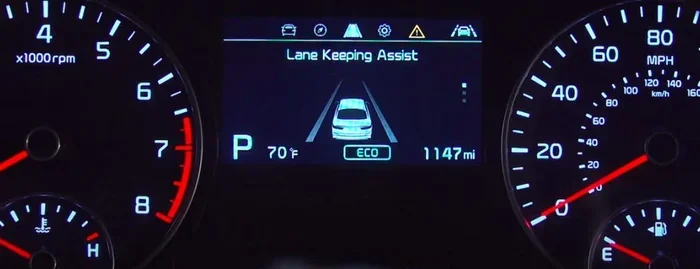
- Lane Keeping Assist: Actively steers the car back into the lane when you start to drift.
- Lane Centering: Keeps the car centered in the lane at all times, often used with adaptive cruise control for a near hands-free driving experience on highways.
- Road Departure Mitigation: Goes a step further by applying brakes or steering input to prevent you from leaving the road entirely.
Understanding which type your car has is important. It affects how and when you might want to turn off lane assist.
Can You Turn Off Lane Assist
Can lane assist be turned off? Yes, in the vast majority of vehicles. Automakers know that drivers have different preferences and needs. That is why they build in an easy way to disable the system when needed.
How to Disable Lane Assist in Popular Cars
The process varies by brand and model, but here are the general steps for some popular automakers:
- Toyota and Lexus: Look for a lane assist button on the steering wheel. Press and hold it for a few seconds to toggle the system off. You can also find the setting in the infotainment menu under driver assistance.
- Honda and Acura: Press the lane keep button on the left side of the steering column. The system will beep once to confirm it is off.
- Ford: Use the steering wheel controls to access the driver assistance menu. Select lane keeping and choose to turn it off or adjust its sensitivity.
- Chevrolet and GMC: Find the lane keep button on the instrument cluster or steering wheel. A quick press toggles it off.
- BMW: Go to the iDrive menu, select Driver Assistance, and toggle lane departure warning or lane departure prevention off.
- Tesla: Tap the steering wheel icon on the touchscreen and select Autopilot settings. You can turn off lane centering or the entire Autopilot system.
Always check your vehicle owner manual for the exact steps. The button or menu location can differ even between model years of the same car.
When You Might Want to Turn It Off
There are several valid reasons to disable lane assist. Here are some common scenarios:
- Unpaved or gravel roads: The camera cannot read road markings on dirt or gravel. The system may give false alerts or try to correct steering unnecessarily.
- Construction zones: Temporary lane lines and cones can confuse the system. It may steer you in the wrong direction.
- Heavy snow or rain: Poor weather can obscure lane lines, causing the system to malfunction or overcorrect.
- Parking and low-speed maneuvers: You do not need lane assist when parallel parking or navigating tight parking lots.
- Driver fatigue: Ironically, some drivers feel over-reliant on hands-free driving features. Turning them off can keep you more engaged.
- Custom driving preferences: Some drivers simply prefer to steer manually and do not want any assistance.
Is It Safe to Drive Without Lane Assist
Turning off lane assist does not make your car unsafe. The system is a helper, not a replacement for attentive driving. However, there are trade-offs to consider.
Risks of Driving with Lane Assist Off
When you disable lane assist, you take on the full responsibility of staying in your lane. This is especially important on long highway drives where driver fatigue can set in. Without the system’s gentle nudges, you may drift out of the lane without realizing it.
Lane departure crashes are a leading cause of highway accidents. According to the National Highway Traffic Safety Administration, lane departure crashes account for thousands of fatalities each year. The lane assist system is designed to reduce this risk.
When Lane Assist Helps Most
The lane assist system shines in specific situations:
- Highway driving: Long stretches of highway with clear lane markings are where lane assist works best. It reduces steering effort and helps prevent fatigue-related drift.
- Monotonous road conditions: Straight, boring highways can lull drivers into inattention. Lane assist helps keep you alert and on track.
- Driver fatigue: If you are tired, lane assist can be a literal lifesaver. It keeps the car in the lane even when your attention wavers.
- Distracted driving moments: We all glance at our phones or adjust the radio for a split second. Lane assist helps cover those brief lapses.
The key takeaway is that lane assist is most beneficial when the conditions are favorable and you are on well-marked roads. In those situations, keeping it on adds a strong safety net.
Common Problems with Lane Assist Systems
Lane assist systems are not perfect. They can malfunction, give false alerts, or behave unexpectedly. Understanding these issues helps you troubleshoot effectively.
Why Lane Assist Keeps Beeping
If your car keeps beeping and the lane assist light is on, it usually means the system cannot see the lane lines clearly. Common causes include:
- Faded or worn road markings
- Heavy rain, snow, or fog obscuring the camera view
- A dirty or obstructed camera lens near the rearview mirror
- Sharp curves that exceed the system’s operating speed
- Lane lines that are too close together or too far apart
In most cases, a quick wipe of the camera lens or a wait for the weather to clear solves the problem. If the beeping continues, check your owner manual for the specific error code.
False Alerts and How to Fix Them
False lane departure alerts can be annoying. Here are some tips to reduce them:
- Keep the camera clean: A dirty camera lens is the number one cause of false alerts. Wipe it gently with a soft cloth.
- Check for software updates: Many automakers release updates that improve lane detection accuracy.
- Adjust sensitivity: Some vehicles let you adjust how sensitive the system is. Lower sensitivity means fewer false alerts.
- Replace worn wiper blades: Poor visibility from streaky wipers can confuse the camera.
Expert Tip: According to automotive engineers, keeping the forward-facing camera clean and unobstructed is the single most important thing you can do to maintain accurate lane assist performance. A quick wipe during your gas station visit can make a big difference.
Lane Assist vs Other Driver Assistance Features
Lane assist is just one part of a broader driver assistance ecosystem. Understanding how it compares to other features helps you use your car’s technology more effectively.
| Feature | What It Does | Can It Be Turned Off? | Best Used For |
|---|---|---|---|
| Lane Assist | Keeps the car centered in the lane | Yes, in most vehicles | Highway driving, long trips |
| Adaptive Cruise Control | Maintains safe following distance | Yes, usually with a button | Highway traffic, road trips |
| Blind Spot Monitoring | Alerts you to vehicles in blind spots | Yes, in most vehicles | Lane changing, merging |
| Automatic Emergency Braking | Applies brakes to avoid collisions | Sometimes, varies by brand | All driving conditions |
| Driver Monitoring | Detects drowsiness or distraction | Rarely, some models allow it | Long drives, fatigue prevention |
Each of these features serves a different purpose. You can often turn them off independently, but it is important to understand what each one does before you disable it. For example, turning off lane assist does not turn off blind spot monitoring. They work separately.
Expert Tips for Using Lane Assist
Getting the most out of your lane assist system is about more than just turning it on and off. Here are some expert tips to help you use it effectively.
Quick Tips
- Clean the camera regularly: The lane assist camera is usually near the rearview mirror. A quick wipe keeps it working accurately.
- Use turn signals: The system expects you to use your turn signal before changing lanes. Without it, you may get false alerts.
- Keep your hands on the wheel: Even if your car has hands-free driving capabilities, most systems require you to keep your hands on the steering wheel. Letting go for too long triggers warnings.
- Adjust the sensitivity: If your car allows it, find a sensitivity level that balances alerts with comfort.
- Update your software: Automakers regularly improve lane detection through software updates. Keep your system current.
Common Mistakes
Here are some mistakes drivers make with lane assist:
- Assuming it works in all conditions: Lane assist struggles on unpaved roads, in heavy snow, and in construction zones. Do not rely on it when visibility is poor.
- Over-relying on the system: Lane assist is a helper, not an autopilot. You should always be ready to take control.
- Ignoring warning lights: If the lane assist light stays on or flashes, something is wrong. Check the camera and system settings.
- Not reading the owner manual: Every car is different. The manual tells you exactly how your system works and how to adjust it.
Expert Insight: Automotive safety experts recommend keeping lane assist enabled for the vast majority of your driving. The system is designed to reduce driver fatigue and prevent lane departure accidents. Only turn it off when you have a specific reason, and turn it back on as soon as conditions improve.
The Future of Lane Assist Technology
Lane assist technology is evolving rapidly. Automakers are constantly improving cameras, sensors, and software to make these systems more reliable and intuitive. Here is what the future holds.
Next-generation systems use higher-resolution cameras and more powerful processors. They can read faded lane markings, detect temporary construction lines, and even predict lane changes before they happen. Some automakers are working on systems that work reliably in heavy rain and snow, addressing one of the biggest current limitations.
As autonomous driving technology advances, lane assist will play a bigger role. It is already a core component of Level 2 and Level 3 driver assistance systems. While fully self-driving cars are still years away, lane assist is a critical stepping stone toward that future.
For now, the best thing you can do is understand your current system. Know how to turn it on, turn it off, and troubleshoot common issues. This knowledge gives you confidence and control every time you get behind the wheel.
Conclusion
Can lane assist be turned off? Absolutely. Whether you want to disable it for a stretch of gravel road, a snowy highway, or simply because you prefer to steer manually, the option is there in nearly every modern vehicle. The key is knowing how and when to use it wisely.
Lane assist is a powerful safety feature that can help prevent lane departure crashes and reduce driver fatigue on long trips. But it is not perfect. It struggles in poor weather, on faded roads, and in complex driving environments. Understanding its limitations helps you use it effectively.
Take the time to learn your specific vehicle’s system. Read the owner manual, experiment with the settings, and find the balance that works for you. Driver assistance features like lane assist are tools. They work best when you use them thoughtfully and stay engaged behind the wheel.
Stay safe, stay informed, and enjoy the ride. Your car has your back, but you are still the driver.
Frequently Asked Questions
Can you turn off lane assist permanently?
Yes, in most vehicles you can turn off lane assist permanently through the infotainment settings or a steering wheel button. However, some cars reset the setting each time you start the engine. Check your owner manual to see how your specific model handles this.
Does turning off lane assist affect other safety features?
No, turning off lane assist does not disable other safety features like automatic emergency braking or blind spot monitoring. These systems work independently of each other. You can have lane assist off while still benefiting from other active safety systems.
Why does lane assist keep turning itself back on?
Some vehicles automatically re-enable lane assist every time you start the engine. This is a factory default setting. You can usually change this in the driver assistance settings menu so it stays off between drives.
Is it legal to drive with lane assist turned off?
Yes, it is completely legal to drive with lane assist turned off in all 50 states. The system is a convenience and safety aid, not a requirement. You are still responsible for maintaining control of your vehicle at all times.
Can a dirty camera cause lane assist to malfunction?
Yes, a dirty or obstructed camera lens is one of the most common causes of lane assist malfunctions. Snow, mud, or even a sticky bug on the camera near the rearview mirror can block its view and cause false alerts or system shutdown.
What should I do if lane assist is not working properly?
First, check that the camera lens is clean and unobstructed. If that does not fix the issue, try restarting the vehicle. If problems persist, consult your owner manual or visit a certified service center. Software updates may also resolve persistent issues.