Do You Have to Pay for Toyota Navigation Subscription
So, do you have to pay for Toyota Navigation Subscription? The answer depends on your vehicle model and how long you’ve owned it. Many newer Toyotas include a free trial period, but ongoing map updates and live traffic features require a paid plan. This guide breaks down the Toyota Navigation Subscription cost, what you get, and how to avoid common pitfalls. By the end, you’ll know exactly whether you need to pay and how to save money.
If you own a Toyota, you might wonder do you have to pay for Toyota Navigation Subscription. The short answer is: it depends on your model and how long you’ve owned the vehicle. Many newer Toyota models come with a free trial, but ongoing map updates and live traffic features require a paid plan. This guide breaks down the Toyota Navigation Subscription cost, what you get, and how to avoid common mistakes. By the end, you’ll know exactly whether you need to pay and how to save money.
Toyota has been a leader in vehicle telematics for years. Their navigation systems offer smooth voice recognition, 3D landmarks, and points of interest. But the question of whether you must pay for these features confuses many owners. Let’s clear that up. We’ll walk through every plan, every cost, and every option. You’ll also learn quick tips to keep your GPS running without breaking the bank.
- Free trials exist: Most Toyota models offer a 3-year or 5-year trial with basic navigation features.
- Paid plans unlock live traffic: You need a subscription for real-time routing, map updates, and destination search.
- Cost varies by plan: Monthly rates range from $5 to $10, or you can choose annual plans for savings.
- You can cancel anytime: Managing your subscription is simple through the Toyota app or your dealer.
- Bundled offers save money: Check if your ToyotaCare package or infotainment upgrade includes navigation.
- Aftermarket options exist: Smartphone apps like Google Maps or Apple CarPlay can replace paid Toyota navigation.
📑 Table of Contents
- What Is the Toyota Navigation Subscription?
- How Much Does Toyota Navigation Cost?
- What Features Do You Get with a Paid Subscription?
- Can You Use Toyota Navigation Without Paying?
- How to Cancel or Manage Your Toyota Navigation Subscription
- Expert Tips to Save Money on Navigation
- Final Thoughts: Should You Pay for Toyota Navigation?
What Is the Toyota Navigation Subscription?
Understanding Your Toyota GPS System
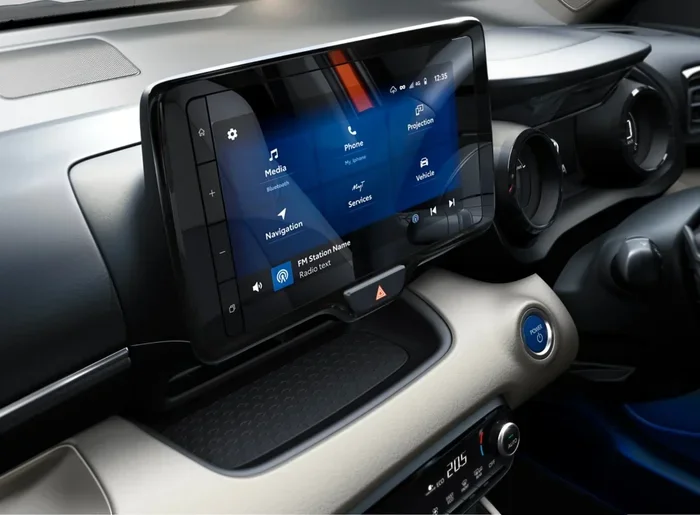
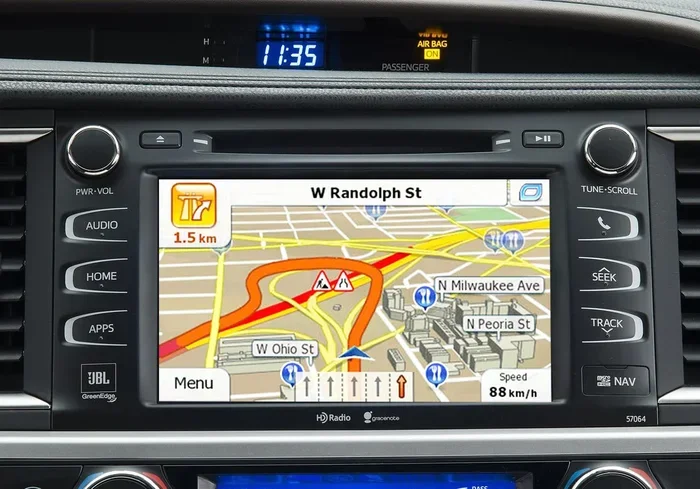
Toyota’s navigation system is a built-in infotainment feature. It uses a GPS antenna to pinpoint your location. The system displays maps, routes, and traffic data on the center screen. Over the years, Toyota has refined this system to include smartphone integration, Apple CarPlay, and Android Auto. These features make the Toyota GPS experience feel modern and connected.
The navigation system is part of Toyota’s connected services. These services include remote start, Wi-Fi hotspot, and premium audio. However, not all features are free forever. Toyota divides them into a free tier and a subscription tier. The subscription tier unlocks advanced features like live traffic and map updates.
How the Subscription Model Works
When you buy a new Toyota, you often get a trial period. This trial gives you full access to the navigation system. After the trial ends, you must pay a Toyota Navigation Subscription fee to keep those features. The subscription model is similar to what you see with other car brands. You pay a monthly or annual fee to access premium services.
The subscription cost varies by plan and region. Toyota offers different packages for different needs. Some plans focus on map updates, while others include live traffic and destination search. You can choose the plan that fits your driving habits. The key is understanding what you actually need from your navigation system.
How Much Does Toyota Navigation Cost?
Free vs. Paid Plans
Toyota offers a clear split between free and paid features. The free tier includes basic map display, static routing, and a limited number of points of interest. You can still find addresses and plot routes without paying. However, you won’t get real-time traffic updates or map changes. The paid tier unlocks live traffic, automatic map updates, and enhanced destination search.
The free trial period typically lasts 3 to 5 years, depending on your model. After the trial, the system will prompt you to subscribe. If you ignore the prompt, you’ll lose access to the premium features. Your basic navigation will still work, but it won’t be as smart or up-to-date.
Pricing Breakdown by Model Year
The subscription cost for Toyota navigation has changed over the years. Here is a general breakdown of what you can expect:
- Basic Plan: Around $5 per month or $50 per year. This covers map updates and a few premium points of interest.
- Standard Plan: Around $8 per month or $80 per year. This adds live traffic, real-time routing, and destination search.
- Premium Plan: Around $10 per month or $100 per year. This includes all features, Wi-Fi hotspot access, and premium audio.
Prices may vary based on your location and dealer. Always check with your local Toyota dealer for the most accurate quote. Some plans also require a one-time activation fee. Keep an eye out for bundled offers that waive this fee.
| Feature | Free Tier | Paid Tier |
|---|---|---|
| Static Map Display | Yes | Yes |
| Basic Routing | Yes | Yes |
| Live Traffic Updates | No | Yes |
| Map Updates | No | Yes |
| Destination Search | Limited | Full |
| Points of Interest | Basic | Premium |
| 3D Landmarks | No | Yes |
| Voice Recognition | Basic | Advanced |
| Wi-Fi Hotspot | No | Yes |
What Features Do You Get with a Paid Subscription?
Live Traffic and Real-Time Routing
The biggest reason people pay for Toyota Navigation Subscription is live traffic. This feature uses real-time data to reroute you around jams. It saves time and reduces stress during your daily commute. Without it, you follow a static route that might lead you into a traffic jam. The system also estimates arrival time more accurately with live traffic data.
Real-time routing adjusts your path on the fly. If an accident blocks your route, the system finds a new way. This is especially useful in busy cities like Los Angeles or New York. The Toyota GPS antenna connects to cellular networks to pull this data. That’s why a subscription is required for this feature.
Destination Search and Points of Interest
A paid subscription expands your destination search capabilities. You can search for restaurants, gas stations, and hotels by name or category. The system shows ratings, hours, and phone numbers for these places. This is powered by a database of points of interest that updates regularly. The free tier only shows a limited set of popular locations.
With a paid plan, you can also save favorite destinations. The system learns your habits and suggests places you visit often. This is part of Toyota’s vehicle telematics. It makes the infotainment system feel personalized and smart.
Premium Audio and Wi-Fi Hotspot
Some paid plans bundle navigation with premium audio and Wi-Fi hotspot. The premium audio feature enhances sound quality for music and podcasts. The Wi-Fi hotspot turns your car into a mobile internet hub. You can connect multiple devices and stream content on the road.
These features are part of Toyota’s connected services. They rely on a built-in modem and data plan. The subscription cost for these add-ons is usually higher than the basic plan. But if you travel often or have a family, the convenience is worth it.
Can You Use Toyota Navigation Without Paying?
The Free Trial Period
Yes, you can use Toyota navigation without paying for a limited time. Most new Toyotas come with a free trial that lasts 3 to 5 years. During this period, you get full access to all premium features. This includes live traffic, map updates, and destination search. The trial is a great way to test the system before committing to a Toyota Navigation Subscription.
The trial period starts when you first activate the system. It’s tied to your vehicle’s identification number. You don’t need to enter a credit card to start the trial. However, the system will remind you as the trial end date approaches. Make sure to check your trial status in the Toyota app.
Limited Access After the Trial
Once the trial ends, you lose access to the premium features. The system reverts to the free tier. You can still see the map and plot basic routes. But you won’t get live traffic, map updates, or 3D landmarks. The navigation will feel outdated over time because the maps won’t refresh.
Some owners choose to stay on the free tier. They use their smartphones for navigation instead. This is a valid option if you don’t need real-time traffic. The navigation system still works as a display for phone apps like Google Maps or Apple CarPlay. You can mirror your phone screen on the Toyota infotainment display.
How to Cancel or Manage Your Toyota Navigation Subscription
Step-by-Step Cancellation Guide
If you decide the Toyota Navigation Subscription isn’t worth it, canceling is straightforward. You have a few options:
- Through the Toyota App: Open the app, go to your vehicle settings, and select “Connected Services.” Find the navigation subscription and tap “Cancel.”
- Through Your Dealer: Call your local Toyota dealer and ask them to cancel the subscription. They can do it over the phone or in person.
- Online Portal: Log in to your Toyota account on the website. Navigate to the subscription management section and follow the prompts.
Your cancellation takes effect at the end of the billing cycle. You’ll still have access to paid features until that date. After that, the system reverts to the free tier.
Common Mistakes to Avoid
Many owners make mistakes when managing their navigation subscription. Here are a few to watch out for:
- Ignoring trial reminders: If you don’t cancel before the trial ends, you’ll be charged automatically.
- Not checking bundled offers: Some ToyotaCare packages include navigation for free. You might already have it covered.
- Forgetting to update payment info: If your card expires, the subscription lapses and you lose features.
- Assuming all Toyotas are the same: Older models may have different subscription terms than newer ones.
Expert Tips to Save Money on Navigation
Bundled Offers and ToyotaCare
The best way to save money is to look for bundled offers. Toyota often runs promotions that include navigation for free with a new purchase. If you’re buying a used Toyota, check the vehicle history for any remaining trial or subscription. Some dealers offer discounted annual plans if you pay upfront.
ToyotaCare is a maintenance package that sometimes includes connected services. If you have ToyotaCare, ask your dealer if navigation is covered. This can save you $100 or more per year. The subscription cost can add up, so any discount helps.
Third-Party Navigation Alternatives
You don’t have to rely solely on Toyota’s system. Smartphone apps like Google Maps, Waze, and Apple Maps offer excellent navigation. They provide live traffic, voice guidance, and points of interest. You can use Apple CarPlay or Android Auto to mirror these apps on your Toyota’s screen.
Aftermarket navigation units are another option. These are standalone GPS devices you can mount on your dashboard. They don’t require a subscription and often have more features than the factory system. If you’re handy with tech, an aftermarket GPS antenna and unit can replace the need for a paid subscription entirely.
Quick Tips to Keep Your Navigation Running Smoothly
- Check your subscription status in the Toyota app every 6 months.
- Turn off live traffic if you don’t need it to save data.
- Use Wi-Fi at home to download map updates instead of cellular data.
- Restart your infotainment system once a month to clear glitches.
- Keep your vehicle’s software updated through the dealer.
Expert Insights
“Many Toyota owners don’t realize they can use their phone for navigation and still use the car’s audio system. You get the best of both worlds without paying for a subscription.” — Automotive Tech Expert
This insight highlights a practical workaround. If you drive a Toyota with Apple CarPlay or Android Auto, you can rely on your phone’s GPS. The car’s speakers and microphone handle calls and audio. This eliminates the need for a paid Toyota Navigation Subscription in many cases.
Final Thoughts: Should You Pay for Toyota Navigation?
The decision to pay for a Toyota Navigation Subscription comes down to your driving habits. If you rely on live traffic and up-to-date maps, the subscription is worth it. It makes your daily commute smoother and your road trips more efficient. The subscription cost is reasonable for what you get, especially if you bundle it with other services.
On the other hand, if you only need basic directions, the free tier is enough. You can also use your smartphone as a backup. Toyota’s system is great, but it’s not the only option. Weigh your needs, check your trial status, and choose the plan that fits your budget.
Remember, you’re never locked in. You can cancel anytime and switch to a different solution. The Toyota GPS system gives you flexibility. Use it wisely, and you’ll enjoy the road ahead without overspending.
Frequently Asked Questions
Do all Toyota models include a free navigation trial?
Most newer Toyota models come with a free trial period, usually lasting 3 to 5 years. However, older models or base trims may not include this trial. Always check your specific vehicle’s connected services details in the owner’s manual or the Toyota app.
Can I use Apple CarPlay instead of paying for Toyota Navigation?
Yes, if your Toyota supports Apple CarPlay or Android Auto, you can mirror your phone’s navigation app on the car’s screen. This gives you access to Google Maps, Waze, or Apple Maps without a subscription. You’ll still use the car’s speakers and microphone for a seamless experience.
What happens if I don’t pay for the subscription after the trial?
Your navigation system will revert to the free tier. You’ll still see the map and plot basic routes, but you’ll lose live traffic, map updates, and 3D landmarks. The system will prompt you to subscribe when you try to access premium features.
Is the Toyota Navigation Subscription cost tax-deductible?
In most cases, no. The subscription is considered a personal convenience feature. However, if you use the vehicle exclusively for business, you may be able to deduct it as a business expense. Consult a tax professional for advice specific to your situation.
Can I transfer my navigation subscription to a new Toyota?
Toyota does not currently allow you to transfer a navigation subscription to a new vehicle. The subscription is tied to the original vehicle’s identification number. When you buy a new Toyota, you’ll start a new trial or purchase a new subscription.
Are there any hidden fees with the Toyota Navigation Subscription?
Toyota is transparent about its pricing, but watch for one-time activation fees on some plans. Also, if you use the Wi-Fi hotspot feature, it counts against your data plan if you don’t have an unlimited data package. Always read the full terms before signing up.