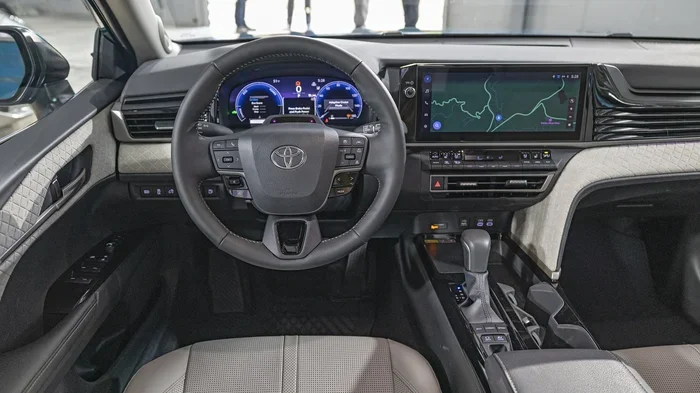
How Do I Know If My Toyota Needs a Software Update
Your Toyota might need a software update if you notice warning lights, slow infotainment, or strange alerts. Keeping your car’s software current ensures safety features work properly and the system runs smoothly. Here’s how to check for a Toyota software update and what to do next.
Your Toyota is more than just a car. It is a smart machine that runs on software. Just like your phone, it needs updates to stay sharp and safe. So how do you know if your Toyota needs a Toyota software update? You might see a light on the dash, or the screen might feel slow. These small signs matter a lot.
A car software update can fix bugs, improve fuel economy, and add new features. It keeps your safety systems working right. Many drivers ignore these updates until something goes wrong. That is a mistake. In this guide, we will show you the clear signs your Toyota needs an update. We will also walk you through the simple steps to check and install one. You will learn how to use the Toyota App, what to expect during the process, and when to visit a dealer. Let us keep your Toyota running at its best.
Key Takeaways
- Dashboard warning lights: These often signal that a software update is needed.
- Toyota App: You can scan for updates right from your phone.
- Infotainment lag: Slow response times are a common sign of outdated software.
- Two update paths: You can update at home or visit a Toyota dealer.
- Safety first: Updates improve driver-assist features and fix bugs.
- Don’t ignore recalls: A software update can address serious safety issues.
- Regular checks: Make it a habit to look for updates every few months.
📑 Table of Contents
- Why Your Toyota Needs Regular Software Updates
- 5 Clear Signs Your Toyota Needs a Software Update
- How to Check for a Toyota Software Update
- Toyota Software Update Methods: DIY vs Dealer
- What Happens During a Toyota Software Update
- Common Mistakes and Expert Tips
- When to Visit a Dealer for a Toyota Software Update
Why Your Toyota Needs Regular Software Updates
Software controls almost everything in a modern Toyota. It manages the engine, the brakes, and the infotainment screen. A Toyota software update keeps all of these systems in top shape. Toyota releases updates to fix problems and improve performance. These updates are like patches for a computer. They close security gaps and smooth out glitches.
When you skip an update, your car may not run as well. You might miss out on new features. More importantly, you could miss a safety fix. Toyota uses software updates to address recalls and technical service bulletins. A simple update can keep you and your family safe on the road. It is one of the easiest ways to care for your vehicle.
What a Software Update Actually Does
A vehicle software update rewrites or refreshes the code in your car’s computers. These computers are called electronic control units. They handle tasks like steering assist, collision warnings, and audio playback. The update sends new instructions to these units. Think of it like a recipe update for your car’s brain. It changes how things work for the better.
Some updates are small and quick. They might just fix a bug in the Toyota infotainment system. Others are larger and can add new driver-assist features. Toyota calls some of these over-the-air updates. They download wirelessly to your car. You do not always need to visit a dealer. A Toyota connected services subscription often enables this feature.
Safety and Performance Benefits
The biggest reason to update your Toyota is safety. Software updates can improve Toyota Safety Sense features. These include pre-collision braking, lane departure alert, and adaptive cruise control. An update might make these systems more sensitive or more reliable. It can also fix a glitch that causes false alerts.
Performance benefits are also real. Updates can optimize fuel injection timing. They can improve how the transmission shifts gears. Some owners report smoother acceleration after an update. Your car’s battery management system can also get a boost. This is especially true for hybrid and electric Toyota models. A car software update keeps your Toyota efficient and responsive.
5 Clear Signs Your Toyota Needs a Software Update
How do you know when to look for an update? Your Toyota will often give you clues. Here are five clear signs that a Toyota software update is needed.
Dashboard Warning Lights
A yellow or red light on the dash is never a good sign. It could mean a software issue. The check engine light sometimes appears when the software is out of date. Toyota has a specific indicator for software updates in some models. If you see a message that says “Update Available,” do not ignore it. Pull over safely and check the Toyota App or visit a dealer.
Infotainment System Lagging
Your infotainment screen controls the radio, navigation, and phone calls. If it takes forever to start, a software update might help. Slow menus, frozen screens, and unresponsive buttons are common signs. The system might also reboot randomly. These issues often come from outdated firmware. A simple update can make the screen fast and smooth again.
Unexpected Error Messages
Do you see pop-up messages that you have never seen before? Maybe the screen says “System Error” or “Connection Lost.” These errors can point to a software bug. Toyota releases updates to fix these exact problems. An error message that pops up often is a strong signal. It means your car is asking for a Toyota system update.
Connectivity Issues
Modern Toyotas connect to your phone and the internet. If your Bluetooth keeps dropping, the update might be the fix. Poor Wi-Fi reception in the car or a failure to pair with your phone can also be a sign. Your Toyota connected services might stop working too. A car software update often restores these connections and adds new features.
Recalls and Technical Notices
Toyota issues recalls for safety problems. Many recalls today are fixed with a software update. You will get a notice from Toyota or your dealer. Do not wait on this. A Toyota software update can resolve a recall quickly and for free. It is one of the most important reasons to keep your software current.
How to Check for a Toyota Software Update
Checking for an update is easier than you think. You have a few options. You can do it yourself or let a professional handle it. Here is how to check for a Toyota software update in three simple ways.
Using the Toyota App
The Toyota App is a great tool for owners. It lets you connect to your car from your phone. First, download the app and create an account. Link your vehicle using the VIN. The app will show you the current software version. It will also tell you if an update is available. You can often start the update right from the app if your car supports it. This is the fastest way to check for a Toyota software update.
Checking Through the Infotainment System
You can also check directly in the car. Turn on the infotainment screen. Look for a “Settings” or “System” menu. Find the “Software Update” or “About” section. The screen will show the current version and any available updates. Some models let you download and install the update right there. Make sure your car is parked safely and connected to Wi-Fi if possible. A Toyota multimedia update can take a few minutes, so be patient.
Visiting a Toyota Dealer
If you are not comfortable with the app or the screen, visit a dealer. Toyota technicians can check your software for free. They have the latest tools and knowledge. They will connect your car to their system and scan for updates. If an update is needed, they can install it while you wait. This is a great option for older models or complex updates. A Toyota dealer software update ensures everything is done correctly.
Toyota Software Update Methods: DIY vs Dealer
You have two main ways to update your Toyota. You can do it yourself at home, or you can go to a dealer. Both methods have their pros and cons. Here is a quick comparison to help you decide.
| Update Method | Best For | Time Required | Cost | Difficulty |
|---|---|---|---|---|
| DIY via Toyota App | Newer models with connected services | 15–30 minutes | Free | Easy |
| DIY via Infotainment System | Models with built-in update feature | 20–45 minutes | Free | Moderate |
| Dealer Visit | Older models or complex updates | 1–2 hours | Free (for updates) | Very Easy |
| Over-the-Air (OTA) Update | Supported models with Wi-Fi | 10–20 minutes | Free | Very Easy |
Most owners can handle a DIY update if their car supports it. The Toyota App guides you through each step. Just make sure your car is in park and the engine is off. If you are unsure, a dealer visit is always a safe choice. They will also check for any open recalls. A Toyota software update at the dealer often includes a full system check.
What Happens During a Toyota Software Update
Knowing what to expect can ease any worries. A Toyota software update is a straightforward process. Here is a step-by-step look at what happens.
The Update Process Step by Step
- Download: Your car receives the update file from Toyota’s servers. This can happen via Wi-Fi or a dealer connection.
- Verify: The system checks the file for errors and compatibility.
- Install: The new software is written to the control units. Your car will restart one or more times.
- Confirm: The system confirms the update is complete and shows the new version number.
During the install, your car’s screens may go dark. This is normal. Do not turn off the engine or disconnect the battery. The update needs uninterrupted power. A vehicle software update usually takes between 15 and 45 minutes. Larger updates can take a bit longer.
How Long Does It Take?
The time depends on the size of the update. A small infotainment patch might take just 10 minutes. A larger safety update can take up to an hour. You will see a progress bar on the screen. Some updates require the car to be stationary for the entire process. Plan to update when you are not in a rush. A weekend morning is a great time for a Toyota software update.
Common Mistakes and Expert Tips
Even simple updates can have pitfalls. Avoid these common mistakes and follow our expert tips for a smooth experience.
Quick Tips for a Smooth Update
- Check your battery: Make sure your car has at least a 50% charge. A low battery can interrupt the update.
- Stay connected: Use a strong Wi-Fi signal for downloads. A weak connection can corrupt the file.
- Park safely: Only update when your car is parked in a safe, flat spot.
- Read the release notes: Toyota often lists what the update fixes. This helps you know what to expect.
- Back up your settings: Some infotainment systems let you save your presets. Do this before a major update.
Common Mistakes to Avoid
- Ignoring warning lights: A dashboard light is your car speaking to you. Do not dismiss it.
- Interrupting the update: Turning off the car during an update can cause serious issues. Wait until it is fully complete.
- Using a phone hotspot for large updates: Hotspots can be slow and unstable. Use home Wi-Fi when possible.
- Skipping recalls: A recall update is critical. It addresses safety defects. Never skip one.
- Assuming all updates are the same: Some updates are small patches. Others are major firmware upgrades. Treat each with care.
Expert Insight: The Importance of Timely Updates
“A Toyota software update is not just a nice-to-have. It is a key part of vehicle maintenance,” says a certified Toyota technician. “We see cars come in with glitches that a simple update would fix. Keeping software current saves owners time and money. It also keeps safety systems working exactly as designed.” He recommends checking for updates every 3 to 6 months. A quick Toyota software update can prevent bigger problems down the road.
When to Visit a Dealer for a Toyota Software Update
Not every update is a DIY job. Some situations require a visit to the dealer. If your car does not support connected updates, you will need a dealer. Older models often rely on dealer tools for software flashes. If you see a recall notice, the dealer will handle it for free. They have the exact software your car needs.
Also, if an update fails, a dealer can fix it. They have diagnostic tools that can reset the system. A Toyota dealer software update ensures the job is done right. Do not hesitate to call your local dealer if you are unsure. They are there to help you keep your Toyota in top shape.
Regular Toyota software updates keep your car safe, efficient, and modern. They are a simple part of owning a smart vehicle. Make it a habit to check for updates. Your Toyota will reward you with smooth performance and peace of mind. Start today by opening the Toyota App or checking your infotainment screen. A few minutes now can save you hours of trouble later.
Frequently Asked Questions
How often should I check for a Toyota software update?
You should check every 3 to 6 months. New updates come out regularly. Checking often ensures you never miss a safety fix or a new feature. The Toyota App makes this easy by sending you alerts.
Can I drive my car while a software update is installing?
No. You must park the car safely and let the update finish. Driving during an update can corrupt the software. Wait until the screen shows the update is complete and the car restarts normally.
Is a Toyota software update free?
Yes. All software updates from Toyota are free. This includes updates for recalls and technical notices. You only pay if you visit a dealer and they charge for labor, but many updates take just a few minutes.
What happens if my Toyota software update fails?
Do not panic. Try restarting the car and running the update again. If it still fails, contact a Toyota dealer. They can use their tools to fix the issue and complete the update safely.
Do all Toyota models support over-the-air updates?
No. Only newer models with connected services support OTA updates. Older models usually need a dealer visit. Check your owner’s manual or use the Toyota App to see if your car has this feature.
Will a software update delete my saved data?
Most updates do not delete your data. However, it is a good idea to back up your presets and saved locations. The infotainment system often has a backup option in the settings menu.
=== CONCLUSION ===
A Toyota software update is one of the simplest ways to keep your car running well. It boosts safety, fixes bugs, and adds new features. You now know the five clear signs your Toyota needs an update. You also know how to check using the App, the infotainment screen, or a dealer visit. Remember the quick tips to avoid common mistakes. Keep your battery charged and your Wi-Fi strong. Make updating a regular part of your car care routine. Your Toyota will stay safe, smart, and ready for the road ahead.