How Do I Unregister My Phone From Toyota Step By Step
Unregistering your phone from Toyota is a simple process that anyone can do at home. Whether you are selling your car, switching phones, or just want a clean Bluetooth connection, this guide walks you through every step. You will learn how to disconnect devices from the Toyota infotainment system, remove paired phones, and reset your Toyota Bluetooth settings in minutes.
Have you ever wondered how do I unregister my phone from Toyota? Maybe you are selling your car, upgrading to a new phone, or just tired of seeing an old device pop up on your screen. Whatever the reason, removing a phone from your Toyota is easier than you think.
Many Toyota owners struggle with the Bluetooth settings and feel stuck. The good news is that you do not need a mechanic or a dealer visit. With a few simple taps on your touchscreen, you can disconnect and remove any paired device. This guide gives you a clear, step-by-step path to do it yourself.
In this article, we cover everything you need to know. From basic Bluetooth disconnect steps to full system resets, you will find all the answers right here. Let us get started and help you clean up your Toyota phone connections.
Key Takeaways
- Easy Process: Unregistering your phone from Toyota takes just a few minutes using the touchscreen or voice controls.
- Multiple Methods: You can disconnect via Bluetooth settings, the audio system menu, or a factory reset if needed.
- No Dealer Required: You do not need to visit a Toyota dealer to remove paired devices from your vehicle.
- Saves Time: Properly unregistering your old phone prevents connection conflicts with your new device.
- Privacy Safe: Removing your phone ensures your contacts and call logs are not stored in the Toyota system.
- Works for All Models: The steps apply to most Toyota models with Bluetooth or Entune connectivity.
📑 Table of Contents
- Why You Might Need to Unregister Your Phone From Toyota
- How Do I Unregister My Phone From Toyota: Step-by-Step Guide
- Toyota Model-Specific Instructions
- Quick Tips for a Smooth Unregistration Process
- Common Mistakes to Avoid When Unregistering Your Phone
- Expert Insights on Toyota Phone Management
- What Happens After You Unregister Your Phone From Toyota
- Can You Unregister Your Phone Remotely?
- How to Prevent Connection Issues in the Future
- Conclusion
Why You Might Need to Unregister Your Phone From Toyota
There are several reasons why you would want to remove a phone from your Toyota vehicle. Understanding these reasons can help you decide the best approach for your situation.
Selling or Trading In Your Vehicle
If you are selling your Toyota, you should always unregister all paired phones. This protects your personal data and gives the next owner a clean slate. You do not want your contacts, call history, or music playlists sitting in someone else’s car.
Switching to a New Phone
Upgrading to a new smartphone is another common reason. When you pair a new phone, the old one can sometimes cause connection issues. Removing the old device first ensures a smooth pairing process with your new phone.
Resolving Bluetooth Connection Problems
Sometimes, a paired phone causes glitches in the Toyota infotainment system. If your audio keeps cutting out or the phone book will not load, unregistering and re-pairing can fix the problem. This simple step often solves many Toyota Bluetooth issues.
Removing a Shared or Borrowed Phone
Maybe a friend or family member paired their phone in your Toyota. Once they no longer need access, you should remove their device. This keeps your system organized and secure.
How Do I Unregister My Phone From Toyota: Step-by-Step Guide
The process to unregister your phone from Toyota depends on your model year and infotainment system. Most newer Toyotas use a touchscreen interface, while older models may have physical buttons. Below, we cover the most common methods.
Method 1: Disconnect via Bluetooth Settings (Most Toyota Models)
This is the most common way to remove a paired phone. Follow these steps carefully:
- Start your Toyota and press the “Setup” or “Settings” button on the touchscreen.
- Navigate to “Bluetooth” or “Phone Settings.” You may need to scroll through the menu.
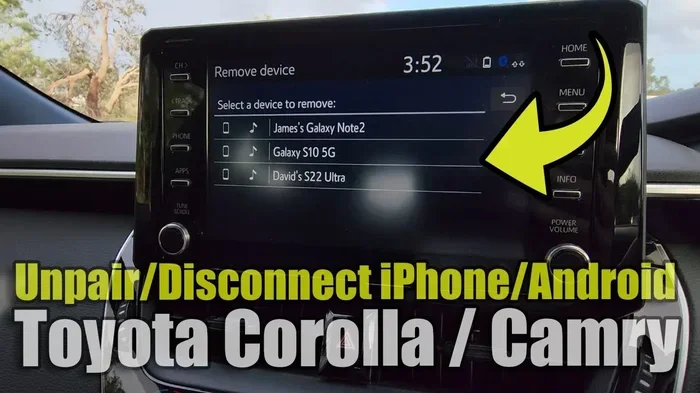
- Find the paired device list. This shows all phones currently connected to your Toyota.
- Select the phone you want to unregister.
- Choose “Delete Device” or “Unpair.” Confirm your choice when prompted.
- Repeat for any other phones you want to remove.
That is it. Your phone is now unregistered from the Toyota system. The device will no longer appear in your Bluetooth list or phone book.
Method 2: Use the Voice Command System
If your Toyota has voice controls, you can also unregister a phone without touching the screen. Try this:
- Press the voice command button on your steering wheel.
- Say “Bluetooth” or “Phone Settings.”
- Follow the voice prompts to access the paired device list.
- Select the phone you want to remove by saying its name.
- Choose “Delete” or “Disconnect.”
Voice commands work well if you prefer a hands-free approach. This method is especially helpful when you are driving and need to make a quick change.
Method 3: Reset the Toyota Infotainment System
If you are having trouble with multiple devices or the Bluetooth menu is not responding, a system reset can help. This method works for most Toyota models with a touchscreen.
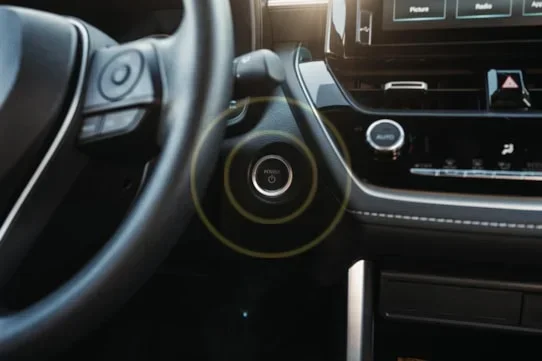
- Turn off the engine but keep the power on (accessory mode).
- Press and hold the power button on the touchscreen for about 10 seconds.
- Select “Factory Reset” or “System Reset”** when prompted.
- Wait for the system to restart. This may take a few minutes.
- Re-pair only the phones you want to keep.
A factory reset removes all paired devices and settings. Use this as a last resort or when you want a completely fresh start with your Toyota audio system.
Toyota Model-Specific Instructions
Different Toyota models have slightly different menus and button layouts. Here is a closer look at how to unregister a phone from some popular Toyota models.
Toyota Camry
The Camry uses the Toyota Entune system. To unregister a phone, go to “Setup,” then “Bluetooth,” then “Device List.” Tap the phone name and select “Delete.” The Camry allows up to five paired devices, so you may need to delete old ones to make room for new ones.
Toyota RAV4
The RAV4 has a similar process. On newer models, tap the “Settings” icon, go to “Bluetooth Settings,” and find your paired device. Select it and choose “Unpair.” On older RAV4 models with a non-touchscreen, use the radio controls to navigate to the Bluetooth menu.
Toyota Highlander
The Highlander offers both touchscreen and voice control options. For the touchscreen route, go to “Setup,” then “Phone,” then “Bluetooth.” Find the device and tap “Remove.” The Highlander also supports multiple phone profiles, so you can keep some devices active while removing others.
Toyota Corolla
The Corolla, especially newer models, uses a simplified infotainment interface. Press “Settings,” tap “Bluetooth,” and select the device you want to remove. Tap “Delete” to unregister it. The Corolla also lets you toggle Bluetooth on and off quickly from the home screen.
Quick Tips for a Smooth Unregistration Process
Follow these quick tips to make the process faster and avoid common issues:
- Turn off Bluetooth on your phone before unregistering it from the Toyota. This prevents any last-minute reconnection attempts.
- Have your phone nearby during the process. You may need to confirm the deletion on both devices.
- Write down your paired device names before deleting them. This helps you remember which phones were connected.
- Restart your Toyota infotainment system after deleting a device. This clears any cached data and ensures a clean slate.
- Check for software updates on your Toyota system. Some Bluetooth issues are fixed with updated software from Toyota.
- Keep your phone book clean. Regularly review and remove old devices to keep your Toyota system running smoothly.
| Method | Best For | Time Required | Difficulty |
|---|---|---|---|
| Bluetooth Settings Menu | Most Toyota models | 2-3 minutes | Easy |
| Voice Commands | Hands-free removal | 1-2 minutes | Easy |
| Factory Reset | Multiple device issues | 5-10 minutes | Medium |
| Dealer Assistance | Complex system issues | 30-60 minutes | Easy (but requires visit) |
Common Mistakes to Avoid When Unregistering Your Phone
Even though the process is straightforward, some common mistakes can cause problems. Here is what to watch out for:
Forgetting to Turn Off Bluetooth on Your Phone
If you do not turn off Bluetooth on your phone first, it may automatically try to reconnect. This can confuse the Toyota system and make the unregistration process take longer. Always disable Bluetooth on your phone before removing it from the Toyota.
Deleting the Wrong Device
Toyota infotainment systems list all paired devices by name. If two phones have similar names, you might accidentally delete the wrong one. Double-check the device name before confirming deletion.
Skipping the Restart Step
After unregistering a phone, many people skip restarting the infotainment system. This can leave behind cached data or cause the system to still show the old device. A quick restart solves this problem.
Assuming All Toyota Models Work the Same Way
Toyota has different infotainment systems across model years. A 2015 Camry may have a different menu layout than a 2023 Camry. Always refer to your specific model’s owner manual if you get stuck.
Not Clearing the Phone Book
When you unregister a phone, the contacts may still remain in the Toyota system. Go to the phone book or contacts menu and delete any remaining entries from the removed device. This protects your privacy.
Expert Insights on Toyota Phone Management
Managing your phone connections in a Toyota vehicle is part of maintaining a smooth driving experience. Automotive tech experts recommend reviewing your paired devices every few months. This keeps your system fast and organized.
According to Toyota service advisors, the most common issue they see is owners trying to pair too many devices at once. Toyota systems work best with two to three active paired phones. If you have more, remove the ones you no longer use.
Another expert tip is to keep your Toyota infotainment software updated. Toyota regularly releases updates that improve Bluetooth performance and fix connection bugs. You can check for updates through the Toyota app or by visiting a dealer.
Experts also suggest naming your phones clearly when pairing. Instead of “iPhone” or “Samsung,” use names like “John’s iPhone” or “Sarah’s Galaxy.” This makes it much easier to identify and remove the correct device later.
What Happens After You Unregister Your Phone From Toyota
Once you successfully unregister a phone, a few things happen. First, the device is removed from the Toyota Bluetooth pairing list. Second, any synced contacts and call logs from that phone are cleared from the Toyota system. Third, the phone can no longer stream audio or make hands-free calls through the Toyota audio system.
If you plan to pair a new phone, make sure your Toyota Bluetooth is turned on and set to “Discoverable” mode. On most Toyotas, this happens automatically after you remove a device. Simply go through the normal pairing process on your new phone, and you should be connected within a minute.
If you are selling your Toyota, it is a good practice to also reset the audio presets, clear the navigation history, and sign out of any connected apps like Spotify or Google Maps. This gives the new owner a fresh and clean experience.
Can You Unregister Your Phone Remotely?
Currently, Toyota does not offer a way to remotely unregister a phone from the vehicle. You must be physically inside the Toyota with the ignition on to access the Bluetooth settings. This is a security feature that prevents unauthorized changes to your vehicle.
If you have lost your phone and want to remove it from the Toyota, you can still do so by following the steps above. If you cannot find the phone at all, a factory reset of the infotainment system will remove all paired devices, including the lost one.
How to Prevent Connection Issues in the Future
Once you have unregistered your old phone and paired your new one, you want to keep things running smoothly. Here are a few habits that help:
- Limit paired devices to three or fewer for the best performance.
- Restart your Toyota infotainment system once a month to clear temporary files.
- Update your Toyota software whenever a new version is available.
- Avoid pairing devices in areas with poor signal, as this can cause incomplete connections.
- Delete old devices promptly instead of letting the paired list get cluttered.
These simple habits go a long way in keeping your Toyota Bluetooth system fast, reliable, and free of connection problems.
Conclusion
Learning how do I unregister my phone from Toyota is a valuable skill every Toyota owner should have. Whether you are selling your car, switching phones, or fixing a Bluetooth issue, the steps in this guide make it easy and fast. You now know three different methods to disconnect and remove a paired device from your Toyota infotainment system.
Remember to always double-check the device name before deleting, restart your system after making changes, and clear any remaining contacts from the phone book. These small steps ensure a clean and secure Toyota Bluetooth experience.
If you ever run into trouble, you can always refer back to this guide or visit a Toyota dealer for assistance. But for most owners, the steps above will get the job done in just a few minutes. Keep your Toyota system organized, and enjoy a seamless connection every time you get behind the wheel.
Frequently Asked Questions
Can I unregister my phone from Toyota without a touchscreen?
Yes, you can. Many Toyota models with non-touchscreen interfaces let you access Bluetooth settings through the radio or audio controls. Use the steering wheel buttons or the dial on the console to navigate to the Bluetooth menu and remove the paired device.
Will unregistering my phone delete my contacts from my phone?
No, unregistering your phone from Toyota only removes the connection between your phone and the car. Your contacts, photos, and data on your phone remain completely safe and untouched.
How many phones can I pair with my Toyota at once?
Most Toyota models allow up to five paired devices. However, only a few can be actively connected at the same time. It is best to keep only the devices you regularly use to avoid connection conflicts.
Do I need to visit a Toyota dealer to unregister my phone?
No, you do not need to visit a dealer. You can unregister your phone directly from the Toyota infotainment system using the steps in this guide. Dealer visits are only necessary if you experience persistent technical issues.
What should I do if the phone will not delete from the Toyota system?
If a phone will not delete, try restarting the infotainment system first. If that does not work, perform a factory reset. As a last resort, contact a Toyota dealer for professional assistance with your Toyota Bluetooth settings.
Can I re-pair a phone after unregistering it from Toyota?
Yes, absolutely. Once you unregister a phone, you can pair it again at any time. Simply turn on Bluetooth on both your phone and your Toyota, and follow the normal pairing process to reconnect the device.