How Do You Retune a Radio for Crystal Clear Reception
Retuning your radio is one of the easiest ways to get crystal clear reception while driving. Whether you listen to FM or AM stations, this guide will show you exactly how to retune a radio the right way. We cover manual tuning, auto scan features, antenna checks, and common mistakes that kill your signal. By the end, you will know how to fix static, boost station clarity, and enjoy your favorite music without interruption.
Have you ever been driving down the road and suddenly your favorite station turns into a wall of static? It is frustrating. You twist the dial, try to find the signal, and still get nothing but noise. The good news is that how do you retune a radio is a skill anyone can learn in just a few minutes.
Whether you drive an old car with a basic dial or a new model with a digital screen, retuning your radio is the fastest way to bring back clear music, talk shows, and news updates. This guide walks you through every method, from simple auto scans to manual tuning tricks that pros use. By the time you finish reading, you will have the confidence to fix any radio problem on the spot.
We also cover things people overlook, like antenna health, signal interference, and the best ways to save your favorite stations. No fluff. No jargon. Just clear, practical steps that work every time. Let us get your radio sounding great again.
Key Takeaways
- Know Your Radio Type: Understanding whether you have an FM/AM radio or a digital tuner changes how you retune a radio.
- Auto Scan Is Your Best Friend: Most modern car radios let you auto scan for the clearest stations with one button.
- Antenna Matters: A damaged or loose antenna is the number one cause of poor radio reception.
- Manual Tuning Gives You Control: Learning to tune by hand helps you find weak stations that auto scan skips.
- Location and Environment Affect Signal: Tunnels, buildings, and weather can all mess with your radio clarity.
- Presets Save Time: Setting radio presets means you never have to retune your favorite stations again.
- Static Has Fixable Causes: Most radio static comes from simple problems that are easy to solve at home.
📑 Table of Contents
- Why Does Your Radio Lose Reception?
- How Do You Retune a Radio: Step-by-Step Methods
- Common Reasons Your Radio Needs Retuning
- How to Improve Radio Reception in Your Car
- FM vs AM: Which Is Better for Clear Reception?
- Quick Tips for Crystal Clear Reception Every Time
- Common Mistakes People Make When Retuning
- When to Seek Professional Help
- Final Thoughts
Why Does Your Radio Lose Reception?
Before we dive into the how, it helps to understand why radios lose their signal in the first place. A car radio picks up radio waves floating through the air. These waves carry the audio from local stations. When something interrupts those waves, your sound gets fuzzy or disappears completely.
Several things cause this. Physical barriers like tall buildings and mountains block signals. Weather changes can shift the frequency band. Even the wiring inside your car can create interference. And sometimes, the radio simply needs a fresh tune to lock onto the station again.
The Role of Radio Frequency
Every radio station broadcasts on a specific radio frequency. FM stations use frequencies between 87.5 and 108.0 megahertz. AM stations use a different range, usually between 530 and 1700 kilohertz. When you turn the dial or press a button, you are telling the radio to tune into one of these frequencies.
If your radio drifts slightly off that frequency, the sound quality drops. This is called signal drift. It happens naturally over time, especially in older radios. Retuning brings you back to the exact frequency where the station is broadcasting.
How Signal Strength Affects Clarity
Signal strength is how strong the radio wave is when it reaches your antenna. Strong signals give you clear, crisp audio. Weak signals cause static, fading, and ghosting. Where you drive matters a lot. Urban areas with lots of buildings can weaken signals. Rural areas might have fewer stations to choose from.
Knowing your signal strength helps you decide whether to retune manually or use the auto scan feature. More on that below.
How Do You Retune a Radio: Step-by-Step Methods
Now let us get into the actual steps. There are two main ways to retune a radio: auto scan and manual tuning. Both work well. Which one you use depends on your radio model and the situation.
Method 1: Use Auto Scan
Most modern car radios come with an auto scan or auto tune feature. This is the fastest way to retune a radio and find all available stations. Here is how it works:
- Turn on your car radio.
- Press the scan or auto tune button. It is usually marked with a “Scan” or “Auto” label.
- The radio will automatically search through the frequency band.
- When it finds a strong station, it stops and locks in the frequency.
- Press scan again or wait for it to move to the next station.
Auto scan is great for quickly finding stations after you move to a new area. It also helps when your radio has drifted and cannot find your usual stations on its own.
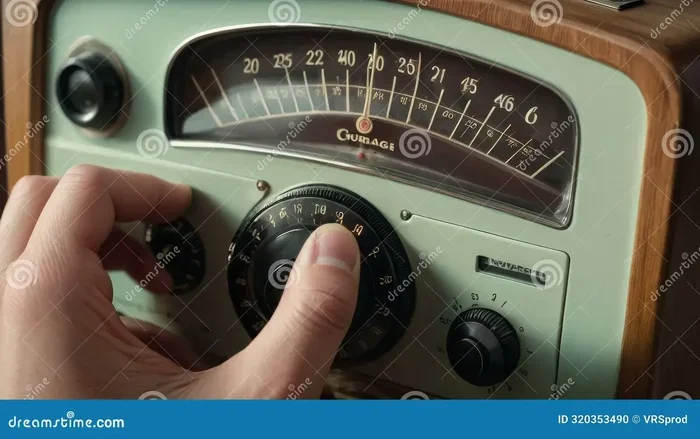
Method 2: Tune Manually
Manual tuning gives you full control. You pick the exact frequency you want. This is especially useful for finding weak stations that auto scan skips over. Here is how to do it:
- Turn the tuning knob or use the arrow buttons on your radio.
- Move slowly through the frequency band.
- Listen for the station to come in clearly.
- Once you find a clear signal, stop tuning.
- If your radio has a preset button, save the station for future use.
Manual tuning takes a little patience, but it works better than auto scan in areas with lots of interference. It also helps you fine-tune the frequency for the best possible audio quality.
Method 3: Use Preset Buttons
If you already know the frequency of your favorite station, preset buttons are a lifesaver. Most car radios let you save up to six or twelve stations. Here is how to set them:
- Tune to the station you want to save.
- Hold down the preset button (numbered 1 through 6 or more).
- The radio stores that frequency.
- Next time you want that station, just press the same button.
This method is perfect for daily commuters who listen to the same stations every day. It saves time and keeps your radio locked on your favorites.
Common Reasons Your Radio Needs Retuning
Sometimes you do not need to retune because something else is wrong. Here are the most common reasons a car radio loses its clear reception:
Antenna Problems
The antenna is the part of your car that catches radio waves. If it is damaged, loose, or corroded, your radio will struggle to find stations. Check the antenna wire first. Make sure it is firmly plugged in. Look at the antenna mast for any bends or breaks.
Even a small issue with the antenna can cause big problems with radio reception. A weak antenna means weak signals, which means more static and fewer stations.
Interference from Other Electronics
Your car is full of electronics. GPS devices, phone chargers, and even LED lights can create radio interference. This interference shows up as static or buzzing on your radio.
If you notice static only when you turn on a specific device, that device might be the culprit. Try unplugging it and see if the reception improves.
Changes in Location
Where you drive affects your radio signal. Driving into a tunnel or a deep valley cuts off your signal completely. Even tall buildings in the city can block or reflect radio waves. This is why you might need to retune a radio every time you enter a new area.
Moving from FM to AM can sometimes help in these situations. AM signals travel farther and bend around obstacles better than FM signals.
Weather and Atmospheric Conditions
Believe it or not, the weather can affect your radio. Heavy rain, thunderstorms, and even high humidity can weaken radio waves. Solar activity also plays a role, especially for AM stations.
During bad weather, you might notice that some stations fade in and out. This is normal. Retuning after the weather clears usually fixes the problem.
How to Improve Radio Reception in Your Car
Retuning is not the only way to get better sound. There are several things you can do to improve your overall radio clarity and reduce static.
Check and Replace Your Antenna
If your radio always sounds fuzzy, the antenna might be the problem. Look for signs of wear and tear. A cracked antenna base or a bent mast will hurt your reception. Replacing a car antenna is usually cheap and easy.
You can buy universal antennas that fit most vehicles. Some aftermarket antennas are designed specifically for better signal pickup. They are worth the small investment if you listen to the radio a lot.
Move Your Antenna Cable Away from Power Wires
Signal distortion often happens when the antenna cable runs too close to power wires or other cables in your car. These wires create electromagnetic fields that interfere with the radio signal.
If you are comfortable under the dash, check the routing of your antenna cable. Try to keep it away from power lines and phone charging cables. This simple change can make a big difference in radio static reduction.
Use a Radio Signal Booster
A signal booster amplifies the radio waves before they reach your radio. It works like a megaphone for your antenna. These boosters plug into your car’s power outlet and connect to the antenna.
They are especially helpful in rural areas or places with weak signals. You can find them at most auto parts stores for under fifty dollars. A booster is one of the best ways to get clear reception without replacing your whole radio.
Keep Your Radio Clean
Dust and dirt can build up inside your radio and affect the tuning dial or buttons. A loose connection inside the unit can also cause intermittent signal loss.
Take a soft cloth and gently clean the outside of your radio. If you are handy, you can open the unit and check for loose wires. Just be careful and disconnect the battery first.
FM vs AM: Which Is Better for Clear Reception?
FM and AM radio each have their strengths. Understanding the difference helps you decide which to use when your reception is poor.
FM Radio: Great for Music and Local Stations
FM radio offers better sound quality for music. It is less prone to certain types of interference. However, FM signals do not travel as far as AM signals. They also do not bend around obstacles well.
If you are driving in a city, FM is usually the best choice. The stations are closer and the sound is clearer. But once you leave the city, FM stations can get weak and noisy.
AM Radio: Better for Long Distance and Talk Shows
AM radio covers longer distances. The signals bounce off the ionosphere and can travel hundreds of miles. This makes AM great for talk radio, news, and sports broadcasts.
AM is also more reliable in rural areas and during bad weather. The trade-off is lower sound quality and more susceptibility to electrical interference from power lines and electronics.
| Feature | FM Radio | AM Radio |
|---|---|---|
| Best For | Music and local stations | Talk shows and long-distance |
| Signal Range | Shorter range | Longer range |
| Sound Quality | Higher quality | Lower quality |
| Weather Resistance | More affected by weather | Less affected by weather |
| Interference | Less electrical interference | More electrical interference |
| Frequency Range | 87.5 to 108.0 MHz | 530 to 1700 kHz |
When you are trying to retune a radio, switching between FM and AM can help you find the clearest available signal. If FM is full of static, try AM and vice versa.
Quick Tips for Crystal Clear Reception Every Time
Here are some fast tips that make a huge difference. Keep these in mind every time you get behind the wheel:
- Retune after moving to a new area. Different locations have different broadcast towers. A quick auto scan helps you find the best stations for where you are.
- Save your favorite stations as presets. This saves time and keeps you from having to search every time you start the car.
- Check your antenna regularly. A quick visual inspection can catch problems before they affect your listening.
- Turn off unnecessary electronics when signal is weak. Unplug phone chargers and turn off GPS if you are struggling with static interference.
- Try a different frequency. Sometimes a station broadcasts on two frequencies. Try switching to the alternate frequency for a stronger signal.
- Update your radio firmware if possible. Some digital radios have software updates that improve tuning accuracy and station scanning speed.
Common Mistakes People Make When Retuning
Even experienced drivers make mistakes when trying to fix their radio. Here are the ones to avoid:
Rushing the Tuning Process
Twisting the dial too fast makes it hard to catch the station. Slow and steady wins the race. Take your time and listen as the signal comes in.
Ignoring the Antenna
People often blame the radio when the real problem is the antenna. Before you retune, check the antenna connection first. A clean connection can solve half your problems.
Not Saving Presets
If you find a great station, save it right away. Otherwise, you will lose it and have to search for it again next time.
Assuming All Static Is Normal
Some static is normal, especially in rural areas. But constant, loud static usually means something is wrong. Do not ignore it. Find the cause and fix it.
Forgetting to Check the Fuse
Some car radios have a separate fuse for the antenna motor. If that fuse blows, the antenna will not move or work properly. Check your fuse box if you notice the antenna is not rising or falling.
When to Seek Professional Help
Most radio issues are easy to fix at home. But sometimes, the problem is deeper. If you have tried everything and still get poor radio reception, it might be time to see a professional.
A car audio specialist can check the internal wiring of your radio. They can test the antenna motor and the radio tuner itself. In some cases, the radio unit needs to be replaced entirely. This is rare, but it does happen, especially in older vehicles.
Before you spend money on a new radio, make sure you have tried all the simple fixes first. Retuning, antenna checks, and interference removal solve most problems. A professional should be your last resort.
Final Thoughts
How do you retune a radio for the best possible sound? The answer is simpler than most people think. Start with an auto scan or manual tune. Check your antenna and connections. Reduce interference from other electronics. Save your favorite stations as presets. And always be willing to switch between FM and AM when one band gives you trouble.
Good radio reception makes every drive more enjoyable. You get to hear your favorite music, stay updated with traffic and news, and enjoy talk shows without frustration. Taking a few minutes to learn how to retune properly pays off every single time you get in the car.
Now that you know the tricks, put them to use. The next time your radio starts acting up, you will know exactly what to do. Clear, crisp audio is just a quick retune away.
Frequently Asked Questions
How often should I retune my car radio?
You should retune your radio whenever you notice static or lose a station. In most cases, a quick auto scan once a month keeps things running smoothly. If you travel to new areas often, retune each time you enter a different region.
Why does my radio have static even after retuning?
Static after retuning usually points to an antenna problem or interference from other electronics. Check your antenna connection first. Then try turning off nearby devices like phone chargers or GPS units to see if the static clears up.
Can weather really affect my car radio reception?
Yes, weather can affect radio signals. Heavy rain, storms, and high humidity can weaken both FM and AM waves. This is temporary and usually clears up once the weather improves. Retuning after a storm often restores full clarity.
What is the difference between auto scan and manual tuning?
Auto scan lets the radio search through all frequencies and stop at each station it finds. Manual tuning lets you pick the exact frequency yourself. Auto scan is faster, but manual tuning gives you more control and often finds weaker stations that auto scan misses.
Do I need special equipment to retune a radio?
No special equipment is needed. Your car radio has all the tools built in. You only need the tuning knob, arrow buttons, or the scan function. If you want better reception, a new antenna or signal booster can help, but they are optional.
Is it worth replacing an old car radio?
It depends on the problem. If your current radio has a broken tuner or frequent signal loss, a new unit can help. But for most issues, retuning and antenna fixes solve the problem without needing a replacement. Try the simple fixes first before spending money on a new radio.
=== CONCLUSION ===
How do you retune a radio for crystal clear reception? Now you know the full answer. Whether you use auto scan, manual tuning, or preset buttons, the key is to act quickly when your signal drops. Check your antenna, reduce interference, and switch between FM and AM when needed.
These simple steps keep your car radio sounding great no matter where you drive. Share this guide with a friend who struggles with static. And next time your favorite station fades out, you will know exactly what to do.