How Long Does It Take to Sync Your Key Fob to a Car
Syncing a key fob to your car typically takes between 3 and 15 minutes, depending on your vehicle make and model. The key fob programming process is straightforward for most modern vehicles, but older cars or luxury brands may require extra steps. This guide walks you through everything you need to know about car key synchronization and helps you avoid common mistakes.
Have you ever stood in your driveway, fumbling with a new key fob, wondering how long this whole process would take? You are not alone. How long does it take to sync your key fob to a car is one of the most searched questions among car owners. Whether you just bought a replacement fob, lost your original, or want to add a spare, the key fob programming timeline matters. This guide gives you a clear answer and walks you through every step.
The good news is that syncing a remote key fob is usually fast. Most vehicles complete the process in under 15 minutes. However, the exact time depends on several factors. These include your car brand, the age of your vehicle, and the type of smart key system you have. Let us break it all down so you know exactly what to expect.
Key Takeaways
- Fast syncing: Most cars take 3 to 15 minutes to sync a key fob.
- Brand differences: Toyota, Ford, and Honda have simple built-in processes, while luxury brands may need a dealer.
- Battery matters: A weak key fob battery can cause sync failures and slow down the process.
- DIY is possible: You can sync most key fobs yourself without visiting a mechanic.
- Troubleshooting helps: Knowing common problems saves time and money.
- Professional help: Call an automotive locksmith if your car requires specialized equipment.
📑 Table of Contents
What Is Key Fob Syncing and Why It Matters
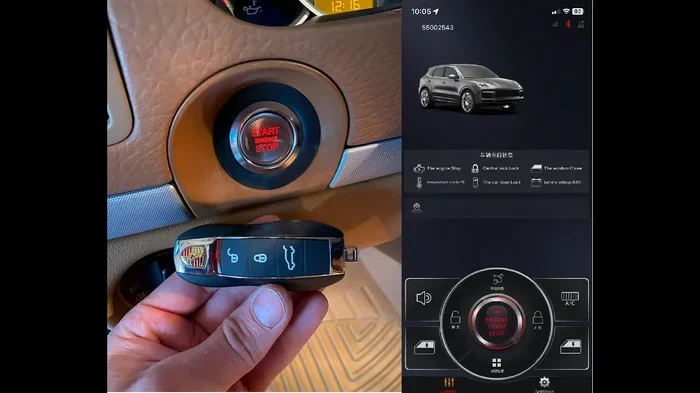
Before we dive into timing, let us understand what key fob syncing actually means. When you sync a key fob, you are pairing the fob’s unique signal with your car’s vehicle security system. This allows the car to recognize your fob and respond to lock, unlock, and start commands.
Think of it like introducing two people who have never met. The car and the fob need to “learn” each other’s signals. Once they are paired, they communicate instantly. This car key synchronization process is the backbone of modern vehicle convenience and security.
Without proper syncing, your fob simply will not work. You will not be able to lock your doors remotely, start the engine with a push button, or use passive entry features. That is why getting the sync right matters so much.
How Key Fob Syncing Works
Every key fob contains a small chip that emits a unique radio frequency. When you press a button, the fob sends a coded signal to the car’s transponder key receiver. The car’s computer checks the code against its stored list of authorized fobs. If the code matches, the car responds. This entire exchange happens in milliseconds.
The syncing process simply teaches the car’s computer to accept a new fob code. Different car brands use different methods to enter the fob pairing mode. Some require you to turn the ignition on and off a specific number of times. Others ask you to press buttons on the steering column or center console.
How Long Does It Take to Sync a Key Fob to a Car
Here is the answer most people want. How long does it take to sync a key fob to a car? In most cases, the actual key fob programming takes between 3 and 15 minutes. But the total time can vary based on your situation.
If you are syncing a single fob to a car that already recognizes other fobs, the process is usually quick. You may finish in under 5 minutes. However, if you are programming a completely new fob and no fobs currently work, the process may take longer. Some vehicles require you to enter a special programming mode that adds extra steps.
Average Sync Times by Car Brand
Different car brands have different syncing procedures and timelines. Here is a general breakdown of what you can expect:
| Car Brand | Average Sync Time | Difficulty Level |
|---|---|---|
| Toyota | 3 to 5 minutes | Easy |
| Honda | 5 to 10 minutes | Easy to Medium |
| Ford | 5 to 10 minutes | Easy |
| Chevrolet | 5 to 15 minutes | Medium |
| BMW | 10 to 20 minutes | Medium to Hard |
| Mercedes-Benz | 10 to 20 minutes | Medium to Hard |
| Luxury / European brands | 15 to 30 minutes | Hard |
As you can see, push button start vehicles and modern cars tend to have simpler syncing processes. Older vehicles or high-end luxury brands often require more time and sometimes special tools.
Factors That Affect Sync Time
Several factors can make your key fob synchronization take more or less time than average:
- Vehicle age: Newer cars generally have faster and simpler syncing processes. Older cars may require longer sequences.
- Number of fobs: Programming the first fob usually takes longer than adding a second or third fob.
- Fob type: Smart key fobs with proximity sensors may take slightly longer than basic remote fobs.
- Battery condition: A weak fob battery can cause failed sync attempts, adding extra time.
- Car model: Some models have unique procedures that require more steps.
- Your experience: If you have done this before, you will move faster than a first-timer.
Step-by-Step Syncing Process for Popular Car Brands
Now let us look at the actual steps for some of the most popular car brands. Each brand has its own way of entering the fob pairing mode. Following the correct steps is the fastest way to get it done.
How to Sync a Key Fob on Toyota
Toyota makes the key fob programming process very simple. Here is what to do:
- Sit in the driver’s seat and close all doors.
- Turn the ignition from OFF to ON, then back to OFF within 5 seconds.
- Repeat this step 3 to 4 times until the doors lock and unlock automatically.
- Within 40 seconds, press any button on the new fob.
- The doors will lock and unlock again to confirm the fob is synced.
Most Toyota owners complete this process in under 5 minutes. It is one of the fastest car key synchronization procedures available.
How to Sync a Key Fob on Ford
Ford vehicles also have a straightforward process:
- Turn the ignition to the ON position without starting the engine.
- Press the brake pedal and hold it.
- Turn the ignition OFF, then back to ON within 10 seconds.
- Wait for the dashboard lights to flash.
- Press any button on the new key fob within 30 seconds.
- The doors will cycle to confirm successful pairing.
This remote key fob programming process usually takes about 5 to 10 minutes on Ford models.
How to Sync a Key Fob on Honda
Honda’s process is slightly different but still manageable:
- Turn the ignition to the ACC or ON position.
- Press the “Unlock” button on the driver’s door panel.
- Within 10 seconds, press the lock or unlock button on the new fob.
- Turn the ignition OFF and then ON again.
- The car should confirm the new fob is recognized.
Honda key fob battery replacement and syncing often go hand in hand. If you are replacing the battery, you may need to re-sync the fob afterward.
How to Sync a Key Fob on Chevrolet
Chevrolet uses a slightly longer sequence:
- Close all doors and windows.
- Insert the key into the ignition and turn it to the ON position.
- Press and hold the Remote Start button for at least 4 seconds.
- The security light should stay on steadily.
- Release the button and press it again within 5 seconds.
- Press any button on the new fob within 30 seconds.
This process can take 10 to 15 minutes if you need to sync multiple fobs at once.
Common Problems When Syncing a Key Fob
Even with clear instructions, things can go wrong. Knowing the most common key fob troubleshooting issues helps you stay calm and fix problems quickly.
Fob Not Recognized by the Car
This is the most common problem. The car simply does not respond when you try to sync a new fob. Usually, this happens because you missed a step in the fob pairing mode sequence. Double-check your owner’s manual for the exact steps.
Another reason could be a dead key fob battery. If the fob’s battery is completely dead, the car may not detect its signal at all. Try replacing the battery first and then attempt the sync again.
Sync Process Times Out
Most cars have a time window for entering programming mode. If you take too long between steps, the car exits the mode and you have to start over. This is frustrating but very common. Stay focused and have your new fob ready before you begin.
Interference from Other Fobs
If you have multiple fobs in the car, the system can get confused. Remove all existing fobs from the vehicle before you start syncing the new one. This ensures the car’s computer focuses on the new fob only.
Signal Range Issues
Sometimes the fob works during sync but fails to work at a distance afterward. This is usually a key fob signal issue. Moving closer to the car during the sync process and keeping other electronics away can help.
Tips to Make Key Fob Syncing Faster and Easier
You can save time and avoid frustration with a few simple preparation steps. These key fob programming tips come from experienced mechanics and car owners.
Read the Owner’s Manual First
This sounds obvious, but many people skip it. Your car’s owner manual contains the exact vehicle pairing process for your specific model. Following the manufacturer’s instructions is always the fastest route to success.
Replace the Fob Battery Before Syncing
A fresh battery ensures the strongest possible signal during the sync process. Most key fobs use a small CR2025 or CR2032 battery. Replacing it takes less than a minute and can prevent many headaches.
Work in a Quiet Environment
Turn off other electronics in the car. Remove all fobs except the one you are programming. This reduces signal interference and helps the car’s computer focus on the new fob.
Have Your Owner’s Manual Handy
Even if you know the steps by heart, keep the manual nearby. If something goes wrong, you can quickly look up the correct sequence without guessing.
Stay Patient and Follow Each Step Carefully
Rushing through the steps is the number one cause of failed sync attempts. Take your time, follow each step in order, and you will have your smart key system working in no time.
Quick Tips for Faster Syncing
- Have all your fobs and the new one within arm’s reach before starting.
- Make sure the car battery is fully charged or jump-started if needed.
- Work in a garage or closed space to reduce signal interference.
- Write down the steps before you begin so you do not have to keep checking.
- Sync one fob at a time if programming multiple fobs.
When to Call a Professional for Help
Most car owners can sync a remote key fob themselves. But there are times when calling in a professional is the smart move. Knowing when to ask for help saves you time and prevents damage to your car’s vehicle security system.
You Have Tried Multiple Times Without Success
If you have followed the steps correctly three or more times and the fob still will not sync, it is time to seek help. Continuing to try may confuse the car’s computer and make the problem worse.
Your Car Requires Specialized Equipment
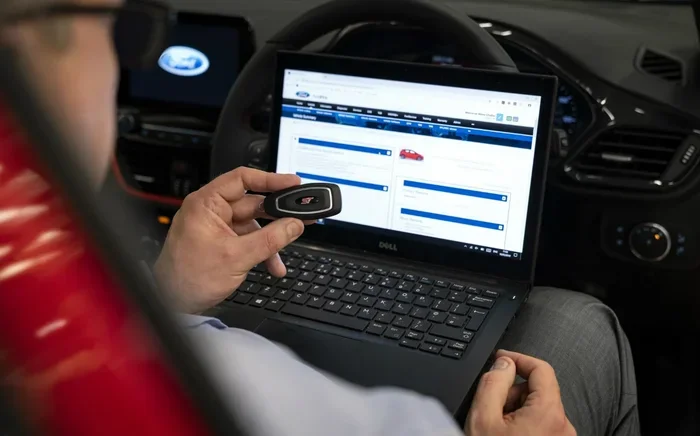
Some luxury and European vehicles need diagnostic tools that are not available to the average car owner. Brands like BMW, Mercedes, Audi, and Land Rover often require dealer-level equipment for key fob programming. An automotive locksmith with the right tools can handle this quickly.
You Lost All Key Fobs
If you have lost every fob and the car will not start, you need professional assistance. Without any working fob, the car’s transponder key system will not allow you to enter programming mode easily. A locksmith or dealer can help you regain access and program a new fob from scratch.
You Are Not Comfortable Doing It Yourself
There is no shame in asking for help. If you feel unsure about any step in the process, a professional can do it for you. Many automotive locksmith services offer mobile key fob programming and can come to your location.
Professional car key replacement services typically charge between $50 and $200 for fob syncing, depending on the brand and your location. This is often faster and less stressful than struggling with the process yourself.
Conclusion
So, how long does it take to sync a key fob to a car? For most vehicles, the answer is between 3 and 15 minutes. The process is quicker for popular brands like Toyota, Ford, and Honda, and may take a bit longer for luxury or European models.
With the right preparation, a fresh battery, and the correct steps from your owner’s manual, you can handle key fob programming on your own. Remember to stay patient, follow each step carefully, and avoid common mistakes like having too many fobs in the car at once.
If you run into trouble, do not hesitate to call a professional. A skilled automotive locksmith can get your car key synchronization done quickly and correctly. The most important thing is to get your remote key fob working so you can get back on the road with confidence.
Now that you know what to expect, grab your new fob, follow the steps, and enjoy the convenience of a fully synced smart key system. Your car is ready to go, and you are ready to roll.
Frequently Asked Questions
Can I sync a key fob myself without going to a dealer?
Yes, most car brands allow you to sync a key fob at home using simple steps in your owner’s manual. Popular brands like Toyota, Ford, and Honda have very user-friendly key fob programming processes that anyone can follow in minutes.
What should I do if my key fob still does not work after syncing?
First, check the battery in the fob. A weak key fob battery is the most common cause of continued problems. If the battery is fresh and the fob still does not work, try re-syncing it or consult your owner’s manual for key fob troubleshooting steps.
How much does it cost to sync a key fob at a dealer?
Dealers typically charge between $100 and $300 for key fob programming, depending on your car brand and model. An independent automotive locksmith often charges less, usually between $50 and $200, for the same service.
Can I sync multiple key fobs at the same time?
It depends on your car brand. Some vehicles allow you to sync multiple fobs in one session, while others require you to program each fob separately. Check your owner’s manual to see which method your vehicle security system supports.
Does syncing a key fob erase existing fobs from the car?
No, syncing a new fob does not erase existing ones. Your car will simply add the new fob to its list of recognized remotes. However, if you want to remove an old fob for security reasons, you may need to follow a separate fob pairing mode reset procedure.
How often do I need to replace my key fob battery?
Most key fob batteries last between 2 and 4 years. If you notice your remote key fob has a shorter range or needs multiple presses to work, it is likely time for a key fob battery replacement. This is a quick and inexpensive fix you can do at home.