How Much Does It Cost to Add Apple CarPlay to Your Car
Adding Apple CarPlay to your car is easier and more affordable than most drivers think. The Apple CarPlay upgrade cost can range from under $50 for a simple adapter to over $500 for a full head unit replacement. Whether you choose a wired CarPlay solution or go for wireless Apple CarPlay, this guide covers every option, price point, and thing you need to know before you buy.
You are stuck in traffic. Your phone is sitting on the passenger seat, and you wish you could see your directions on the big screen in front of you. Maybe your car does not have Apple CarPlay, or perhaps you bought a used vehicle that left this feature out. Either way, you are not alone. Thousands of drivers ask the same question every single day: how much does it cost to add Apple CarPlay to their car?
The answer might surprise you. There is no one-size-fits-all price tag. The Apple CarPlay retrofit cost depends on your car model, your budget, and how much effort you want to put in. Some drivers spend under $50. Others invest several hundred dollars for a premium wireless Apple CarPlay experience. This guide will walk you through every single option so you can make a smart, informed choice.
We will look at adapters, head units, installation costs, and common mistakes to avoid. By the time you finish reading, you will know exactly what path makes the most sense for your vehicle and your wallet. Let us get into it.
Key Takeaways
- Aftermarket adapters cost as little as $30-$100: A simple CarPlay adapter is the cheapest way to add Apple CarPlay to an older car.
- Aftermarket head units run $200-$800: Replacing your factory car infotainment system with an aftermarket head unit gives you the best Apple CarPlay experience.
- Wired vs wireless matters for price: Wireless Apple CarPlay units cost more but offer more convenience than wired CarPlay options.
- Professional installation adds $100-$300: If you are not comfortable with DIY, hiring a pro ensures a clean and safe install.
- Compatibility is key: Not every car can support Apple CarPlay, so check your vehicle compatibility before spending money.
- DIY saves money but requires skill: Swapping a head unit replacement yourself can cut costs significantly if you have basic tools.
- Factory Apple CarPlay is the gold standard: If buying a new car, look for OEM CarPlay built into the original car stereo upgrade.
📑 Table of Contents
What Is Apple CarPlay and Why Do People Want It?
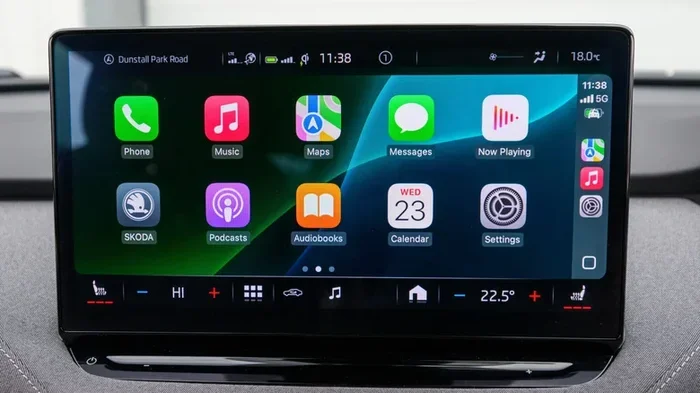
Apple CarPlay is a smartphone integration system made by Apple. It lets you mirror your iPhone onto your car’s touch screen display. You can make calls, send messages, listen to music, and get directions all without taking your eyes off the road. It works through a simple cable connection or, in newer setups, through Bluetooth connectivity and Wi-Fi.
The reason so many drivers want Apple CarPlay is simple: it makes driving safer and more convenient. Instead of fumbling with your phone, you get a familiar interface right on your dashboard. You can use Siri voice commands, access your favorite apps, and navigate with Google Maps or Apple Maps seamlessly.
How Apple CarPlay Works
When you connect your iPhone to a CarPlay-enabled system, your phone’s interface appears on the car’s screen. You can swipe, tap, and use voice commands just like you would on your phone. The system is designed to be distraction-free, so it limits certain features while the car is in motion. Calls, messages, and navigation are the core functions that work best behind the wheel.
Most modern cars come with factory CarPlay already built in. But if your car was made before Apple CarPlay became standard, you will need to add it yourself. That is where the options and costs come in.
The Different Ways to Add Apple CarPlay
There are several methods to add Apple CarPlay to a car that does not have it. Each method has its own price range, installation requirements, and level of functionality. Let us break them down one by one.
Method 1: Aftermarket CarPlay Adapters
The most affordable way to add Apple CarPlay is through an aftermarket CarPlay adapter. These small devices plug into your existing car stereo or infotainment system and add CarPlay functionality. Some adapters work with your current screen, while others require a small additional display.
Adapters like the Carlinkit or AAOS units are popular choices. They are easy to install and do not require replacing your entire car infotainment system. You simply plug the adapter into your car’s USB port or auxiliary input, and your Apple CarPlay is ready to go.
Method 2: Aftermarket Head Unit Replacement
A more thorough approach is to replace your entire factory car stereo with an aftermarket head unit that supports Apple CarPlay. This method gives you a brand-new touch screen display with all the features of a modern infotainment system. Brands like Pioneer, Sony, and Kenwood offer excellent aftermarket head units with wireless Apple CarPlay built in.
This option is more expensive, but it also delivers a much better overall experience. You get better sound quality, a brighter screen, and smoother smartphone integration. It is the go-to choice for drivers who want a full navigation system upgrade along with Apple CarPlay.
Method 3: Mirror-Link and Third-Party Solutions
Some older cars do not support Apple CarPlay directly but can use mirror-link CarPlay technology. This method mirrors your phone screen through the car’s existing display using an intermediary device. It is not as smooth as native Apple CarPlay, but it works well for older vehicles that cannot be easily upgraded.
Other third-party solutions include universal CarPlay monitors that mount on your dashboard or windshield. These work with almost any car and are a great option if you want a portable Apple CarPlay setup without touching your factory stereo.
Method 4: Factory Retrofit Kits
If you have a newer car that supports Apple CarPlay in its hardware but it is not activated, a factory retrofit kit might be the answer. These kits are specific to your car model and activate the built-in OEM CarPlay features. They are more expensive than adapters but offer a seamless, factory-quality experience.
You can find these kits through your car dealer or specialized online retailers. The price varies widely depending on the vehicle make and model. Some kits are affordable, while others can be quite pricey.
How Much Does It Cost to Add Apple CarPlay?
The Apple CarPlay installation cost varies a lot depending on the method you choose. Below is a detailed breakdown of the most common options.
Price Breakdown by Method
| Method | Price Range | Best For |
|---|---|---|
| Aftermarket CarPlay Adapter | $30 – $100 | Budget-conscious drivers with a working stereo |
| Mirror-Link CarPlay Device | $50 – $150 | Older cars without native support |
| Universal CarPlay Display | $100 – $300 | Portable setups and multi-vehicle use |
| Aftermarket Head Unit Replacement | $200 – $800 | Full infotainment upgrade with wireless Apple CarPlay |
| Factory Retrofit Kit | $200 – $600 | Cars with built-in CarPlay hardware but no activation |
| Professional Installation (labor only) | $100 – $300 | Drivers who prefer hands-off setup |
What Affects the Apple CarPlay Cost?
Several factors influence how much you will pay to add Apple CarPlay. Your car’s make and model play a big role. Luxury vehicles and newer models often have more complex systems that require special adapters or programming. Older cars with simpler stereos are usually easier and cheaper to upgrade.
Another factor is whether you choose wired CarPlay or wireless Apple CarPlay. Wireless Apple CarPlay units cost more because they use Wi-Fi and Bluetooth technology to connect without a cable. The convenience is worth it for many drivers, but it does add to the CarPlay installation cost.
Your location matters too. Labor rates vary by region, and some installers charge more for premium brands or complex setups. Always get quotes from at least two or three shops before committing to a professional install.
Quick Tips for Budget Planning
- Set a realistic budget before you start shopping. Know what you can afford and what features matter most to you.
- Factor in the Apple CarPlay adapter cost plus any installation fees if you are not doing it yourself.
- Remember that a head unit replacement might also improve your car’s sound system and overall driving experience.
- Look for bundle deals. Some retailers offer Apple CarPlay adapters with installation at a discounted rate.
- Check if your car already has the hardware for Apple CarPlay but just needs a software update or activation kit.
DIY vs Professional Installation
One of the biggest decisions you will make is whether to install your Apple CarPlay setup yourself or hire a professional. Both options have pros and cons, and the right choice depends on your comfort level with car electronics and your budget.
Doing It Yourself
If you are handy with basic car tools, a DIY installation can save you a significant amount of money. Aftermarket CarPlay adapters are the easiest to install yourself. Most plug and play with no wiring required. You just connect the adapter to your car’s USB port or AUX input, pair it with your iPhone, and you are good to go.
Replacing a head unit yourself is more involved but still doable for many car owners. You will need a dash removal kit, a wiring harness adapter, and about an hour of your time. There are countless video tutorials online that walk you through the process step by step for almost every car model. The savings can be $100 to $300 compared to professional installation.
Hiring a Professional
Professional installation ensures everything is connected correctly and safely. A skilled installer will handle wiring, programming, and testing so you do not have to worry about anything. This is especially important for head unit replacement jobs, where incorrect wiring can damage your car’s electrical system.
The CarPlay installation cost for professional labor typically runs between $100 and $300, depending on your location and the complexity of the job. Some shops offer flat-rate pricing for common vehicle models, while others charge by the hour. Always ask for a clear estimate before work begins.
Expert Insight
“The best approach is to buy the unit yourself and have a local installer fit it for you,” says Jake Morrison, a certified automotive electrician with over 12 years of experience. “This way, you save on the markup that shops add to their own equipment, and you still get a clean, professional installation. I recommend checking reviews on local shops before you commit.”
Is Your Car Compatible with Apple CarPlay?
Not every car can support Apple CarPlay, and compatibility is something you need to check before spending any money. The good news is that most cars made after 2016 have some level of Apple CarPlay support, either built-in or through an upgrade.
Checking Your Vehicle
Start by checking your owner’s manual. Look for mentions of Apple CarPlay, smartphone integration, or infotainment system features. You can also check your car manufacturer’s website and enter your vehicle’s year, make, and model to see if Apple CarPlay is listed as a supported feature.
If your car has a touch screen display, there is a good chance it can support Apple CarPlay with the right adapter or head unit. Even older cars with basic CD players can often be upgraded using a universal CarPlay monitor or an aftermarket CarPlay adapter.
Understanding Vehicle Compatibility
Vehicle compatibility depends on your car’s stereo system and its input options. Cars with USB ports and AUX inputs are the easiest to upgrade. Vehicles with older CD-only stereos may need a more creative solution, such as a universal CarPlay display that mounts on the dashboard.
Some car brands, like Ford, Toyota, and Honda, have their own specific Apple CarPlay retrofit kits available. These are designed to work seamlessly with the car’s existing wiring and display. Searching for your specific model plus “Apple CarPlay retrofit” often yields the best results.
Apple CarPlay vs Android Auto
While this article focuses on Apple CarPlay, it is worth mentioning that Android Auto is Google’s equivalent. Both systems offer similar features for smartphone integration while driving. If you use an Android phone, Android Auto might be the better choice. Some aftermarket head units support both Apple CarPlay and Android Auto, giving you the best of both worlds.
If you switch between iPhones and Android phones, look for a head unit replacement that supports both platforms. This ensures you are not locked into one ecosystem and can enjoy smartphone integration no matter which phone you use.
Final Thoughts: Is Adding Apple CarPlay Worth It?
Adding Apple CarPlay to your car is one of the best upgrades you can make for daily driving. It improves safety, convenience, and entertainment all at once. The Apple CarPlay retrofit cost is reasonable for almost every budget, from a $30 adapter to a $800 premium head unit.
Start by checking your car’s compatibility. Then decide which method fits your needs and budget. If you are on a tight budget, an aftermarket CarPlay adapter is hard to beat. If you want a full experience, invest in an aftermarket head unit with wireless Apple CarPlay.
Whatever you choose, the key is to do your research, compare prices, and avoid common mistakes like buying incompatible parts or skipping the installation instructions. Apple CarPlay is a game-changer for any car, and the cost to add it is more accessible than ever. Take your time, pick the right option, and enjoy a smarter, safer driving experience every time you hit the road.
Frequently Asked Questions
Can I add Apple CarPlay to any car?
Most cars made after 2016 can support Apple CarPlay either natively or through an adapter. Even older vehicles can often be upgraded with a universal CarPlay display or aftermarket adapter. The key is checking your car’s current stereo system and input options to find the right solution.
What is the cheapest way to add Apple CarPlay?
The cheapest option is an aftermarket CarPlay adapter, which typically costs between $30 and $100. These plug into your existing car stereo and add Apple CarPlay functionality without replacing any factory components. They are a great budget-friendly choice for drivers who want the basics.
Is wireless Apple CarPlay worth the extra cost?
Wireless Apple CarPlay offers more convenience since you do not need to plug in a cable every time. The price difference between wired and wireless setups is usually $50 to $150. For many drivers, the added convenience is well worth the extra CarPlay installation cost, especially for daily use.
How long does Apple CarPlay installation take?
A DIY adapter installation takes about 5 to 10 minutes. A professional head unit replacement usually takes one to two hours. The time depends on your car model, the complexity of the setup, and whether you are doing it yourself or hiring a pro.
Will adding Apple CarPlay void my car warranty?
In most cases, adding an aftermarket CarPlay adapter will not void your warranty. However, if the installation involves rewiring or modifying your car’s electrical system, it could potentially cause issues. Always check with your dealer or review your warranty terms before making any changes to your vehicle.
Can I use Apple CarPlay and Android Auto at the same time?
Yes, many modern aftermarket head units support both Apple CarPlay and Android Auto. You can switch between the two systems depending on which phone you are using. This is a great option for families with mixed phone ecosystems or for drivers who switch devices frequently.