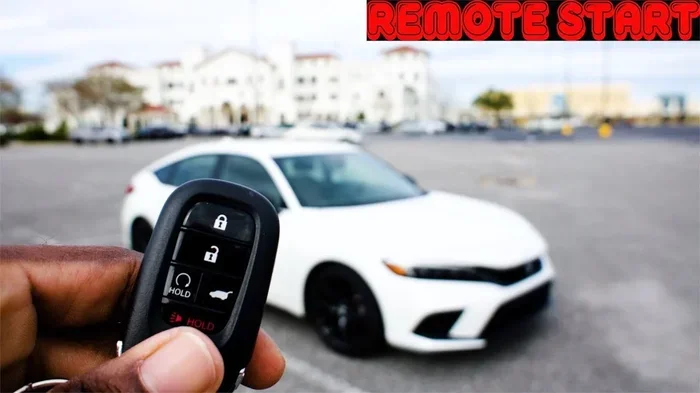
How to Auto Start a Honda Civic With Remote Start Key
Auto starting your Honda Civic with a remote start key is one of the most convenient features you can add to your daily routine. Whether you want to warm up the car on a cold morning or cool it down in summer, a remote start system makes it easy. This guide covers everything from factory options to aftermarket setups, so you can choose what works best for your Honda Civic. You will learn the step-by-step process, common mistakes to avoid, and expert tips that make the whole experience smoother.
There is something deeply satisfying about walking out your door on a freezing morning and getting into a warm Honda Civic that was already running. The seat heaters are on. The defroster has cleared the windshield. The cabin feels like a cozy retreat before you even turn the key. This is the magic of auto start, and it is easier to set up than most people think.
If you own a Honda Civic, you have options. Some models come with a factory remote start system built right into the key fob. Others need an aftermarket remote start kit to unlock this feature. Either way, the process is straightforward once you know the steps. In this guide, we walk you through everything you need to auto start a Honda Civic using a remote start key.
We will cover factory and aftermarket options, setup procedures, benefits, troubleshooting, and expert tips. By the end, you will feel confident enough to set up your own system or get the most out of one you already have. Let us dive in.
Key Takeaways
- Factory remote start is available on select Honda Civic trim levels and comes with your key fob out of the box.
- Aftermarket remote start kits offer more flexibility and features if your Civic does not have a built-in system.
- Setting up auto start is simple, but following the correct sequence matters for safety and performance.
- Remote start helps with cold weather warmup, battery health, and cabin comfort before you even step inside.
- Common issues like range limits and battery drain can be fixed with basic troubleshooting steps.
- Regular maintenance of your remote start system keeps it working reliably for years.
📑 Table of Contents
- What Is a Honda Civic Remote Start System?
- Factory vs Aftermarket Remote Start Options
- How to Set Up Remote Start on Your Honda Civic
- Benefits of Auto Starting Your Honda Civic
- Common Problems and How to Fix Them
- Expert Tips for Getting the Most From Remote Start
- Frequently Asked Questions
- Final Thoughts
What Is a Honda Civic Remote Start System?
A remote start system lets you start your Honda Civic engine from a distance using your key fob or a smartphone app. The car turns on, the engine runs, and the climate control activates without you being inside. It is a small convenience that adds a lot of comfort to your daily drive.
Honda Civic remote start works through a combination of the key fob, the vehicle’s immobilizer system, and the engine control unit. When you press the remote start button, the system sends a coded signal to the car. The car verifies the code, disengages the security system, and fires up the engine. All of this happens in seconds.
Not every Honda Civic trim comes with this feature out of the box. The Sport and EX trims on newer models may include it, but base models often leave it out. This is where aftermarket solutions come in handy. Understanding the difference between factory and aftermarket systems is the first step toward getting your car to auto start.
How Does Remote Start Work on a Honda Civic?
The basic process is simple. You press the remote start button on your key fob. The car’s engine immobilizer checks your key’s unique code. Once verified, the engine cranks and starts. The climate control system turns on automatically, and the headlights may flash to confirm the system is active.
Most Honda Civic remote start systems allow the engine to run for 10 to 15 minutes before shutting off automatically. This prevents fuel waste and keeps the car safe. If you want more time, you can press the button again while inside the vehicle.
Key Components of the Remote Start System
- Key fob or smart key – The device you carry that sends the start signal.
- Engine control unit (ECU) – The car’s computer that receives and processes the start command.
- Immobilizer module – Ensures only your authorized key can start the engine remotely.
- Climate control module – Activates the heater or air conditioning when the engine starts.
- Aftermarket remote start module – A third-party device installed in cars without factory remote start.
Factory vs Aftermarket Remote Start Options
Choosing between a factory remote start and an aftermarket kit is one of the biggest decisions you will make. Both options get the job done, but they differ in convenience, cost, and features.
Factory Remote Start
If your Honda Civic came with a factory remote start, you are already set. The feature is built into the key fob and requires no extra hardware. You simply press the remote start button, and the car responds. Factory systems integrate seamlessly with the vehicle’s existing electronics, which means fewer compatibility issues.
Factory remote start also tends to be more reliable over time because it is designed specifically for your Honda Civic model. The Honda Smart Key system on newer models adds another layer of convenience, allowing you to start the car without even taking the fob out of your pocket.
Aftermarket Remote Start Kits
An aftermarket remote start kit is a third-party device you install in your Honda Civic to add remote start capability. These kits range from basic one-way remote systems to advanced two-way systems with smartphone integration.
Popular brands like Compustar, Viper, and DroneMobile offer Honda Civic-compatible kits. Installation can be DIY if you are comfortable with basic car electronics, or you can have a professional install it. Aftermarket kits often come with extra features like:
- Two-way remote control with confirmation signals.
- Smartphone app integration for starting your car from anywhere.
- GPS tracking for added vehicle security.
- Extended range up to 3,000 feet or more.
- Multiple vehicle support if you own more than one car.
Comparison Table: Factory vs Aftermarket Remote Start
| Feature | Factory Remote Start | Aftermarket Remote Start |
|---|---|---|
| Cost | Included with trim level | $150 to $500+ |
| Installation | None needed | DIY or professional |
| Range | 500 to 1,500 feet | 500 to 3,000+ feet |
| Smartphone Control | Limited or none | Yes, with app |
| Integration | Seamless with Honda systems | Varies by brand |
| Reliability | High | Depends on brand and install |
| Warranty Impact | None | Potential if not installed properly |
How to Set Up Remote Start on Your Honda Civic
Setting up auto start on your Honda Civic depends on whether you have a factory system or an aftermarket kit. Here is a step-by-step guide for both scenarios.
Setting Up Factory Remote Start
If your Honda Civic has a factory remote start system, the setup process is quick and easy. Follow these steps:
- Enter the vehicle and make sure all doors are closed.
- Press the lock button on the key fob to lock all doors.
- Press the remote start button (it usually has a circular arrow icon).
- Wait for the engine to start and the parking lights to flash.
- Enter the vehicle within the preset time limit and press the brake pedal to drive.
That is it. The entire process takes less than 10 seconds. Make sure your key fob battery is fresh, as a weak battery can reduce the remote start range and reliability.
Setting Up an Aftermarket Remote Start Kit
Installing an aftermarket remote start kit requires a bit more effort. Here is a general overview of the process:
- Choose the right kit for your Honda Civic year and trim level.
- Gather the necessary tools, including wire strippers, electrical tape, and a multimeter.
- Locate the ignition wiring harness under the dashboard.
- Connect the remote start module to the ignition, starter, and accessory wires.
- Install the bypass module to work with the Honda immobilizer system.
- Mount the remote control in a convenient location inside the vehicle.
- Test the system thoroughly before driving.
If you are not comfortable with car electronics, we strongly recommend having a professional handle the installation. A proper install ensures your Honda Civic remote start works reliably and does not void your warranty.
Quick Tips for a Smooth Setup
- Always refer to the installation manual that comes with your specific kit.
- Label every wire before disconnecting anything to avoid confusion.
- Test each function individually before combining them.
- Keep the remote start module away from heat sources and moving parts.
- Update the firmware on smart start systems regularly.
Benefits of Auto Starting Your Honda Civic
Auto start is not just a luxury. It serves real practical purposes that improve your driving experience and protect your vehicle. Here are the key benefits of adding remote start to your Honda Civic.
Warm Up the Cabin in Cold Weather
One of the biggest advantages of auto start is warming up your Honda Civic before you get in. On cold winter mornings, stepping into a heated car is a game changer. The seat warmers, steering wheel heat, and defroster all work while the engine is running remotely.
This also reduces engine wear. Cold engines run less efficiently and experience more friction. Letting the engine idle warmup process begin before you drive helps oil circulate faster and reduces stress on internal components.
Cool Down the Car in Summer
On hot summer days, remote start lets you turn on the air conditioning before you step inside. Instead of blasting hot air for the first few minutes of your drive, you get a cool cabin ready to go. This is especially helpful if your Honda Civic is parked in direct sunlight.
Improve Battery Health
Running your Honda Civic periodically through remote start can help maintain the 12-volt battery, especially during periods of inactivity. A battery that sits unused for days can lose charge and struggle to start the engine. Remote start keeps the battery active and ready to go.
Enhance Vehicle Security
Most remote start systems include built-in security features. The engine will not run if someone tries to enter the vehicle without the proper key. The doors remain locked, and the alarm system stays active. This adds a layer of protection, especially if your Honda Civic is parked in a public space.
Save Time on Your Daily Commute
When you auto start your Honda Civic every morning, you save valuable time. The car is ready to go while you finish your coffee, check your phone, or grab your bag. Over weeks and months, these small time savings add up significantly.
Common Problems and How to Fix Them
Like any car feature, remote start systems can encounter issues. Most problems are easy to fix with basic troubleshooting. Here are the most common issues Honda Civic owners face and how to resolve them.
Remote Start Does Not Respond
If pressing the remote start button does nothing, the first thing to check is the key fob battery. A dead or weak battery is the most common cause. Replace it with a fresh CR2032 battery and try again. Also, make sure you are within the remote start range, which is typically 500 to 1,500 feet depending on your system.
Engine Starts but Shuts Off Immediately
This usually happens because the system detects the brake pedal is not pressed within the preset time window. To fix this, enter the vehicle quickly after remote starting and press the brake pedal. If the problem persists, check the brake light switch for proper operation.
Remote Start Works Intermittently
Intermittent issues often point to a weak key fob battery or a loose wiring connection in the aftermarket install. Check the fob battery first. If that is not the issue, inspect the remote start module connections for corrosion or loose pins.
Climate Control Does Not Activate
Some Honda Civic models require you to set the climate control to your desired temperature before using remote start. If the system does not activate the heater or AC, go back and check your climate control preset settings. This is a common oversight that trips up many first-time users.
Aftermarket Kit Causes Dashboard Warning Lights
Dashboard warning lights after installing an aftermarket remote start kit usually indicate a wiring issue. The most common culprit is an improperly connected bypass module. Double-check all connections against the installation diagram and make sure the bypass module is programmed correctly for your Honda Civic model.
Can I Remote Start in an Enclosed Garage?
No. Always remote start your Honda Civic in an open area. Running a car engine in an enclosed garage produces carbon monoxide, which is extremely dangerous. Never leave a running vehicle unattended in a closed space.
Expert Tips for Getting the Most From Remote Start
Once your Honda Civic auto start system is up and running, a few expert tips can help you get the most out of it. These small adjustments make a big difference in performance and convenience.
Set Your Climate Control Before Leaving the Car
Always set your preferred temperature before turning off the engine. Most Honda Civic remote start systems remember the last climate settings and apply them automatically when the engine starts remotely. This saves you from stepping into a freezing or sweltering car.
Keep the Key Fob Within Range
Even though you are starting the car remotely, the key fob must be inside the vehicle for the engine to keep running. If you leave the fob too far away, the system will shut the engine off as a safety measure. Keep the fob in your pocket or bag when you get in after remote starting.
Use Two-Way Remotes for Confirmation
If you install an aftermarket kit, consider upgrading to a two-way remote that sends confirmation signals back to you. Instead of guessing whether the car started, you get a beep or vibration confirming the engine is running. This small upgrade adds a lot of peace of mind.
Maintain the Battery Regularly
Your key fob battery should be replaced every 12 to 18 months. Your Honda Civic’s main battery also benefits from regular use, which remote start helps facilitate. A well-maintained battery ensures your remote engine start system works reliably every time.
Upgrade to a Smart Start System
If you want the ultimate Honda Civic remote start experience, consider upgrading to a smart start system. These systems let you start your car from your smartphone using a dedicated app. You can turn on the climate control, check the vehicle status, and even locate your car in a crowded parking lot. Brands like Compustar and DroneMobile offer excellent smartphone-enabled options.
Protect Your System with a Warranty
Most reputable aftermarket remote start kits come with a warranty. Register your product and keep the receipt. If anything goes wrong, a warranty saves you from costly repairs. Professional installation also typically includes a labor warranty that covers any issues related to the setup.
Be Mindful of Local Laws
Some areas have regulations about idling vehicles. Check your local laws to make sure using remote start on your Honda Civic complies with any idle reduction ordinances. In most cases, the brief idle period during remote start is perfectly legal, but it is always good to verify.
Frequently Asked Questions
Can I Install a Remote Start System on Any Honda Civic Model?
Yes, you can install a remote start system on most Honda Civic models. Newer models with push-button start may require a specific bypass module. Older models with traditional ignition systems are generally easier to retrofit. Always check compatibility with your specific year and trim before purchasing a kit.
Does Remote Start Void My Honda Warranty?
Aftermarket remote start installation can potentially void parts of your Honda warranty if it causes damage to the electrical system. However, professional installation from authorized dealers or reputable shops minimizes this risk. Factory remote start systems that came with the vehicle do not affect the warranty at all.
How Far Can I Remote Start My Honda Civic?
The range depends on your system. Factory remotes typically work up to 1,500 feet. Aftermarket two-way remotes can reach 3,000 feet or more. Smartphone-based systems have virtually unlimited range as long as you have cellular or Wi-Fi connectivity.
Is It Safe to Leave My Honda Civic Running Remotely?
Yes, it is safe when done properly. Honda Civic remote start systems include built-in safety features. The engine shuts off if someone tries to enter the car without the proper key. The transmission remains in park, and the doors stay locked. Always remote start in an open area to avoid carbon monoxide buildup.
How Long Can I Leave My Honda Civic Running with Remote Start?
Most Honda Civic remote start systems allow the engine to run for 10 to 15 minutes before automatically shutting off. Some aftermarket systems can be programmed for longer intervals. You can usually extend the runtime by pressing the remote start button again while inside the vehicle.
What Kind of Battery Does the Honda Civic Remote Start Key Fob Use?
The Honda Civic key fob uses a CR2032 battery, which is widely available and easy to replace. Keeping a spare battery in your glove box is a smart habit. A fresh battery ensures reliable remote start performance and maximum range.
Final Thoughts
Auto starting your Honda Civic with a remote start key is one of the best upgrades you can make to your daily driving routine. It saves time, improves comfort, and protects your vehicle from the stresses of cold starts. Whether you go with a factory system or an aftermarket kit, the setup process is manageable and the results are well worth the effort.
Start by checking whether your Honda Civic already has factory remote start capability. If not, an aftermarket kit is a reliable and affordable option. Follow the setup steps carefully, troubleshoot any issues using our guide, and apply the expert tips to get the most from your system.
The small investment in a remote start system pays off every single time you step into a warm or cool Honda Civic. Take action today and enjoy the convenience of auto start on your next drive.